Premium Members, follow the link below to download this new mix.
[wlm_private ‘PRO-Platinum|PRO-Monthly|PRO-Gratis|PRO-Seasonal|Platinum-trial|Monthly-trial|PRO-Military|30-Days-of-PRO|90 Day PRO|Stages-Instructor|Schwinn-Instructor|Instructor-Bonus|28 Day Challenge']
Right Click on the blue underlined link
Select “Download Linked File As”
Select a download location
Once file is completely downloaded, find it in the location you selected
Drag the file into your iTunes or Spotify library OR
Right Click on the file and Select “Open With”
From the drop down menu select “iTunes” or “Spotify”
File should begin playing and is now part of your iTunes or Spotify library
To download the above media on a PC:
Right Click on the blue underlined link
Select “Save Link As”
Select a download location
Once file is completely downloaded, find it in the location you selected
Drag the file into your iTunes or Spotify library OR
Right Click on the file and Select “Open With”
From the drop down menu select “iTunes” or “Spotify”
File should begin playing and is now part of your iTunes or Spotify library Click here to watch a video on how to download media files from ICI/Pro.
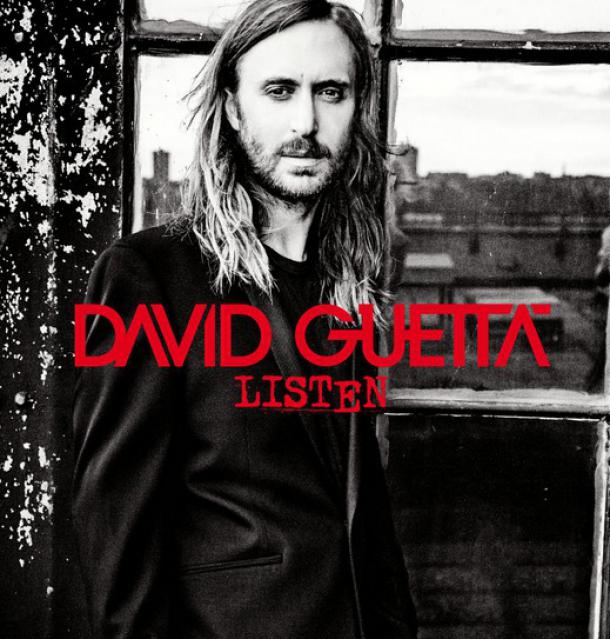
Attached to this post is a 60 minute harmonically mixed indoor cycling music set that I put together with all David Guetta music.
All you need to do is “Play It and Forget It.”
Premium Members, follow the link below to download this new mix.
[wlm_private ‘PRO-Platinum|PRO-Monthly|PRO-Gratis|PRO-Seasonal|Platinum-trial|Monthly-trial|PRO-Military|30-Days-of-PRO|90 Day PRO|Stages-Instructor|Schwinn-Instructor|Instructor-Bonus|28 Day Challenge']
Right Click on the blue underlined link
Select “Download Linked File As”
Select a download location
Once file is completely downloaded, find it in the location you selected
Drag the file into your iTunes or Spotify library OR
Right Click on the file and Select “Open With”
From the drop down menu select “iTunes” or “Spotify”
File should begin playing and is now part of your iTunes or Spotify library
To download the above media on a PC:
Right Click on the blue underlined link
Select “Save Link As”
Select a download location
Once file is completely downloaded, find it in the location you selected
Drag the file into your iTunes or Spotify library OR
Right Click on the file and Select “Open With”
From the drop down menu select “iTunes” or “Spotify”
File should begin playing and is now part of your iTunes or Spotify library Click here to watch a video on how to download media files from ICI/Pro.
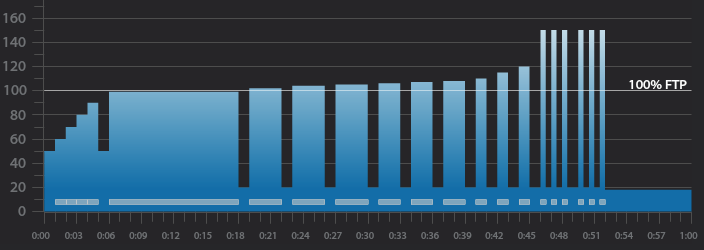
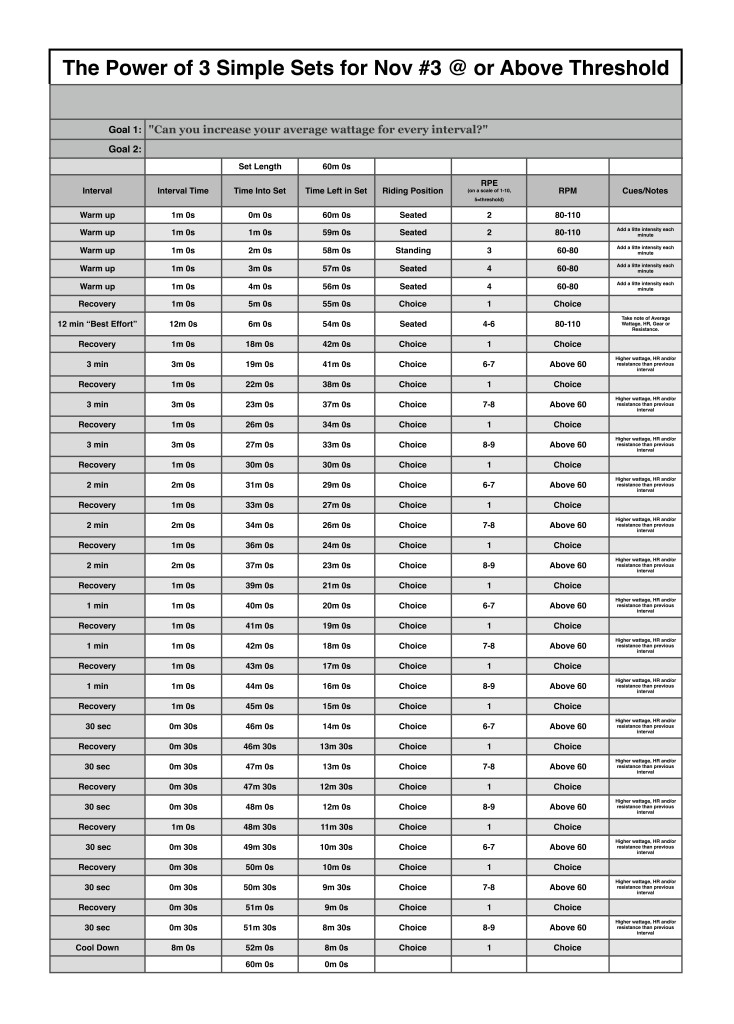
Below you'll find Week 2 of November's @ or Above Threshold Keep it Simple and Progress indoor cycling profile.
Workout Basics:
5 minute warmup
12 minute benchmark ride to find “Maximum Sustainable Wattage”
1 minute recovery
3 x 3 minute interval w/1 min recovery after each
3 x 2 minute intervals w/1 min recovery after each
3 x 1 minute intervals w/1 min recovery after each
3 x 30 second intervals w/30 second recovery after each
1 minute recovery
3 x 30 second intervals w/30 second recovery after each
8 minute cool down
Workout Goal:
“Can you increase your average wattage for EVERY interval?”
5 minute warm up
Slowly and steadily elevate the HR or Wattage to above threshold
1 minute recovery
12 minute “Maximum Sustainable Wattage” Test
Settle into a sustainable intensity, HR or Wattage
Ride for 12 minutes and let the songs dictate the terrain
Remember average wattage for the 12 minute ride
1 minute recovery
3 x 3 minute w/1 minute recovery after each interval goals and specifics:
Ride for 3 minutes (as the instructor you dictate the position and RPM)
The goal is to complete every effort with a higher average wattage than the previous interval.
1 minute recovery or reset
3 x 2 minute w/1 minute recovery after each interval goals and specifics:
Ride for 2 minutes (as the instructor you dictate the position and RPM)
The goal is to complete every effort with a higher average wattage than the previous interval.
1 minute recovery or reset
3 x 1 minute w/1 minute recovery after each interval goals and specifics:
Ride for 2 minute (as the instructor you dictate the position and RPM)
The goal is to complete every effort with a higher average wattage than the previous interval.
1 minute recovery or reset
3 x 30 seconds w/30 seconds recovery (2 times)
Ride for 30 seconds (as the instructor you dictate the position and RPM)
The goal is to complete every effort with a higher average wattage than the previous interval.
1 minute recovery after the 3rd interval then repeat
Cool Down
[wlm_private ‘PRO-Platinum|PRO-Monthly|PRO-Gratis|PRO-Seasonal|Platinum-trial|Monthly-trial|PRO-Military|30-Days-of-PRO|90 Day PRO|Stages-Instructor|Schwinn-Instructor|Instructor-Bonus|28 Day Challenge'].
Below you'll find a 60 minute harmonically mixed indoor cycling music set. All you need to do is “Play It and Forget It.”
Premium Members, follow the link below to download this new mix.
[wlm_private ‘PRO-Platinum|PRO-Monthly|PRO-Gratis|PRO-Seasonal|Platinum-trial|Monthly-trial|PRO-Military|30-Days-of-PRO|90 Day PRO|Stages-Instructor|Schwinn-Instructor|Instructor-Bonus|28 Day Challenge']
Right Click on the blue underlined link
Select “Download Linked File As”
Select a download location
Once file is completely downloaded, find it in the location you selected
Drag the file into your iTunes or Spotify library OR
Right Click on the file and Select “Open With”
From the drop down menu select “iTunes” or “Spotify”
File should begin playing and is now part of your iTunes or Spotify library
To download the above media on a PC:
Right Click on the blue underlined link
Select “Save Link As”
Select a download location
Once file is completely downloaded, find it in the location you selected
Drag the file into your iTunes or Spotify library OR
Right Click on the file and Select “Open With”
From the drop down menu select “iTunes” or “Spotify”
File should begin playing and is now part of your iTunes or Spotify library Click here to watch a video on how to download media files from ICI/Pro.
Premium Members, follow the link below to download this new mix.
[wlm_private ‘PRO-Platinum|PRO-Monthly|PRO-Gratis|PRO-Seasonal|Platinum-trial|Monthly-trial|PRO-Military|30-Days-of-PRO|90 Day PRO|Stages-Instructor|Schwinn-Instructor|Instructor-Bonus|28 Day Challenge']
Right Click on the blue underlined link
Select “Download Linked File As”
Select a download location
Once file is completely downloaded, find it in the location you selected
Drag the file into your iTunes or Spotify library OR
Right Click on the file and Select “Open With”
From the drop down menu select “iTunes” or “Spotify”
File should begin playing and is now part of your iTunes or Spotify library
To download the above media on a PC:
Right Click on the blue underlined link
Select “Save Link As”
Select a download location
Once file is completely downloaded, find it in the location you selected
Drag the file into your iTunes or Spotify library OR
Right Click on the file and Select “Open With”
From the drop down menu select “iTunes” or “Spotify”
File should begin playing and is now part of your iTunes or Spotify library Click here to watch a video on how to download media files from ICI/Pro.