

My interview with Douglas Brooks continues with a discussion of RealRyder's class planning – it maybe the exact opposite of how you create your profile.
Listen below to find out why.
Show notes:
During our discussion Douglas references their class planning template – you can download a copy here.
Douglas also described how they teach a method of trimming the length of a song in iTunes (setting the start & stop times) to fit a specific segment. I mentioned that we have specific instructions for trimming the length of a track available here for ICI/PRO members – but it's buried in a video over at the MixMeister Academy.
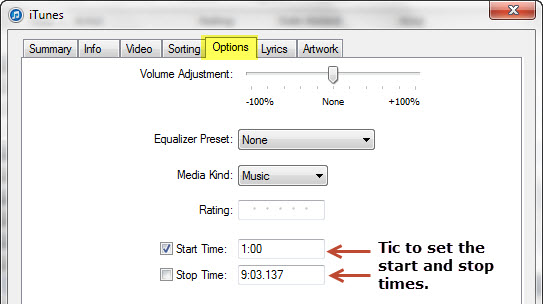
Here's how to “Trim” the length of a song in iTunes.
- Sample the track and record where you would like it to begin and end.
- Highlight the track in the list view.
- Either go to: File > Get Info, Right Click the Track and select > Get Info or use the shortcut Control i
- Tick the box you wish to change and enter your preferred start/stop times.
- Finish with OK
Unfortunately this isn't an option in Spotify. Just to be sure I experimented with first trimming a song in iTunes, and then opening it in Spotify – both on my computer and iPhone. It played full length (not trimmed) in both cases.
Here's part two of my interview with Douglas Brooks – enjoy and let me know if this was helpful for you [wlm_firstname].
Podcast: Play in new window | Download

John is a member on the AFS (Association of Fitness Studios) Advisory Council.
Holding certifications from; Schwinn, Heart Zones, Team ICG and Life Time Fitness, John's held regularly scheduled cycling classes between 1998 and 2015 when he moved to Florida.
When the weather permits, you'll find him riding and leading outdoor groups by himself or with his Tandem partner (wife) Amy.
- Training for hills and random rollers - October 24, 2026
- Connections - October 21, 2026
- Best Practices For Professional Indoor Cycling Instructors - October 12, 2026