
I’m hearing from Instructors outside of the USA who are switching from Spotify, over to Deezer.
Hi,
I have had Spotify for a long time now and have created lots of different playlists. I have recently just converted into using Deezer, however, it would be much easier for my Spotify playlists to be on Deezer instead!
Is this possible? If so, how do i do it?
Thanks
Cydnie.
Cyndie we created an ICI/PRO playlist conversion tool for just this occasion 🙂
Here’s the steps to convert your Spotify playlist to one Deezer can play.
Step #1 Open and log in to Deezer in a new tab – clicking this link will do that for you. Note: Deezer is different from Spotify in that Deezer is a web application, vs. Spotify, which is a program that you install on your computer. Yes I know that Spotify also has a web version… I never had much luck using it and suggest you install the full program if you want to run Spotify on a laptop.
Step #2 Clicking this link will open our conversion tool in another tab. Scroll down the page and you should see that you’re logged in to Deezer and a Please enter Spotify URI dialog box like this:
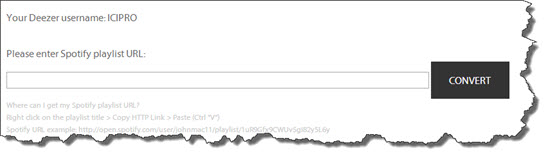
If you don’t see this click the Log into Deezer link or refresh the conversion tool page.
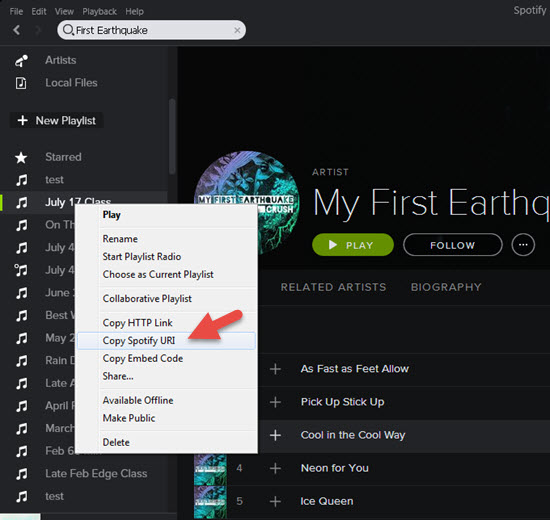
Step #3 In Spotify, Right Click the playlist you want to convert and select Copy Spotify URI.
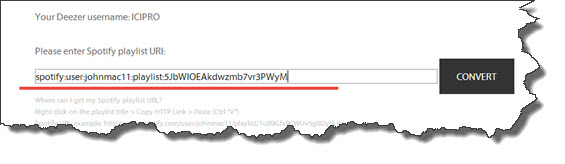
Step #4 Back at the conversion tool, Paste the URI you copied and click Convert. It will look like this:
Step #5 Success! Click the link to see your new Deezer playlist 🙂

A few notes:
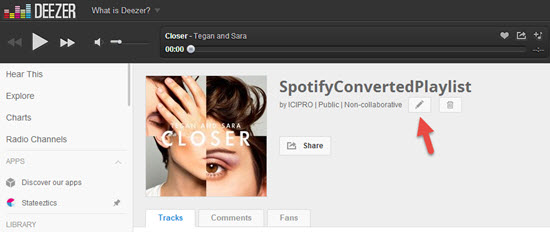
- Despite a lot of programming time, we weren’t able to get Deezer to carry over the name of the playlist from Spotify. Renaming the Deezer playlist is a snap using the edit option shown below.
- Check your new Deezer playlists for accuracy > differences between each service’s music library and Meta Data = not every playlist will convert perfectly.
Any other questions?
Feel free to contact us like Cydnie did – we’re happy to help.