
by Joey Stabile | Aug 1, 2026 | Best Practices, Engage Your Students, Instructor Tech Help
While it may seem redundant to say, most indoor bikes do not move. Please, stop and think about that for a moment. We are not talking about forward motion or distance, of course an indoo r bike does not move forward. But what about the other motions that are involved in cycling.
When a rider is out of the saddle, most riders sway the bike from side to side a bit. Why does this happen? Generally, it is the mechanical reality of the situation due to applying extreme power to each pedal. Since the pedals are not on the centerline of the bike, applying a large force to the right pedal will, physically speaking, apply a rotational force that pushes the top of the bike to the right and the bottom of the bike to the left. Without this counterbalancing motion, the wheel would kick out to the side. By swaying the bike in the opposite direction, the amount of force that can be applied to the pedals is increased without crashing.
The second primary aspect of swaying the bike is that it allows the rider to engage their upper body (especially core and arms) into the movement which increases power.
Take a moment and watch some of the pros race, they only have about a 12 degree sway; less than most avid riders. This is due to their efficiency and power.
The last aspect of swaying the bike is that it allows the rider to more thoroughly align their biomechanics with the work that is being done. By tilting the bike, the rider is able to keep the leg that is driving down with a majority of the force in alignment lessoning the outward lateral stress on the joints.
With the exception of a few new bikes on the market, most indoor bikes do not provide movement side-to-side, and none of them replicate the true motion of an outdoor bicycle. Because of this limitation, instructors must emphasize relaxation when riding and allow gentle upper-body movement. Attempting to maintain a still upper body can place the spine and surrounding muscles at risk from the forces being generated by the legs.
I hope this helps, Joey
Originally posted 2019-02-25 06:00:00.

by John | May 20, 2026 | Boutique Instructor, Instructor Tech Help, Instructor Training, Your Fitness Business

Suggest finding someone who looks like this to help you evaluate your online registration system – or review the one you're using now.
Prospective Indoor Cycling Studio owners have hundreds of both challenging and easy decisions to make, long before they're ready to launch. Considering that your new studio will be a real business and the purpose of your business is to make money, the registration system you choose* to collect your money is pretty darn important… in fact it's crucial IMO. With multiple solution providers of online registration systems – how do you choose?)
I'd start by answering the: how easy/intuitive are the registration and collect the money process?
In the online world, marketers describe collecting the money as a conversion – I call it making a sale. Conversion percentages = what percentage of visitors who somehow end up on your registration page actually convert? Conversions don't always equate to sales. They can also be; create a user's profile, register for a class or even just join your email list.
Any difficulty the visitor experiences during the process can reduce the number of successful conversions (you don't get the money).
Now I don't need to tell you that different people, react to online “difficulties” or “frustrations” differently. You could throw any amount of digital confusion at either of my two girls and they'd still figure out how to register for your class. But there are potential customers who aren't comfortable with online anything.
Testing the registration and collect the money process
You're probably not the right person to test and compare online registration systems. The fact that you are here reading this tells me you are comfortable using a computer and are probably routinely using it to make purchases online.
I suggest finding someone in your life who's not all that comfortable with technology and ask them to help you evaluate the various systems. For some of you it could be your Mom (hence the Mom Test), a friend or family member that's similarly technophobic.
Here's how I would structure your “Mom Test”.[wlm_private ‘PRO-Platinum|PRO-Monthly|PRO-Gratis|PRO-Seasonal|Platinum-trial|Monthly-trial|PRO-Military|30-Days-of-PRO|90 Day PRO|Stages-Instructor|Schwinn-Instructor|Instructor-Bonus|28 Day Challenge']
- Contact each company's representative and ask for a link to the home page of an actual studio that uses their system/software.
- Collect each studio's link
- Sit down with your evaluator and have them go through a complete registration process: Create a user's profile and then register and pay for an actual class. Yes, this will cost you a few dollars > what you learn will be invaluable.
- But please don't waste their time and ask the studio owner to refund these small purchases.
While your evaluator is going through the registration process, You Need To Sit On Your Hands and offer no direction or assistance. Just watch exactly what happens and how she/he responds.
- How quick was the process?
- Was there any place where they got stuck
- Did anything happen/change that caused them to question anything? Am I doing this right? Why was I taken here? etc…
With any luck you'll have a fun time doing this and learn a lot about what works and what doesn't, making your final choice easier. After all, you and your successful studio is going to be married to this software for years to come 🙂
[/wlm_private]*Of course this isn't the only reason you would decide on one registration vendor over another. If you have other questions you can ask me here.
Originally posted 2015-01-15 05:20:41.

by Dennis Mellon | Apr 20, 2026 | Dennis Mellon, Instructor Tech Help, iTunes, iTunes & Spotify Training, Spotify

Have you been having a hard time figuring out how to download media from the ICI/Pro website?
Try following these directions and let me know if it helps:
To download media to a Mac:
- Right Click on the blue underlined link
- Select “Download Linked File As”
- Select a download location
- Once file is completely downloaded, find it in the location you selected
- Drag the file into your iTunes or Spotify library OR
- Right Click on the file and Select “Open With”
- From the drop down menu select “iTunes” or “Spotify”
- File should begin playing and is now part of your iTunes or Spotify library
To download media to a PC:
- Right Click on the blue underlined link
- Select “Save Link As”
- Select a download location
- Once file is completely downloaded, find it in the location you selected
- Drag the file into your iTunes or Spotify library OR
- Right Click on the file and Select “Open With”
- From the drop down menu select “iTunes” or “Spotify”
- File should begin playing and is now part of your iTunes or Spotify library
Click here to watch a video.
I hope this helps.
Podcast: Play in new window | Download
Originally posted 2015-07-17 18:22:05.

by Joey Stabile | Apr 11, 2026 | Audio PROfiles, Bonus Materials, Instructor Tech Help, Instructor Training, iTunes, KEEP IT FUN, Motivation, PRO Podcasts, PRO/Playlists, Spotify

This week features the 2018 Holiday ride from Joey. The ride is primarily focused towards strength, but there is a fair mix of cadence work. Good luck and have fun. Joey
Get all of the ride details HERE.
Get all of the ride details HERE.
Joey's “2018 Holiday Ride” Playlist
1: “Wizards in Winter (Instrumental)”, Trans-Siberian Orchestra (The Lost Christmas Eve)
2: “Mmm Yeah (feat. Pitbull)”, Austin Mahone (The Secret)
3: “Palladio”, Escala (Escala)
4: “A Mad Russian's Christmas (Instrumental)”, Trans-Siberian Orchestra (The Christmas Trilogy)
5: “Switch”, Don Diablo (Switch – Single)
6: “Drop That Low (when I Dip)”, Tujamo (Spinnin Records Best of Dance 2016, Vol. 1)
7: “Carol of the Bells”, Pentatonix (PTXmas (Deluxe Edition))
8: “Santa's Lost His Mojo”, Jeremy Lister (Gift Wrapped – 20 Songs That Keep On Giving!)
9: “Santa Claus Is Comin' to Town (Live at C.W. Post College, Greenvale, NY – December 1975)”, Bruce Springsteen (Christmas Hits)
10: “Jingle Bells (feat. Henry Rollins)”, William Shatner (Shatner Claus)
11: “In the Cold, Cold Night”, Tracey Thorn (Tinsel and Lights)
12: “Man Like That”, Gin Wigmore (Gravel & Wine)
13: “What Christmas Means To Me”, 98° (Let It Snow)
14: “You're a Mean One, Mister Grinch”, Famous for a Century (Christmas – Single)
15: “Christmas In Hollis (Bonus Track)”, Run-DMC (Tougher Than Leather)
16: “Deck the Halls”, R.E.M. (Gift Wrapped – 20 Songs That Keep On Giving!)
17: “Christmas / Sarajevo 12/24 (Instrumental)”, Trans-Siberian Orchestra (Christmas Eve and Other Stories)
18: “Feliz Navidad”, Unspoken (Christmas: Joy To the World)
19: “My Dear Acquaintance (A Happy New Year) [Non-Album Track]”, Regina Spektor (My Dear Acquaintance (A Happy New Year) – Single)
Originally posted 2018-12-30 08:49:38.
by John | Mar 7, 2026 | Best Practices, Instructor Tech Help
Last spring I was getting a flood of emails from hacked email accounts 🙁
Because we are regularly emailing close to 10,000 Instructors, my email address is in all those contact lists. When an account is compromised, the first thing the hackers do is send an email to everyone on your list. That email typically includes a nasty link that, when your mom/dad/babysitter or club department head clicks, could infect their computer with a virus or worse… like taking complete control of your computer.
It even happened to me – an old yahoo.com email I haven't used in years started sending out spam emails. Embarrassing to say the least.
I wrote two posts here & here about the importance of using a good/strong password to prevent this from happening to you. Here were my suggestions.
… take your existing password (if it has 8 or more letters) and add one capital letter and two special characters.
So “password” would be greatly improved by changing it to “@Password!”
Another option would be to combine three easy to remember words, separated by special characters. The three girls in my life are Amy, Abby and Carly so a reasonably secure password could be Amy&Abby&Carly. You can use your first name, your dog’s name and your city or any other three words and special character combination.
One more suggestion — You may have heard you should have a different password for every website — unrealistic. But I personally use a few different passwords, depending on the type of website where I have a user name.
-
One simple password for sites that don’t matter (No email or financial data) Here’s where you can use “password” 
-
One password for important sites (No financial data)
-
A complex password for each website that has financial, medical or credit data. Create a prefix password and add the name of the institution at the end like; @Password!=visa or @Password!=bank or @Password!=401k
To be clear, my example of @Password!=visa would in actuality be: @Password!=FirstBankVisa but please don't use “password” instead use an easily remembered root word. Password is the number one, err – password and it's the very first word the hackers try.
But how do you know what you've created is really a good/strong password? This online password strength checking tool can tell you the relative security of any password you dream up. Suggest testing a slightly different version of your password – change one digit-just in case this site is an elaborate scam to actually steal passwords. It did come to me from a trusted source… but you never know.
So “password” (without the quote marks) returns:

Please don't use this password.
Which is pretty much like posting your password online, but @Password!

Much better
Is a big improvement, while @Password!=FirstBankVisa should be pretty secure.

Now you're talking 🙂
So until we all have the new iPhone 5S with fingerprint recognition, please protect yourself and change your passwords.
Originally posted 2013-09-11 14:49:42.
by John | Jul 18, 2021 | Best Practices, Instructor Tech Help
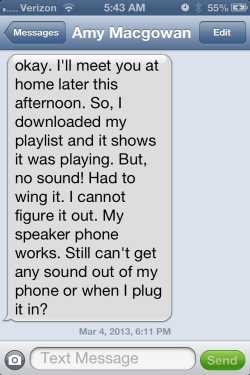 Our family has nick-names for just about everything; Ruby, Jade, Baby Rocket and Scootie are in actuality; my red Mazda 3, Abby's green Mazda 3, Amy's black Acura TL and Carly's Honda Scooter. No, you don't want my car insurance bill 🙁
But when one of them (or some other mechanical / electronic device) has failed in some fashion, its name changes to a less endearing term, typically – Pig. So when I saw this text from Amy on Monday, after she had taught her noon class at Cycle Quest, my first thought was; “well, bring the Pig home and I'll see if I can help you figure it out.
Once I had the Pig her Android Razor in my hands, Amy showed me that there were in fact a bunch of her Spotify playlists that wouldn't play. They appeared to be correctly downloaded (Spotify describes making tracks available off-line as Downloaded on a Droid vs. Make Available Off-Line on an iPhone… go figure) and when you clicked a song it showed it as playing, but no sound came out.
I'm not an Apple computer user, so I don't know if the below applies to you – but it probably does.
My brother Dan taught me a number of years ago that the first step in diagnosing any PC computer problem is to Re-Boot (shut down everything) and see if that will fix the problem. Many times that's all that's required.
Dan explained how device software and the hardware they run on are not 100% perfect – resulting in small errors that occur each time you load or run a program. The operating software system can deal with these small errors (which build up over time) until they become unmanageable, resulting in your computer/device changing into a Pig.
So after poking around unsuccessfully, I asked Amy when was the last time she re-booted her phone. She couldn't think of a time, but she did remember seeing a notice that Spotify had updated. This appears to be another difference between Android and Apple. Droid Apps update on their own. Apple device Apps display a little red arrow indicating an update is available & you manually approve each. Hearing Dan's voice in the back of my head saying; “you need to re-boot the Pig”, which we did and problem solved 🙂
Side note Over the past 4 1/2 years I've answered hundreds of tech related questions from ICI/PRO members. A common theme that runs through these requests is; I'm not very Techie, I must be doing something wrong or similar self-defamatory statements where the questioner takes personal responsibility for the problems/issues they are experiencing. THIS IS ALMOST ALWAYS NOT TRUE!
A lot of the technology we use as Instructors IS confusing, frustrating, problematic or just plain doesn't work like you think it should. In nearly every instance I can think of, what was preventing the person asking me the question from solving it themselves, was a reluctance to take the next step.
The next time you run into something confusing, frustrating, problematic or just plain doesn't work like you think it should – give yourself permission to try something else; start clicking buttons… every one you can find. If that doesn't work close the program, walk away, and then return with a fresh perspective.
My brother Dan is really sharp with computers – a real Techie. I've watched him work trying to solve a problem for me and he'll be zooming around my laptop, opening and closing stuff faster than my eyes can follow. I'll ask him; “what are you doing?” and he'll say; “I have no idea… I'm just trying different things, hoping one will work.”
And of course, if all else fails, please know that we're here to help 🙂
Originally posted 2013-03-06 04:52:19.


