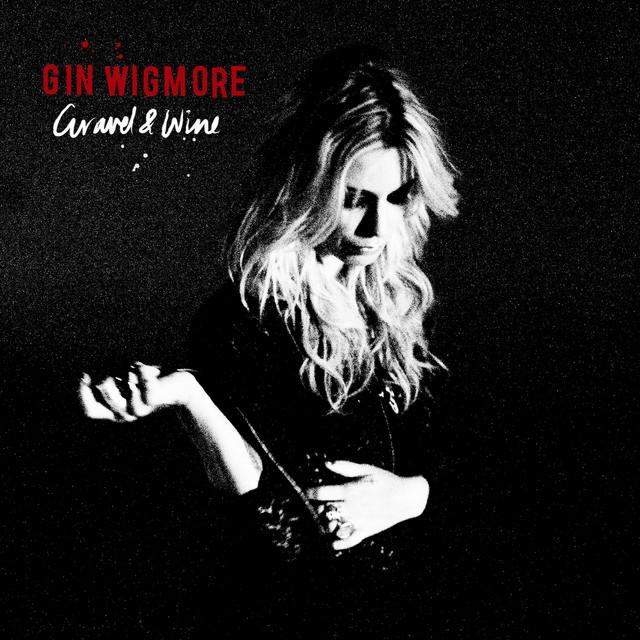
I've definitely been on a Shazam kick lately so I'm going to share one of my recent favorites with you. Last weekend my husband and I watched the movie Spy. (Highly recommend if you're a Melissa McCarthy fan.) I quickly Shazamed this one as I watched because I knew I loved the familiar voice but I had not heard the song before and I loved it! Gin Wigmore hasn't been on my radar until fairly recently, so I'd somehow missed this one from 2011. I haven't used it yet, but it will be on a playlist soon as a climb. I hope you can use it in an upcoming playlist!
Last week I shared an hour long set that was mixed by DJ Joe. Today I'm sharing what I think is the best 16 minutes of that long mix. I've been using it for the last few days and everyone is loving it. I'm not usually a “Beat Junkie” but I find myself riding and instructing to 64 RPMs whenever I use this mix.
I hope you enjoy it.
[wlm_private ‘PRO-Platinum|PRO-Monthly|PRO-Gratis|PRO-Seasonal|Platinum-trial|Monthly-trial|PRO-Military|30-Days-of-PRO|90 Day PRO|Stages-Instructor|Schwinn-Instructor|Instructor-Bonus|28 Day Challenge']
Right Click on the blue underlined link
Select “Download Linked File As”
Select a download location
Once file is completely downloaded, find it in the location you selected
Drag the file into your iTunes or Spotify library OR
Right Click on the file and Select “Open With”
From the drop down menu select “iTunes” or “Spotify”
File should begin playing and is now part of your iTunes or Spotify library
To download the above media on a PC:
Right Click on the blue underlined link
Select “Save Link As”
Select a download location
Once file is completely downloaded, find it in the location you selected
Drag the file into your iTunes or Spotify library OR
Right Click on the file and Select “Open With”
From the drop down menu select “iTunes” or “Spotify”
File should begin playing and is now part of your iTunes or Spotify library Click here to watch a video on how to download media files from ICI/Pro.
Time for another ‘Favorite Track(s) of the week! If you've never used music from Cirque Du Soleil in your classes you should definitely consider giving them a try. Every time I use a song from one of the soundtracks, I receive positive feedback from my riders. Today I'm going to share three of my favorites and how I use them in my classes. Feel free to comment and let me know how you use them!
Incantation: At around 80 RPM's, this one can be used either as a flat road or a hill, or a combination of both. I like to use what I call ‘gear play' here. Keeping the cadence at 80 RPM's, but changing the gear between heavy and light resistance every 30-45 seconds.
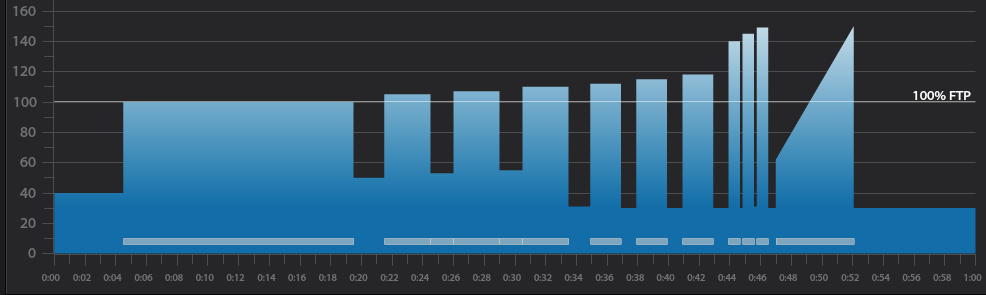
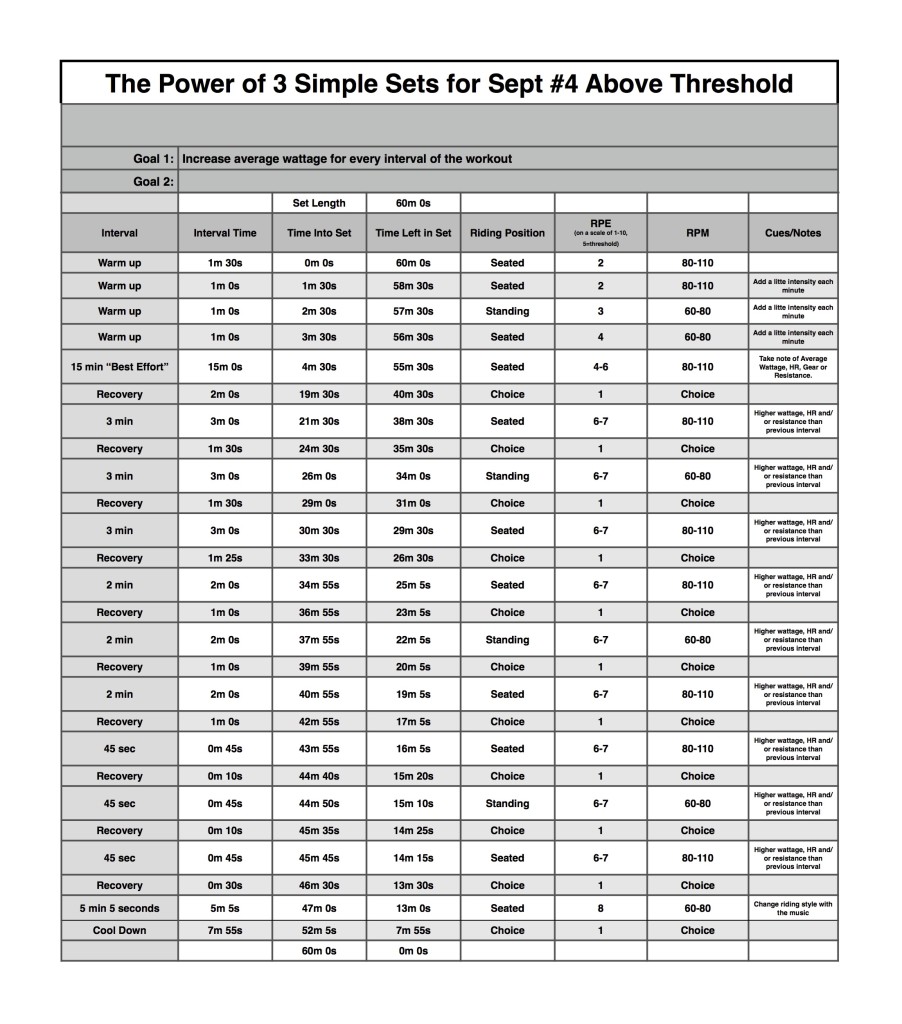
Below you'll find Week 1 of October's @ or Above Threshold Keep it Simple and Progress indoor cycling profile.
Workout Basics:
4 minute 30 second warmup
15 minute benchmark ride to find “Maximum Sustainable Wattage”
2 minute recovery
3 x 3 minute interval w/1 minute 30 secondrecovery after each
3 x 2 minute interval w/1 minute recovery after each
3 x 45 second interval w/10 seconds recovery after each
5 minute interval increasing intensity throughout
8 minute cooldown
Workout Goal:
“Can you increase your average wattage for EVERY interval until the last song?”
4 minute 30 second warm up
Slowly and steadily elevate the HR or Wattage to above threshold
1 minute recovery
15 minute “Maximum Sustainable Wattage” Test
Settle into a sustainable intensity, HR or Wattage
The songs change every 3 minutes
Change riding position or RPM with song changes
Remember Average wattage at the end of the 15 minute interval
2 minute recovery
3 minute interval goals and specifics:
Ride for 3 minutes seated at a constant RPM between 80-110 rpm.
Complete the interval with a higher average wattage than the previous interval
1 minute 30 second recovery or reset
3 minute interval goals and specifics:
Ride for 3 minutes standing at a constant RPM between 60-80 rpm.
Complete the interval with a higher average wattage than the previous interval
1 minute 30 second recovery or reset
3 minute interval goals and specifics:
Ride for 3 minutes seated at a constant RPM between 60-80 rpm.
Complete the interval with a higher average wattage than the previous interval
1 minute 30 second recovery or reset
2 minute interval goals and specifics:
Ride for 2 minutes seated at a constant RPM between 80-110 rpm.
Complete the interval with a higher average wattage than the previous interval
1 minute recovery or reset
2 minute interval goals and specifics:
Ride for 2 minutes standing at a constant RPM between 60-80 rpm.
Complete the interval with a higher average wattage than the previous interval
1 minute recovery or reset
2 minute interval goals and specifics:
Ride for 2 minutes seated at a constant RPM between 60-80 rpm.
Complete the interval with a higher average wattage than the previous interval
1 minute recovery or reset
45 second interval goals and specifics:
Ride for 45 second seated at a constant RPM between 80-110 rpm.
Complete the interval with a higher average wattage than the previous interval
10 second recovery or reset
45 second interval goals and specifics:
Ride for 45 second standing at a constant RPM between 60-80 rpm.
Complete the interval with a higher average wattage than the previous interval
10 second recovery or reset
45 second interval goals and specifics:
Ride for 45 second seated at a constant RPM between 60-80 rpm.
Complete the interval with a higher average wattage than the previous interval
30 second recovery or reset
5 minute interval goals and specifics:
Increase intensity every minute until end of song
Cool Down
[wlm_private ‘PRO-Platinum|PRO-Monthly|PRO-Gratis|PRO-Seasonal|Platinum-trial|Monthly-trial|PRO-Military|30-Days-of-PRO|90 Day PRO|Stages-Instructor|Schwinn-Instructor|Instructor-Bonus|28 Day Challenge'].
Trainer Road Profile (If you're Trainer Road Member join my Team to get this and all profiles)
[wlm_private ‘PRO-Platinum|PRO-Monthly|PRO-Gratis|PRO-Seasonal|Platinum-trial|Monthly-trial|PRO-Military|30-Days-of-PRO|90 Day PRO|Stages-Instructor|Schwinn-Instructor|Instructor-Bonus|28 Day Challenge'
Right Click on the blue underlined link
Select “Download Linked File As”
Select a download location
Once file is completely downloaded, find it in the location you selected
Drag the file into your iTunes or Spotify library OR
Right Click on the file and Select “Open With”
From the drop down menu select “iTunes” or “Spotify”
File should begin playing and is now part of your iTunes or Spotify library
To download the above media on a PC:
Right Click on the blue underlined link
Select “Save Link As”
Select a download location
Once file is completely downloaded, find it in the location you selected
Drag the file into your iTunes or Spotify library OR
Right Click on the file and Select “Open With”
From the drop down menu select “iTunes” or “Spotify”
File should begin playing and is now part of your iTunes or Spotify library Click here to watch a video on how to download media files from ICI/Pro.