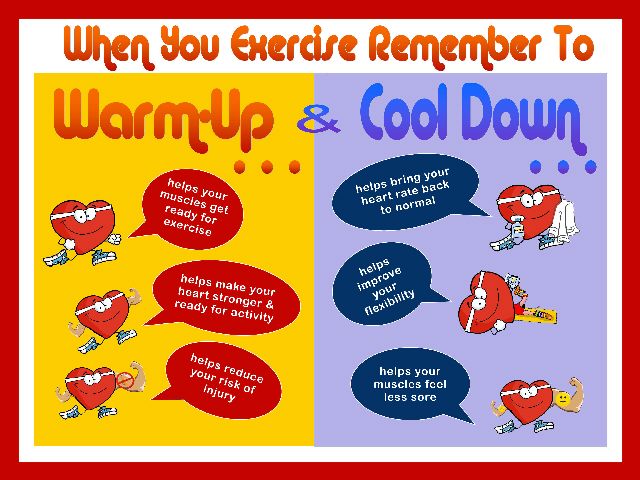
Warm Up or Cool Down Video – Landscapes

Warm Up or Cool Down Video – Landscapes

1300


I'm always looking for Warm Up and Cool Down videos and I think I just created my all time favorite.

Check it out.

[wlm_private ‘PRO-Platinum|PRO-Monthly|PRO-Gratis|PRO-Seasonal|Platinum-trial|Monthly-trial|PRO-Military|30-Days-of-PRO|90 Day PRO|Stages-Instructor|Schwinn-Instructor|Instructor-Bonus|28 Day Challenge']


Right Click and follow directions below to download


To download any of the above media on a Mac:

  1. Right Click on the blue underlined link
  2. Select “Download Linked File As”
  3. Select a download location
  4. Once file is completely downloaded, find it in the location you selected
  5. Drag the file into your iTunes or Media Player library OR
  6. Right Click on the file and Select “Open With”
  7. From the drop down menu select “iTunes” or your preferred media player
  8. File should begin playing and is now part of your library

To download any of the above media on a PC:

  1. Right Click on the blue underlined link
  2. Select “Save Link As”
  3. Select a download location
  4. Once file is completely downloaded, find it in the location you selected
  5. Drag the file into your iTunes or Media Player library OR
  6. Right Click on the file and Select “Open With”
  7. From the drop down menu select “iTunes” or your preferred media player
  8. File should begin playing and is now part of your library

Click here to watch a video on how to download media files from ICI/Pro

[/wlm_private]

Video for Some Old and Some New

Video for Some Old and Some New

2014-USA-Pro-Cycling-Challenge2

This weeks video takes the music from my The Power of 3 – Three Song Harmonically Mixed Music Sets – Some Old and Some New post and I add it to the first stage of last year's USA Pro Challenge Bike Race.  It's so exciting living in the bike crazy state of Colorado then add a professional bike race to the mix and many of us cyclist feel like we have died and gone to Heaven.

I hope you like it, I know my class participants do.

[wlm_private ‘PRO-Platinum|PRO-Monthly|PRO-Gratis|PRO-Seasonal|Platinum-trial|Monthly-trial|PRO-Military|30-Days-of-PRO|90 Day PRO|Stages-Instructor|Schwinn-Instructor|Instructor-Bonus|28 Day Challenge'].



Right Click and follow directions below to download.

To download any of the above media on a Mac:

  1. Right Click on the blue underlined link
  2. Select “Download Linked File As”
  3. Select a download location
  4. Once file is completely downloaded, find it in the location you selected
  5. Drag the file into your iTunes or Media Player library OR
  6. Right Click on the file and Select “Open With”
  7. From the drop down menu select “iTunes” or your preferred media player
  8. File should begin playing and is now part of your library

To download any of the above media on a PC:

  1. Right Click on the blue underlined link
  2. Select “Save Link As”
  3. Select a download location
  4. Once file is completely downloaded, find it in the location you selected
  5. Drag the file into your iTunes or Media Player library OR
  6. Right Click on the file and Select “Open With”
  7. From the drop down menu select “iTunes” or your preferred media player
  8. File should begin playing and is now part of your library

Click here to watch a video on how to download media files from ICI/Pro

[/wlm_private]

It’s a Power of 3 Free-For-All Profile

It’s a Power of 3 Free-For-All Profile

FreeForAll_at_Kenneth_Cole_2_400x400


It's amazing how time flies when you're having fun AND training with a purpose.  We've just completed the third week of our “The Power of 3 – Keep it Simple and Progress – Profile” for August.  Now it's time to do something crazy!  Let's pick a 60 minute mixes from one of the previous weeks, doesn't matter which one.  Let's warmup for 5 minutes, then ride at maximum sustainable intensity, heart rate or threshold wattage for 9 minutes.  At the end of the 9 minutes check average heart rate or wattage and hold this number for the rest of class.  Sound easy? Well it's not!

If you haven't noticed I like the number “3”.  As you ride through the rest of class try to put together sets that are 3 minutes long.  For example, increase RPM every minute for 3 minutes, ride at a slow RPM, 60-65 for 3 minutes, stand for 3 minutes.  Anything works, but make sure average HR or wattage does not drop.  It's all fun and games until fatigue starts to set in around 30 minutes then things get VERY challenging.

Now there is a little science to go along with this madness.  It is assumed that a rider can ride at Threshold for an hour, so theoretically if a rider know his/her threshold he/she can do this entire ride at Functional Threshold Power.  The science says it can be done so challenge your riders to average their FTP for then entire ride.

Here's an example of me teaching this type of class:

Recording of me teaching this profile with Power on the Stages SC3 Indoor Cycling Bike

Here's some music you could use:

60 minute music mixed track


60 minute music mixed track


60 minute music mixed track


60 minute music mixed track


To download any of the above media on a Mac:

  1. Right Click on the blue underlined link
  2. Select “Download Linked File As”
  3. Select a download location
  4. Once file is completely downloaded, find it in the location you selected
  5. Drag the file into your iTunes or Spotify library OR
  6. Right Click on the file and Select “Open With”
  7. From the drop down menu select “iTunes” or “Spotify”
  8. File should begin playing and is now part of your iTunes or Spotify library

To download any of the above media on a PC:

  1. Right Click on the blue underlined link
  2. Select “Save Link As”
  3. Select a download location
  4. Once file is completely downloaded, find it in the location you selected
  5. Drag the file into your iTunes or Spotify library OR
  6. Right Click on the file and Select “Open With”
  7. From the drop down menu select “iTunes” or “Spotify”
  8. File should begin playing and is now part of your iTunes or Spotify library

Click here to watch a video on how to download media files from ICI/Pro.

The Power of 3 – Three Song Harmonically Mixed Music Sets – Some Old and Some New

The Power of 3 – Three Song Harmonically Mixed Music Sets – Some Old and Some New

400x400bb-7 400x400bb-8 400x400bb-9

[wlm_private ‘PRO-Platinum|PRO-Monthly|PRO-Gratis|PRO-Seasonal|Platinum-trial|Monthly-trial|PRO-Military|30-Days-of-PRO|90 Day PRO|Stages-Instructor|Schwinn-Instructor|Instructor-Bonus|28 Day Challenge']

Download this 3 song harmonically mixed track

To download the above media on a Mac:

Right Click on the blue underlined link
Select “Download Linked File As”
Select a download location
Once file is completely downloaded, find it in the location you selected
Drag the file into your iTunes or Spotify library OR
Right Click on the file and Select “Open With”
From the drop down menu select “iTunes” or “Spotify”
File should begin playing and is now part of your iTunes or Spotify library
To download the above media on a PC:

Right Click on the blue underlined link
Select “Save Link As”
Select a download location
Once file is completely downloaded, find it in the location you selected
Drag the file into your iTunes or Spotify library OR
Right Click on the file and Select “Open With”
From the drop down menu select “iTunes” or “Spotify”
File should begin playing and is now part of your iTunes or Spotify library
Click here to watch a video on how to download media files from ICI/Pro.

.[/wlm_private]

Video – I Hold On by Dierks Bentley

Video – I Hold On by Dierks Bentley

IHoldOn

I love music.  One of the reason I enjoy teaching indoor cycling so much is that I get to hear the music I love on rockin sound systems numerous times per week and to top it off, I get paid for it.  I'm on an endless search for songs that I can add to the soundtrack of my life and ever once in a while a song miraculously emerges.

The song I Hold On by Direks Bentley is one of those songs.  I had plans for a long post where I would write about all that I think is wrong in the world today, but who needs another political rant.  I believe the lyrics below say it better than I ever could.

I Hold On by Dierks Bentley

It's just an old beat up truck,
Some say that I should trade up
Now that I got some jangle in my pocket
But what they don't understand
Is it's the miles that make a man
I wouldn't trade that thing in for a rocket
What they don't know is my dad and me
We drove her out to Tennessee
And she's still here and now he's gone
So I hold on

It's just an old beat up box,
Its rusty strings across the top
It probably don't look like much to you
But these dents and scratches in the wood,
Yeah, that's what makes it sound so good
To me it's better than brand new
You see this here flat top guitar,
Has had my back in a million bars
Singing every country song
So I hold on

[Chorus]
To the things I believe in
My faith, your love, our freedom
To the things I can count on
To keep me going strong
Yeah, I hold on, I hold on

Like the stripes to the flag,
Like a boy to his dad
I can't change who I am, right or wrong
So I hold on

Yeah, baby, looking at you right now,
There ain't never been no doubt
Without you I'd be nothing
So if you ever worry about
Me walking out
Yeah, let me tell you something
I hold on
I hold on
Can you hear me, baby?
I hold on
Yea,
I hold on

To the things I believe in
My faith, your love, our freedom
To the things I can count on
To keep me going strong

To the things I believe in
My faith, your love, our freedom
To the things I can count on
To keep me going strong
Yeah, I hold on
I hold on
I hold on and on and on and on and on

[wlm_private ‘PRO-Platinum|PRO-Monthly|PRO-Gratis|PRO-Seasonal|Platinum-trial|Monthly-trial|PRO-Military|30-Days-of-PRO|90 Day PRO|Stages-Instructor|Schwinn-Instructor|Instructor-Bonus|28 Day Challenge'].

Right Click and follow directions below to download.

To download any of the above media on a Mac:

  1. Right Click on the blue underlined link
  2. Select “Download Linked File As”
  3. Select a download location
  4. Once file is completely downloaded, find it in the location you selected
  5. Drag the file into your iTunes or Media Player library OR
  6. Right Click on the file and Select “Open With”
  7. From the drop down menu select “iTunes” or your preferred media player
  8. File should begin playing and is now part of your library

To download any of the above media on a PC:

  1. Right Click on the blue underlined link
  2. Select “Save Link As”
  3. Select a download location
  4. Once file is completely downloaded, find it in the location you selected
  5. Drag the file into your iTunes or Media Player library OR
  6. Right Click on the file and Select “Open With”
  7. From the drop down menu select “iTunes” or your preferred media player
  8. File should begin playing and is now part of your library

Click here to watch a video on how to download media files from ICI/Pro

[/wlm_private]

The Power of 3 – Keep it Simple and Progress – Profile (Aug 2015 Week 3)

The Power of 3 – Keep it Simple and Progress – Profile (Aug 2015 Week 3)

bnr-week3


Below you'll find Week 3 of August's Keep it Simple and Progress indoor cycling profile.

Riders should start seeing, in their wattage numbers, and feeling how their bodies have adapted to the two previous weeks of high intensity intervals.

Good Luck!

Click here for a great article explaining the different zones.

Workout Basics:

  • 5 minute warmup
  • 4 minute benchmark ride to find “Maximum Sustainable Wattage”
  • 1 minute recovery
  • 3 x 1 minute intervals
  • 1 minute recovery after each
  • 3 x 3 minute intervals
  • 2 minute recovery after the first 2 intervals and only 1 minute after the third
  • 4  minute interval
  • 1 minute recovery
  • 3 x 2 minute intervals
  • 1.5 minute recovery after each
  • 3 x 30 second intervals
  • 30 second recovery after the first 2 intervals and 1 minutes after the third
  • 3 x 30 second intervals
  • 30 second recovery after the first 2 intervals and 1 minutes after the third
  • 3 x 30 second intervals
  • 5 minute cool down

4 minute “Maximum Sustainable Wattage” Test

  • Settle in to a 4 minute interval at 80-110 rpm.
  • This interval should be ridden at a maximum sustainable intensity.
    • if riders know their threshold they can spend this 5 minutes riding at it.
  • At the end of the interval take note of average wattage or HR or be aware of the RPE.

3 x 1 minute interval goals and specifics:

  • 1st one minute interval should be ridden seated at 80-110 rpm at 140% of maximum sustainable wattage or threshold.
    • 1 minute recovery or reset
  • 2nd one minute interval should be ridden seated at 60-80 rpm at the same wattage or intensity as the 1st.
    • 1 minute recovery or reset
  • 3rd one minute interval should ridden standing at 60-70 rpm at the same wattage or intensity as the 2nd.
    • 1 minute recovery or reset

3 x 3 minute interval goals and specifics:

  • 1st 3 minute intervals should be ridden seated at 80-110 rpm at 120% of  maximum sustainable wattage or threshold.
    • 2 minute recovery or reset
  • 2nd 3 minute interval should be ridden seated at 60-80 rpm at the same wattage or intensity as the 1st.
    • 2 minute recovery or reset
  • 3rd 3 minute interval should ridden standing at 60-70 rpm at the same wattage or intensity as the 2nd.
    • 1 minute recovery or reset

4 minute “Threshold” interval goals and specifics:

  • Ride for 4 minute seated at 80-110 rpm and try match the output or wattage from the “Maximum Sustainable Wattage” test
    • 1 minute recovery or reset

3 x 2 minute interval goals and specifics:

  • 1st 2 minute intervals should be ridden seated at 80-110 rpm at 130% of maximum sustainable wattage or threshold.
    • 1.5 minute recovery or reset
  • 2nd 2 minute interval should be ridden seated at 60-80 rpm at the same wattage or intensity as the 1st.
    • 1.5 minute recovery or reset
  • 3rd 2 minute interval should ridden standing at 60-70 rpm at the same wattage or intensity as the 2nd.
    • 1.5 minute recovery or reset

3 x 30 second interval goals and specifics:

  • 1st 30 second intervals should be ridden seated at 80-110 rpm at 150% of maximum sustainable wattage or threshold.
    • 30 second recovery or reset
  • 2nd 30 second interval should be ridden seated at 80-110 rpm at the same wattage or intensity as the 1st.
    • 30 second recovery or reset
  • 3rd 30 second interval should be ridden seated at 80-110 rpm at the same wattage or intensity as the 2nd.
    • 1 minute recovery or rest

3 x 30 second interval goals and specifics:

  • 1st 30 second intervals should be ridden seated at 60-80 rpm at 150% of maximum sustainable wattage or threshold.
    • 30 second recovery or reset
  • 2nd 30 second interval should be ridden seated at 60-80 rpm at the same wattage or intensity as the 1st.
    • 30 second recovery or reset
  • 3rd 30 second interval should be ridden seated at 60-80 rpm at the same wattage or intensity as the 2nd.
    • 1 minute recovery or rest

3 x 30 second interval goals and specifics:

  • 1st 30 second intervals should be ridden standing at 60-70 rpm at 150% of maximum sustainable wattage or threshold.
    • 30 second recovery or reset
  • 2nd 30 second interval should be ridden standing at 60-70 rpm at the same wattage or intensity as the 1st.
    • 30 second recovery or reset
  • 3rd 30 second interval should be ridden standing at 60-70 rpm at the same wattage or intensity as the 2nd.
    • 5 minute cool down

[wlm_private ‘PRO-Platinum|PRO-Monthly|PRO-Gratis|PRO-Seasonal|Platinum-trial|Monthly-trial|PRO-Military|30-Days-of-PRO|90 Day PRO|Stages-Instructor|Schwinn-Instructor|Instructor-Bonus|28 Day Challenge'].

Trainer Road Profile (If you're Trainer Road Member join my Team to get this and all profiles)

Screen Shot 2015-08-19 at 6.59.42 PM

Click for a detailed profile to print

DM_Simple_Sets_Aug_3


60 minute music mixed track used with this profile.


Recording of me teaching this profile with Power on the Stages SC3 Indoor Cycling Bike


To download any of the above media on a Mac:

  1. Right Click on the blue underlined link
  2. Select “Download Linked File As”
  3. Select a download location
  4. Once file is completely downloaded, find it in the location you selected
  5. Drag the file into your iTunes or Spotify library OR
  6. Right Click on the file and Select “Open With”
  7. From the drop down menu select “iTunes” or “Spotify”
  8. File should begin playing and is now part of your iTunes or Spotify library

To download any of the above media on a PC:

  1. Right Click on the blue underlined link
  2. Select “Save Link As”
  3. Select a download location
  4. Once file is completely downloaded, find it in the location you selected
  5. Drag the file into your iTunes or Spotify library OR
  6. Right Click on the file and Select “Open With”
  7. From the drop down menu select “iTunes” or “Spotify”
  8. File should begin playing and is now part of your iTunes or Spotify library

Click here to watch a video on how to download media files from ICI/Pro.

. [/wlm_private]