With the holidays upon us, I thought it was only appropriate to dedicate this post to a song or two that you might use over the next few weeks. I personally don't create playlists dedicated to strictly holiday songs. I typically sprinkle a few in here and there in the weeks leading up to Christmas, and I try to keep them pretty non-traditional. One of my favorite go-to bands for Christmas tunes is the progressive rock band Trans-Siberian Orchestra.
Here are two of my favorites:
Christmas Eve/Sarajevo: This one starts out slow and then picks up at about the 30 second mark. Slowing down again at around 1:30, then really picking up around 2:20 all the way to the finish.
Wizards in Winter: I use this one for accelerations on a flat road. Accelerations happen at :30 (20 seconds); 1:15 (25 seconds); and 2:10 (50 seconds: begin to accelerate and build to a sprint for the final 20 seconds).
Premium Members, follow the link below to download this new mix.
[wlm_private ‘PRO-Platinum|PRO-Monthly|PRO-Gratis|PRO-Seasonal|Platinum-trial|Monthly-trial|PRO-Military|30-Days-of-PRO|90 Day PRO|Stages-Instructor|Schwinn-Instructor|Instructor-Bonus|28 Day Challenge']
Right Click on the blue underlined link
Select “Download Linked File As”
Select a download location
Once file is completely downloaded, find it in the location you selected
Drag the file into your iTunes or Spotify library OR
Right Click on the file and Select “Open With”
From the drop down menu select “iTunes” or “Spotify”
File should begin playing and is now part of your iTunes or Spotify library
To download the above media on a PC:
Right Click on the blue underlined link
Select “Save Link As”
Select a download location
Once file is completely downloaded, find it in the location you selected
Drag the file into your iTunes or Spotify library OR
Right Click on the file and Select “Open With”
From the drop down menu select “iTunes” or “Spotify”
File should begin playing and is now part of your iTunes or Spotify library Click here to watch a video on how to download media files from ICI/Pro.
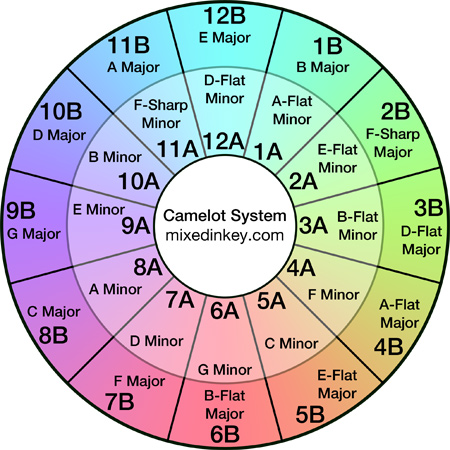
Attached to this post is a 60 minute harmonically mixed indoor cycling music set that just flows.
All you need to do is “Play It and Forget It.”
Premium Members, follow the link below to download this new mix.
[wlm_private ‘PRO-Platinum|PRO-Monthly|PRO-Gratis|PRO-Seasonal|Platinum-trial|Monthly-trial|PRO-Military|30-Days-of-PRO|90 Day PRO|Stages-Instructor|Schwinn-Instructor|Instructor-Bonus|28 Day Challenge']
Right Click on the blue underlined link
Select “Download Linked File As”
Select a download location
Once file is completely downloaded, find it in the location you selected
Drag the file into your iTunes or Spotify library OR
Right Click on the file and Select “Open With”
From the drop down menu select “iTunes” or “Spotify”
File should begin playing and is now part of your iTunes or Spotify library
To download the above media on a PC:
Right Click on the blue underlined link
Select “Save Link As”
Select a download location
Once file is completely downloaded, find it in the location you selected
Drag the file into your iTunes or Spotify library OR
Right Click on the file and Select “Open With”
From the drop down menu select “iTunes” or “Spotify”
File should begin playing and is now part of your iTunes or Spotify library Click here to watch a video on how to download media files from ICI/Pro.
Right Click on the blue underlined link
Select “Download Linked File As”
Select a download location
Once file is completely downloaded, find it in the location you selected
Drag the file into your iTunes or Spotify library OR
Right Click on the file and Select “Open With”
From the drop down menu select “iTunes” or “Spotify”
File should begin playing and is now part of your iTunes or Spotify library
To download the above media on a PC:
Right Click on the blue underlined link
Select “Save Link As”
Select a download location
Once file is completely downloaded, find it in the location you selected
Drag the file into your iTunes or Spotify library OR
Right Click on the file and Select “Open With”
From the drop down menu select “iTunes” or “Spotify”
File should begin playing and is now part of your iTunes or Spotify library Click here to watch a video on how to download media files from ICI/Pro.
One of my favorite climbing songs of all time is “Preliator” by Globus (from their album Epicon). I use this type of music sparingly in my classes, but I really love coaching my classes through songs such as these. The music provides so much motivation and just begs your legs to climb. Globus' music has been described as ‘symphonic rock' or ‘symphonic metal', and this particular song is epic enough to have been used in several movie trailers. Check out the live version here:
I was recently turned on to another song from the same album called “Europa”. I'll be using this one as a seated climb at around 70 rpm's, adding gear every minute. The music slows briefly at 2:10, but don't let that slow your climb. Continue on and finish this nearly 4 minute climb strong! Enjoy!
Premium Members, follow the link below to download this new mix.
[wlm_private ‘PRO-Platinum|PRO-Monthly|PRO-Gratis|PRO-Seasonal|Platinum-trial|Monthly-trial|PRO-Military|30-Days-of-PRO|90 Day PRO|Stages-Instructor|Schwinn-Instructor|Instructor-Bonus|28 Day Challenge']
Right Click on the blue underlined link
Select “Download Linked File As”
Select a download location
Once file is completely downloaded, find it in the location you selected
Drag the file into your iTunes or Spotify library OR
Right Click on the file and Select “Open With”
From the drop down menu select “iTunes” or “Spotify”
File should begin playing and is now part of your iTunes or Spotify library
To download the above media on a PC:
Right Click on the blue underlined link
Select “Save Link As”
Select a download location
Once file is completely downloaded, find it in the location you selected
Drag the file into your iTunes or Spotify library OR
Right Click on the file and Select “Open With”
From the drop down menu select “iTunes” or “Spotify”
File should begin playing and is now part of your iTunes or Spotify library Click here to watch a video on how to download media files from ICI/Pro.