Simple and Progress Profile for July #2 – Hang On

Simple and Progress Profile for July #2 – Hang On

hanging-on


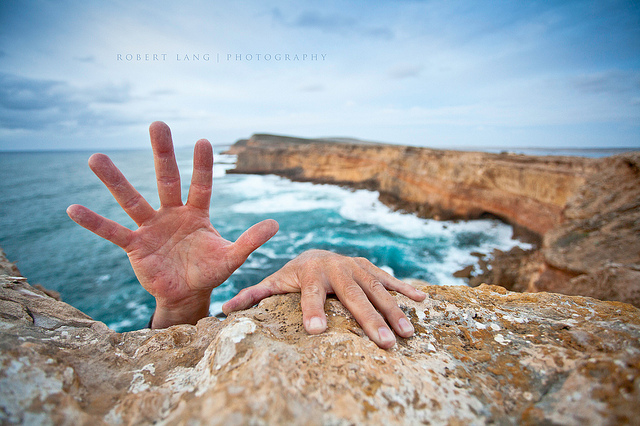
How long can you HANG ON?

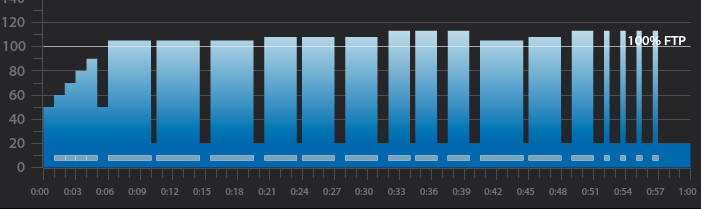
Screen Shot 2016-07-10 at 10.37.54 AM


Workout Basics:

  • 5-minute warmup
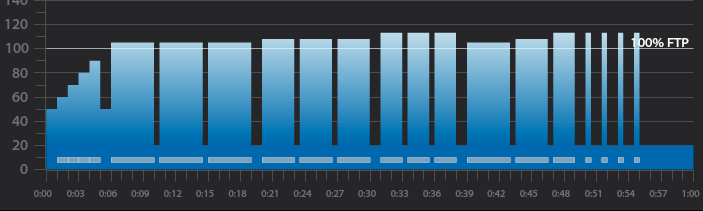
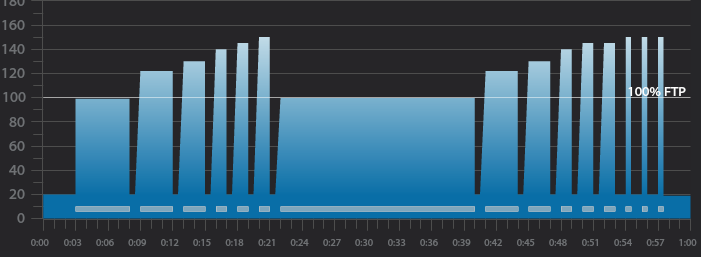
  • 3 x 4-minute intervals with 30 seconds recovery after the 1st and 1 minute after the 2nd
  • 1-minute recovery after the third 4-minute interval
  • 3 x 3-minute intervals with 30 seconds recovery after the 1st and 1 minute after the 2nd
  • 1-minute recovery after the third 3-minute interval
  • 3 x 2-minute intervals with 30 seconds recovery after the 1st and 1 minute after the 2nd
  • 1-minute recovery after the third 2-minute interval
  • 4,3,2 minute intervals with 30 seconds recovery after the 1st and 1 minute after the 2nd
  • 1-minute recovery after the 2-minute interval
  • 4 x 30-second intervals with 1-minute recovery after each
  • 5 minute cool down

3 x 4-minute interval goals and specifics:

  • 1st 4-minute intervals should be ridden seated at 80-110 rpm at Threshold wattage, HR or RPE or in the Light Red or Orange Zone if using VismoX or Stages IQ
    • 30-second recovery or reset
  • 2nd 4-minute interval should be ridden seated at 60-80 rpm at the same wattage, HR or RPE as the 1st or in the Light Red or Orange Zone if using VismoX or Stages IQ
    • 1-minute recovery or reset
  • 3rd 4-minute interval should be ridden standing at 60-70 rpm at the same wattage, HR or RPE as 2nd or in the Light Red or Orange Zone if using VismoX or Stages IQ
    • 1-minute recovery or reset

3 x 3-minute interval goals and specifics:

  • 1st 3-minute intervals should be ridden seated at 80-110 rpm a wattage, HR or RPE that is higher than the last 4-minute interval or in the Light or Dark Red if using VismoX or Stages IQ
    • 30-second recovery or reset
  • 2nd 3-minute interval should be ridden seated at 60-80 rpm at the same wattage, HR or RPE as the 1st 3-minute interval or in the Light or Dark Red if using VismoX or Stages IQ
    • 1-minute recovery or reset
  • 3rd 3-minute interval should be ridden standing at 60-70 rpm at the same wattage, HR or RPE as 2nd 3-minute interval or in the Light or Dark Red if using VismoX or Stages IQ
    • 1-minute  recovery or reset

3 x 2-minute interval goals and specifics:

  • 1st 2-minute intervals should be ridden seated at 80-110 rpm a wattage, HR or RPE that is higher than the last 3-minute interval  or in the Dark Red if using VismoX or Stages IQ
    • 30-second recovery or reset
  • 2nd 2-minute interval should be ridden seated at 60-80 rpm at the same wattage, HR or RPE as the 1st 2-minute interval or in the Light or Dark Red if using VismoX or Stages IQ
    • 1-minute recovery or reset
  • 3rd 2-minute interval should be ridden standing at 60-70 rpm at the same wattage, HR or RPE as 2nd 2-minute interval or in the Light or Dark Red if using VismoX or Stages IQ
    • 1-minute recovery or reset

4,3,2 minute interval goals and specifics:

  • 4-minute intervals should be ridden seated at 80-110 rpm at Threshold wattage, HR or RPE or in the Orange if using VismoX or Stages IQ
    • 30-second recovery or reset
  • 3-minute intervals should be ridden seated at 60-80 rpm at a wattage, HR or RPE that is higher than the last 4-minute interval or in the Light if using VismoX or Stages IQ
    • 1-minute recovery or reset
  • 2-minute interval should be ridden standing at 60-70 rpm at a wattage, HR or RPE that is higher than the last 3-minute interval  or in the Dark Red if using VismoX or Stages IQ
    • 1-minute recovery or reset

4 x 30-second interval goals and specifics:

  • The 4 x 30-second intervals should be ridden at the riders choice RPM or position and should be ridden at maximum effort followed by a 1-minute recovery  or in the Purple if using VismoX or Stages IQ

Recording of me teaching this profile on the Stages SC3 IC Bike


65-minute music mix that can be used when teaching this profile


400x40000bb-2

Click Here to download VismoX

Below, Premium Members can follow links to download all the above media, view and download a printable Class Profile that can be used in class, read a detailed description of the Power Based Training Zones and download a printable Power Postcard.

[wlm_private ‘PRO-Platinum|PRO-Monthly|PRO-Gratis|PRO-Seasonal|Platinum-trial|Monthly-trial|PRO-Military|30-Days-of-PRO|90 Day PRO|Stages-Instructor|Schwinn-Instructor|Instructor-Bonus|28 Day Challenge']

Right Click to Download the Class Recording associated with this profile

Right Click to Download the music mix used with this profile

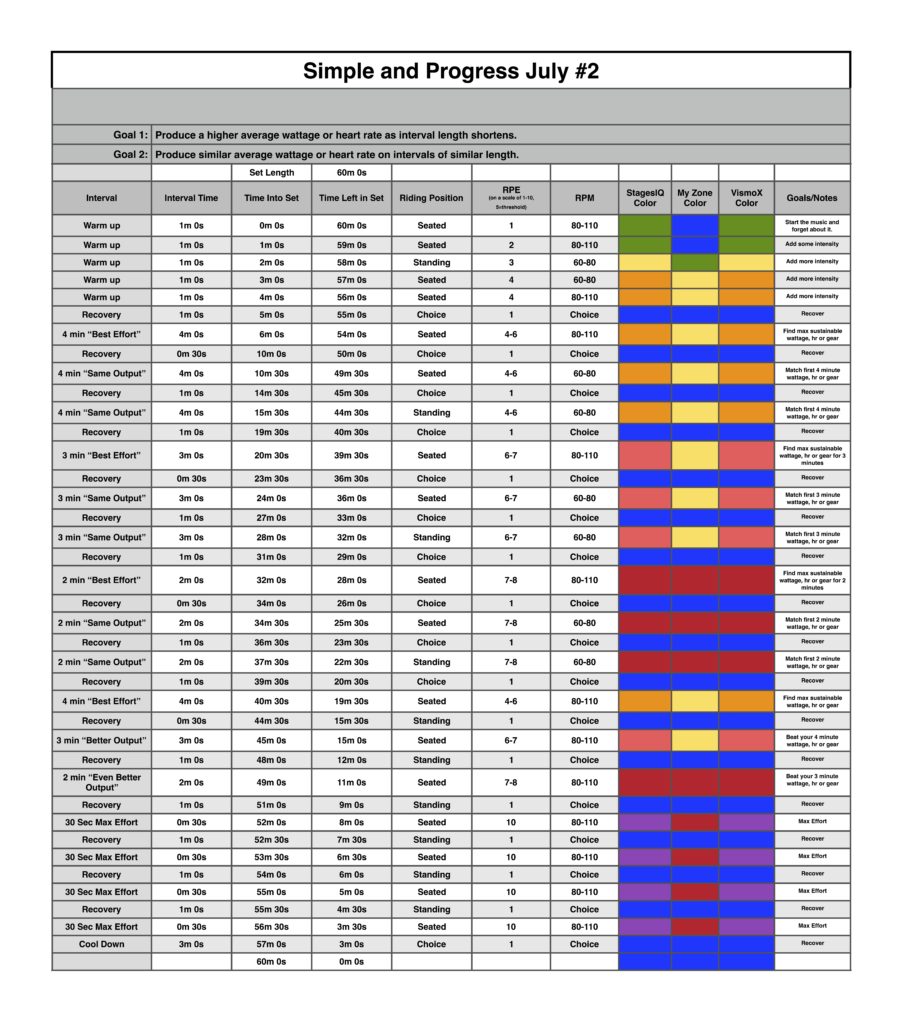
Right Click to Download or Print this Class Profile


Simple Sets July 2


[/wlm_private]

Click here for a great article explaining the different zones.

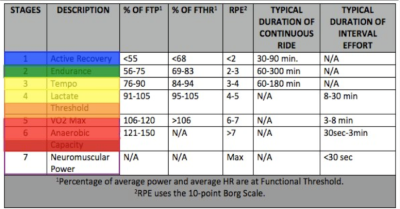
Power Based Training Zones (Coggan Power Zones)

Click here to Downloadable Power Postcard to Print

PowerPlus - Workbook

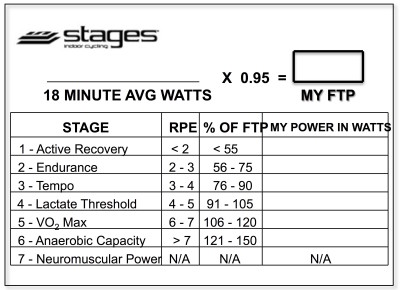
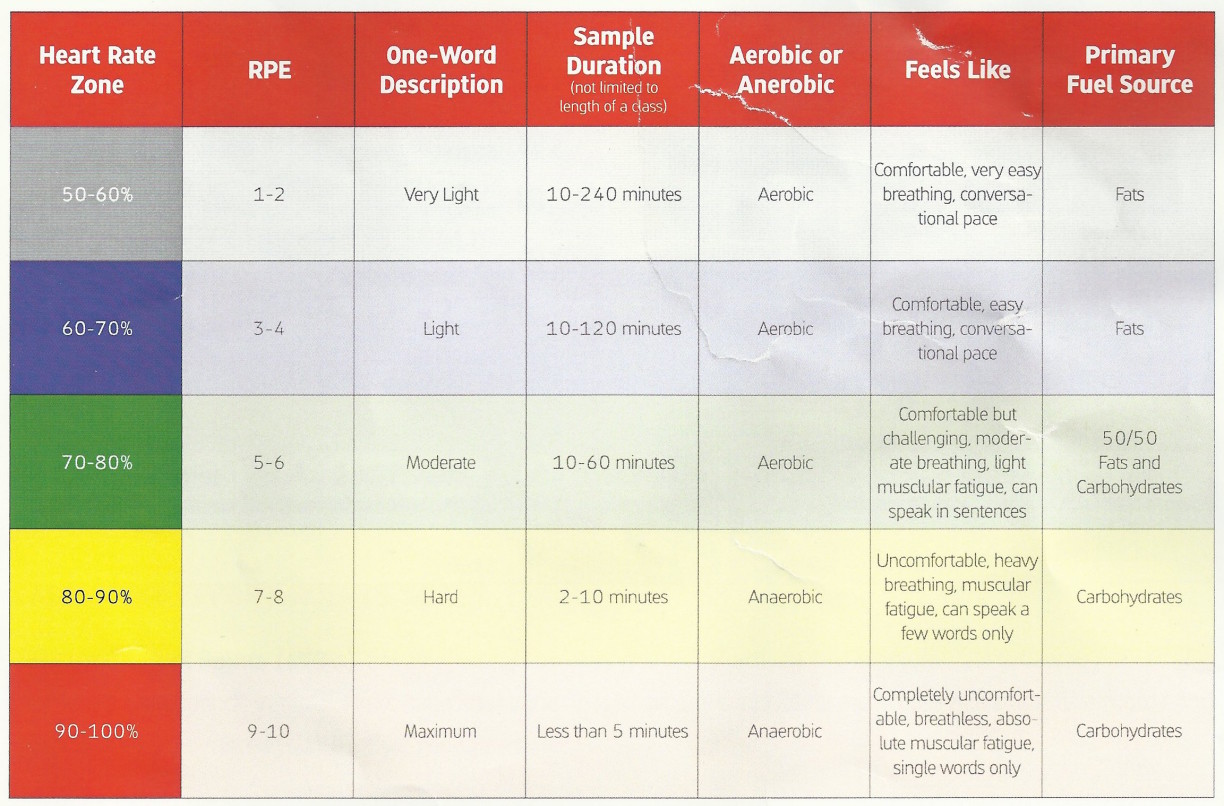
Click here to Downloadable Zone Chart that includes StagesIQ Colors

Screen Shot 2015-12-13 at 9.58.48 AM

PiQ Zones

My_Zone_Zones

[/wlm_private]

To download any of the above media on a Mac:

  1. Right Click on the blue underlined link
  2. Select “Download Linked File As”
  3. Select a download location
  4. Once file is completely downloaded, find it in the location you selected
  5. Drag the file into your iTunes or Spotify library OR
  6. Right Click on the file and Select “Open With”
  7. From the drop down menu select “iTunes” or “Spotify”
  8. File should begin playing and is now part of your iTunes or Spotify library

To download any of the above media on a PC:

  1. Right Click on the blue underlined link
  2. Select “Save Link As”
  3. Select a download location
  4. Once file is completely downloaded, find it in the location you selected
  5. Drag the file into your iTunes or Spotify library OR
  6. Right Click on the file and Select “Open With”
  7. From the drop down menu select “iTunes” or “Spotify”
  8. File should begin playing and is now part of your iTunes or Spotify library

Click here to watch a video on how to download media files from ICI/Pro.


Simple and Progress Profile for July #2 – Hang On

Simple and Progress Profile for July #1 – Hang On

hanging-on


Can you Hang On to the work done in the previous interval?


Screen Shot 2016-07-04 at 9.21.34 AM

Workout Basics:

  • 5-minute warmup
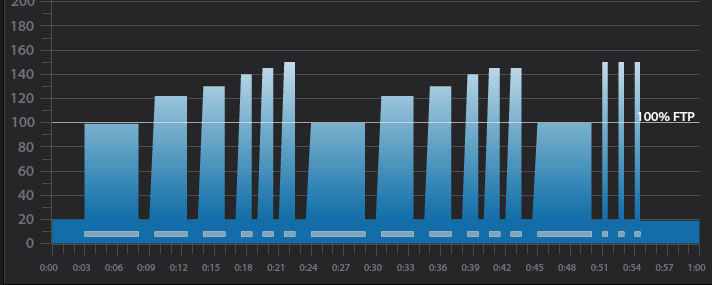
  • 3 x 4-minute intervals with 30 seconds recovery after each
  • 1-minute recovery after the third 4-minute interval
  • 3 x 3-minute intervals with 30 seconds recovery after each
  • 1-minute recovery after the third 3-minute interval
  • 3 x 2-minute intervals with 30 seconds recovery after each
  • 1-minute recovery after the third 2-minute interval
  • 4,3,2 minute intervals with 30 seconds recovery after each
  • 1-minute recovery after the 2-minute interval
  • 4 x 30-second intervals with 1-minute recovery after each
  • 5 minute cool down

3 x 4-minute interval goals and specifics:

  • 1st 4-minute intervals should be ridden seated at 80-110 rpm at Threshold wattage, HR or RPE or in the Light Red or Orange Zone if using VismoX or Stages IQ
    • 30-second recovery or reset
  • 2nd 4-minute interval should be ridden seated at 60-80 rpm at the same wattage, HR or RPE as the 1st or in the Light Red or Orange Zone if using VismoX or Stages IQ
    • 30-second recovery or reset
  • 3rd 4-minute interval should be ridden standing at 60-70 rpm at the same wattage, HR or RPE as 2nd or in the Light Red or Orange Zone if using VismoX or Stages IQ
    • 1-minute recovery or reset

3 x 3-minute interval goals and specifics:

  • 1st 3-minute intervals should be ridden seated at 80-110 rpm a wattage, HR or RPE that is higher than the last 4-minute interval or in the Light or Dark Red if using VismoX or Stages IQ
    • 30-second recovery or reset
  • 2nd 3-minute interval should be ridden seated at 60-80 rpm at the same wattage, HR or RPE as the 1st 3-minute interval or in the Light or Dark Red if using VismoX or Stages IQ
    • 30-second recovery or reset
  • 3rd 3-minute interval should be ridden standing at 60-70 rpm at the same wattage, HR or RPE as 2nd 3-minute interval or in the Light or Dark Red if using VismoX or Stages IQ
    • 1-minute  recovery or reset

3 x 2-minute interval goals and specifics:

  • 1st 2-minute intervals should be ridden seated at 80-110 rpm a wattage, HR or RPE that is higher than the last 3-minute interval  or in the Dark Red if using VismoX or Stages IQ
    • 30-second recovery or reset
  • 2nd 2-minute interval should be ridden seated at 60-80 rpm at the same wattage, HR or RPE as the 1st 2-minute interval or in the Light or Dark Red if using VismoX or Stages IQ
    • 30-second recovery or reset
  • 3rd 2-minute interval should be ridden standing at 60-70 rpm at the same wattage, HR or RPE as 2nd 2-minute interval or in the Light or Dark Red if using VismoX or Stages IQ
    • 1-minute recovery or reset

4,3,2 minute interval goals and specifics:

  • 4-minute intervals should be ridden seated at 80-110 rpm at Threshold wattage, HR or RPE or in the Orange if using VismoX or Stages IQ
    • 30-second recovery or reset
  • 3-minute intervals should be ridden seated at 60-80 rpm at a wattage, HR or RPE that is higher than the last 4-minute interval or in the Light if using VismoX or Stages IQ
    • 30-second recovery or reset
  • 2-minute interval should be ridden standing at 60-70 rpm at a wattage, HR or RPE that is higher than the last 3-minute interval  or in the Dark Red if using VismoX or Stages IQ
    • 1-minute recovery or reset

4 x 30-second interval goals and specifics:

  • The 4 x 30 second intervals should be ridden at the riders choice RPM or position and should be ridden at maximum effort followed by a 1 minute recovery  or in the Purple if using VismoX or Stages IQ


Recording of me teaching this profile on the Stages SC3 IC Bike


Recording of the music mix used during this class


400x40000bb-2

Click Here to download VismoX


Below, Premium Members can follow links to download all the above media, view and download a printable Class Profile that can be used in class, read a detailed description of the Power Based Training Zones and download a printable Power Postcard.

[wlm_private ‘PRO-Platinum|PRO-Monthly|PRO-Gratis|PRO-Seasonal|Platinum-trial|Monthly-trial|PRO-Military|30-Days-of-PRO|90 Day PRO|Stages-Instructor|Schwinn-Instructor|Instructor-Bonus|28 Day Challenge']
Right Click to Download the Class Recording associated with this profile.

Right Click to Download the music mix used with this profile.

Right Click to Download or Print this Class Profile

Simple_Sets_July_1

[/wlm_private]

Click here for a great article explaining the different zones.

Power Based Training Zones (Coggan Power Zones)

Click here to Downloadable Power Postcard to Print

PowerPlus - Workbook

Click here to Downloadable Zone Chart that includes StagesIQ Colors

Screen Shot 2015-12-13 at 9.58.48 AM

PiQ Zones

My_Zone_Zones

[/wlm_private]

To download any of the above media on a Mac:

  1. Right Click on the blue underlined link
  2. Select “Download Linked File As”
  3. Select a download location
  4. Once file is completely downloaded, find it in the location you selected
  5. Drag the file into your iTunes or Spotify library OR
  6. Right Click on the file and Select “Open With”
  7. From the drop down menu select “iTunes” or “Spotify”
  8. File should begin playing and is now part of your iTunes or Spotify library

To download any of the above media on a PC:

  1. Right Click on the blue underlined link
  2. Select “Save Link As”
  3. Select a download location
  4. Once file is completely downloaded, find it in the location you selected
  5. Drag the file into your iTunes or Spotify library OR
  6. Right Click on the file and Select “Open With”
  7. From the drop down menu select “iTunes” or “Spotify”
  8. File should begin playing and is now part of your iTunes or Spotify library

Click here to watch a video on how to download media files from ICI/Pro.

Simple and Progress Profile for May #1 – “How Far Can You Go?”

Simple and Progress Profile for May #1 – “How Far Can You Go?”

how-far_6970225_lrgScreen Shot 2016-05-15 at 9.59.26 AM

Recording of Me teaching this profile on the Stages SC3 IC Bike.

Right Click to download this class recording.


Below, Premium Members can listen and download the music mix used in this class, view and download a printable Class Profile that can be used in class, read a detailed description of the Power Based Training Zones and download a printable Power Postcard.

[wlm_private ‘PRO-Platinum|PRO-Monthly|PRO-Gratis|PRO-Seasonal|Platinum-trial|Monthly-trial|PRO-Military|30-Days-of-PRO|90 Day PRO|Stages-Instructor|Schwinn-Instructor|Instructor-Bonus|28 Day Challenge']
Here's the music mix used in this class.

Right Click to download this mix.


Right Click to Download or Print the Class Profile

Simple_and_Progress_May_1_1

Simple_and_Progress_May_1_2


Click here for a great article explaining the different zones.

Power Based Training Zones (Coggan Power Zones)

Click here to Downloadable Power Postcard to Print

PowerPlus - Workbook

Click here to Downloadable Zone Chart that includes StagesIQ Colors

Screen Shot 2015-12-13 at 9.58.48 AM

PiQ Zones

My_Zone_Zones

[/wlm_private]

To download any of the above media on a Mac:

  1. Right Click on the blue underlined link
  2. Select “Download Linked File As”
  3. Select a download location
  4. Once file is completely downloaded, find it in the location you selected
  5. Drag the file into your iTunes or Spotify library OR
  6. Right Click on the file and Select “Open With”
  7. From the drop down menu select “iTunes” or “Spotify”
  8. File should begin playing and is now part of your iTunes or Spotify library

To download any of the above media on a PC:

  1. Right Click on the blue underlined link
  2. Select “Save Link As”
  3. Select a download location
  4. Once file is completely downloaded, find it in the location you selected
  5. Drag the file into your iTunes or Spotify library OR
  6. Right Click on the file and Select “Open With”
  7. From the drop down menu select “iTunes” or “Spotify”
  8. File should begin playing and is now part of your iTunes or Spotify library

Click here to watch a video on how to download media files from ICI/Pro.

PlayPlay
Simple and Progress Profile for Week 2 –  3, 2, 1 Blast Off!!

Simple and Progress Profile for Week 2 – 3, 2, 1 Blast Off!!

Blastoff


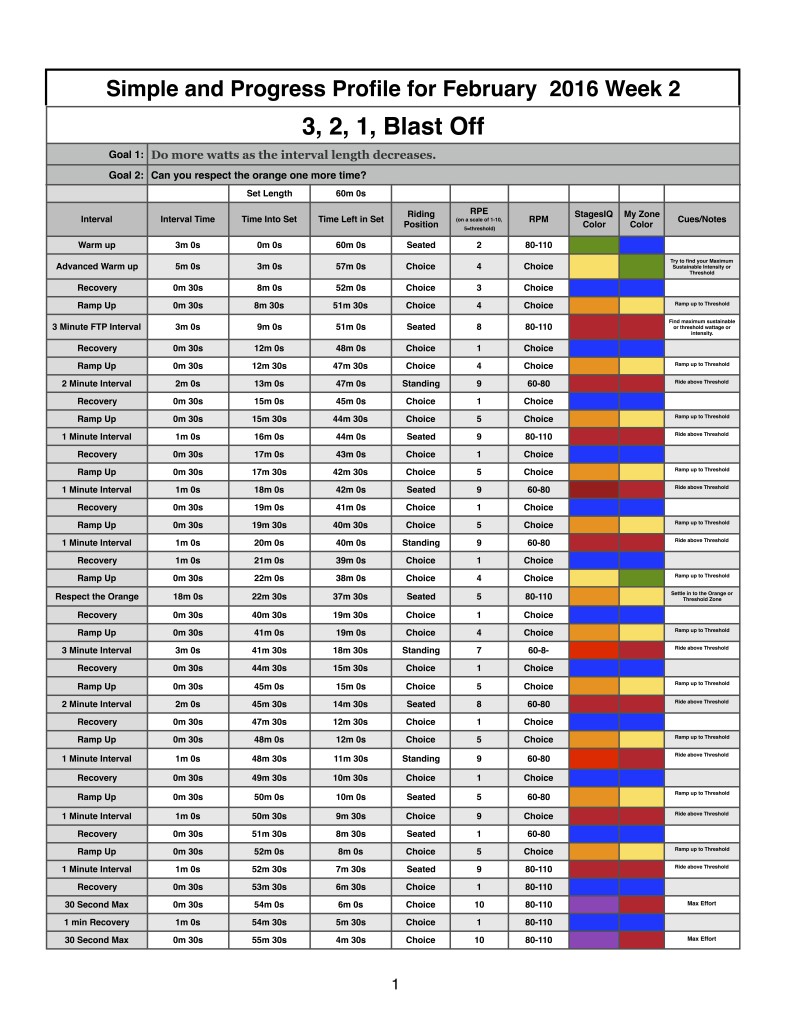
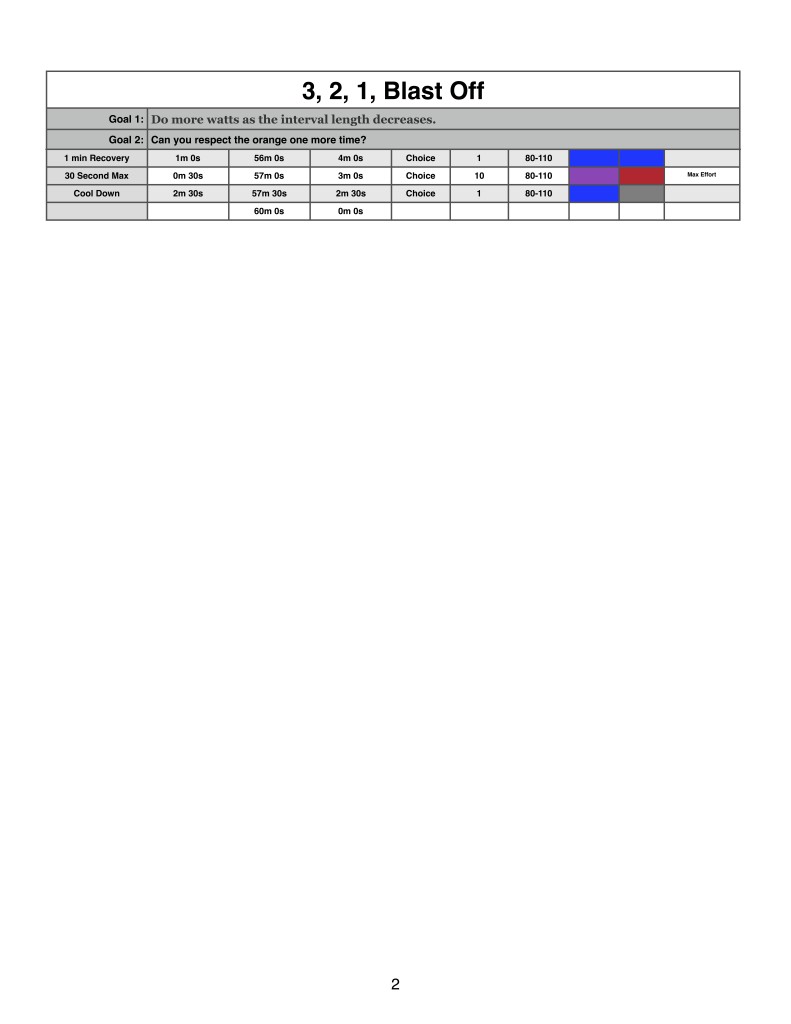
Here's the week 2 profile for the month of March 2016.

3, 2, 1 Blast off!!!!  As the intervals get shorter the intensity gets HOTTER and more POWERFUL!!!!   But you'll need to cruise into orbit in the middle.


Right Click to download a recording of me teaching this profile  with a Stages IQ


Right Click to download a Trainer Road video and audio recording of me teaching this profile  with a Stages IQ


Right Click to download a recording of me teaching this profile  on a Stages SC3 Bike with MyZone


Right Click to download a Trainer Road video and audio recording of me teaching this profile  on a Stages SC3 Bike with MyZone


Below, Premium Members can read a detailed description of this Class Profile, download a printable Class Profile that can be used in class, read a detailed description of the Power Based Training Zones and download a printable Power Postcard.

[wlm_private ‘PRO-Platinum|PRO-Monthly|PRO-Gratis|PRO-Seasonal|Platinum-trial|Monthly-trial|PRO-Military|30-Days-of-PRO|90 Day PRO|Stages-Instructor|Schwinn-Instructor|Instructor-Bonus|28 Day Challenge']

 

Screen Shot 2016-03-12 at 6.10.32 PM


Downloadable Profile to Print

Simple_and_Progress_March_2

Simple_and_Progress_March_2.1


Click here for a great article explaining the different zones.

Power Based Training Zones (Coggan Power Zones)

Click here to Downloadable Power Postcard to Print

PowerPlus - Workbook

Click here to Downloadable Zone Chart that includes StagesIQ Colors

Screen Shot 2015-12-13 at 9.58.48 AM

PiQ Zones

My_Zone_Zones

[/wlm_private]

To download any of the above media on a Mac:

  1. Right Click on the blue underlined link
  2. Select “Download Linked File As”
  3. Select a download location
  4. Once file is completely downloaded, find it in the location you selected
  5. Drag the file into your iTunes or Spotify library OR
  6. Right Click on the file and Select “Open With”
  7. From the drop down menu select “iTunes” or “Spotify”
  8. File should begin playing and is now part of your iTunes or Spotify library

To download any of the above media on a PC:

  1. Right Click on the blue underlined link
  2. Select “Save Link As”
  3. Select a download location
  4. Once file is completely downloaded, find it in the location you selected
  5. Drag the file into your iTunes or Spotify library OR
  6. Right Click on the file and Select “Open With”
  7. From the drop down menu select “iTunes” or “Spotify”
  8. File should begin playing and is now part of your iTunes or Spotify library

Click here to watch a video on how to download media files from ICI/Pro.


Simple and Progress Profile for Week 2 –  3, 2, 1 Blast Off!!

Simple and Progress Profile for Week 1 – 3, 2, 1 Blast Off!!

Blastoff


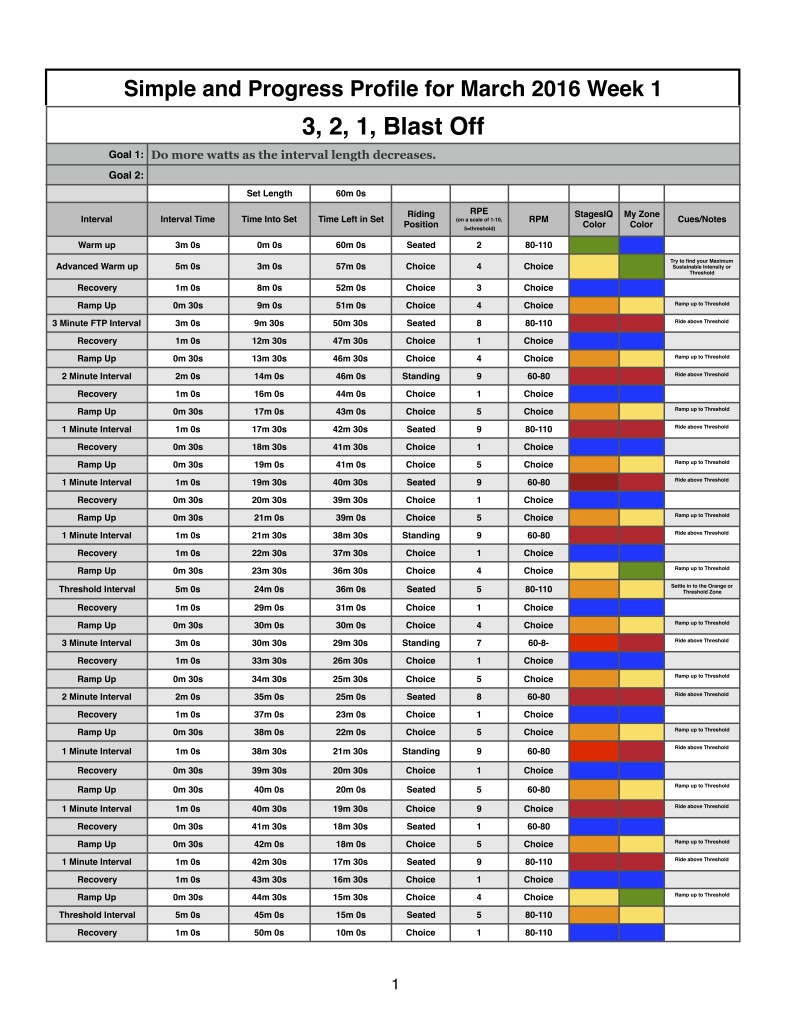
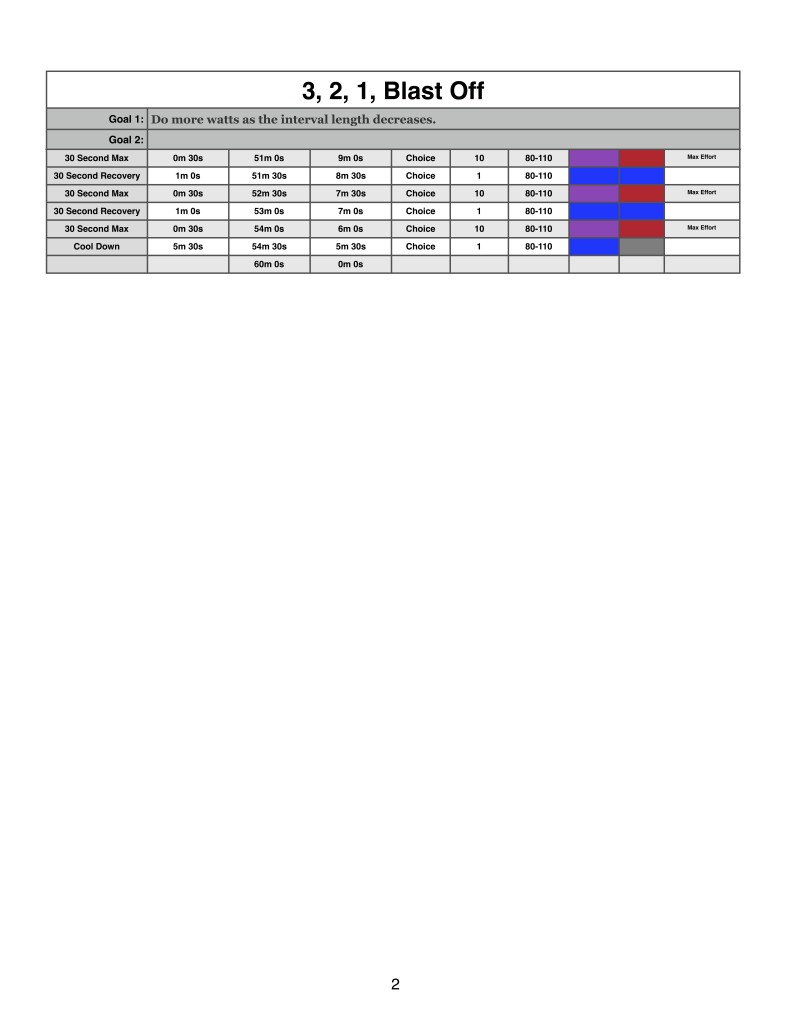
Here's the week 1 profile for the month of March 2016.

3, 2, 1 Blast off!!!!  As the intervals get shorter the intensity gets HOTTER and more POWERFUL!!!!

Below is a recording of me teaching this profile:

Right Click to download a recording of me teaching this profile  with a Stages SC3 Bike


Below, Premium Members can read a detailed description of this Class Profile, download a printable Class Profile that can be used in class, read a detailed description of the Power Based Training Zones and download a printable Power Postcard.

[wlm_private ‘PRO-Platinum|PRO-Monthly|PRO-Gratis|PRO-Seasonal|Platinum-trial|Monthly-trial|PRO-Military|30-Days-of-PRO|90 Day PRO|Stages-Instructor|Schwinn-Instructor|Instructor-Bonus|28 Day Challenge']
 

Right Click to download a 60 minute music track that can be used with this profile


Screen Shot 2016-03-06 at 5.32.05 PM


Downloadable Profile to Print

Simple_and_Progress_March_1_1

Simple_and_Progress_March_1_2

Click here for a great article explaining the different zones.

Power Based Training Zones (Coggan Power Zones)

Click here to Downloadable Power Postcard to Print

PowerPlus - Workbook

Click here to Downloadable Zone Chart that includes StagesIQ Colors

Screen Shot 2015-12-13 at 9.58.48 AM

PiQ Zones

My_Zone_Zones

[/wlm_private]

To download any of the above media on a Mac:

  1. Right Click on the blue underlined link
  2. Select “Download Linked File As”
  3. Select a download location
  4. Once file is completely downloaded, find it in the location you selected
  5. Drag the file into your iTunes or Spotify library OR
  6. Right Click on the file and Select “Open With”
  7. From the drop down menu select “iTunes” or “Spotify”
  8. File should begin playing and is now part of your iTunes or Spotify library

To download any of the above media on a PC:

  1. Right Click on the blue underlined link
  2. Select “Save Link As”
  3. Select a download location
  4. Once file is completely downloaded, find it in the location you selected
  5. Drag the file into your iTunes or Spotify library OR
  6. Right Click on the file and Select “Open With”
  7. From the drop down menu select “iTunes” or “Spotify”
  8. File should begin playing and is now part of your iTunes or Spotify library

Click here to watch a video on how to download media files from ICI/Pro.