The Power of 3 – Keep it Simple and Progress – Profile
I have been receiving an incredible amount of positive feedback about these progressive profiles, so I have decided to provide ICI/Pro members with two profiles per week starting in September. In order to keep it Simple and keep it Progressive I'm going to provide a profile every Wednesday that focuses on intervals that are @ or Above Threshold (Zones 4,5 and 6) and on Saturday or Sunday I'll post a profile that focuses on intervals that are @ or Below Threshold (Zones 2,3 and 4). Heart Rate, Power and RPE zone descriptions are available below.
Through my years an endurance coach and indoor cycling instructor I have seen my athletes and class participants make great gains by following a progressive program for 3 weeks then using the 4th week for recovery or a “free” or non-technical workout. In order to stick to this plan I'll be providing 3 weeks of @ or Above Threshold workouts followed by a “Free-For-All” workout. I'll also be providing 3 weeks @ or Below Threshold workouts followed by a FTP (Functional Threshold Power) or FTHR (Functional Threshold Heart Rate) workout. I believe the testing profile is VERY important to show riders the gains they are making as well as finding new and REAL numbers to work with for the next month.
Most, but not all, weeks I'll also be providing a 65 minute mixed music set that can be used with these profiles.
Let me know how it goes.
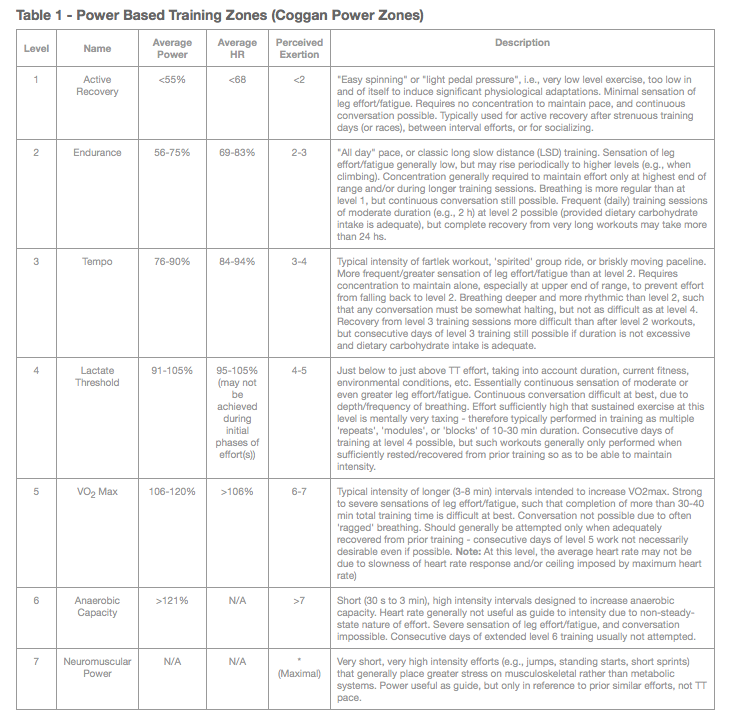
Click here for a great article explaining the different zones.
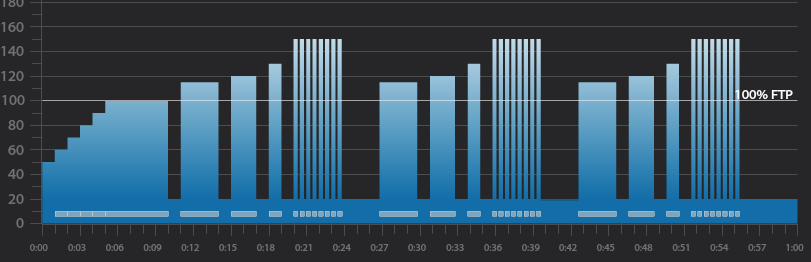
Below you'll find Week 1 of September's @ or Above Threshold Keep it Simple and Progress indoor cycling profile.
Workout Basics:
- 5 minute warmup
- 5 minute benchmark ride to find “Maximum Sustainable Wattage”
- 1 minute recovery
- 3 minute interval
- 1 minute recovery
- 2 minute interval
- 1 minute recovery
- 1 minute interval
- 1 minute recovery
- Tabata Interval 8×20 seconds with 10 seconds recovery after each
- 3 minute recovery
- Repeat the above 3,2,1 minute intervals 2 more times
- 5 minute cool down
5 minute “Maximum Sustainable Wattage” Test
- Settle in to a 5 minute interval at 80-110 rpm.
- This interval should be ridden at a maximum sustainable intensity.
- if riders know their threshold they can spend this 5 minutes riding at it.
- At the end of the interval take note of average wattage or HR or be aware of the RPE.
3 minute interval goals and specifics:
- Ride for 3 minutes Seated at 80-110 rpm.
- Complete the interval with an average HR or Wattage that is greater than the 5 minute “Maximum Sustainable Wattage” Test
- 1 minute recovery or reset
2 minute interval goals and specifics:
- Ride for 2 minutes Seated at 80-110 rpm.
- Complete the interval with an average HR or Wattage that is greater than the previous 3 minute average.
- 1 minute recovery or reset
1 minute interval goals and specifics:
- Ride for 1 minute seated at 80-110 rpm.
- Complete the interval with an average HR or Wattage that is greater than the previous 2 minute average.
- 1 minute recovery or reset
Tabata goals and specifics:
- 8 x 20 seconds “ON” w/ 10 second rest
- Ride the 20 second intervals in a seated position at 80-110 rpm. Rest in a standing position
- 3 minute recovery or reset
3 minute interval goals and specifics:
- Ride for 3 minutes standing at 60-80 rpm.
- Complete the interval with an average HR or Wattage that is greater than the 5 minute “Maximum Sustainable Wattage” Test
- 1 minute recovery or reset
2 minute interval goals and specifics:
- Ride for 2 minutes standing at 60-80 rpm.
- Complete the interval with an average HR or Wattage that is greater than the previous 3 minute average.
- 1 minute recovery or reset
1 minute interval goals and specifics:
- Ride for 1 minute standing at 60-80 rpm.
- Complete the interval with an average HR or Wattage that is greater than the previous 2 minute average.
- 1 minute recovery or reset
Tabata goals and specifics:
- 8 x 20 seconds “ON” w/ 10 second rest
- Ride the 20 second intervals in a standing position at 60-80 rpm. Rest in a standing position
- 3 minute recovery or reset
3 minute interval goals and specifics:
- Ride for 3 minutes Seated at 60-80 rpm.
- Complete the interval with an average HR or Wattage that is greater than the 5 minute “Maximum Sustainable Wattage” Test
- 1 minute recovery or reset
2 minute interval goals and specifics:
- Ride for 2 minutes Seated at 60-80 rpm.
- Complete the interval with an average HR or Wattage that is greater than the previous 3 minute average.
- 1 minute recovery or reset
1 minute interval goals and specifics:
- Ride for 1 minute seated at 60-80 rpm.
- Complete the interval with an average HR or Wattage that is greater than the previous 2 minute average.
- 1 minute recovery or reset
Tabata goals and specifics:
- 8 x 20 seconds “ON” w/ 10 second rest
- Ride the 20 second intervals in a seated position at 60-80 rpm. Rest in a standing position
Cool Down
[wlm_private ‘PRO-Platinum|PRO-Monthly|PRO-Gratis|PRO-Seasonal|Platinum-trial|Monthly-trial|PRO-Military|30-Days-of-PRO|90 Day PRO|Stages-Instructor|Schwinn-Instructor|Instructor-Bonus|28 Day Challenge'].
Trainer Road Profile (If you're Trainer Road Member join my Team to get this and all profiles)
60 minute music mixed track used with this profile.
Recording of me teaching this profile with Power on the Stages SC3 Indoor Cycling Bike
To download any of the above media on a Mac:
- Right Click on the blue underlined link
- Select “Download Linked File As”
- Select a download location
- Once file is completely downloaded, find it in the location you selected
- Drag the file into your iTunes or Spotify library OR
- Right Click on the file and Select “Open With”
- From the drop down menu select “iTunes” or “Spotify”
- File should begin playing and is now part of your iTunes or Spotify library
To download any of the above media on a PC:
- Right Click on the blue underlined link
- Select “Save Link As”
- Select a download location
- Once file is completely downloaded, find it in the location you selected
- Drag the file into your iTunes or Spotify library OR
- Right Click on the file and Select “Open With”
- From the drop down menu select “iTunes” or “Spotify”
- File should begin playing and is now part of your iTunes or Spotify library
Click here to watch a video on how to download media files from ICI/Pro.
. [/wlm_private]
Podcast: Play in new window | Download
Originally posted 2015-09-02 05:00:00.