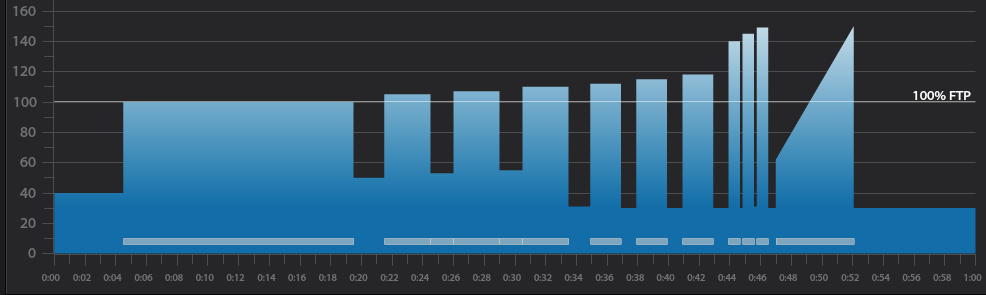
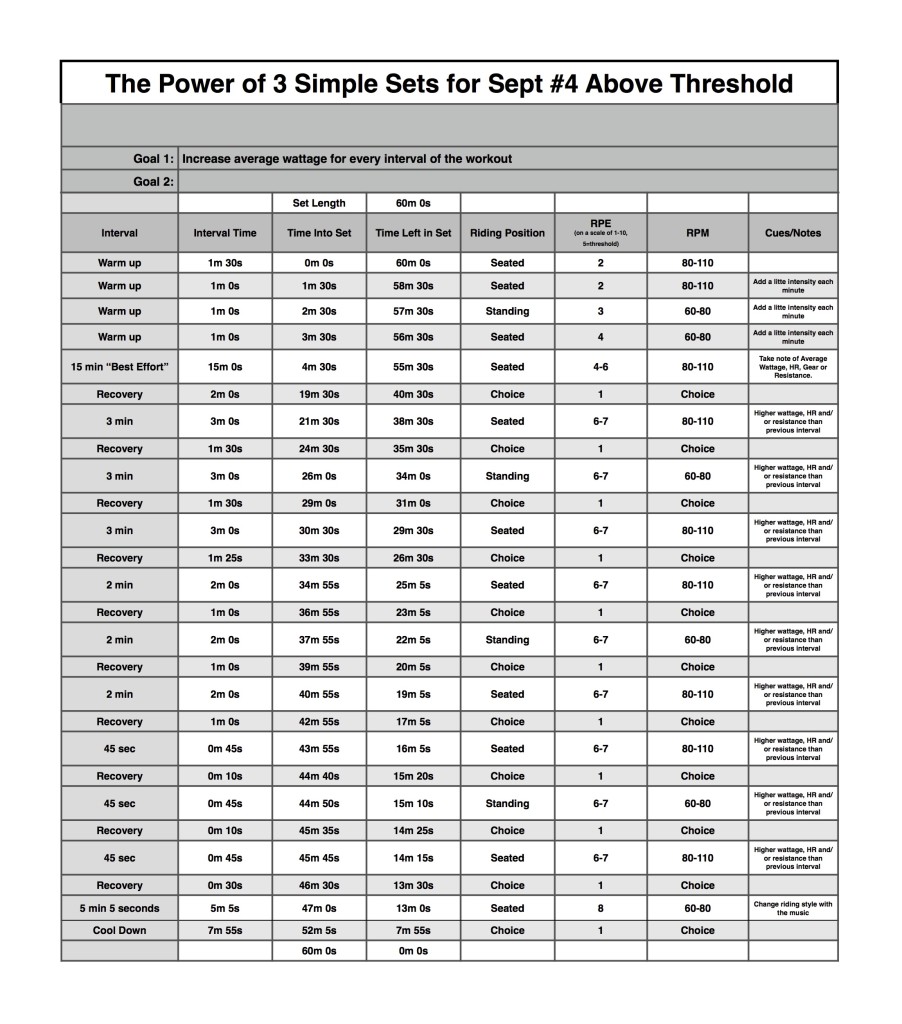
Below you'll find Week 1 of October's @ or Above Threshold Keep it Simple and Progress indoor cycling profile.
Workout Basics:
4 minute 30 second warmup
15 minute benchmark ride to find “Maximum Sustainable Wattage”
2 minute recovery
3 x 3 minute interval w/1 minute 30 secondrecovery after each
3 x 2 minute interval w/1 minute recovery after each
3 x 45 second interval w/10 seconds recovery after each
5 minute interval increasing intensity throughout
8 minute cooldown
Workout Goal:
“Can you increase your average wattage for EVERY interval until the last song?”
4 minute 30 second warm up
Slowly and steadily elevate the HR or Wattage to above threshold
1 minute recovery
15 minute “Maximum Sustainable Wattage” Test
Settle into a sustainable intensity, HR or Wattage
The songs change every 3 minutes
Change riding position or RPM with song changes
Remember Average wattage at the end of the 15 minute interval
2 minute recovery
3 minute interval goals and specifics:
Ride for 3 minutes seated at a constant RPM between 80-110 rpm.
Complete the interval with a higher average wattage than the previous interval
1 minute 30 second recovery or reset
3 minute interval goals and specifics:
Ride for 3 minutes standing at a constant RPM between 60-80 rpm.
Complete the interval with a higher average wattage than the previous interval
1 minute 30 second recovery or reset
3 minute interval goals and specifics:
Ride for 3 minutes seated at a constant RPM between 60-80 rpm.
Complete the interval with a higher average wattage than the previous interval
1 minute 30 second recovery or reset
2 minute interval goals and specifics:
Ride for 2 minutes seated at a constant RPM between 80-110 rpm.
Complete the interval with a higher average wattage than the previous interval
1 minute recovery or reset
2 minute interval goals and specifics:
Ride for 2 minutes standing at a constant RPM between 60-80 rpm.
Complete the interval with a higher average wattage than the previous interval
1 minute recovery or reset
2 minute interval goals and specifics:
Ride for 2 minutes seated at a constant RPM between 60-80 rpm.
Complete the interval with a higher average wattage than the previous interval
1 minute recovery or reset
45 second interval goals and specifics:
Ride for 45 second seated at a constant RPM between 80-110 rpm.
Complete the interval with a higher average wattage than the previous interval
10 second recovery or reset
45 second interval goals and specifics:
Ride for 45 second standing at a constant RPM between 60-80 rpm.
Complete the interval with a higher average wattage than the previous interval
10 second recovery or reset
45 second interval goals and specifics:
Ride for 45 second seated at a constant RPM between 60-80 rpm.
Complete the interval with a higher average wattage than the previous interval
30 second recovery or reset
5 minute interval goals and specifics:
Increase intensity every minute until end of song
Cool Down
[wlm_private ‘PRO-Platinum|PRO-Monthly|PRO-Gratis|PRO-Seasonal|Platinum-trial|Monthly-trial|PRO-Military|30-Days-of-PRO|90 Day PRO|Stages-Instructor|Schwinn-Instructor|Instructor-Bonus|28 Day Challenge'].
Trainer Road Profile (If you're Trainer Road Member join my Team to get this and all profiles)
[wlm_private ‘PRO-Platinum|PRO-Monthly|PRO-Gratis|PRO-Seasonal|Platinum-trial|Monthly-trial|PRO-Military|30-Days-of-PRO|90 Day PRO|Stages-Instructor|Schwinn-Instructor|Instructor-Bonus|28 Day Challenge'
Right Click on the blue underlined link
Select “Download Linked File As”
Select a download location
Once file is completely downloaded, find it in the location you selected
Drag the file into your iTunes or Spotify library OR
Right Click on the file and Select “Open With”
From the drop down menu select “iTunes” or “Spotify”
File should begin playing and is now part of your iTunes or Spotify library
To download the above media on a PC:
Right Click on the blue underlined link
Select “Save Link As”
Select a download location
Once file is completely downloaded, find it in the location you selected
Drag the file into your iTunes or Spotify library OR
Right Click on the file and Select “Open With”
From the drop down menu select “iTunes” or “Spotify”
File should begin playing and is now part of your iTunes or Spotify library Click here to watch a video on how to download media files from ICI/Pro.
The Roadless Ride is quickly approaching and every year I search for new video and music to play during the classes I lead for this fundraiser. The one song that has been on the playlist for the past 8 years is U2's Where the Streets Have No Name. This year I'm going to couple it with a live version of Bad from their Elevation tour way back in 2001. I own all of U2's concert DVD's and this performance of Streets is the best. My plan is to warmup and talk about Brent's Place during Bad then let the party begin with Streets.
Let me know what you think and if you're in the Denver area next Friday come join me, Jay and the other instructors for an awesome day of riding positive energy while we raise money for kids with cancer.
I put this mix together over 2 years ago and when I first played it I didn't like it all that much. The other day I put it on for one of my strength training circuit classes and my clients were all saying how much they enjoyed my new mix. I told them it wasn't new it was actually old, but I never thought it “worked”. Over the past few days I've listened to it a few more times and it has really grown on me so I thought I would share.
Let me know what you think.
[wlm_private ‘PRO-Platinum|PRO-Monthly|PRO-Gratis|PRO-Seasonal|Platinum-trial|Monthly-trial|PRO-Military|30-Days-of-PRO|90 Day PRO|Stages-Instructor|Schwinn-Instructor|Instructor-Bonus|28 Day Challenge']
Right Click on the blue underlined link
Select “Download Linked File As”
Select a download location
Once file is completely downloaded, find it in the location you selected
Drag the file into your iTunes or Spotify library OR
Right Click on the file and Select “Open With”
From the drop down menu select “iTunes” or “Spotify”
File should begin playing and is now part of your iTunes or Spotify library
To download the above media on a PC:
Right Click on the blue underlined link
Select “Save Link As”
Select a download location
Once file is completely downloaded, find it in the location you selected
Drag the file into your iTunes or Spotify library OR
Right Click on the file and Select “Open With”
From the drop down menu select “iTunes” or “Spotify”
File should begin playing and is now part of your iTunes or Spotify library Click here to watch a video on how to download media files from ICI/Pro.
[wlm_private ‘PRO-Platinum|PRO-Monthly|PRO-Gratis|PRO-Seasonal|Platinum-trial|Monthly-trial|PRO-Military|30-Days-of-PRO|90 Day PRO|Stages-Instructor|Schwinn-Instructor|Instructor-Bonus|28 Day Challenge']
Right Click on the blue underlined link
Select “Download Linked File As”
Select a download location
Once file is completely downloaded, find it in the location you selected
Drag the file into your iTunes or Spotify library OR
Right Click on the file and Select “Open With”
From the drop down menu select “iTunes” or “Spotify”
File should begin playing and is now part of your iTunes or Spotify library
To download the above media on a PC:
Right Click on the blue underlined link
Select “Save Link As”
Select a download location
Once file is completely downloaded, find it in the location you selected
Drag the file into your iTunes or Spotify library OR
Right Click on the file and Select “Open With”
From the drop down menu select “iTunes” or “Spotify”
File should begin playing and is now part of your iTunes or Spotify library Click here to watch a video on how to download media files from ICI/Pro.