Attached to this post is a 65 minute harmonically mixed music set.
All you need to do is “Play It and Forget It.”
Premium Members can download this new mix for FREE by following the links below.
[wlm_private ‘PRO-Platinum|PRO-Monthly|PRO-Gratis|PRO-Seasonal|Platinum-trial|Monthly-trial|PRO-Military|30-Days-of-PRO|90 Day PRO|Stages-Instructor|Schwinn-Instructor|Instructor-Bonus|28 Day Challenge']
Right Click on the blue underlined link
Select “Download Linked File As”
Select a download location
Once file is completely downloaded, find it in the location you selected
Drag the file into your iTunes or Spotify library OR
Right Click on the file and Select “Open With”
From the drop down menu select “iTunes” or “Spotify”
File should begin playing and is now part of your iTunes or Spotify library
To download the above media on a PC:
Right Click on the blue underlined link
Select “Save Link As”
Select a download location
Once file is completely downloaded, find it in the location you selected
Drag the file into your iTunes or Spotify library OR
Right Click on the file and Select “Open With”
From the drop down menu select “iTunes” or “Spotify”
File should begin playing and is now part of your iTunes or Spotify library Click here to watch a video on how to download media files from ICI/Pro.
Check out my latest Power of 3 Harmonically Mixed Music Videos Set.
Non-Members can watch these 3 videos on YouTube
Premium Members can watch and download this video for free by following the link below:
[wlm_private ‘PRO-Platinum|PRO-Monthly|PRO-Gratis|PRO-Seasonal|Platinum-trial|Monthly-trial|PRO-Military|30-Days-of-PRO|90 Day PRO|Stages-Instructor|Schwinn-Instructor|Instructor-Bonus|28 Day Challenge']
Right Click on the blue underlined link
Select “Download Linked File As”
Select a download location
Once file is completely downloaded, find it in the location you selected
Drag the file into your iTunes or Spotify library OR
Right Click on the file and Select “Open With”
From the drop down menu select “iTunes” or “Spotify”
File should begin playing and is now part of your iTunes or Spotify library
To download the above media on a PC:
Right Click on the blue underlined link
Select “Save Link As”
Select a download location
Once file is completely downloaded, find it in the location you selected
Drag the file into your iTunes or Spotify library OR
Right Click on the file and Select “Open With”
From the drop down menu select “iTunes” or “Spotify”
File should begin playing and is now part of your iTunes or Spotify library
Click here to watch a video on how to download media files from ICI/Pro.
Premium Members can download this mix for free by following the links below:
[wlm_private ‘PRO-Platinum|PRO-Monthly|PRO-Gratis|PRO-Seasonal|Platinum-trial|Monthly-trial|PRO-Military|30-Days-of-PRO|90 Day PRO|Stages-Instructor|Schwinn-Instructor|Instructor-Bonus|28 Day Challenge']
Right Click on the blue underlined link
Select “Download Linked File As”
Select a download location
Once file is completely downloaded, find it in the location you selected
Drag the file into your iTunes or Spotify library OR
Right Click on the file and Select “Open With”
From the drop down menu select “iTunes” or “Spotify”
File should begin playing and is now part of your iTunes or Spotify library
To download the above media on a PC:
Right Click on the blue underlined link
Select “Save Link As”
Select a download location
Once file is completely downloaded, find it in the location you selected
Drag the file into your iTunes or Spotify library OR
Right Click on the file and Select “Open With”
From the drop down menu select “iTunes” or “Spotify”
File should begin playing and is now part of your iTunes or Spotify library
Click here to watch a video on how to download media files from ICI/Pro.
I was teaching a class early this morning in a studio that's about 35 by 20 feet, has eight ceiling fans as well as two oscillating floor fans. This morning it was not particularly hot, and I didn't feel the need to turn on both of the oscillating floor fans, that was a mistake! I did turn on the eight ceiling fans and one of the oscillating floor fans for a total of nine fans. About 10 minutes into class I hear a shout from a rider who is about 30 feet away from the ONE fan that's not spinning asking to turn it on. As usual, this outburst came in the middle of my detailed explanation of the upcoming set. Annoyed, I took a deep breath, finished my set description and asked, “That fan all the way across the room?” I admit, this wasn't the best way to handle this request. But what I wanted to say was “THAT fan, that's 30 feet away from you and has to push air through 15 other riders for you to have any chance of feeling any additional air flow on top of the other nine fans that are already circulating air in this room. What about the people who are riding next to that fan, what if they don't want it blowing on them and is that tiny itty bit of additional air flow worth interrupting me in the middle of my set description?” I didn't say all that; I waited until I got everyone started in the next set and quietly made my way over to the one out of ten fans that wasn't running, asked everyone in the area if they were okay with me turning it on. Most of these riders asked if I could adjust the fan so it wouldn't blow directly on them, so I ended up facing it in a direction where there was no way the person who requested it be turned on could feel it.
What is it with some people and fans? It's a workout and when you workout you may get hot and sweat. All the facilities where I work are equipped with full locker rooms and have showers. Don't get me wrong; I believe cycling studios should be properly cooled with adequate circulation, but it's impossible to find the perfect temperature and perfect amount of circulation for everyone. Sometimes people simply need to work through their discomfort.
What do these people do when they spend time outside and conditions aren't perfect, do they pray?
Premium Members can download this mix for free by following the links below:
[wlm_private ‘PRO-Platinum|PRO-Monthly|PRO-Gratis|PRO-Seasonal|Platinum-trial|Monthly-trial|PRO-Military|30-Days-of-PRO|90 Day PRO|Stages-Instructor|Schwinn-Instructor|Instructor-Bonus|28 Day Challenge']
Right Click on the blue underlined link
Select “Download Linked File As”
Select a download location
Once file is completely downloaded, find it in the location you selected
Drag the file into your iTunes or Spotify library OR
Right Click on the file and Select “Open With”
From the drop down menu select “iTunes” or “Spotify”
File should begin playing and is now part of your iTunes or Spotify library
To download the above media on a PC:
Right Click on the blue underlined link
Select “Save Link As”
Select a download location
Once file is completely downloaded, find it in the location you selected
Drag the file into your iTunes or Spotify library OR
Right Click on the file and Select “Open With”
From the drop down menu select “iTunes” or “Spotify”
File should begin playing and is now part of your iTunes or Spotify library
Click here to watch a video on how to download media files from ICI/Pro.
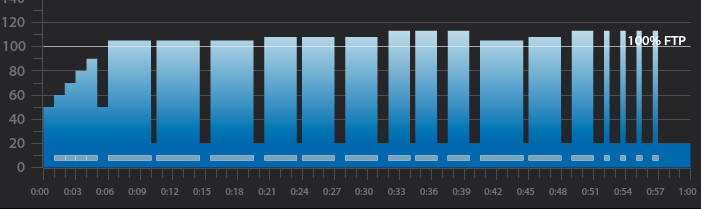
3 x 4-minute intervals with 30 seconds recovery after the 1st and 1 minute after the 2nd
1-minute recovery after the third 4-minute interval
3 x 3-minute intervals with 30 seconds recovery after the 1st and 1 minute after the 2nd
1-minute recovery after the third 3-minute interval
3 x 2-minute intervals with 30 seconds recovery after the 1st and 1 minute after the 2nd
1-minute recovery after the third 2-minute interval
4,3,2 minute intervals with 30 seconds recovery after the 1st and 1 minute after the 2nd
1-minute recovery after the 2-minute interval
4 x 30-second intervals with 1-minute recovery after each
5 minute cool down
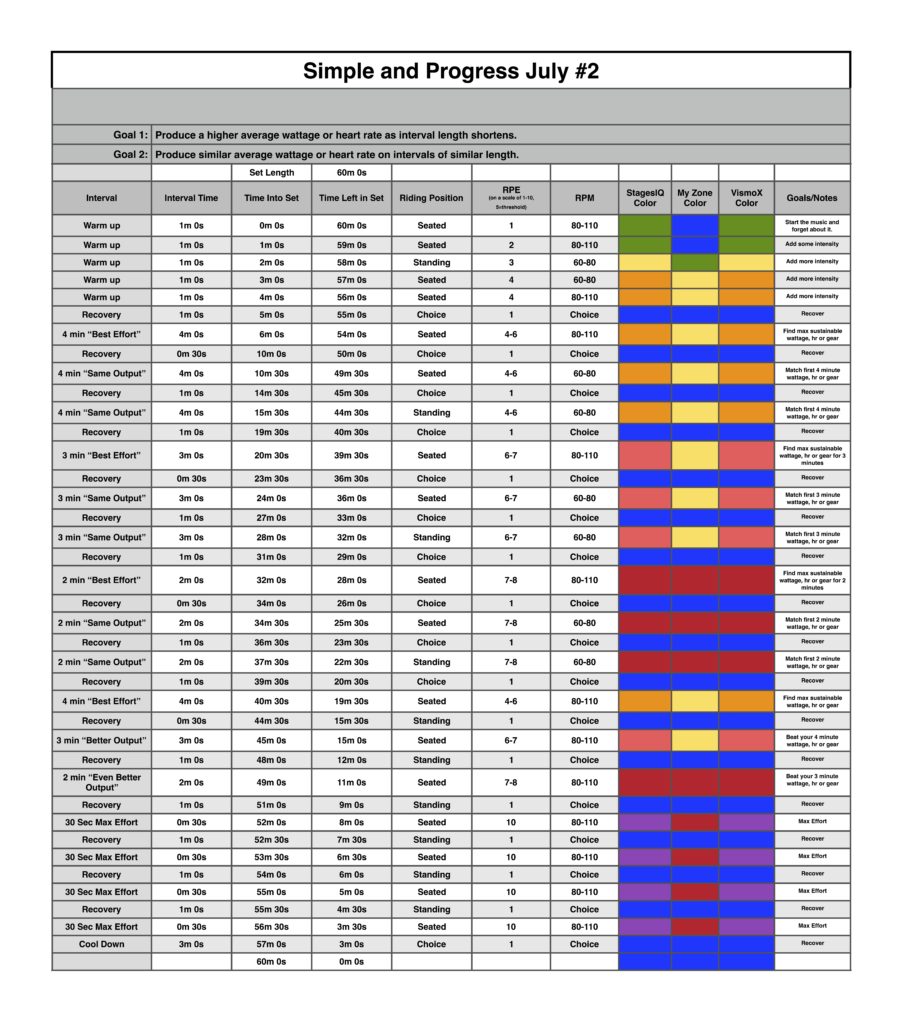
3 x 4-minute interval goals and specifics:
1st 4-minute intervals should be ridden seated at 80-110 rpm at Threshold wattage, HR or RPE or in the Light Red or Orange Zone if using VismoX or Stages IQ
30-second recovery or reset
2nd 4-minute interval should be ridden seated at 60-80 rpm at the same wattage, HR or RPE as the 1st or in the Light Red or Orange Zone if using VismoX or Stages IQ
1-minute recovery or reset
3rd 4-minute interval should be ridden standing at 60-70 rpm at the same wattage, HR or RPE as 2nd or in the Light Red or Orange Zone if using VismoX or Stages IQ
1-minute recovery or reset
3 x 3-minute interval goals and specifics:
1st 3-minute intervals should be ridden seated at 80-110 rpm a wattage, HR or RPE that is higher than the last 4-minute interval or in the Light or Dark Red if using VismoX or Stages IQ
30-second recovery or reset
2nd 3-minute interval should be ridden seated at 60-80 rpm at the same wattage, HR or RPE as the 1st 3-minute interval or in the Light or Dark Red if using VismoX or Stages IQ
1-minute recovery or reset
3rd 3-minute interval should be ridden standing at 60-70 rpm at the same wattage, HR or RPE as 2nd 3-minute interval or in the Light or Dark Red if using VismoX or Stages IQ
1-minute recovery or reset
3 x 2-minute interval goals and specifics:
1st 2-minute intervals should be ridden seated at 80-110 rpm a wattage, HR or RPE that is higher than the last 3-minute interval or in the Dark Red if using VismoX or Stages IQ
30-second recovery or reset
2nd 2-minute interval should be ridden seated at 60-80 rpm at the same wattage, HR or RPE as the 1st 2-minute interval or in the Light or Dark Red if using VismoX or Stages IQ
1-minute recovery or reset
3rd 2-minute interval should be ridden standing at 60-70 rpm at the same wattage, HR or RPE as 2nd 2-minute interval or in the Light or Dark Red if using VismoX or Stages IQ
1-minute recovery or reset
4,3,2 minute interval goals and specifics:
4-minute intervals should be ridden seated at 80-110 rpm at Threshold wattage, HR or RPE or in the Orange if using VismoX or Stages IQ
30-second recovery or reset
3-minute intervals should be ridden seated at 60-80 rpm at a wattage, HR or RPE that is higher than the last 4-minute interval or in the Light if using VismoX or Stages IQ
1-minute recovery or reset
2-minute interval should be ridden standing at 60-70 rpm at a wattage, HR or RPE that is higher than the last 3-minute interval or in the Dark Red if using VismoX or Stages IQ
1-minute recovery or reset
4 x 30-second interval goals and specifics:
The 4 x 30-second intervals should be ridden at the riders choice RPM or position and should be ridden at maximum effort followed by a 1-minute recovery or in the Purple if using VismoX or Stages IQ
Recording of me teaching this profile on the Stages SC3 IC Bike
65-minute music mix that can be used when teaching this profile
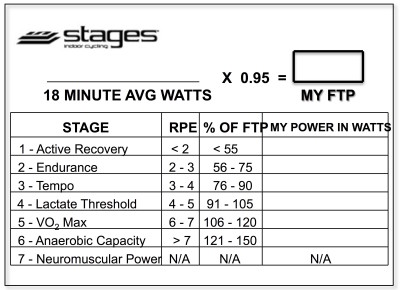
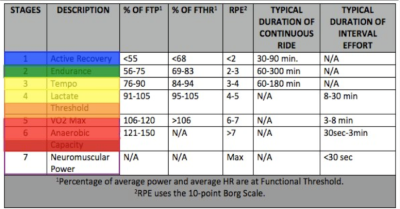
Below, Premium Members can follow links to download all the above media, view and download a printable Class Profile that can be used in class, read a detailed description of the Power Based Training Zones and download a printable Power Postcard.
[wlm_private ‘PRO-Platinum|PRO-Monthly|PRO-Gratis|PRO-Seasonal|Platinum-trial|Monthly-trial|PRO-Military|30-Days-of-PRO|90 Day PRO|Stages-Instructor|Schwinn-Instructor|Instructor-Bonus|28 Day Challenge']