Attached to this post is a 65 minute harmonically mixed music set.
All you need to do is “Play It and Forget It.”
Premium Members can download this new mix for FREE by following the links below.
[wlm_private ‘PRO-Platinum|PRO-Monthly|PRO-Gratis|PRO-Seasonal|Platinum-trial|Monthly-trial|PRO-Military|30-Days-of-PRO|90 Day PRO|Stages-Instructor|Schwinn-Instructor|Instructor-Bonus|28 Day Challenge']
Right Click on the blue underlined link
Select “Download Linked File As”
Select a download location
Once file is completely downloaded, find it in the location you selected
Drag the file into your iTunes or Spotify library OR
Right Click on the file and Select “Open With”
From the drop down menu select “iTunes” or “Spotify”
File should begin playing and is now part of your iTunes or Spotify library
To download the above media on a PC:
Right Click on the blue underlined link
Select “Save Link As”
Select a download location
Once file is completely downloaded, find it in the location you selected
Drag the file into your iTunes or Spotify library OR
Right Click on the file and Select “Open With”
From the drop down menu select “iTunes” or “Spotify”
File should begin playing and is now part of your iTunes or Spotify library Click here to watch a video on how to download media files from ICI/Pro.
Premium Members can download this mix for free by following the links below:
[wlm_private ‘PRO-Platinum|PRO-Monthly|PRO-Gratis|PRO-Seasonal|Platinum-trial|Monthly-trial|PRO-Military|30-Days-of-PRO|90 Day PRO|Stages-Instructor|Schwinn-Instructor|Instructor-Bonus|28 Day Challenge']
Right Click on the blue underlined link
Select “Download Linked File As”
Select a download location
Once file is completely downloaded, find it in the location you selected
Drag the file into your iTunes or Spotify library OR
Right Click on the file and Select “Open With”
From the drop down menu select “iTunes” or “Spotify”
File should begin playing and is now part of your iTunes or Spotify library
To download the above media on a PC:
Right Click on the blue underlined link
Select “Save Link As”
Select a download location
Once file is completely downloaded, find it in the location you selected
Drag the file into your iTunes or Spotify library OR
Right Click on the file and Select “Open With”
From the drop down menu select “iTunes” or “Spotify”
File should begin playing and is now part of your iTunes or Spotify library
Click here to watch a video on how to download media files from ICI/Pro.
Can you Hang On to the work done in the previous interval?
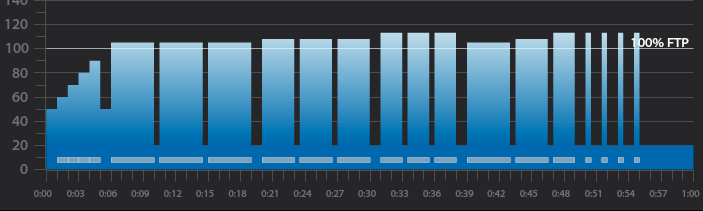
Workout Basics:
5-minute warmup
3 x 4-minute intervals with 30 seconds recovery after each
1-minute recovery after the third 4-minute interval
3 x 3-minute intervals with 30 seconds recovery after each
1-minute recovery after the third 3-minute interval
3 x 2-minute intervals with 30 seconds recovery after each
1-minute recovery after the third 2-minute interval
4,3,2 minute intervals with 30 seconds recovery after each
1-minute recovery after the 2-minute interval
4 x 30-second intervals with 1-minute recovery after each
5 minute cool down
3 x 4-minute interval goals and specifics:
1st 4-minute intervals should be ridden seated at 80-110 rpm at Threshold wattage, HR or RPE or in the Light Red or Orange Zone if using VismoX or Stages IQ
30-second recovery or reset
2nd 4-minute interval should be ridden seated at 60-80 rpm at the same wattage, HR or RPE as the 1st or in the Light Red or Orange Zone if using VismoX or Stages IQ
30-second recovery or reset
3rd 4-minute interval should be ridden standing at 60-70 rpm at the same wattage, HR or RPE as 2nd or in the Light Red or Orange Zone if using VismoX or Stages IQ
1-minute recovery or reset
3 x 3-minute interval goals and specifics:
1st 3-minute intervals should be ridden seated at 80-110 rpm a wattage, HR or RPE that is higher than the last 4-minute interval or in the Light or Dark Red if using VismoX or Stages IQ
30-second recovery or reset
2nd 3-minute interval should be ridden seated at 60-80 rpm at the same wattage, HR or RPE as the 1st 3-minute interval or in the Light or Dark Red if using VismoX or Stages IQ
30-second recovery or reset
3rd 3-minute interval should be ridden standing at 60-70 rpm at the same wattage, HR or RPE as 2nd 3-minute interval or in the Light or Dark Red if using VismoX or Stages IQ
1-minute recovery or reset
3 x 2-minute interval goals and specifics:
1st 2-minute intervals should be ridden seated at 80-110 rpm a wattage, HR or RPE that is higher than the last 3-minute interval or in the Dark Red if using VismoX or Stages IQ
30-second recovery or reset
2nd 2-minute interval should be ridden seated at 60-80 rpm at the same wattage, HR or RPE as the 1st 2-minute interval or in the Light or Dark Red if using VismoX or Stages IQ
30-second recovery or reset
3rd 2-minute interval should be ridden standing at 60-70 rpm at the same wattage, HR or RPE as 2nd 2-minute interval or in the Light or Dark Red if using VismoX or Stages IQ
1-minute recovery or reset
4,3,2 minute interval goals and specifics:
4-minute intervals should be ridden seated at 80-110 rpm at Threshold wattage, HR or RPE or in the Orange if using VismoX or Stages IQ
30-second recovery or reset
3-minute intervals should be ridden seated at 60-80 rpm at a wattage, HR or RPE that is higher than the last 4-minute interval or in the Light if using VismoX or Stages IQ
30-second recovery or reset
2-minute interval should be ridden standing at 60-70 rpm at a wattage, HR or RPE that is higher than the last 3-minute interval or in the Dark Red if using VismoX or Stages IQ
1-minute recovery or reset
4 x 30-second interval goals and specifics:
The 4 x 30 second intervals should be ridden at the riders choice RPM or position and should be ridden at maximum effort followed by a 1 minute recovery or in the Purple if using VismoX or Stages IQ
Recording of me teaching this profile on the Stages SC3 IC Bike
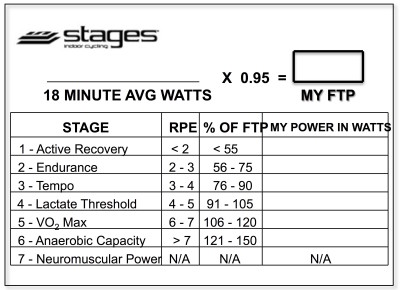
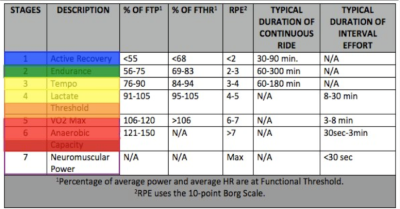
Below, Premium Members can follow links to download all the above media, view and download a printable Class Profile that can be used in class, read a detailed description of the Power Based Training Zones and download a printable Power Postcard.
[wlm_private ‘PRO-Platinum|PRO-Monthly|PRO-Gratis|PRO-Seasonal|Platinum-trial|Monthly-trial|PRO-Military|30-Days-of-PRO|90 Day PRO|Stages-Instructor|Schwinn-Instructor|Instructor-Bonus|28 Day Challenge']
Premium Members can download this mix for free by following the links below:
[wlm_private ‘PRO-Platinum|PRO-Monthly|PRO-Gratis|PRO-Seasonal|Platinum-trial|Monthly-trial|PRO-Military|30-Days-of-PRO|90 Day PRO|Stages-Instructor|Schwinn-Instructor|Instructor-Bonus|28 Day Challenge']
Right Click on the blue underlined link
Select “Download Linked File As”
Select a download location
Once file is completely downloaded, find it in the location you selected
Drag the file into your iTunes or Spotify library OR
Right Click on the file and Select “Open With”
From the drop down menu select “iTunes” or “Spotify”
File should begin playing and is now part of your iTunes or Spotify library
To download the above media on a PC:
Right Click on the blue underlined link
Select “Save Link As”
Select a download location
Once file is completely downloaded, find it in the location you selected
Drag the file into your iTunes or Spotify library OR
Right Click on the file and Select “Open With”
From the drop down menu select “iTunes” or “Spotify”
File should begin playing and is now part of your iTunes or Spotify library
Click here to watch a video on how to download media files from ICI/Pro.
Attached to this post is a 65 minute harmonically mixed music set.
All you need to do is “Play It and Forget It.”
I have also provided an iTunes playlist so you can listen to each song individually.
Premium Members can listen and download this new mix for FREE by following the links below.
[wlm_private ‘PRO-Platinum|PRO-Monthly|PRO-Gratis|PRO-Seasonal|Platinum-trial|Monthly-trial|PRO-Military|30-Days-of-PRO|90 Day PRO|Stages-Instructor|Schwinn-Instructor|Instructor-Bonus|28 Day Challenge']
Right Click on the blue underlined link
Select “Download Linked File As”
Select a download location
Once file is completely downloaded, find it in the location you selected
Drag the file into your iTunes or Spotify library OR
Right Click on the file and Select “Open With”
From the drop down menu select “iTunes” or “Spotify”
File should begin playing and is now part of your iTunes or Spotify library
To download the above media on a PC:
Right Click on the blue underlined link
Select “Save Link As”
Select a download location
Once file is completely downloaded, find it in the location you selected
Drag the file into your iTunes or Spotify library OR
Right Click on the file and Select “Open With”
From the drop down menu select “iTunes” or “Spotify”
File should begin playing and is now part of your iTunes or Spotify library Click here to watch a video on how to download media files from ICI/Pro.
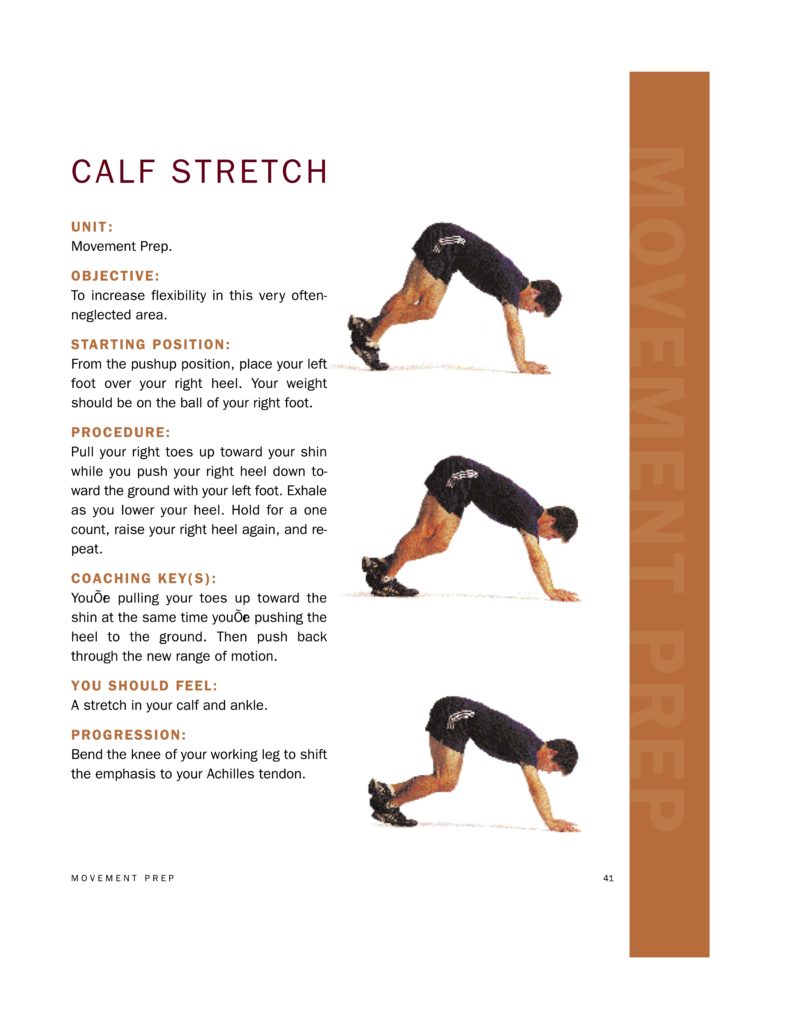
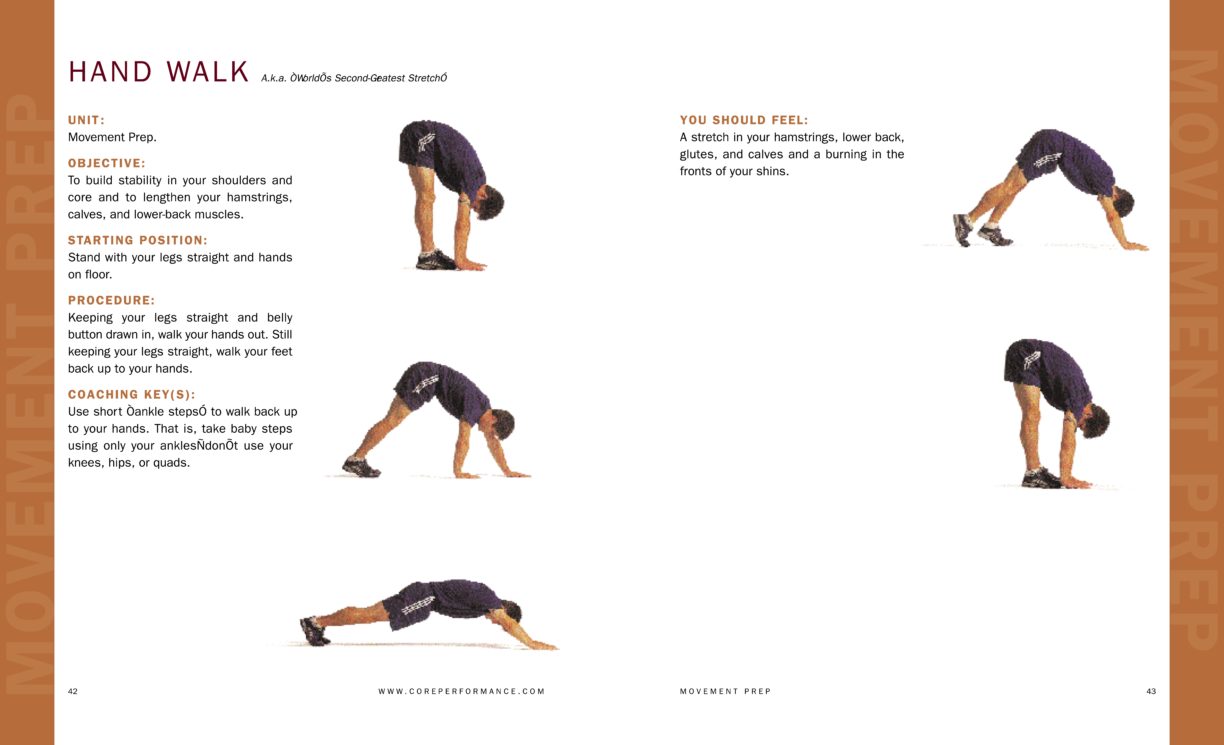
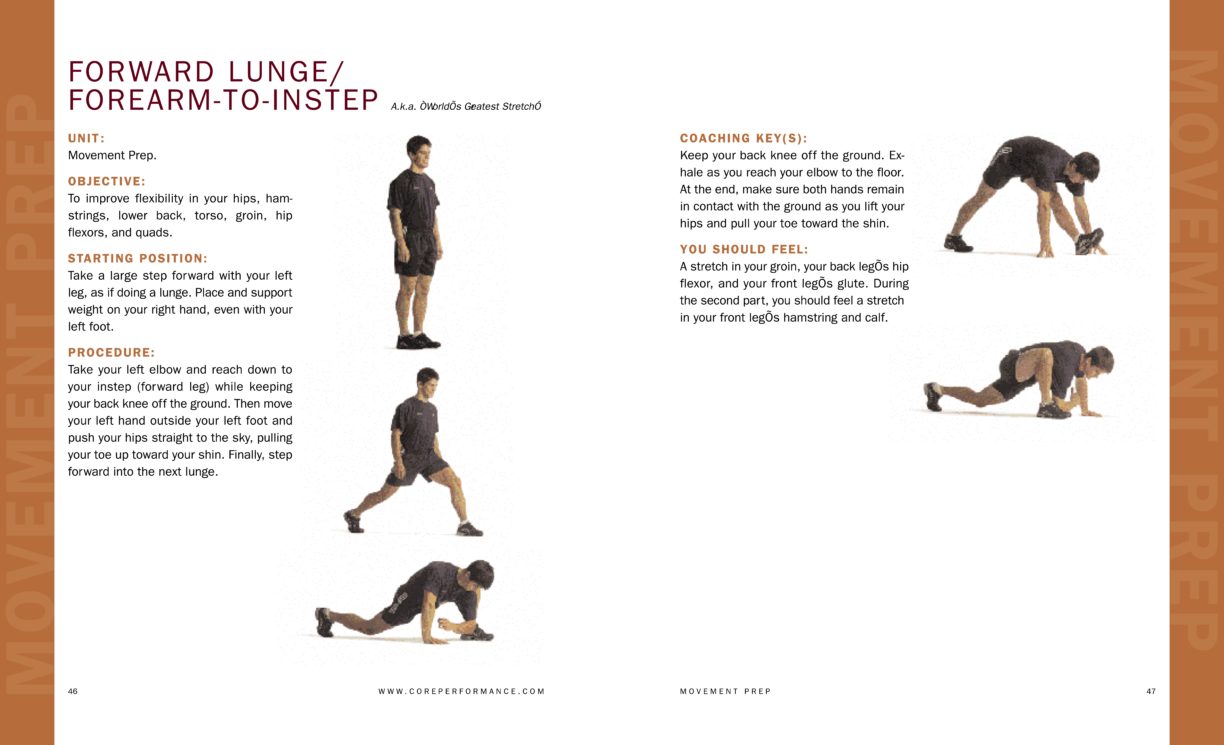
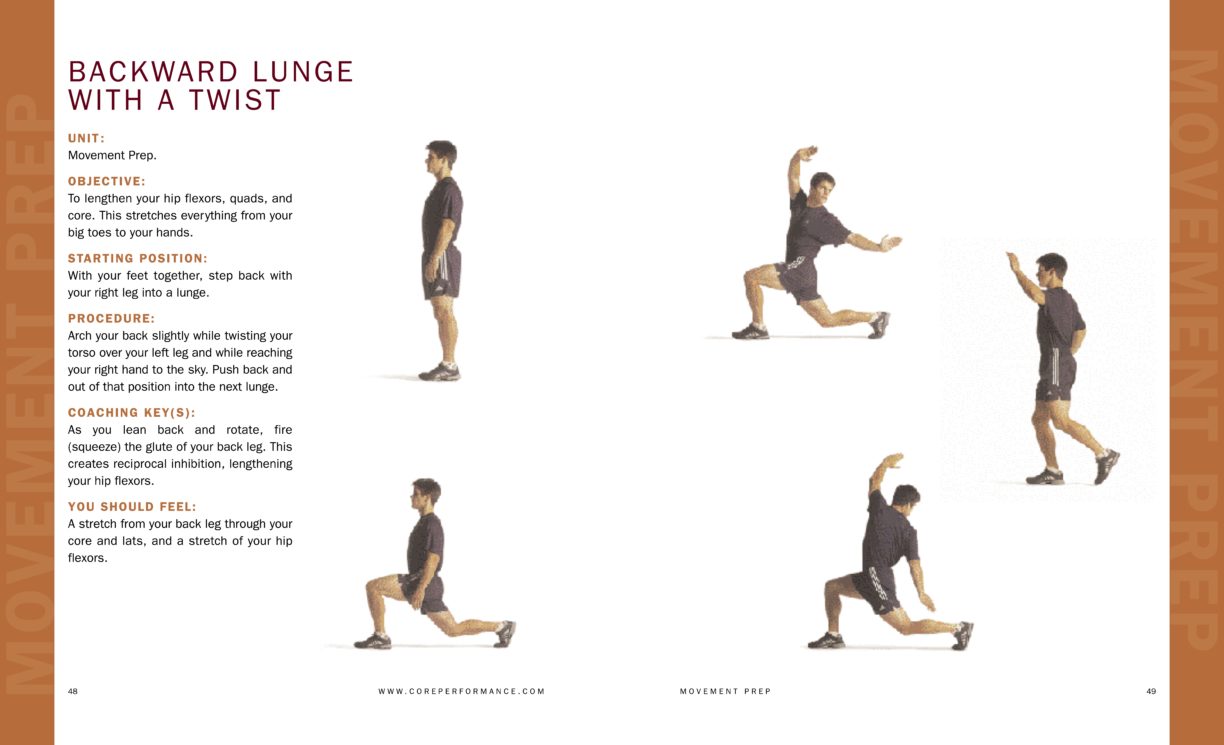
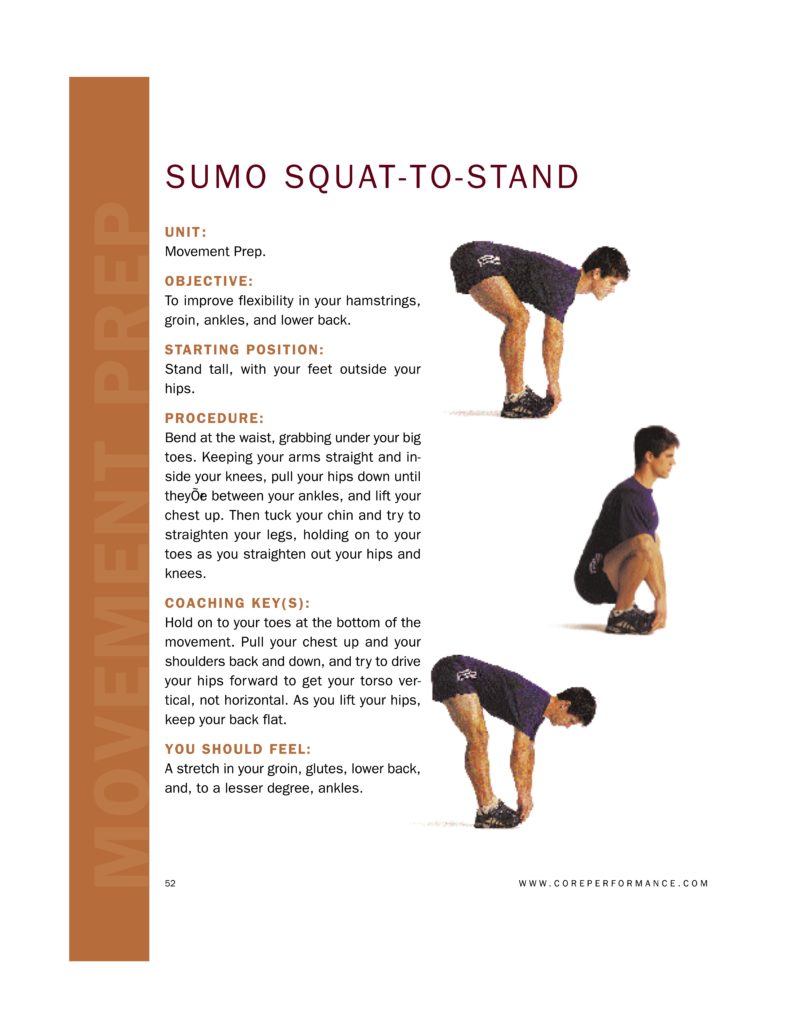
Many of my riders know that I'm also a Personal Trainer, so I often get asked questions about all aspects of fitness. Warm-Up is a subject that comes up again and again. I've been using the Movement Prep Warm-up featured below for nearly 15 years.
Cycle training is an exclusively linear exercise and I believe it's important to activate the lateral movers as well as muscle groups that are not emphasized while riding. Keeping all muscle groups active will assist in continued powerful pain-free riding.
These exercises, videos and .pdfs come from the book Core Performance by Mark Verstegen & Pete Williams which should be part of any fitness professional's library.