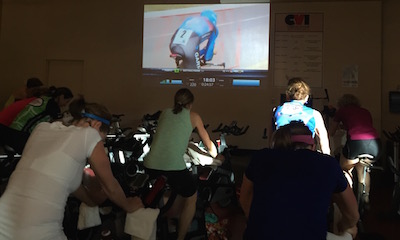
The music industry is figuring out that a great Indoor Cycling class is built on a fabulous playlist. Now they're making noises that they feel they should be charging fitness studios a higher rate for their commercial performance licenses…
By Andrew Sparkler, Vice President, Business Affairs & Operations
At this year’s SXSW, SoulCycle teamed up with Spotify and some of their favorite DJs at what was dubbed as “an epic music and movement experience.” While the popular fitness club’s trip to Austin underscores the importance of music to its business, it is unclear if the music business is spinning to the same beat.
SoulCycle, launched in 2006, is now filing for an IPO. Its business is primarily based on offering a high intensity spin class led by an instructor who also serves as a DJ. Take a class, glance at their website or read their S-1 filing and it is clear that music is perhaps as essential to their business as the bikes themselves.
SoulCycle’s SEC filing characterizes its product as a “carefully curated ‘cardio party’ [that] is fueled by the personalities of our instructors, their uniquely crafted musical playlists and the energy of the room” and says that “[w]ith inspirational coaching and high-energy music, SoulCycle was created to strengthen both the mind and the body.” Their instructors go as far as to claim that music “is the most important part of what we do at SoulCycle.”
Performing rights organizations like ASCAP and BMI are on constant lookout for ways to generate royalties for their songwriters and rights holders, but one publishing exec (and former ASCAP vp) argues they need to look harder — maybe even break a sweat — when dealing with your favorite fitness center.
In an op-ed for Medium, Downtown Publishing vp of business affairs Andrew Sparkler said PROs are dropping the proverbial medicine ball by classifying certain gyms under “general” licenses — the same umbrella as restaurants, bars and concert/sports venues — when music has become such an ubiquitous and personalized part of the workout experience.
To make his point, Sparkler cites the popular SoulCycle chain of spin classes, who in a recent SEC filing for an IPO called their product a “carefully curated ‘cardio party' [that] is fueled by the personalities of our instructors, their uniquely crafted musical playlists and the energy of the room.”
In its SEC filing, SoulCycle projects 2015 revenue to be around $140 million and said it hopes to expand to 250 locations (up from 36 in 2014) in the near future.
Sparkler figures each SoulCycle is currently bringing in about $3.1 million apiece for the company, but is only paying a tiny fraction of that to PROs under the “general” licenses for the music it plays. BMI, for example, charges fitness clubs a maximum of $2,123 per year per location — which would amount to .01 percent of what Sparkler estimates each SoulCycle makes. ASCAP also has a flat fee per location, but it slides depending on inflation.
According to his calculations, fitness center revenue increased over 104 percent in the U.S. between 2000 and 2014, and SoulCycle jumped 108 percent from 2012 to 2013 alone.
While noting that SoulCycle is doing nothing wrong — they’re simply paying the bills sent by PROs — it’s those rights groups that should tap into “this cultural phenomenon and increase their rates accordingly.”
So where does this lead? My guess is that ASCAP and BMI will be looking for ways to monetize (make more money) off the excitement surrounding SoulCycle/Indoor Cycling and the ease of music delivery from Spotify/iTunes Music = they'll be contacting clubs and studios with “revised” (read more expensive) license agreements.
As someone who prefers to maintain a level of fair exchange, I can't begrudge them for asking a higher rate than a sports bar or restaurant would pay. My only hope is that club/studio owners/managers recognise the value great music brings to our classes and not follow the LA Fitness path that pretends to save money by enforcing canned Muzac use by their Instructors 🙁
This week I was asked by a class participant to NOT play “Stairway to Heaven” in a class she was planning on attending. I was shocked that someone would ask me NOT to play what many people still consider the greatest song of all time. If any of you have ever been to a video class of mine I sometimes play Heart's cover of Stairway.
Here it is:
That's AWESOME! Would you ever ask someone NOT to play THAT?
or THIS:
I was so shocked by this request that I decided to ask the “experts” at the Indoor Cycling Instructors Facebook Group how they would respond. I was even more surprised by some of the comments:
“I would stop playing STH. It's 2015, save that for a classic rock playlist. As a rider, I too would be annoyed hearing Stairway if you play it so often. Or maybe try to find some remixes of it if you love it so much.”
“my surprise is that anyone would use STH for a song in Spin Class!!”
There were some great comments and advice given but these two really stuck out. Stairway is timeless and I'm sorry that I sometimes like to play music that was created with real instruments.
Ok, enough ranting. As anyone who has followed me here at ICI/Pro, listened to one of my recorded classes or taken a live class from knows, I play music from all genres. This week I put together a 3 song mix from some more “current” artists.
[wlm_private ‘PRO-Platinum|PRO-Monthly|PRO-Gratis|PRO-Seasonal|Platinum-trial|Monthly-trial|PRO-Military|30-Days-of-PRO|90 Day PRO|Stages-Instructor|Schwinn-Instructor|Instructor-Bonus|28 Day Challenge']
Right Click on the blue underlined link
Select “Download Linked File As”
Select a download location
Once file is completely downloaded, find it in the location you selected
Drag the file into your iTunes or Spotify library OR
Right Click on the file and Select “Open With”
From the drop down menu select “iTunes” or “Spotify”
File should begin playing and is now part of your iTunes or Spotify library
To download the above media on a PC:
Right Click on the blue underlined link
Select “Save Link As”
Select a download location
Once file is completely downloaded, find it in the location you selected
Drag the file into your iTunes or Spotify library OR
Right Click on the file and Select “Open With”
From the drop down menu select “iTunes” or “Spotify”
File should begin playing and is now part of your iTunes or Spotify library Click here to watch a video on how to download media files from ICI/Pro.
Many instructors tell me that teaching indoor cycling has ruined their appreciation of music. They say that once you become an instructor music comes in only two genres, can be used in class or not. This is sad but true. I have been experiencing a different problem since I started using video in my classes. Now when I watch YouTube videos they are put into the same categories. I am stuck in the never ending quest for the best videos to use in my classes. Every once in a while someone posts a gem that magically appears in my Facebook News Feed, this week the gem was posted by non other than our very own John Macgowan.
[wlm_private ‘PRO-Platinum|PRO-Monthly|PRO-Gratis|PRO-Seasonal|Platinum-trial|Monthly-trial|PRO-Military|30-Days-of-PRO|90 Day PRO|Stages-Instructor|Schwinn-Instructor|Instructor-Bonus|28 Day Challenge']
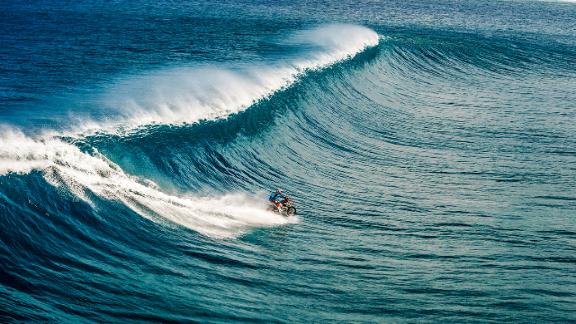
I hope you like it and I wonder what would happen if the bike stalled?
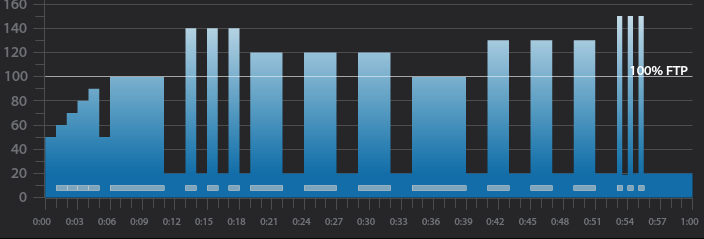
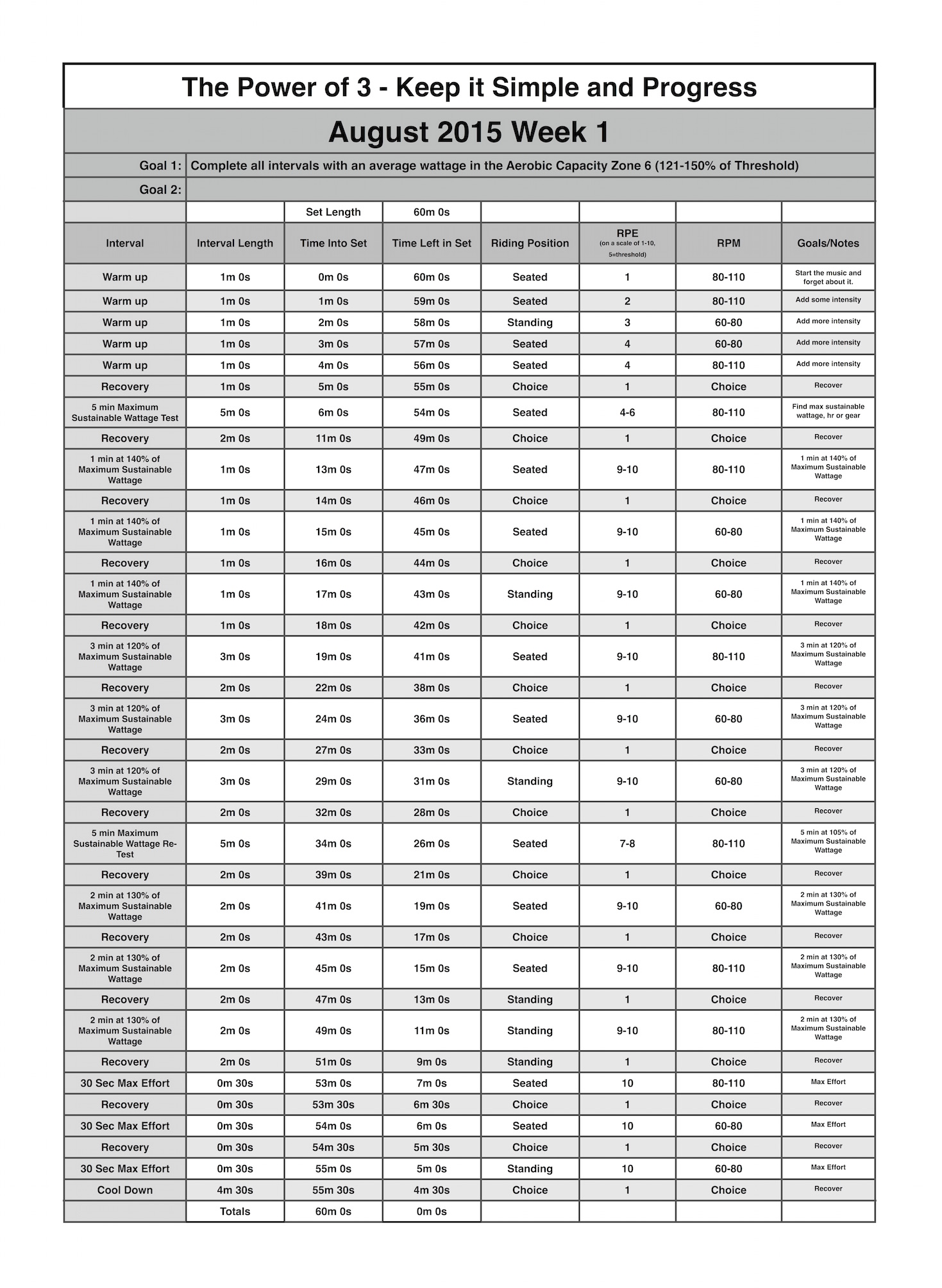
Below you'll find Week 1 of August's Keep it Simple and Progress indoor cycling profile. Over the past few months we have been working hard but with the limited rest most of the work was being performed in the Lactate Threshold and VO2 Max Zones of 90-120% of Threshold. The August progression is going to call for higher intensities into the Aerobic Capacity Zone of 121-150% of Threshold. Because of these higher intensities I'll also be giving more recovery. At first it may seem scary to recover this much, but I promise you, if your riders are working in the Aerobic Capacity Zone the'll appreciate the rest.
5 minute benchmark ride to find “Maximum Sustainable Wattage”
2 minute recovery
3 x 1 minute intervals
1 minute recovery after each
3 x 3 minute intervals
2 minute recovery after each
5 minute interval
2 minute recovery
3 x 2 minute intervals
2 minute recovery after each
3 x 30 second intervals
30 second recovery after each
5 minute cool down
5 minute “Maximum Sustainable Wattage” Test
Settle in to a 5 minute interval at 80-110 rpm.
This interval should be ridden at a maximum sustainable intensity.
if riders know their threshold they can spend this 5 minutes riding at it.
At the end of the interval take note of average wattage or HR or be aware of the RPE.
3 x 1 minute interval goals and specifics:
1st one minute interval should be ridden seated at 80-110 rpm at 140% of maximum sustainable wattage or threshold.
1 minute recovery or reset
2nd one minute interval should be ridden seated at 60-80 rpm at the same wattage or intensity as the 1st.
1 minute recovery or reset
3rd one minute interval should ridden standing at 60-70 rpm at the same wattage or intensity as the 2nd.
1 minute recovery or reset
3 x 3 minute interval goals and specifics:
1st 3 minute intervals should be ridden seated at 80-110 rpm at 120% of maximum sustainable wattage or threshold.
2 minute recovery or reset
2nd 3 minute interval should be ridden seated at 60-80 rpm at the same wattage or intensity as the 1st.
2 minute recovery or reset
3rd 3 minute interval should ridden standing at 60-70 rpm at the same wattage or intensity as the 2nd.
2 minute recovery or reset
5 minute “Threshold” interval goals and specifics:
Ride for 5 minute seated at 80-110 rpm and try match the output or wattage from the “Maximum Sustainable Wattage” test
2 minute recovery or reset
3 x 2 minute interval goals and specifics:
1st 2 minute intervals should be ridden seated at 80-110 rpm at 130% of maximum sustainable wattage or threshold.
2 minute recovery or reset
2nd 2 minute interval should be ridden seated at 60-80 rpm at the same wattage or intensity as the 1st.
2 minute recovery or reset
3rd 2 minute interval should ridden standing at 60-70 rpm at the same wattage or intensity as the 2nd.
2 minute recovery or reset
3 x 30 second interval goals and specifics:
1st 30 second intervals should be ridden seated at 80-110 rpm at 150% of maximum sustainable wattage or threshold.
30 second recovery or reset
2nd 30 second interval should be ridden seated at 60-80 rpm at the same wattage or intensity as the 1st.
30 second recovery or reset
3rd 30 second interval should ridden standing at 60-70 rpm at the same wattage or intensity as the 2nd.
4 minute and 30 second cool down
[wlm_private ‘PRO-Platinum|PRO-Monthly|PRO-Gratis|PRO-Seasonal|Platinum-trial|Monthly-trial|PRO-Military|30-Days-of-PRO|90 Day PRO|Stages-Instructor|Schwinn-Instructor|Instructor-Bonus|28 Day Challenge'].
Trainer Road Profile (If you're Trainer Road Member join my Team to get this and all profiles)
Over the last year I have been trying to take classes from many different instructors in many different facilities. I've been doing this to see what kind of profiles other instructors are using and what kind of music they are playing. Also, as a Master Educator for Stages Indoor Cycling, I want to see if our eduction is making it's way into these facilities and what we need to emphasize in our trainings.
When it comes to music I have found that most instructors are using mixes that you would hear in dance clubs. They are high energy with a strong beat. I like these mixes and they work well in most class, but sometimes I like to use Classic Rock songs that have real instruments with sing-a-long lyrics.
In this week's “Power of 3” mix I used some songs that bring me back to my childhood, riding in the car with my parents and hearing them sing along on the old AM radio.
[wlm_private ‘PRO-Platinum|PRO-Monthly|PRO-Gratis|PRO-Seasonal|Platinum-trial|Monthly-trial|PRO-Military|30-Days-of-PRO|90 Day PRO|Stages-Instructor|Schwinn-Instructor|Instructor-Bonus|28 Day Challenge']
Kickstart My Heart by Motley Crue is one of my favorite indoor cycling songs. It's my first choice whenever a profile calls for a Tabata interval. A Tabata interval is simply 8 max effort 20 second intervals with only 10 seconds rest between each.
If a Tabata interval done to Kick Start My Heart while watching a big wave surfing video doesn't get your rider's heart pumping, nothing will.
[wlm_private ‘PRO-Platinum|PRO-Monthly|PRO-Gratis|PRO-Seasonal|Platinum-trial|Monthly-trial|PRO-Military|30-Days-of-PRO|90 Day PRO|Stages-Instructor|Schwinn-Instructor|Instructor-Bonus|28 Day Challenge'].