


Spotify has added an Equalizer to their iPhone App in the latest update. NOTE: Spotify triggers software upgrades progressively, to groups of users over time. If you're not seeing the notification (pictured above) – you will soon.
This morning I saw the new notice, while I was checking that I had my playlist set to off-line mode and that it would play. This is cool, I thought and I had the chance to acquaint myself with how it worked, before my 6:00 am class. Wearing my ear buds, I found that the Electronic preset sounded the best… turns out I was wrong.
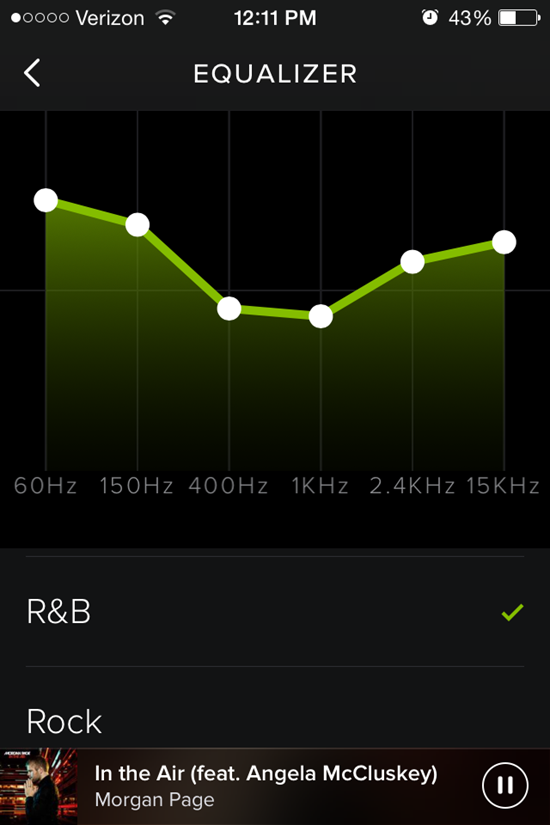
You'll find the new Equalizer in; Settings > Playback > (Scroll down) Equalizer toggle to turn it on/off. Spotify gives you 22 pre-set EQ settings or you can drag any of the six frequency ranges up/down to create you own personal settings.
I'm not sure why, but it seemed like I had to adjust both the sound system's and my iPhone's to a much higher volume level than normal. Please let me know if you experience something similar.
Class sounded OK – well actually I couldn't hear any difference where I sit. After class I connected my bluetooth receiver, so I could stand in the middle of the room to hear what my class hears – while changing the EQ settings.
Now I realise that this is completely subjective; what sounds good to me, may or may not be your preference and every studio's acoustics is different. The R&B setting sounded best, using Morgan Page — In the Air (feat. Angela McCluskey) as my demo track.
That track was part of today's playlist – 45 minutes. I built it from a larger playlist I followed from Instructor Gregg Pitts who teaches at Zengo Cycle in Washington DC – Gregg Pitts Cycle July Tunes. Gregg was featured in this Active Life DC fitness instructor profile. Here's my playlist.

John is a member on the AFS (Association of Fitness Studios) Advisory Council.
Holding certifications from; Schwinn, Heart Zones, Team ICG and Life Time Fitness, John's held regularly scheduled cycling classes between 1998 and 2015 when he moved to Florida.
When the weather permits, you'll find him riding and leading outdoor groups by himself or with his Tandem partner (wife) Amy.
- Tech Tuesday – Stages Cycling StageONE Power Meter - August 10, 2026
- Do you teach with a focus on Heart Rate? Does your club promote it? - August 7, 2026
- Making your classes about more than just exercise - August 4, 2026