I love group display systems. I mean I really really really love group display systems. Systems like Performance IQ and My Zone make classes so much more interactive and they magically make participants work so much harder AND smarter.
I teach at multiple locations in the Denver area and two of them use group display systems. One, just recently, launched Stages IQ which is Stages Indoor Cycling's version of Performance IQ and the other has been using My Zone for about 6 months. Stages IQ uses the power meter that is on every bike in the cycling studio. My Zone picks up the heart rate that is transmitted from the proprietary My Zone chest strap. When I teach a class with Stages IQ EVERYONE in the class can be part of the group display system. When I teach a My Zone class ONLY those who have purchased the MY Zone chest strap can enjoy the group display system.
The energy felt in the studio using Stages IQ is infectious as EVERYONE is working for a common goal and can see if they are successfully achieving that goal. The energy in the My Zone studio is not the same because, on a good day, only 25% of the participants may have the necessary MY Zone chest strap to see their heart rate on the group display system.
I have been working in the fitness industry for 25 years and heart rate based group exercise classes have NEVER been successful because the only way to ensure everyone's compliance is to “loan out” heart rate monitors and this becomes a very time consuming and expensive proposition, this also goes without saying that there are far better ways to determine intensity like power and pace.
If you are looking into a group display system and you want 100% compliance with the system you need to provide members with EVERYTHING to use the system. If they are required to purchase their own hardware or do more than simply sign up for the class they will not do it and your investment will have been wasted.
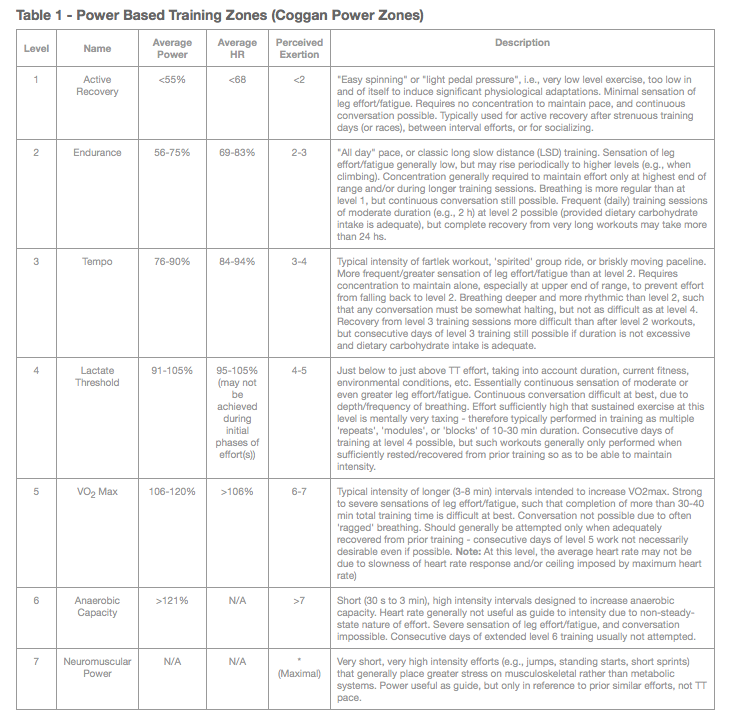
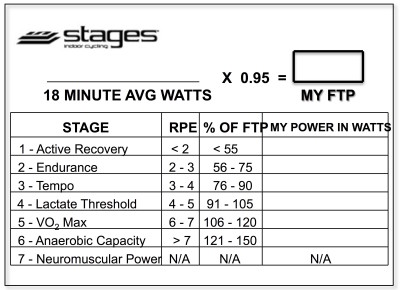
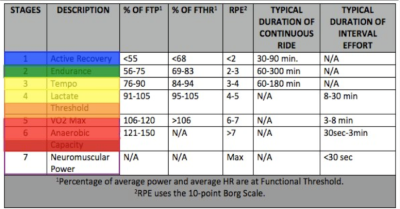
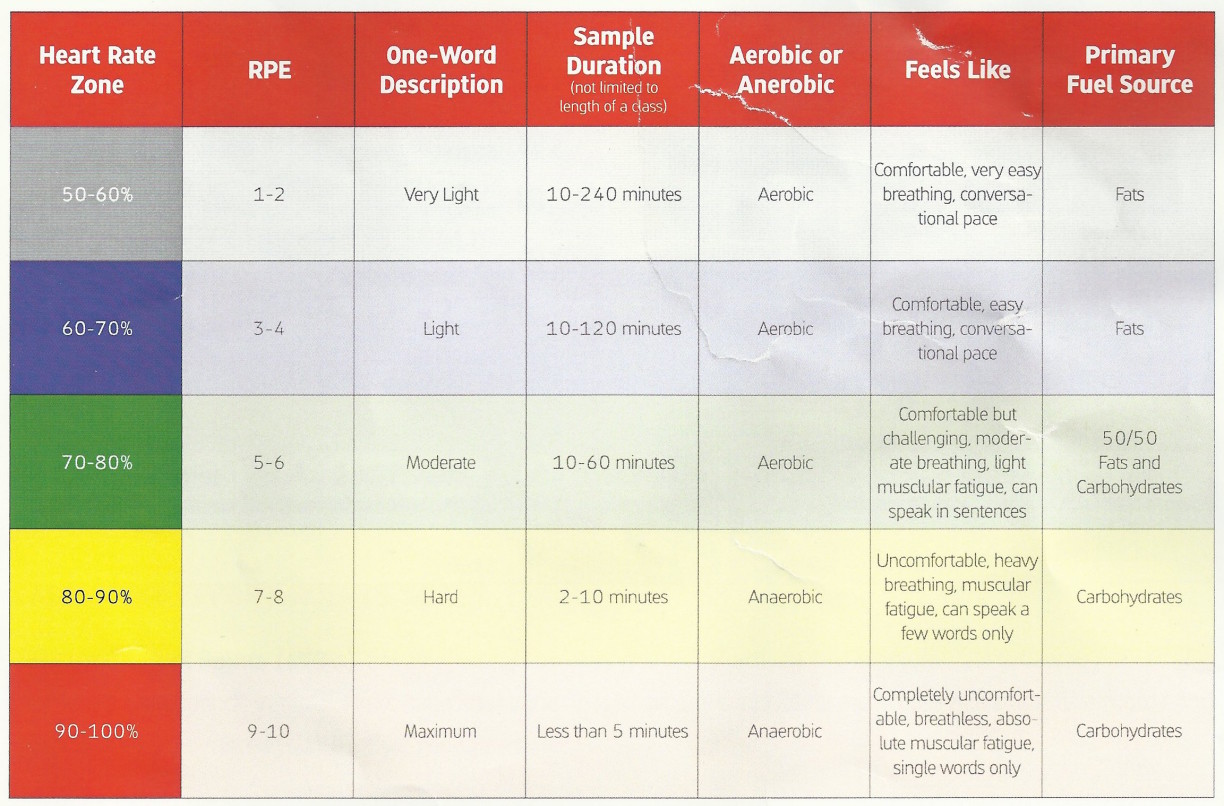
I have been receiving an incredible amount of positive feedback about these progressive profiles, so I have decided to provide ICI/Pro members with two profiles per week starting in September. In order to keep it Simple and keep it Progressive I'm going to provide a profile every Wednesday that focuses on intervals that are @ or Above Threshold (Zones 4,5 and 6) and on Saturday or Sunday I'll post a profile that focuses on intervals that are @ or Below Threshold (Zones 2,3 and 4). Heart Rate, Power and RPE zone descriptions are available below.
Through my years an endurance coach and indoor cycling instructor I have seen my athletes and class participants make great gains by following a progressive program for 3 weeks then using the 4th week for recovery or a “free” or non-technical workout. In order to stick to this plan I'll be providing 3 weeks of @ or Above Threshold workouts followed by a “Free-For-All” workout. I'll also be providing 3 weeks @ or Below Threshold workouts followed by a FTP (Functional Threshold Power) or FTHR (Functional Threshold Heart Rate) workout. I believe the testing profile is VERY important to show riders the gains they are making as well as finding new and REAL numbers to work with for the next month.
Most, but not all, weeks I'll also be providing a 65 minute mixed music set that can be used with these profiles.
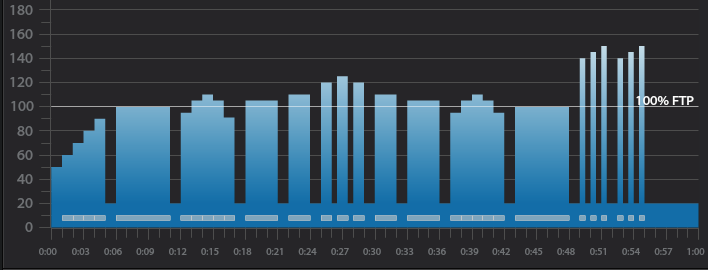
Below you'll find Week 1 of September's @ or Above Threshold Keep it Simple and Progress indoor cycling profile.
Workout Basics:
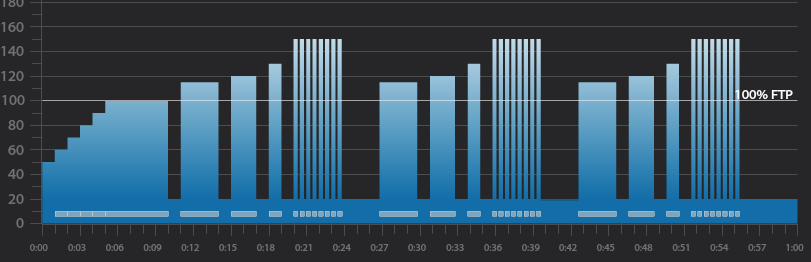
5 minute warmup
5 minute benchmark ride to find “Maximum Sustainable Wattage”
1 minute recovery
3 minute interval
1 minute recovery
2 minute interval
1 minute recovery
1 minute interval
1 minute recovery
Tabata Interval 8×20 seconds with 10 seconds recovery after each
3 minute recovery
Repeat the above 3,2,1 minute intervals 2 more times
5 minute cool down
5 minute “Maximum Sustainable Wattage” Test
Settle in to a 5 minute interval at 80-110 rpm.
This interval should be ridden at a maximum sustainable intensity.
if riders know their threshold they can spend this 5 minutes riding at it.
At the end of the interval take note of average wattage or HR or be aware of the RPE.
3 minute interval goals and specifics:
Ride for 3 minutes Seated at 80-110 rpm.
Complete the interval with an average HR or Wattage that is greater than the 5 minute “Maximum Sustainable Wattage” Test
1 minute recovery or reset
2 minute interval goals and specifics:
Ride for 2 minutes Seated at 80-110 rpm.
Complete the interval with an average HR or Wattage that is greater than the previous 3 minute average.
1 minute recovery or reset
1 minute interval goals and specifics:
Ride for 1 minute seated at 80-110 rpm.
Complete the interval with an average HR or Wattage that is greater than the previous 2 minute average.
1 minute recovery or reset
Tabata goals and specifics:
8 x 20 seconds “ON” w/ 10 second rest
Ride the 20 second intervals in a seated position at 80-110 rpm. Rest in a standing position
3 minute recovery or reset
3 minute interval goals and specifics:
Ride for 3 minutes standing at 60-80 rpm.
Complete the interval with an average HR or Wattage that is greater than the 5 minute “Maximum Sustainable Wattage” Test
1 minute recovery or reset
2 minute interval goals and specifics:
Ride for 2 minutes standing at 60-80 rpm.
Complete the interval with an average HR or Wattage that is greater than the previous 3 minute average.
1 minute recovery or reset
1 minute interval goals and specifics:
Ride for 1 minute standing at 60-80 rpm.
Complete the interval with an average HR or Wattage that is greater than the previous 2 minute average.
1 minute recovery or reset
Tabata goals and specifics:
8 x 20 seconds “ON” w/ 10 second rest
Ride the 20 second intervals in a standing position at 60-80 rpm. Rest in a standing position
3 minute recovery or reset
3 minute interval goals and specifics:
Ride for 3 minutes Seated at 60-80 rpm.
Complete the interval with an average HR or Wattage that is greater than the 5 minute “Maximum Sustainable Wattage” Test
1 minute recovery or reset
2 minute interval goals and specifics:
Ride for 2 minutes Seated at 60-80 rpm.
Complete the interval with an average HR or Wattage that is greater than the previous 3 minute average.
1 minute recovery or reset
1 minute interval goals and specifics:
Ride for 1 minute seated at 60-80 rpm.
Complete the interval with an average HR or Wattage that is greater than the previous 2 minute average.
1 minute recovery or reset
Tabata goals and specifics:
8 x 20 seconds “ON” w/ 10 second rest
Ride the 20 second intervals in a seated position at 60-80 rpm. Rest in a standing position
Cool Down
[wlm_private ‘PRO-Platinum|PRO-Monthly|PRO-Gratis|PRO-Seasonal|Platinum-trial|Monthly-trial|PRO-Military|30-Days-of-PRO|90 Day PRO|Stages-Instructor|Schwinn-Instructor|Instructor-Bonus|28 Day Challenge'].
Trainer Road Profile (If you're Trainer Road Member join my Team to get this and all profiles)
Below, Premium Members can view and download a printable Class Profile that can be used in class, read a detailed description of the Power Based Training Zones and download a printable Power Postcard.
[wlm_private ‘PRO-Platinum|PRO-Monthly|PRO-Gratis|PRO-Seasonal|Platinum-trial|Monthly-trial|PRO-Military|30-Days-of-PRO|90 Day PRO|Stages-Instructor|Schwinn-Instructor|Instructor-Bonus|28 Day Challenge']
You know the type; this is the rider who after EVERY class quietly, almost stealthfully, navigates their way to the instructor bike and starts every class critique by saying “That was a great class!”, then pauses for a few seconds and says “But” or “Have you ever considered” or “You should try…” or “why did you…?”.
The first few times this happens you're happy to engage, but as you realize this is going to be an EVERY class occurrence, you start to despise this person. I'm all for constructive criticism and suggestions, but it becomes exhausting having to defend or explain your training philosophy, music choices and cueing to the same person after EVERY class.
Some would say that I shouldn't be so sensitive, that I should embrace the fact that the critiquer wants to discuss my craft with me. I would most often agree, especially if the critiquer approached me after every 3rd or 4th class but when it happens EVERY class I start to feel like it's more passive-aggressive than constructive criticism. Quite frankly it becomes more like nagging than anything else.
Eventually, you realize the critiquer's critiques are only self-serving rants in an attempt to turn your class into a personal indoor cycling training session for them without any concern for the 40 or 50 other riders who may be loving what you are doing. As you wise up to the critiquer's narcissistic tactics, you should try to keep your “end-of-class evaluations” as short as possible. Sometimes they get the hint and back off, but in my experience, they realize they are losing control over you and turn into the tattle-tale. Now you need to be prepared for that dreaded conversation with your supervisor. 99.9% or your class participants probably think you're awesome, but this self-serving, narcissistic, tattle-tailing critiquer is about to make your life miserable.
I would suggest being honest with your supervisor. Most likely management has had to deal with this person in the past and will back you up in this uncomfortable situation. In the unfortunate situation that management is not supportive, you have a hard decision to make. If you are regularly filling your classes and receiving positive feedback from your class participants, I would not change anything about your class. Indoor Cycling is a group activity, and you need to do what is best for the group NOT THE INDIVIDUAL. If management feels the need to kowtow to the wants and needs of every self-serving facility user it may be time to look for another place to teach.
I apologize for the negative tone of this post. It's not always hugs and kisses when you're on the instructor bike. Once in a while, you need to deal with challenging situations and “crazy” people. It takes years of experience to be confident enough in your product to stand up to unwarranted critiques of riders and possibly management. After nearly 25 years on the instructor bike the criticism still stings, EVERYTIME! But now, I listen and “take in” the feedback. If any negative comments are warranted, I'll make the appropriate changes and move on as a better instructor. But when I identify someone as a self-serving, narcissistic, tattle-tailing, critiquer. And when this life sucking vampire approaches me with their 5th “suggestion” of the week, I just smile and say “thank you” as I make my way out the door to my next appointment.
Then, when I get to my car I cue up, crank up and scream along to Eminem's The Way I Am and get on with life.
Below, Premium Members can follow links to download all the above media, view and download a printable Class Profile that can be used in class, read a detailed description of the Power Based Training Zones and download a printable Power Postcard.
[wlm_private ‘PRO-Platinum|PRO-Monthly|PRO-Gratis|PRO-Seasonal|Platinum-trial|Monthly-trial|PRO-Military|30-Days-of-PRO|90 Day PRO|Stages-Instructor|Schwinn-Instructor|Instructor-Bonus|28 Day Challenge']