This won't replace Spotify, but if you enjoy a steady stream of background music, that's geared to your activity or mood, Songza maybe something you'll enjoy.
Available in the USA and (if you can believe it with their very restrictive licensing) Canada, Songza is the latest of the free streaming music services following Pandora, iTunes and Spotify.
Songza has been around for a while and appears to be gaining peoples attention and influence, but there isn't much press about them. I did find this article from CNBC.com
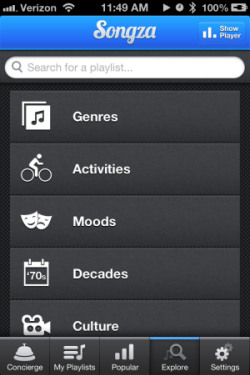
Songza is a music streaming service that aims to provide what Roman calls a “soundtrack for your life,” matching curated playlists to the time of day, day of the week, your taste in music and what you're doing while you're listening (i.e. waking up, working out, eating dinner, etc.).
Working? Relaxing? At the gym? Songza plays you the right music at the right time.
What makes Songza different is how they've created playlists based on common activities. Doing some housework? You can cue up one of more than two dozen different playlists. Working at home and would prefer music without lyrics? They have a bunch. Making out? At a formal dinner party? Shopping at a vintage store? All covered + over 30 more.
I wasn't much of music background person until Amy bought us this Sony RDPX200iP Docking Stationfor us for Christmas. So it's very cool for me to have either Spotify or now Songza playing while I'm doing whatever. Only trouble is that then I don't have Shazam available if I'm using my iPhone – but Songza will also play from your computer, so it's a great discovery tool for finding the perfect track for your next class. Get the free app for iPhone/iPad or Android.
Think your latest playlist is the bomb? You can even contribute your work to Songza – but for licensing reasons you can't listen to it yourself.
NOTE: while I was experimenting with Songza it occurred to me that there's no way to prevent Songza from using your 3g/4g data service unless you place your iPhone on airplane mode and then turn the wireless back on = no phone call from Ed McMann telling you that you've won the publisher's clearing house sweepstakes or from one of your college students that it's time to pay for another semester. Not finding an answer on their support page, I sent and email and will follow up when I know more.
I really enjoy adding a jump track in the middle of a long endurance segment, sandwiched between two, long, 90ish RPM flats. The jumps serve a couple of purposes;
They breakup a potentially monotonous part of your class.
The slower tempo encourages additional load, which should have everyone working a bit harder once we accelerate on to the second flat.
The speed needs to be just right. I like a track around 70 RPM and found this song while I was creeping on Schwinn Master Instructor Julz Arney's Spotify profile.
Macy Gray's “Nothing Else Matters” looks like this – once you move past your cluelessness.
If you've experimented with some of the 3/4 time track suggestions from this past weekend, you may have some confusion about how you count oddly timed music – like I did.
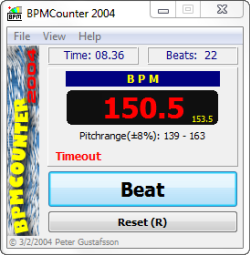
While I was writing the post, I wanted to find the RPM they communicated and share it with you. So I broke out my trusty BPM Counter*… and then quickly drove myself crazy trying to tap out the count; One-Two-Three / One-Two-Three and have it show a believable RPM. I actually quit trying to tap out the songs and instead jumped on my FreeMotion S11.0 down in the official ICI/PRO training facility (my basement) and rode to each song. Riding to the One-Two-Three / One-Two-Three comes easy to me – which is exactly why we recommend using music in 3/4 time to help your students Find The Beat – Find The Beat.Some LTF Instructors may get that private little joke.
When Amy returned, I explained that my rhythmic deficiencies were preventing me from tapping out the RPM successfully 🙁
She gave me a little smile and explained; “It's just Beat-Beat-Beat, Tap-Tap-Tap like any music in 4/4 time.” “Then you just divide it in half to find the RPM… silly.”
So I tried it again, this time forgetting the; One-Two-Three / One-Two-Three and instead just used Tap-Tap-Tap.
And she was right – as usual.
*Here's an old tap-to-the-beat program (PC only) that I've used for years. You can (right click here – save as) to your desktop. It's an .exe file that you need to run each time you want to use it. Your PC may warn you to be concerned about .exe files – you should if they don't come from somewhere not trustworthy (like a spam email) but this file is clean.
One of my goals for 2013 is to have a majority of my participants riding to the beat of my music. Not an easy task with the number of riders I teach that can't seem to hear the beat of the music – or are simply ignoring it.
Now I know that you may have been taught that it's not always the dominate beat that you should follow and match with your pedals. You're supposed to hear some subtle rhythm hiding in the music and follow it where ever it takes you.
Sorry, I don't (and never did) buy it – or at least I've never been able to hear these magical under tones and follow them. I (and most of the men in your class) need a strong beat if you expect us to follow it.
So let's give them something easy to follow. A beat that you can't ignore and has your head swinging from side to side.
That would be a Waltz… as in One-Two_Three / One-Two-Three / One-Two-Three / One-Two-Three / Right-Two-Three / Left-Two-Three / Right-Two-Three / Left-Two-Three
Amy's working on an audio version of this concept. I call her the Human Metronome and believe me, when we dance together, she leads. She has a very fun way to present this in your class that will have your (and my) participants learning to follow the intended cadence RPM that you designed into your class. Podcast #246 featuring Amy is now available.
But for now I wanted to give you some suggestions that you can add to a playlist
ICI/PRO Learn to Ride to the Beat Spotify playlist with 48 tracks that are in either 3/4 or 6/8 (Waltz) time.
This cover of Nothing Else Matters from Macy Gray would make an awesome 75 RPM climb. Listen to it with your eyes closed and count out the one-two-three / one-two-three and hear yourself cuing Left-Two-Three / Right-Two-Three to gently bring everyone in sync. Notice how each measure ends on the opposite leg – which many of the men in your class will find easy to follow.
While shopping for workout wear last weekend, I heard this fantastic song, and thought, “This would make for a phenomenal climb”. Luckily, I had my trusty phone with me and was able to Shazam it (prior to dropping said trusty phone in the toilet later that day, drying it out and it thankfully working again).
This 4:30, 68 rpm climb is haunting and motivating all at the same time. Having already used it twice this week, I have been asked a number of times what the song is and who sings it. Natasha Khan, known by her stage name as Bat for Lashes is captivating singing “All Your Gold” from her latest album, The Haunted Man.
Comment & question from a brand new ICI/PRO member.
John,
Just a quick hello from the Midwest. I teach cycle at Lifetime Indianapolis and LOVED your suggestion on using Spotify! I am so excited to have a new way to use, create and lets face it steal great song lists!
Quick question for you…do you download to your phone to make your song list available offline or do you use WiFi when using Spotify in class? It seems to take a long time to upload the tunes if I go offline. My concern if I am on WiFi is that someone will text or call me during class. Any suggestions would be great.
Excited to be a part of the ICI/PRO community….Ride on!
Party Marti
Marti asks a couple of really good questions and expresses a common confusion surrounding airplane mode, that I'll paraphrase and respond to here:
Should you download your playlists to your phone or use the club's WiFi?
I forgot or didn't leave myself enough time for everything to download to my phone, before running off to teach my class. How do I prevent a call or text from interrupting my class, if I need to use the club's WiFi?
Let's start with the confusion about using airplane mode – I had the same concern when I cut the cord and started using a Bluetooth receiver with my iPhone and worked through it again with Amy's Android.
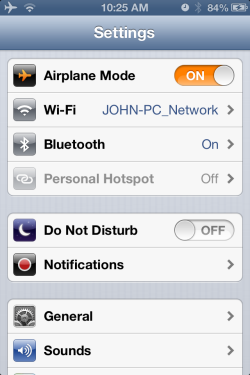
On either type of device (iPhone/Pad or Droid) turning on airplane mode switches off all connections to the outside world; no cell service, WiFi, hot spot or Bluetooth. But both devises do allow you to turn WiFi or Bluetooth back on, leaving the cellular connection off, preventing those embarrassing calls from interrupting your class.
Should you download your Spotify* playlists to your phone or use the club's WiFi? If at all possible you want your music on your phone for two major reasons…
You can't depend on a public WiFi to have the connection speed you need to reliably stream your music = possible technology failure that would wreck your class.
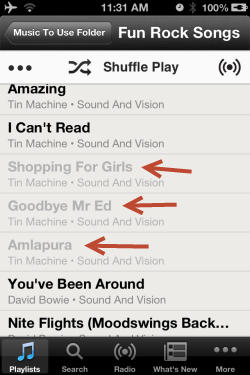
Your playlist may include Local Files – music from your computer that's not available on Spotify = tracks that are Local Files won't play over WiFi, wrecking your class.
Grey tracks are local and won't play using WiFi
But what if I'm stuck and have no choice but use the WiFi at the club?
Start by turning on airplane mode and then going into the Settings and turning WiFi back on.
Next, Spotify will download (save in offline mode) your playlist from any WiFi. So as soon as you can, connect up and turn Available OfflineON. Spotify downloads in order, starting with track one. Feel free to hit play and start your class without needing to wait for everything to download 🙂
Then pray that your playlist doesn't have any Local Files that won't play and wreck your class. But if it does, just smile and pretend you wanted it to happen.