Master Instructor Tom Scotto delivers our latest Audio PROfile Climbing Strength Intervals. PROFILE OVERVIEW
This profile is called Climbing Strength Intervals. It is a simple profile that focuses on four 3- minute climbing intervals designed to test and develop muscular strength. Riders can track their heart rate and/or power during the class to gauge their individual climbing efforts. The beauty of this class is that it takes a simple look at one concept of heart rate and power training and reduces the risk of overwhelming people. This profile can be introduced without any previous training on heart rate or power. It is a simple way to explore and learn.
Here's your Spotify PRO/Playlist!Deezer. We have made every attempt to replicate the original playlist. In some instances the tracks specified were unavailable in Spotify. When necessary we have substituted individual songs of similar length and tried to maintain the Instructor's intent.
Cycling Fusion Master Instructor Tom Scotto is back! Tom conducts a Cycle Strong Instructor workshop and here is an abbreviated version for you to enjoy and learn from.
As this is an actual workshop I asked Tom to provide a PDF of Cycle Strong that includes the Power Point slides that you can reference while you listen.
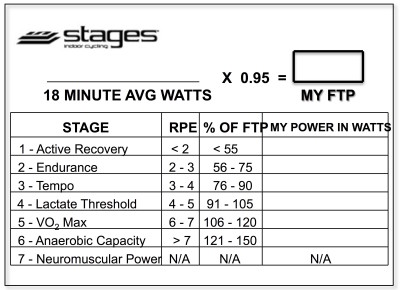
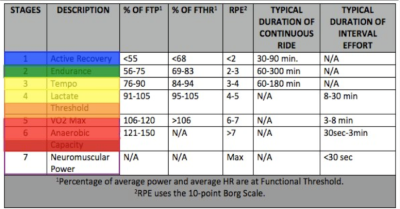
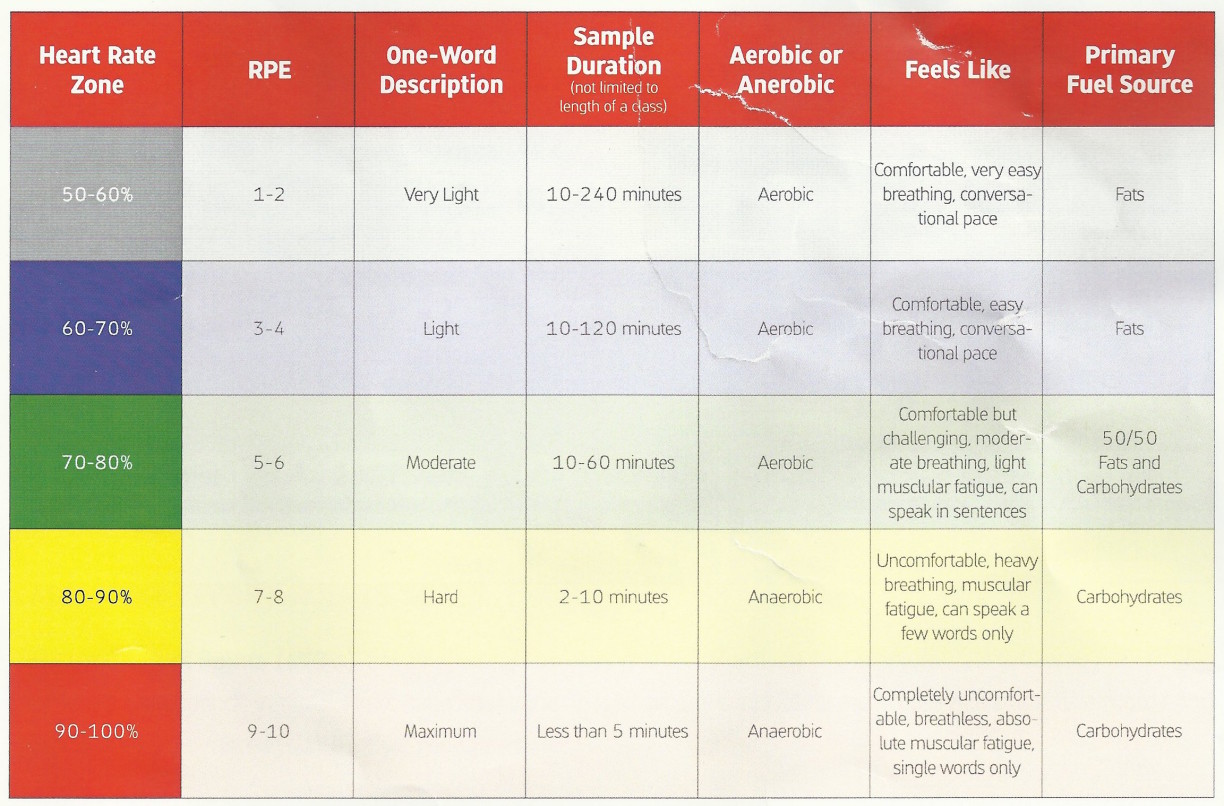
Below, Premium Members can follow links to download all the above media, view and download a printable Class Profile that can be used in class, read a detailed description of the Power Based Training Zones and download a printable Power Postcard.
[wlm_private ‘PRO-Platinum|PRO-Monthly|PRO-Gratis|PRO-Seasonal|Platinum-trial|Monthly-trial|PRO-Military|30-Days-of-PRO|90 Day PRO|Stages-Instructor|Schwinn-Instructor|Instructor-Bonus|28 Day Challenge']
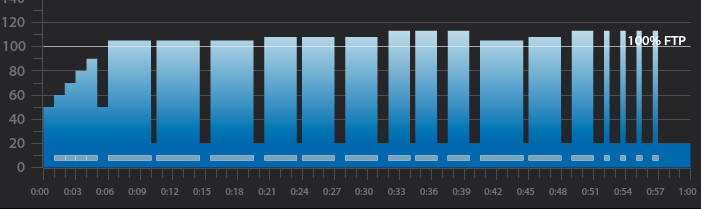
3 x 4-minute intervals with 30 seconds recovery after the 1st and 1 minute after the 2nd
1-minute recovery after the third 4-minute interval
3 x 3-minute intervals with 30 seconds recovery after the 1st and 1 minute after the 2nd
1-minute recovery after the third 3-minute interval
3 x 2-minute intervals with 30 seconds recovery after the 1st and 1 minute after the 2nd
1-minute recovery after the third 2-minute interval
4,3,2 minute intervals with 30 seconds recovery after the 1st and 1 minute after the 2nd
1-minute recovery after the 2-minute interval
4 x 30-second intervals with 1-minute recovery after each
5 minute cool down
3 x 4-minute interval goals and specifics:
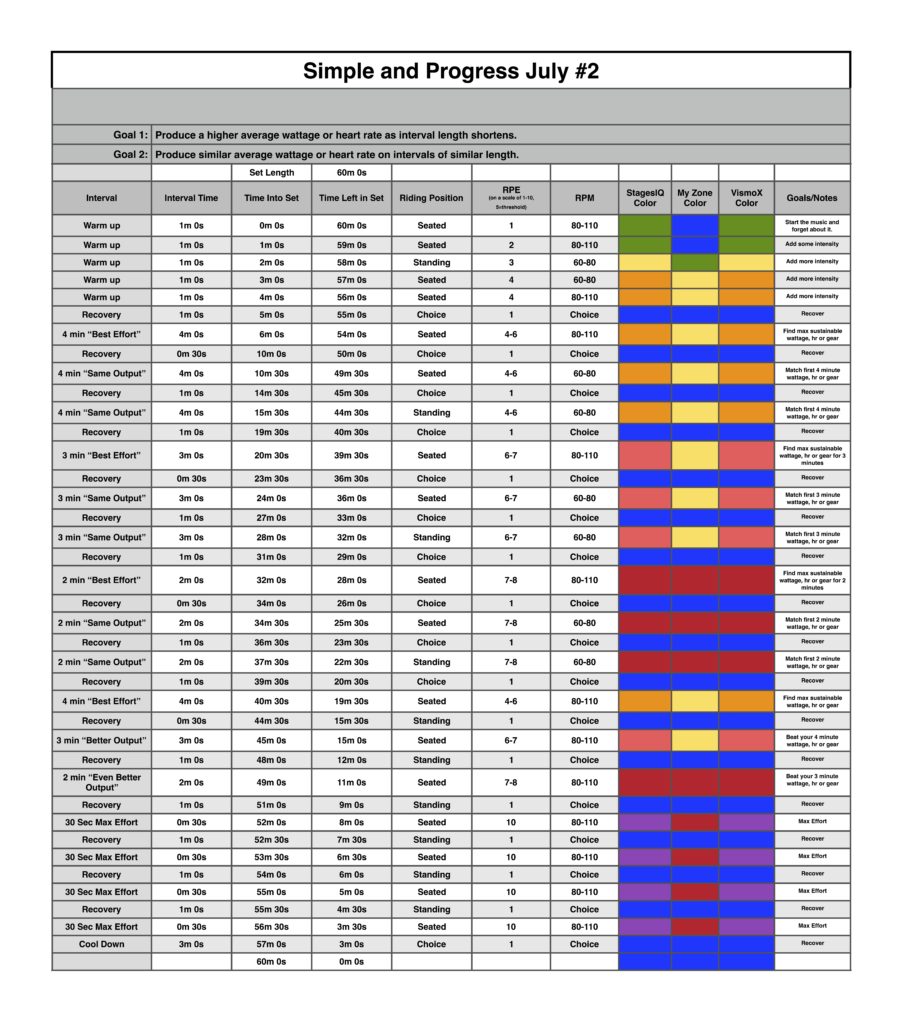
1st 4-minute intervals should be ridden seated at 80-110 rpm at Threshold wattage, HR or RPE or in the Light Red or Orange Zone if using VismoX or Stages IQ
30-second recovery or reset
2nd 4-minute interval should be ridden seated at 60-80 rpm at the same wattage, HR or RPE as the 1st or in the Light Red or Orange Zone if using VismoX or Stages IQ
1-minute recovery or reset
3rd 4-minute interval should be ridden standing at 60-70 rpm at the same wattage, HR or RPE as 2nd or in the Light Red or Orange Zone if using VismoX or Stages IQ
1-minute recovery or reset
3 x 3-minute interval goals and specifics:
1st 3-minute intervals should be ridden seated at 80-110 rpm a wattage, HR or RPE that is higher than the last 4-minute interval or in the Light or Dark Red if using VismoX or Stages IQ
30-second recovery or reset
2nd 3-minute interval should be ridden seated at 60-80 rpm at the same wattage, HR or RPE as the 1st 3-minute interval or in the Light or Dark Red if using VismoX or Stages IQ
1-minute recovery or reset
3rd 3-minute interval should be ridden standing at 60-70 rpm at the same wattage, HR or RPE as 2nd 3-minute interval or in the Light or Dark Red if using VismoX or Stages IQ
1-minute recovery or reset
3 x 2-minute interval goals and specifics:
1st 2-minute intervals should be ridden seated at 80-110 rpm a wattage, HR or RPE that is higher than the last 3-minute interval or in the Dark Red if using VismoX or Stages IQ
30-second recovery or reset
2nd 2-minute interval should be ridden seated at 60-80 rpm at the same wattage, HR or RPE as the 1st 2-minute interval or in the Light or Dark Red if using VismoX or Stages IQ
1-minute recovery or reset
3rd 2-minute interval should be ridden standing at 60-70 rpm at the same wattage, HR or RPE as 2nd 2-minute interval or in the Light or Dark Red if using VismoX or Stages IQ
1-minute recovery or reset
4,3,2 minute interval goals and specifics:
4-minute intervals should be ridden seated at 80-110 rpm at Threshold wattage, HR or RPE or in the Orange if using VismoX or Stages IQ
30-second recovery or reset
3-minute intervals should be ridden seated at 60-80 rpm at a wattage, HR or RPE that is higher than the last 4-minute interval or in the Light if using VismoX or Stages IQ
1-minute recovery or reset
2-minute interval should be ridden standing at 60-70 rpm at a wattage, HR or RPE that is higher than the last 3-minute interval or in the Dark Red if using VismoX or Stages IQ
1-minute recovery or reset
4 x 30-second interval goals and specifics:
The 4 x 30-second intervals should be ridden at the riders choice RPM or position and should be ridden at maximum effort followed by a 1-minute recovery or in the Purple if using VismoX or Stages IQ
Recording of me teaching this profile on the Stages SC3 IC Bike
65-minute music mix that can be used when teaching this profile
Below, Premium Members can follow links to download all the above media, view and download a printable Class Profile that can be used in class, read a detailed description of the Power Based Training Zones and download a printable Power Postcard.
[wlm_private ‘PRO-Platinum|PRO-Monthly|PRO-Gratis|PRO-Seasonal|Platinum-trial|Monthly-trial|PRO-Military|30-Days-of-PRO|90 Day PRO|Stages-Instructor|Schwinn-Instructor|Instructor-Bonus|28 Day Challenge']
Can you Hang On to the work done in the previous interval?
Workout Basics:
5-minute warmup
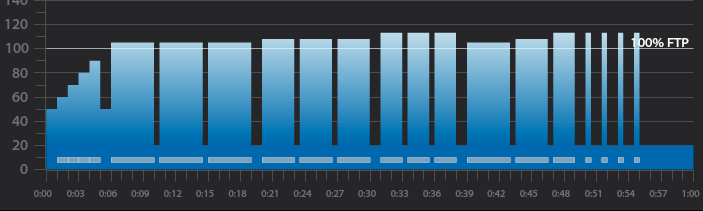
3 x 4-minute intervals with 30 seconds recovery after each
1-minute recovery after the third 4-minute interval
3 x 3-minute intervals with 30 seconds recovery after each
1-minute recovery after the third 3-minute interval
3 x 2-minute intervals with 30 seconds recovery after each
1-minute recovery after the third 2-minute interval
4,3,2 minute intervals with 30 seconds recovery after each
1-minute recovery after the 2-minute interval
4 x 30-second intervals with 1-minute recovery after each
5 minute cool down
3 x 4-minute interval goals and specifics:
1st 4-minute intervals should be ridden seated at 80-110 rpm at Threshold wattage, HR or RPE or in the Light Red or Orange Zone if using VismoX or Stages IQ
30-second recovery or reset
2nd 4-minute interval should be ridden seated at 60-80 rpm at the same wattage, HR or RPE as the 1st or in the Light Red or Orange Zone if using VismoX or Stages IQ
30-second recovery or reset
3rd 4-minute interval should be ridden standing at 60-70 rpm at the same wattage, HR or RPE as 2nd or in the Light Red or Orange Zone if using VismoX or Stages IQ
1-minute recovery or reset
3 x 3-minute interval goals and specifics:
1st 3-minute intervals should be ridden seated at 80-110 rpm a wattage, HR or RPE that is higher than the last 4-minute interval or in the Light or Dark Red if using VismoX or Stages IQ
30-second recovery or reset
2nd 3-minute interval should be ridden seated at 60-80 rpm at the same wattage, HR or RPE as the 1st 3-minute interval or in the Light or Dark Red if using VismoX or Stages IQ
30-second recovery or reset
3rd 3-minute interval should be ridden standing at 60-70 rpm at the same wattage, HR or RPE as 2nd 3-minute interval or in the Light or Dark Red if using VismoX or Stages IQ
1-minute recovery or reset
3 x 2-minute interval goals and specifics:
1st 2-minute intervals should be ridden seated at 80-110 rpm a wattage, HR or RPE that is higher than the last 3-minute interval or in the Dark Red if using VismoX or Stages IQ
30-second recovery or reset
2nd 2-minute interval should be ridden seated at 60-80 rpm at the same wattage, HR or RPE as the 1st 2-minute interval or in the Light or Dark Red if using VismoX or Stages IQ
30-second recovery or reset
3rd 2-minute interval should be ridden standing at 60-70 rpm at the same wattage, HR or RPE as 2nd 2-minute interval or in the Light or Dark Red if using VismoX or Stages IQ
1-minute recovery or reset
4,3,2 minute interval goals and specifics:
4-minute intervals should be ridden seated at 80-110 rpm at Threshold wattage, HR or RPE or in the Orange if using VismoX or Stages IQ
30-second recovery or reset
3-minute intervals should be ridden seated at 60-80 rpm at a wattage, HR or RPE that is higher than the last 4-minute interval or in the Light if using VismoX or Stages IQ
30-second recovery or reset
2-minute interval should be ridden standing at 60-70 rpm at a wattage, HR or RPE that is higher than the last 3-minute interval or in the Dark Red if using VismoX or Stages IQ
1-minute recovery or reset
4 x 30-second interval goals and specifics:
The 4 x 30 second intervals should be ridden at the riders choice RPM or position and should be ridden at maximum effort followed by a 1 minute recovery or in the Purple if using VismoX or Stages IQ
Recording of me teaching this profile on the Stages SC3 IC Bike
Below, Premium Members can follow links to download all the above media, view and download a printable Class Profile that can be used in class, read a detailed description of the Power Based Training Zones and download a printable Power Postcard.
[wlm_private ‘PRO-Platinum|PRO-Monthly|PRO-Gratis|PRO-Seasonal|Platinum-trial|Monthly-trial|PRO-Military|30-Days-of-PRO|90 Day PRO|Stages-Instructor|Schwinn-Instructor|Instructor-Bonus|28 Day Challenge']