Macy Gray's “Nothing Else Matters” looks like this – once you move past your cluelessness.
If you've experimented with some of the 3/4 time track suggestions from this past weekend, you may have some confusion about how you count oddly timed music – like I did.
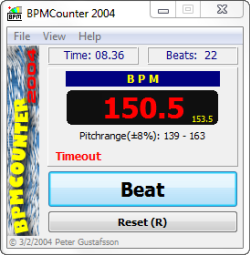
While I was writing the post, I wanted to find the RPM they communicated and share it with you. So I broke out my trusty BPM Counter*… and then quickly drove myself crazy trying to tap out the count; One-Two-Three / One-Two-Three and have it show a believable RPM. I actually quit trying to tap out the songs and instead jumped on my FreeMotion S11.0 down in the official ICI/PRO training facility (my basement) and rode to each song. Riding to the One-Two-Three / One-Two-Three comes easy to me – which is exactly why we recommend using music in 3/4 time to help your students Find The Beat – Find The Beat.Some LTF Instructors may get that private little joke.
When Amy returned, I explained that my rhythmic deficiencies were preventing me from tapping out the RPM successfully 🙁
She gave me a little smile and explained; “It's just Beat-Beat-Beat, Tap-Tap-Tap like any music in 4/4 time.” “Then you just divide it in half to find the RPM… silly.”
So I tried it again, this time forgetting the; One-Two-Three / One-Two-Three and instead just used Tap-Tap-Tap.
And she was right – as usual.
*Here's an old tap-to-the-beat program (PC only) that I've used for years. You can (right click here – save as) to your desktop. It's an .exe file that you need to run each time you want to use it. Your PC may warn you to be concerned about .exe files – you should if they don't come from somewhere not trustworthy (like a spam email) but this file is clean.
Barbara Hoots joins me to discuss her session at the ICI/PRO conference, “G -String” Thongs and most importantly Barbara offers her suggestions on creating the perfect order of the songs in your Indoor Cycling class Playlist.
BPM control for all of you who teach to tempo and use an iPhone or iPod Touch.
Here's the newClass Builder iPhone App for Spinning Instructors. Tempo Magic Pro is a new iPhone app that allows you to change the BPM of your music on your iPhone, while it's playing. You old Group Fitness instructors all know what that slider is for on the CD player. Looking to add a little more intensity to a song? Adding a few additional BPM may be just what you need.
I saw Tempo Magic Pro at IDEA last month being promoted by Petra Kolber and Yes! Fitness Music. They didn't have a working demo at the time and I just got their announcement that it is now available. I downloaded (purchased $4.95) the app and am giving it a try. I hope to have more about this as I play with it.
Here's what I do know so far:
It sounds great! Changes to the BPM seem to have very little effect on the pitch. No chipmunks in your class 🙂
It takes a while for the App to analyze the music in your playlist. But then it appears to work without delay.
The change in BPM is gradual, without a sudden change that would disrupt the flow of your class.
It only works with unprotected files (AAC or MP3), not with protected AAC files – which is no different than MixMeister or any other music software
You can add individual songs or a complete playlist. You can control the BPM of each song as it's being played or set it to match all the songs at the same BPM.
You lose the “now playing screen” that shows time elapsed and you will need to use the volume control on the side of your iPhone.
You can move ahead or back from one song.
Tempo Magic Pro iPhone App is another toy for you to play with and for 5 bucks it is something you will want to try in a class. As I type this I am thinking of all sorts of ways I can use this… Strangle Hold (my favorite climbing song) is at 148 BPM so it has you pedaling at 74 RPM. What would happen if I slowly increased the tempo at the half way point? Or started it a little slower so they really add on the load?