by John | Sep 5, 2018 | Best Practices, Instructor Tech Help
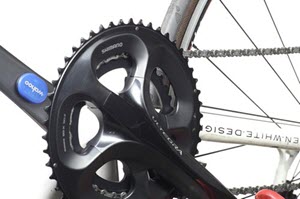
This maybe an option to adding cadence/RPM to any conventional Indoor Cycling Bike
Teaching to a room full of new Indoor Cycles with power & cadence monitors is awesome, if your club has made, or is ready and willing to make the investment. So what are the options for adding metrics to conventional cycles like the Star Trac Spinner® Pro, NXT or those made by Schwinn and others?
Let's get this part out of the way. At this time there is no, known option to add a power meter (that displays watts) to any Indoor Cycle that wasn't designed with power as an option. I get that question a lot.
How about a speed/distance meter? Nope. You can't accurately measure speed and/or distance by measuring the rotations of the flywheel. Could you install a bicycle computer and would it display something like speed/distance? Yes, but what you're seeing is nonsense. Years ago I watched my club add cheap bike computers to our NXTs in preparation for an indoor triathlon. It was comical to watch everyone spinning away like hamsters on crack, trying to reach their required distance. Please don't waste your time or money on this.
What can be added is a cadence (RPM) meter to display a riders pedaling speed. Not the same as power/watts, but it would make a big improvement to your class and simplify your cuing. I've talked to dozens of instructors who really aren't interested in teaching to power… but they almost all appreciate cuing to RPM and having everyone seeing their cadence.
Your options for installing a cadence meter to an indoor cycle are:
- Wired Cadence Computer (NOT Recommended) – you'll need to run the wire down to the sensor added to one crank arm and the computer either needs to be attached to the cycle's frame (because the handlebars move) or you'll need to leave a bunch of cable slack so you can raise the bars. Looks tacky and I guarantee someone will rip off the wires no mater how carefully you route them.
- Wireless Cadence Computer – I like the big numbers on this CatEye Wireless Speed and Cadence Bicycle Computer.
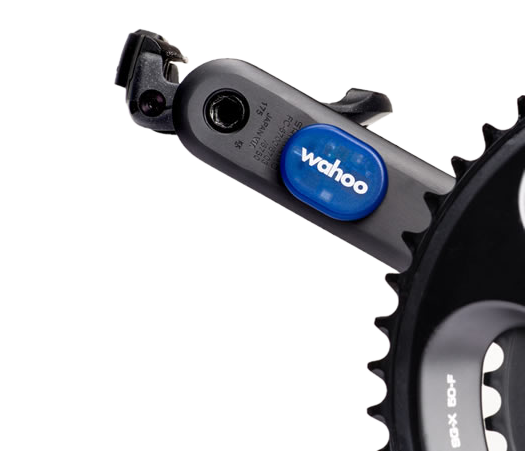
- A wireless cadence sensor used with an iPhone or Android device. The picture at the top of this post shows the Wahoo Cadence Sensor which works with any of the dozens of free cycling Apps. Installation couldn't be easier > you just stick it on one crank arm and pair it to your phone. There aren't any magnets. This might not be the best option for a studio, but would be perfect for anyone training at home.
Speaking of Wahoo – I hear they are coming out with their new TICKR HR Strap – a Heart Rate strap that transmits both ANT+ and Bluetooth. Why this is important is your iPhone/Droid doesn't pickup ANT+, only Bluetooth. In the past you'd need to purchase a Wahoo ANT+ Key, a “Dongle” to plug into your device to read ANT+ signals. It's supposed to be out in a month or so and I'll let you know if you're on our newsletter list. You can join for free if you aren't.

by John | Oct 24, 2017 | Instructor Tech Help, Instructor Training, KEEPING IT FUN, Your Fitness Business
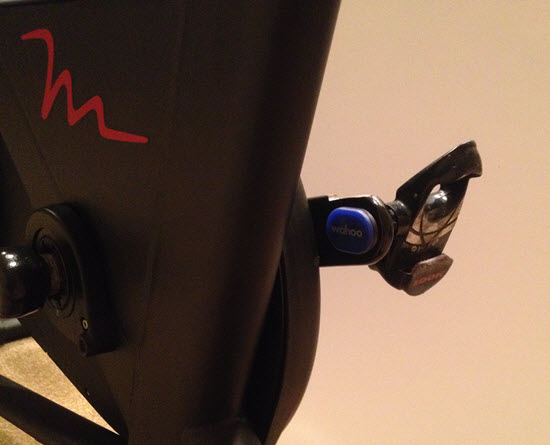
Wahoo BLE & ANT+ cadence sensor easily attaches to either crank arm and doesn't require any magnet or second sensor.
We talk a lot about the new Indoor Cycles with consoles that display a rider's performance data; Power /watts, RPM, distance, calories. Training with Power is fabulous if your club or studio as invested bikes recently. It's even more fabulous when all of that data is connected to a display training system like what's offered from Performance IQ or Spivi. Either system really adds to the fun factor, while delivering true performance data directly into each participant's email box – an awesome convergence of Keeping It Fun & Indoor Cycling 2.0 🙂
But is there an option to bringing big screen display training to your club or studio using conventional Indoor Cycles?
Absolutely and around 90% of the investment you'll make today will carry over to when you do finally upgrade to Power bikes – assuming you do of course.
My assumption is based on the fact that if you are riding a conventional Indoor Cycle, with no computer/console, there's a good chance you're on Star Trac Spinner® NXT's and Spinner® Pro's. Star Trac owned the market for indoor cycles back in the 2000's and sold thousands of both models. To my knowledge, back then nearly all of the Big Box clubs were riding Star Trac's – the one exception being LA Fitness.
So if your NXT's or Pro's are in relatively good nick and you would like to add technology so everyone knows how fast they're pedalling, you have a couple of options.
NOTE: I haven't seen a studio adapt a bicycle computer successfully and don't recommend wasting your time trying.
The most common solution is to install a Spinning® computer. These consoles will display cadence, distance (wildly inaccurate) time and HR if you're wearing an analog HR strap. A few words of caution:
- The Spinning computer has no option for connection (BLE or ANT+) to a display training system = they won't connect with Performance IQ or Spivi.
- These computers are designed to fit multiple models of Spinners®. There is a setting (you use a magnet to get into the option screen) you need to make to adjust the computer to your model of bike – to have RPM displayed correctly.
- They're pricey at $167.00 each and I'm not aware of any bulk discounts.
The alternative for studios not ready to replace their bikes, but do want to begin offering performance metrics (even RPM & HR can make a huge impression on clients) and possibly a bike reservation system, I recommend the new Wahoo RPM cadence sensor.
The $39.99 Wahoo sensor is about the size of a quarter and attaches easily to one of the crank arms. That's it. There's no second  magnet or parts needed. The package comes with a number of attachment methods – I'm showing it simply stuck on using some incredibly sticky double sided tape.
Battery life (replaceable coin cell) is supposed to be a year or more with it's auto-on feature. The sensor transmits in both BLE and ANT+ with great range so you could have a large studio with 40 or more NXT's wirelessly connected to Performance IQ or Spivi. Let the fun begin 🙂
The other option would be for participants to bring in their personal portable device; iPhone, iPad or Android phone. There are multiple Apps that will receive the sensor's BLE signal (all phones have BLE) and the free Wahoo Fitness App would be my choice. It's super easy to use and paring is very intuitive.
Yes this sensor will work with the Spinning App – only after you purchase additional sensor options.

Wahoo Fitness App showing RPM and Heart Rate
Save
Save
