
by John | Jul 27, 2014 | Deezer, Instructor Tech Help, Latest News, Music, Spotify
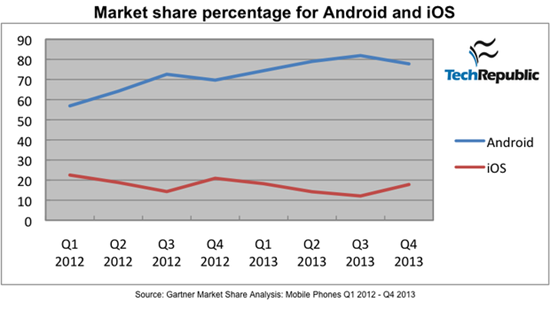
Image from http://www.techrepublic.com/
I find it fascinating to watch all the posturing going on in the digital music delivery business. It all started with iTunes – who ruled the legal, digital download space for years. Multiple services (ZUNE, Rhapsody, Napster, etc…) have tried, and failed to take more than a tiny amount of market share from Apple.
But that's all changing because of Spotify, Deezer and a little company called Google. The article below opened my eyes to why.
Apple looking Into Android Compatible Streaming Music Service To Compete With Spotify
In an interesting turn of events, Apple is reportedly considering opening up and launching their own streaming music service to compete with the likes of similar services like Spotify and the newly released Beats music. In addition to this they are apparently considering launching an Android app for the streaming service to go along with the launch of the service itself, all in an effort to attack the declining sales of US iTunes music downloads according to sources that are close to the matter. People still use iTunes? All jokes aside, it has been difficult for apple to compete with services that offer streaming music at a low price, as the music libraries are competitively similar in size, and listening is unlimited, all for a small monthly fee. Downloading the same number of songs through iTunes that you would have at your disposal with a service like Spotify would take massive amounts of money, even with most songs on iTunes being available as singles with most as low as $0.99 a hit.
It’s interesting to hear these possibilities as Apple and iTunes have always been known to be a partnered exclusive company and service. While Google’s popular Google Play Music is available on multiple platforms including Mac, Windows, Android and iOS, Apple’s iTunes is only accessible to those who use iOS devices or Mac computers. They have effectively closed themselves off from other possibilities for quite some time, and it used to work for them when they were the dominating force in digital music. With the iPod reaching its end of life though, and a myriad of subscription based music services available on virtually any platform you can think of, Apple will have to find a way to take the once reigning king of music services and transform it if they want to compete.
So I did some quick research to see how Apple's iOS competes with Google's Android market share for portable device sales.
… If you look at the raw numbers for sales market share between Android and iOS devices, Google seems to be dominating the space. In Q4 2013, Gartner reported that Android had 77.8% worldwide market share while iOS had only 17.8% share. One quarter prior, Android had 81.9% and iOS took second place with 12.1%. It is worth noting that, according to ComScore, iOS market share in the lucrative US market is about 40%, while Android accounts for around 50% of US sales. The problem with these numbers is that the do not take into account the fragmentation that Google has allowed with the Android platform.
What goes around…comes around
One of the legacies of Steve Jobs was his/Apple's decision to keep iTunes exclusive to iDevices (there is no iTunes App for an Android phone). While this worked to Apple's advantage for years, they now find themselves becoming uncompetitive now that Spotify and Deezer have Apps for both iOS and Android phones.
So what does this mean for you?
Choices, lots of choices for digital music coming with fewer restrictions on how you'll be able to build, share and then deliver great music to your classes. Many of us found Spotify to be revolutionary – it completely changed my views about renting vs. buying music. But now Spotify is SOP (standard operating procedure). I'm guessing that a few years from now we'll be using a music service that doesn't even exist today and we will access it using a device none of us has even seen.
And we can't wait to help you understand how you'll use it in your class 🙂
by John | Jul 19, 2014 | Deezer, Instructor Tech Help, iTunes & Spotify Training, Master Instructor Blog, Music, Spotify
I'm hearing from Instructors outside of the USA who are switching from Spotify, over to Deezer.
Hi,
I have had Spotify for a long time now and have created lots of different playlists. I have recently just converted into using Deezer, however, it would be much easier for my Spotify playlists to be on Deezer instead!
Is this possible? If so, how do i do it?
Thanks
Cydnie.
Cyndie we created an ICI/PRO playlist conversion tool for just this occasion 🙂
Here's the steps to convert your Spotify playlist to one Deezer can play.
Step #1 Open and log in to Deezer in a new tab – clicking this link will do that for you. Note: Deezer is different from Spotify in that Deezer is a web application, vs. Spotify, which is a program that you install on your computer. Yes I know that Spotify also has a web version… I never had much luck using it and suggest you install the full program if you want to run Spotify on a laptop.
Step #2 Clicking this link will open our conversion tool in another tab. Scroll down the page and you should see that you're logged in to Deezer and a Please enter Spotify URI dialog box like this:
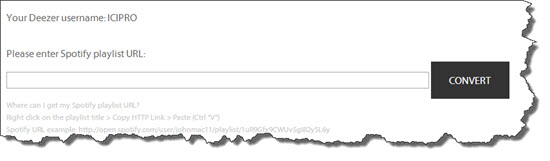
If you don't see this click the Log into Deezer link or refresh the conversion tool page.
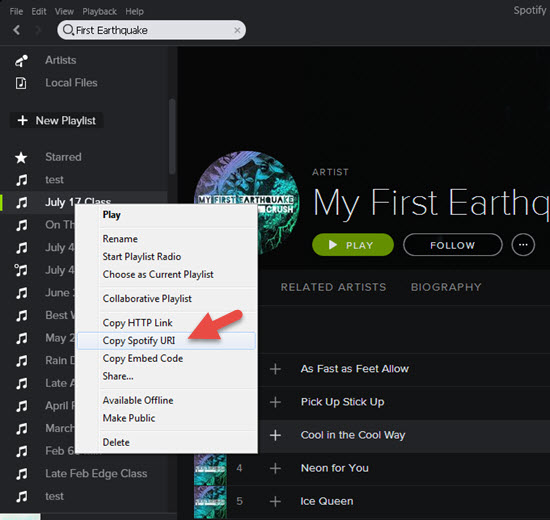
Step #3 In Spotify, Right Click the playlist you want to convert and select Copy Spotify URI.
Step #4 Back at the conversion tool, Paste the URI you copied and click Convert. It will look like this:
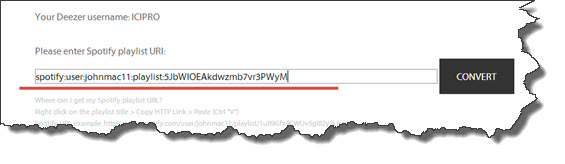
Step #5 Success! Click the link to see your new Deezer playlist 🙂

A few notes:
- Despite a lot of programming time, we weren't able to get Deezer to carry over the name of the playlist from Spotify. Renaming the Deezer playlist is a snap using the edit option shown below.
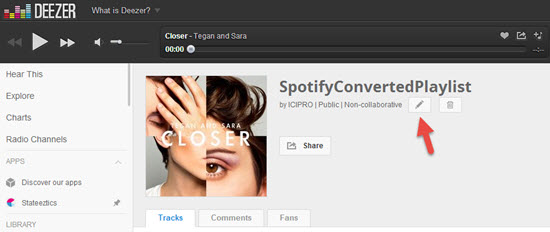
- Check your new Deezer playlists for accuracy > differences between each service's music library and Meta Data = not every playlist will convert perfectly.
Any other questions?
Feel free to contact us like Cydnie did – we're happy to help.
by John | Jun 20, 2014 | Deezer, Music, Spotify
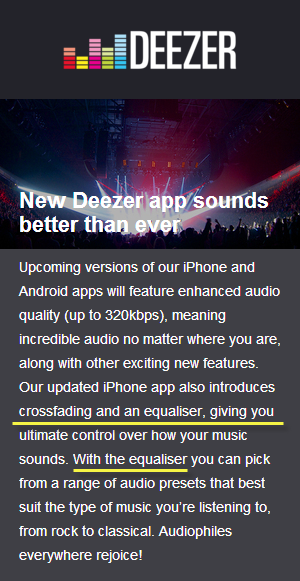
It's “Equalizer” or “Equaliser” depending on what side of the pond your classes are held.
In a comparison of Deezer's and Spotify's iPhone Apps, I would always choose Spotify – their App includes adjustable crossfade playback. Once you have crossfade you won't want to go without it. Beyond that the IOS Apps are very similar.
A little bird notified me today that Deezer is going to release a new version of their music player App for both iPhone and Android soon… whatever that means? Based on the above graphic, the new Apps will allow higher quality 320kbps playback, crossfade and an Equalizer. I let you know when I hear more.
I know how to use crossfade effectively – OK, I just have it set at about 8 seconds and have left it there for at least a year.
But I'm going to be really curious to play with the Equalizer 🙂
Have you delivered your class music with your laptop and used the Equalizer that's in iTunes?
by John | Jun 13, 2014 | Instructor Tech Help, Instructor Training, iTunes & Spotify Training, Music, Spotify

Does Spotify seem to take forever to load on your iPhone? Did it close abruptly (crash) when you hit ‘play', act sluggish or is just not as responsive as when it was new? It may have bonked. Here's how to nurse your prized device back to life…
Wikipedia describes bonking as
In endurance sports such as cycling and running, hitting the wall or the bonk describes a condition caused by the depletion of glycogen stores in the liver and muscles, which manifests itself by sudden fatigue and loss of energy. Milder instances can be remedied by brief rest and the ingestion of food or drinks containing carbohydrates. The condition can usually be avoided by ensuring that glycogen levels are high when the exercise begins, maintaining glucose levels during exercise by eating or drinking carbohydrate-rich substances, or by reducing exercise intensity.
Your iPhone, or other portable device, can experience the bonk as well. No, not because the battery is low, or you haven't fed it enough GU, but from a depletion of available system memory (RAM – Random Access Memory). This results in slow operation, freezing / crashing Apps and mysteriously frustrating actions that have you wondering why you're not using CD's anymore 🙁
Two types of fuel
As a fitness professional you no doubt are aware that your body stores two types of energy; sugars (glycogen) and fat. Regardless of your fitness level, during a long period of exercise the limited amount of stored glycogen you have is consumed. If you don't eat carbohydrates before they are exhausted, you'll bonk. Interestingly, your body can't access the energy in your stored body fat quickly enough to prevent bonking, even though you have all the fat calories needed to keep you going for days. Yes, with proper training you can improve fat usage, but watch the Tour de France next month and you'll see very fit cyclists eating frequently during each stage.
The energy that fuels your iPhone is memory:
- System memory (RAM) which runs all of the phone's operations – a small amount @ 512MB (one half GB)
- Storage memory – that's the amount of memory you choose when you bought your iPhone; 8GB, 16GB, 32GB, etc… that holds your offline Spotify music files, iTunes tracks, videos and pictures.
Your iPhone bonks when it runs low on available RAM – none of the 32GB of storage memory you paid extra for is available to help out. You don't see it, but there are a bunch of processes running continuously on your phone, eating small bits of RAM. Typically this happens when you have multiple Apps running in the background or you have too many Apps looking for updates (push notifications) or GPS location updates. You can't add any additional RAM – so the solution to prevent bonking is to free up RAM – by closing unused Apps and turning off unneeded functions will free up some additional memory.
Step one – Close Unused Apps
Did you know that clicking the Home button doesn't actually close an App? It doesn't. There's a good chance that every App you've ever downloaded and opened is still quietly running, consuming the much needed RAM to run Spotify properly. Powering down your iPhone doesn't close them either – each App needs to be closed manually.

Double click the home button and then swipe up to close Apps.
Here's how…
- Double click the ‘Home' button quickly and you'll see thumbnails of the Apps currently running.
- Scroll left/right to select an App to close.
- Swipe the thumbnail up to close it – there's no reason not to close all of them.
Step two – Do you talk to Siri?
Besides it being annoying, Siri is a bit of a RAM hog. If you're not on speaking terms, turn her off. Settings>General>Siri
Step three – Reboot Regularly
Whenever you're tired, does it seem like your mental processor doesn't operate as sharply as it does after a good night's sleep? After a long day your brain's RAM has a bunch of “stuff” running in the background that it collected during the day; problems at work, anxiety about a future event, what to get your dad for Father's Day… stuff. The best way to clear it is an 8 hour horizontal reboot.
Computers are no different. They collect “stuff” as they work, reducing the amount of RAM needed for Spotify to crossfade between songs. NOTE: cross-fading streaming tracks is actually a very neat (and memory intensive) trick.
So when was the last time you powered down your iPhone and give it a rest? I've asked people this question and mostly been told that the only time they've rebooted their phone is when the battery goes dead. Same goes with your computer, Mac or PC – they all benefit from regularly being turned off. Wait until it has completely powered down and then bring it back to life 🙂
Step four -Turn off unneeded services
Every neat little thing your iPhone does requires RAM…
- Do you really need to instantly see every new FB comment displayed on your home screen? Turn a few off: General > Settings > Notification Center.
- Location tagging is a bit creepy. Does Shazam really need to know where I am? I don't think so. Turn off all of the nonessential location tags: General > Settings > Privacy > Location Services and scroll down to see who's tracking your location. I only have Facebook (for checking in) and Google Maps turned on.
There are multiple ways to reduce RAM usage beyond this list – these should be a great start to prevent your iPhone from bonking anytime soon!
by John | Jan 10, 2014 | Deezer, iTunes & Spotify Training, Music, Spotify

Spotify is awesome for delivering your class music – at least for those of us teaching in a country where it's available. Seeing so many visitors here from Canada – where Spotify doesn't work, we decided it would be helpful to build a simple, free tool that will quickly convert a Spotify playlist into something a Deezer user can open and play!
The tool is located on it's own page that you can find here:
https://www.indoorcycleinstructor.com/free-spotify-deezer-music-track-playlist-conversion-tool/
Please note that you need a free or premium Deezer user's account before you'll see the actual tool. Click this link to login into to your Deezer account and convert away!
