I've been sharing my Power of 3 Harmonically Mixed Music Sets with you all for a while. Now I'm going to take a shot at harmonically mixing videos.
I hope you like it.
These videos on YouTube.
Premium Members can download this Video for free by following the link below:
[wlm_private ‘PRO-Platinum|PRO-Monthly|PRO-Gratis|PRO-Seasonal|Platinum-trial|Monthly-trial|PRO-Military|30-Days-of-PRO|90 Day PRO|Stages-Instructor|Schwinn-Instructor|Instructor-Bonus|28 Day Challenge']
Right Click on the blue underlined link
Select “Download Linked File As”
Select a download location
Once file is completely downloaded, find it in the location you selected
Drag the file into your iTunes or Spotify library OR
Right Click on the file and Select “Open With”
From the drop down menu select “iTunes” or “Spotify”
File should begin playing and is now part of your iTunes or Spotify library
To download the above media on a PC:
Right Click on the blue underlined link
Select “Save Link As”
Select a download location
Once file is completely downloaded, find it in the location you selected
Drag the file into your iTunes or Spotify library OR
Right Click on the file and Select “Open With”
From the drop down menu select “iTunes” or “Spotify”
File should begin playing and is now part of your iTunes or Spotify library
Click here to watch a video on how to download media files from ICI/Pro.
Have I told you how much I love teaching with a group display system like Performance IQ's StagesIQ. I simply can not get over how awesome it is to have access to a group display. The new game I play with my riders in not allowing them to take ANY easy recovery. Below is a copy of the poster I use to explain my zones:
Riders are amazed at how much more difficult a ride is when I don't allow them to ride in the Blue, Active Recovery, Zone for their recovery. Instructors never knew how easy or hard their riders were recovering, with group display systems we can see these recovery efforts for the first time. For years we tried to manage the high end of a workout, now we can also manage the low end.
Premium Members can download this mix for free by following the links below:
[wlm_private ‘PRO-Platinum|PRO-Monthly|PRO-Gratis|PRO-Seasonal|Platinum-trial|Monthly-trial|PRO-Military|30-Days-of-PRO|90 Day PRO|Stages-Instructor|Schwinn-Instructor|Instructor-Bonus|28 Day Challenge']
Right Click on the blue underlined link
Select “Download Linked File As”
Select a download location
Once file is completely downloaded, find it in the location you selected
Drag the file into your iTunes or Spotify library OR
Right Click on the file and Select “Open With”
From the drop down menu select “iTunes” or “Spotify”
File should begin playing and is now part of your iTunes or Spotify library
To download the above media on a PC:
Right Click on the blue underlined link
Select “Save Link As”
Select a download location
Once file is completely downloaded, find it in the location you selected
Drag the file into your iTunes or Spotify library OR
Right Click on the file and Select “Open With”
From the drop down menu select “iTunes” or “Spotify”
File should begin playing and is now part of your iTunes or Spotify library Click here to watch a video on how to download media files from ICI/Pro.
The world of group indoor cycling has recently collided with the realm of technology to give instructors access to and class participants the ability to experience three learning styles in each and every class. I like to call these learning styles being able to seeit, hear it and feel it. This means your senses are all stimulated and makes indoor cycling much more accessible to more types of people. Here’s how it works.
3 Types of Learning Styles
See It — Some of us are visual learners, where we learn best when aided by images, pictures or movies.
Hear It — Others are auditory learners who understand best when supported by music, sound, rhythm or voice.
Feel It — Kinesthetic learners do best when they can move, feel or experience what is being taught.
Cue-munication
At Stages Indoor Cycling we teach instructors the art of “Cue-munication”, which is anything you indicate that you would like your riders to absorb & retain. It could be a feeling, a sensation, an effort, or a physical way of doing something. Before group display technology was available, instructors were forced only to use language when trying to cue-municate. For the auditory learners this may have been fine, but for a significant portion of riders, this cue-munication style may not have resonated.
Cue-munication Tools & Their Limitations
Some might say that heart rate monitors and power meters would solve the visual learner’s frustration of being asked to decipher their instructor’s direction and translate it into how they should feel. Before the invention of group display systems, I would agree with those who said this. But there are limitations with both heart rate monitors and power meters.
Heart Rate Monitor Limitations:
Only a small percentage of exercisers use them. An instructor is lucky if 20% of class participants are using a heart rate monitor at any one time.
Heart rate simply isn’t the best way to monitor intensity. Too many factors affect heart rate on a day to day basis; factors like sleep, hydration, stress, caffeine, recovery, heat…. the list goes on and on.
There is a lag time associated with heart rate. Pulse rate reflects what an exerciser’s body did 15 to 30 seconds ago, not what it’s doing right now. In today’s HIIT (High-Intensity Interval Training) world, riders may be halfway through their recovery interval before their heart rate peaks from a hard effort.
The better option for monitoring intensity in indoor cycling is to use a power meter. A power meter shows a cyclist the exact amount of work being done second by second. If a rider’s wattage increases over time, that rider is doing an increasing amount of work. Power meters are now the “gold standard” when it comes to monitoring intensity in indoor and outdoor cycling.
Power Meter Limitations:
Although power meters give the visual learner the numbers they crave, for many riders, all these numbers and data are a lot to remember.
When using data for effective Power Zone Training (what we teach at Stages Indoor Cycling), a rider is required to memorize his/her zones or perform calculations on the fly.
The Power of Group Display
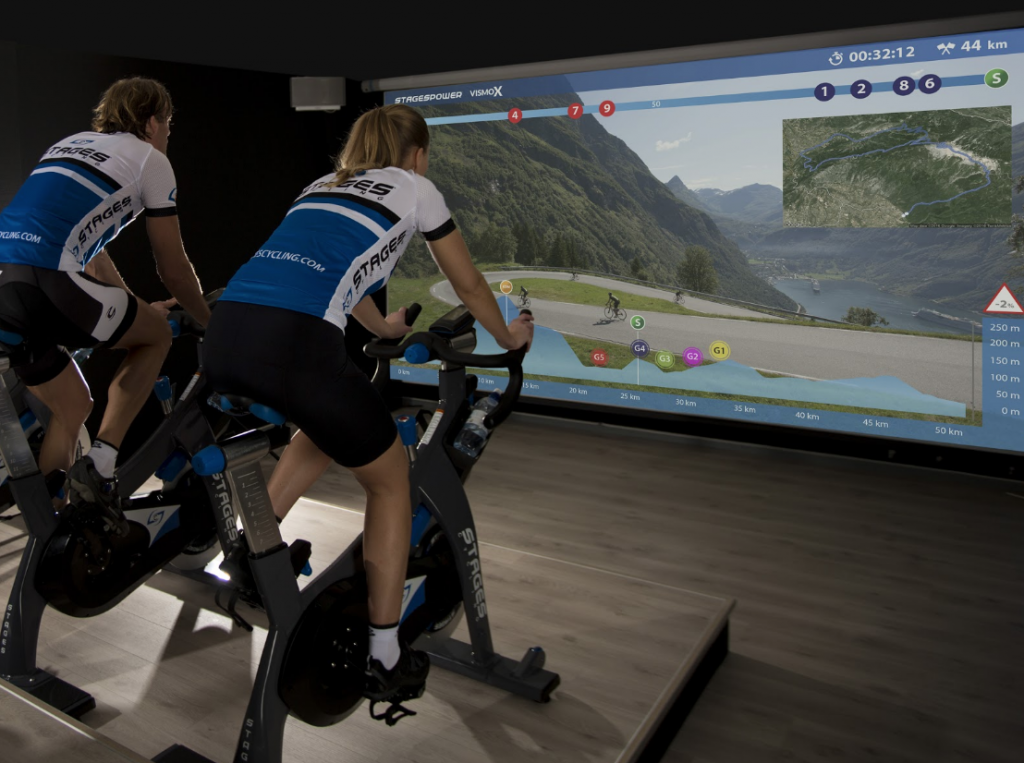
Group display systems, like VismoX, perform all the needed calculations and store each rider’s zones for them. Then when riding in an indoor cycling class, these zones can be displayed on a screen, so each participant knows exactly how hard they are working at any given moment.
See It — Visual learners love group display because their power zones are shown as numbers, colors, or a mix of both.
Hear It — Auditory learners are now supported with visual cues, which further enhances their experience.
Feel It — Group display systems assure kinesthetic learners that they are working at the right intensity with a simple glance at the screen. They can then anchor the associated sensations or feelings with that power zone or intensity.
Group display systems, like VismoX, have given instructors a way to SHOW their class participants how much work they’re doing. The visual systems simplify the complex world of exercise and training with data. They provide immediate feedback and support all three different learning styles. Instructors now have all the tools necessary to cue-municate the most effectively to EVERY cyclist in class.
Premium Members can download this mix for free by following the links below:
[wlm_private ‘PRO-Platinum|PRO-Monthly|PRO-Gratis|PRO-Seasonal|Platinum-trial|Monthly-trial|PRO-Military|30-Days-of-PRO|90 Day PRO|Stages-Instructor|Schwinn-Instructor|Instructor-Bonus|28 Day Challenge']
Right Click on the blue underlined link
Select “Download Linked File As”
Select a download location
Once file is completely downloaded, find it in the location you selected
Drag the file into your iTunes or Spotify library OR
Right Click on the file and Select “Open With”
From the drop down menu select “iTunes” or “Spotify”
File should begin playing and is now part of your iTunes or Spotify library
To download the above media on a PC:
Right Click on the blue underlined link
Select “Save Link As”
Select a download location
Once file is completely downloaded, find it in the location you selected
Drag the file into your iTunes or Spotify library OR
Right Click on the file and Select “Open With”
From the drop down menu select “iTunes” or “Spotify”
File should begin playing and is now part of your iTunes or Spotify library
Click here to watch a video on how to download media files from ICI/Pro.