One of my Christmas gifts this year was a record player and the first album I listened to on this turn table was Elton John's Greatest Hits. The sound that comes from vinyl is amazing, it simply can not be replicated on a digital device like an iPhone. One of my resolutions this year is to learn to enjoy music again. The day I got certified to teach indoor cycling I started putting all music in two categories; Can I ride to this song or not? Music that I felt could not be used in an indoor cycling class was simply deleted.
There's too much great music out there to go through life not really enjoying it. So I have that turntable set up in my office and when I'm ready to listen and enjoy some music, I pull a record out of my new collection of vinyl, place it on the turn table, watch it spin for a little bit, place the needle on the edge and just let the music play. It's incredibly liberating to enjoy the beauty and artistry of some of the greatest song writers and musician again.
An interesting thing happened while listening to albums in their entirety, I'm still finding songs that will work in my classes, here's a Power of 3 mix from one of my favorite artists, Elton John.
Premium Members, follow the link below to download this new mix.
[wlm_private ‘PRO-Platinum|PRO-Monthly|PRO-Gratis|PRO-Seasonal|Platinum-trial|Monthly-trial|PRO-Military|30-Days-of-PRO|90 Day PRO|Stages-Instructor|Schwinn-Instructor|Instructor-Bonus|28 Day Challenge']
Right Click on the blue underlined link
Select “Download Linked File As”
Select a download location
Once file is completely downloaded, find it in the location you selected
Drag the file into your iTunes or Spotify library OR
Right Click on the file and Select “Open With”
From the drop down menu select “iTunes” or “Spotify”
File should begin playing and is now part of your iTunes or Spotify library
To download the above media on a PC:
Right Click on the blue underlined link
Select “Save Link As”
Select a download location
Once file is completely downloaded, find it in the location you selected
Drag the file into your iTunes or Spotify library OR
Right Click on the file and Select “Open With”
From the drop down menu select “iTunes” or “Spotify”
File should begin playing and is now part of your iTunes or Spotify library Click here to watch a video on how to download media files from ICI/Pro.
Are you ready for some football??? Superbowl Sunday is just over a week away and if you are planning on creating a Superbowl themed ride or playlist this year, I have just the tunes to get you started. First, here's a playlist that includes five tunes to get you started with your ride music:
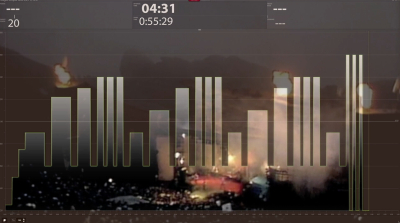
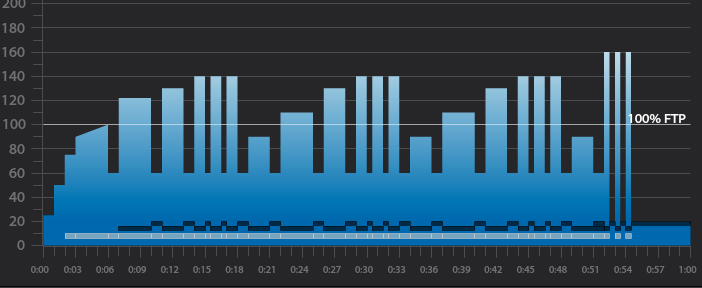
I've been using video in my indoor cycling classes for years, recently I started added my Trainer Road profiles to the display so riders know the exact length of every interval. I'm a firm believer in sharing the entire profile with my riders. By projecting the profile on the screen riders can make a plan on how they can most effectively complete the workout.
Today I was playing around with iMovie and found a way to embed the Trainer Road profile into the video as well as add my class recording the the audio.
Numerous studies have proven that if we can keep our New Year's resolutioners on an exercise program from New Year's Day until Valentines Day they will have been successful in making exercise a part of their life.
Keep up the motivation and support of these new exercisers.
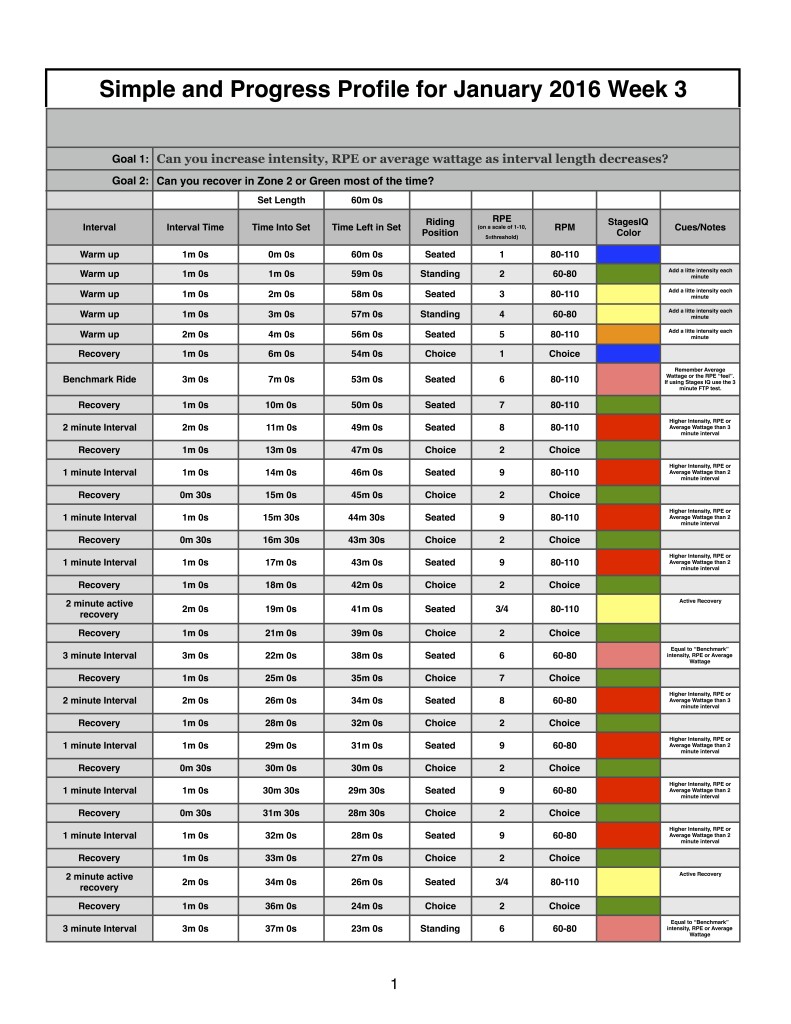
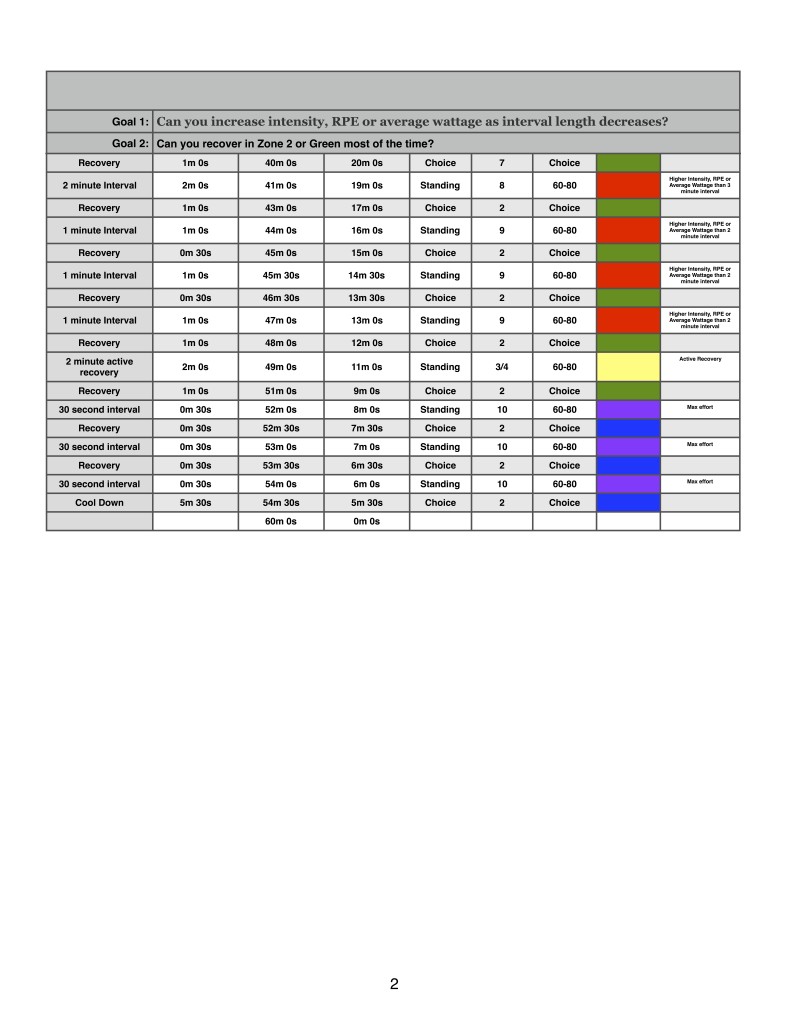
Here's the week 4 profile progression for the month of January 2016. The only change is that most recovery is now done in Zone 2. This is much harder than it sounds.
Below I'll post recordings of me teaching this profile in my various classes. Check back because I'll be adding more recordings and music suggestions throughout the week:
The above classes and many more are available for free in the iTunes Store as Podcasts. You can subscribe to them by following the links below.
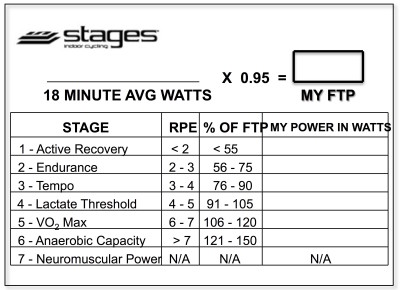
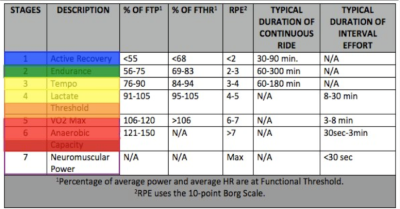
Below, Premium Members can read a detailed description of this Class Profile, download a printable Class Profile that can be used in class, read a detailed description of the Power Based Training Zones, download a printable Power Postcard and download a Harmonically Mixed Music Set that can be used for this profile.
[wlm_private ‘PRO-Platinum|PRO-Monthly|PRO-Gratis|PRO-Seasonal|Platinum-trial|Monthly-trial|PRO-Military|30-Days-of-PRO|90 Day PRO|Stages-Instructor|Schwinn-Instructor|Instructor-Bonus|28 Day Challenge']
3 minute interval slightly above “maximum sustainable intensity” or threshold
1 minute recovery in Zone 2
2 minute interval at a slightly higher intensity or average wattage than the 3 minute interval
1 minute recovery in Zone 2
3 x 1 minute interval at a slightly higher intensity or average wattage than the 2 minute interval followed by a 30 second recovery after interval 1 and 2
1 minute recovery after the set
2 minute interval riding at a slightly BELOW threshold intensity or wattage
1 minute recovery in Zone 2
Repeat the above 3,2,1 and 2 minute interval sets two more times, changing riding position and RPM.
3 X 30 second interval done at absolute maximum intensity
30 seconds recovery
Workout Goal:
Can you Anchor Time and Effort by increasing intensity or average wattage as interval length decreases and recover in zone 2?
6 minute warm up
Soft pedal for the first 2 minutes. Get comfortable on bike. Discuss fit and console.
Slowly and steadily increase HR and/or Average Wattage each minute, for 4 minutes, keep intensity below threshold.
1 minute recovery.
3 minute “Benchmark” or Stages IQ FTP Test goals and specifics:
Ride for 3 minutes at a VERY challenging intensity or wattage.
If you have the capability to capture average wattage use the average wattage as your “Benchmark”. If you are limited to RPE to determine intensity use your cueing to make sure participants remember how this 3 minute interval “feels”. All intervals sets in this profile will use this wattage number or RPE as a starting point.
If you are instructing with a Group Display System like Stages IQ, this is when you will have your class perform their initial FTP or Threshold test.
Ride Seated with a cadence of 80-110 RPM
1 minute recovery in Zone 2 or Green
2 minute interval goals and specifics:
Ride for 2 minutes at a higher intensity, RPE or average wattage than the previous 3 minute interval.
Ride seated with a cadence of 80-110 RPM.
If using Stages IQ ride in the DARK RED zone.
1 minute recovery in Zone 2 or Green
3 x 1 minute interval goals and specifics:
Ride for 3 x 1 minute at a higher intensity, RPE or average wattage than the previous 2 minute interval.
Ride seated with a cadence of 80-110 RPM.
If using Stages IQ ride in the DARK RED zone.
30 second recovery after the interval 1 and 2
1 minute recovery at the end of the set in Zone 2 or Green
2 minute below threshold ride goals and specifics:
Ride for 2 minutes slightly below “Benchmark” intensity, RPE or average wattage.
Ride seated with a cadence of 80-110 RPM.
Use this as an active recovery. Riders may want to ride at a very low intensity, don't let them!
If using Stages IQ ride in the YELLOW zone.
1 minute recovery in Zone 2 or Green
3 minute interval goals and specifics:
Ride for 3 minutes AT “Benchmark” intensity, RPE or average wattage.
Ride Seated with a cadence of 60-80 RPM
If using Stages IQ ride in the LIGHT RED zone.
1 minute recovery in Zone 2 or Green
2 minute interval goals and specifics:
Ride for 2 minutes at a higher intensity, RPE or average wattage than the previous 3 minute interval.
Ride seated with a cadence of 60-80 RPM.
If using Stages IQ ride in the DARK RED zone.
1 minute recovery in Zone 2 or Green
3 x 1 minute interval goals and specifics:
Ride for 1 minute at a higher intensity, RPE or average wattage than the previous 2 minute interval.
Ride seated with a cadence of 60-80 RPM.
If using Stages IQ ride in the DARK RED zone.
30 second recovery after the interval 1 and 2
1 minute recovery at the end of the set in Zone 2 or Green
2 minute below threshold ride goals and specifics:
Ride for 3 minutes slightly below “Benchmark” intensity, RPE or average wattage.
Ride seated with a cadence of 60-80 RPM.
Use this as an active recovery. Riders may want to ride at a very low intensity, don't let them!
If using Stages IQ ride in the YELLOW zone.
1 minute recovery in Zone 2 or Green
3 minute interval goals and specifics:
Ride for 3 minutes AT “Benchmark” intensity, RPE or average wattage.
Ride standing with a cadence of 60-80 RPM
If using Stages IQ ride in the LIGHT RED zone.
1 minute recovery in Zone 2 or Green
2 minute interval goals and specifics:
Ride for 2 minutes at a higher intensity, RPE or average wattage than the previous 3 minute interval.
Ride standing with a cadence of 60-80 RPM.
If using Stages IQ ride in the DARK RED zone.
1 minute recovery in Zone 2 or Green
3 x 1 minute interval goals and specifics:
Ride for 1 minute at a higher intensity, RPE or average wattage than the previous 2 minute interval.
Ride standing with a cadence of 60-80 RPM.
If using Stages IQ ride in the DARK RED zone.
30 second recovery after the interval 1 and 2
1 minute recovery at the end of the set in Zone 2 or Green
2 minute below threshold ride goals and specifics:
Ride for 3 minutes slightly below “Benchmark” intensity, RPE or average wattage.
Ride standing with a cadence of 60-80 RPM.
Use this as an active recovery. Riders may want to ride at a very low intensity, don't let them!
If using Stages IQ ride in the YELLOW zone.
1 minute recovery in Zone 2 or Green
3 X 30 second interval goals and specifics:
Repeat three 30 seconds at MAX intensity, RPE or wattage.
Last week I wrote about how I use many different genres of music in my cycling classes. While I did mention that I sometimes used classical music, what I didn't tell you was that I particularly love to use music that has been scored for movies. Many of my favorites come from German composer Hans Zimmer. If you're not familiar with his name, you are definitely familiar with his music. He has written scores for The Lion King, Gladiator, Inception and The Dark Knight just to name a few. I've loved using Time, Now We Are Free and A Dark Knight in the past.
This week, the score to Kung Fu Panda 3 was released and while there is not much here that I would use, I did find a few little gems. One of them is called Passing the Torch. Here's how I'll be riding to it in my class next week:
(We don't have cadence meters on our bikes, so I'll just be giving you guidelines on how the ride should feel. Feel free to use your own interpretation.)
:00-1:30 moderate seated climbing, adding gear every 15 seconds to heavy seated climb
1:30-2:00 increase cadence but don't take gear off
2:00-3:30 maintain cadence, and start taking gear off every 15 seconds
3:30 maintain gear and increase cadence to the finish
This week's Power of 3 mix it a tribute to one of the greatest rock bands of all time, the Eagles. Glen Frey, one of the band's founding members, passed away today. So many of the musician who sang the soundtrack of my youth are leaving us but their music will live on forever.
Premium Members, follow the link below to download this new mix.
[wlm_private ‘PRO-Platinum|PRO-Monthly|PRO-Gratis|PRO-Seasonal|Platinum-trial|Monthly-trial|PRO-Military|30-Days-of-PRO|90 Day PRO|Stages-Instructor|Schwinn-Instructor|Instructor-Bonus|28 Day Challenge']
Right Click on the blue underlined link
Select “Download Linked File As”
Select a download location
Once file is completely downloaded, find it in the location you selected
Drag the file into your iTunes or Spotify library OR
Right Click on the file and Select “Open With”
From the drop down menu select “iTunes” or “Spotify”
File should begin playing and is now part of your iTunes or Spotify library
To download the above media on a PC:
Right Click on the blue underlined link
Select “Save Link As”
Select a download location
Once file is completely downloaded, find it in the location you selected
Drag the file into your iTunes or Spotify library OR
Right Click on the file and Select “Open With”
From the drop down menu select “iTunes” or “Spotify”
File should begin playing and is now part of your iTunes or Spotify library Click here to watch a video on how to download media files from ICI/Pro.