The Deezer iPhone App is very similar to the Spotify App. No, make that darn near exactly the same. While there are a few very small differences between Deezer and Spotify, there's one positive and one negative that will affect how you use Deezer in your class.
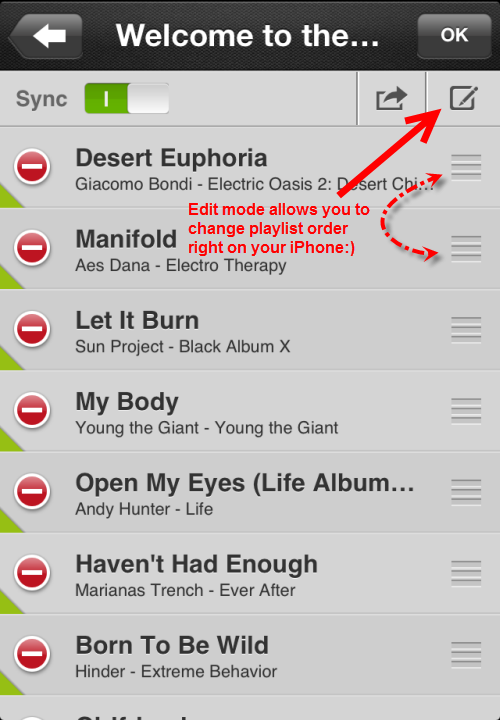
I love how the Deezer App allows you to change the track order on your phone, instead of needing to make changes on a computer like Spotify. Clicking the pencil icon bring you to edit mode where you can reorder to your hearts content.
Note: neither service lets you change someone else's playlist. If you want to switch/change/substitute tracks you need to create a new playlist and copy/drag all the tracks into it.
Both Deezer and Spotify offer an “offline” mode so the music is actually downloaded to your phone vs. needing to rely on a wireless connection for streaming.
Note: we hear frequently from Instructors who are confused by both Deezer and Spotify being advertised as “Streaming Music Services” – which they are… but for your class you should only use the “Sync” (Deezer) or “Available Offline” (Spotify) modes to ensure uninterrupted playback. Android devices say simply “Download”. This is very important because both Deezer and Spotify display “local” tracks (from iTunes) when you're creating a new playlist. If your new playlist includes a local track it'll skip over / won't play if you try to stream your class using the club's wireless. Syncing your iPhone, using the same wireless network as your desktop, ensures all your tracks will be there.
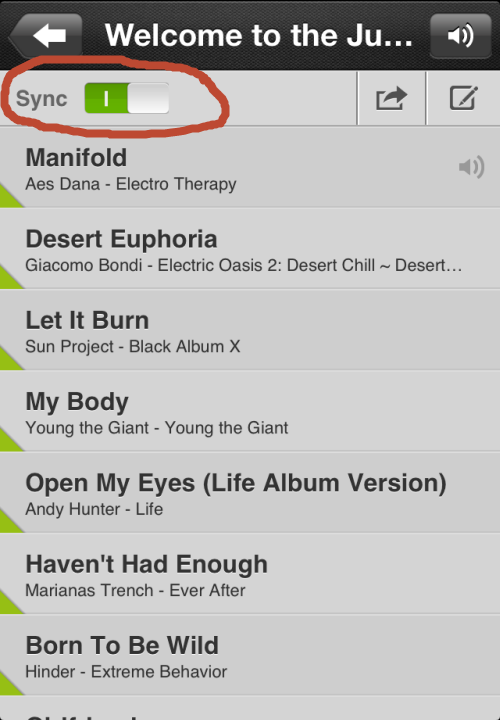
With Spotify you need to open each playlist before you can toggle the “Available Offline” option. With Deezer you can set a playlist to “Sync” at both the playlists screen and once you've opened the individual playlist.
Here's the “Now Playing” screen. Disappointingly Deezer has chosen to use the same tiny font as Spotify for the playlist timer. Obviously all of their developers are all young, with young people's eyes 🙁
So what's the negative difference between Deezer and Spotify?
Deezer doesn't appear (I can't find it) to offer a crossfade option. I really enjoy a seamless class, especially when it doesn't take any time to create, so I would miss not having this feature. Beyond that they're almost identical and either could make a huge improvement to your class.
We're in the process of adding a one-click Deezer playlist link to each Audio PROfile and plan to have this completed by tomorrow. We are doing this specially for all of our Canadian ICI/PRO members who can't access Spotify.
If you are in Canada you can click any of the Deezer links like this one to Krista's playlist shown above and sample each track – Deezer will open and you don't need to sign up in advance. Those of us in America will need to wait until whenever they get here.
Based on what's being described, iTunes Radio won't work for your class. Unless you just want to hit play and work with whatever iTunes decides to deliver to you.
iTunes Radio (from what I can see) is really just Apple's version of Pandora. Give them a song or genre of music and iTunes Radio will serve a streaming radio of suggested songs.
I found a good explanation at zdnet.com of why Apple isn't offering a streaming catalog like Spotify or Google's new Google Play music services.
1. It's less like to cannibalize its iTunes music sales. A buy button is prominently displayed in the upper-right hand corner of the iTunes Radio now playing screen putting you just a touch away from being able to purchase a track.
2. It was a much easier sell to the music labels. I'm sure that the buy button in the upper-right corner was a significant part of Apple pitch to labels.
3. It was easier to close deals with three major music labels (which came down to the wire) as opposed to getting deals with all of the labels representing the 26 million plus tracks in the iTunes Store's massive music library.
Personally, I'd rather have a “catalog” (or hybrid) music streaming service from Apple (imagine, every track in the iTunes store being free to listen to!) over a “radio” service, which is why I don't see canceling my Spotify subscription any time soon. Ever since I've bought into the catalog streaming model, I've purchased very few individual tracks (although I've still purchased a few pre-release albums and live recordings) — which is probably the exact reason why Apple (and the labels) opted for iTunes Radio on Monday. I hope that Apple eventually expands it's music subscription offering, but judging by how long it took it to secure deals with three music labels (iRadio has been rumored since September) I'm not optimistic.
When I click on the links nothing happens as I try to bring the playlists into Spotify. I also clicked on each person's name/profile but Spotify says they are unknown user?
Please help, I think I'm way off. I'm still trying to learn this app. Also, in order to take advantage in my class, I have to get a Premium account to stream through my iPhone right?
Thanks!
My response:
Hi – I'll try to help.
Yes you need a Spotify premium account to use your iPhone. You can get a free 30 day trial to see if Spotify is right for you.
There's a setting in Spotify that maybe preventing this.
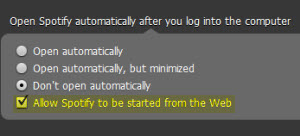
Open Spotify – Up at the top go to Edit > Preferences > and then scroll down to Open Spotify automatically and check the Allow Spotify to be started from the webbox.
Let me know if that solves it 🙂
John
P.S. You'll notice that I have the Don't Open Automatically box ticked. That setting prevents Spotify from opening on computer startup, but doesn't prevent Spotify from opening if you click a track or playlist link.
——————————–
Do you ever Shazam a track and then forget about it… only to be pleasantly surprised to find it later in our tagged lists?
I remembered to check this morning and here's what I found:
Lissie — Go Your Own Way is a cover of Fleetwood Mac's well known hit. I'd never heard of Lissie before – a powerful message that screams TURN IT UP as you cue a breakaway during a long climb that could begin with Lissie — Nothing Else Matters 🙂
When I joined Spotify Premium almost a year ago, I just loved the ease of using it to create and share playlists so much that I was able to overlook some of the problems I had with it’s cluttered look and lack of social features. Now, with Spotify’s newest updates, many of those problems have been fixed, making it even easier to find and follow other people and artists.
If you haven’t already taken advantage of the update, I highly recommend it. While there is one major drawback (I’ll get to that.), I’m finding the advantages to be worth it.
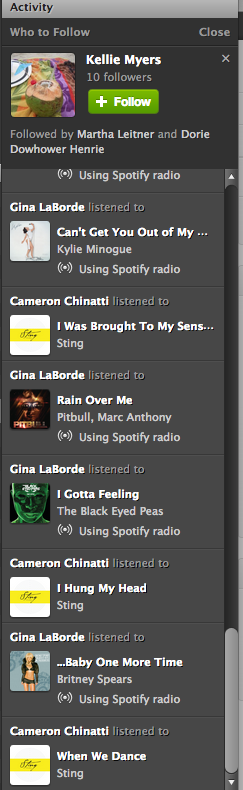
The first thing you will notice with the new update is the less cluttered look. Now it is much easier to navigate your profile page, playlists and activity sections. On the right side of your desktop screen, there is no longer a ‘favorites’ list. It has been replaced with a larger activity bar. Above the activity bar, you will find a handy ‘Who To Follow’ box. This box highlights people or artists that other people you follow are connected to-a great way to find new people to follow! Here’s a tip: If you don’t like Spotify’s current suggestion, click the ‘x’ on the top right of the box and a new suggestion will pop up.
You might also notice that the ‘Share’ and ‘Start Radio’ buttons are just above your playlist now for quick access. Tip: When you click ‘Share’, and then ‘Post To Feed’, you can add a little message that will show up on your follower’s feed. This would be a great place to share something about your playlist or a specific song in your playlist.
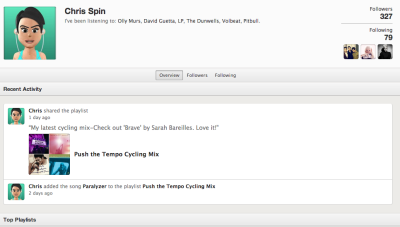
One of my favorite things about the newest update is the social section, with it’s emphasis on following others and viewing their activity. Click on a user and go to their profile page. You can view their published and followed playlists just like before AND you can now see their most recent activity and their ‘following’ activity-another great way to find new people to follow!
With all of these great new updates comes one little glitch. This one has caused instructors quite a bit of frustration. They took away the playlist timer. I can’t think of a good reason why they would do it, but they did. To get around this, I use on online timer which you can find here. It adds an extra step to my playlist preparation, and it’s kind of an inconvenience, but it really doesn't take too much longer once you get used to it.
These changes in Spotify are a step in the right direction, and I hope to see more updates and changes from them in the future. Great job on this update Spotify!
What do you think? Do you like the new updates? Is there anything you would like to see Spotify add to make your job as an instructor easier?
By Jennifer Lintz, Registered Dietitian and ICI/PRO Member Soigneur
Now that I'm finally on Spotify, there is one feature that I particularly appreciate:
Spotify Radio.
Pre-Spotify, this was my process for finding new music and creating playlists:
Listen to Pandora.
Make a note of songs that would work well in class.
Download new tunes from eMusic.
Create playlist in iTunes.
Not anymore!
Spotify has become my one-stop shop for creating class profiles. Instead of going from Pandora to eMusic to iTunes, I now do every single bit of my playlist prep in Spotify. This is my current routine:
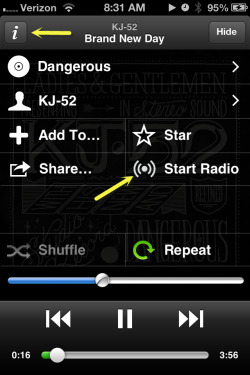
Click the “i” for any track and then click Start Radio for a playlist of similar music.
Listen to Spotify Radio. I also enjoy looking at my friends' and colleagues' Spotify playlists for ideas.
Add songs I like directly to my class playlist.
The “directly” part was a huge selling piece for me.In addition to hitting the “Thumbs Up” button, which immediately saves songs to the “Liked from Radio” playlist, you can add radio songs directly to your class playlist by:
dragging them to a playlist on your computer OR
clicking “Add to _______” and selecting the appropriate playlist
Talk about a time saver!
On top of this feature, Spotify has unlimited skips, meaning we can hit the “Thumbs Down” button as many times as we would like. The number of stations is unlimited, too. You can create radio stations based on a specific artist, song, genre, or even a playlist you already made.
My love of Spotify caused me to cancel my $16.99/month eMusic membership and sign up for Spotify Premium ($9.99/month) so that I can use my music “offline” when I am teaching classes. So far, I am not looking back!
How many of you have sung along to a favorite tune for years, in the safety of your car/shower or (God forbid) over the Instructor Mic, only to learn that you have some of the lyrics completely wrong?
Or looked at from the other direction; how many of you have felt a sense of contentment – once you've discovered the correct lyrics for a song – and your brain no longer needs to create sounds to fill the space where the newly discovered word fits?
I'll bet nearly every person in your class has a similar experience. That's why I'm thinking what follows could be something they would enjoy 🙂
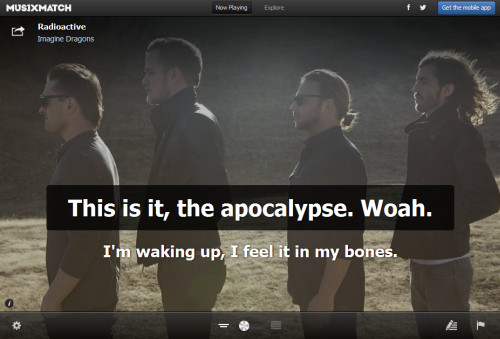
If you're using Spotify, you may have seen all of the different desk top Apps that are available. Most of them are designed around discovering new music. When I fired up Spotify this morning I saw this new musiXmatch App that displays the lyrics Karaoke style for tracks playing on Spotify, along with rotating cover art.
This could be something cool you could add to your class if you have video and a method of connecting your computer or device.
WARNING – Many songs you may search for may have the lyrics, but haven't been timed to the actual song. MUSIXMATCH will then ask if you would like to be the first to sync the lyrics to the song, as you listen along. THIS IS VERY ADDICTIVE! I burned an hour this morning working my way through the whole David Bowie — The Rise and Fall of Ziggy Stardust and the Spiders from Mars (40th Anniversary Edition) [Remastered] both to see if my 40 year memory was correct and to add the sync if needed.
I'm going to experiment with this next week. I'm starting a new 6:00 AM class on Thursdays and my experience is that these early AM “A” types appreciate being mentally stimulated early in the morning.
Here's a fun video about MUSIXMATCH.







 By Jennifer Lintz, Registered Dietitian and ICI/PRO Member Soigneur