
by John | Jun 17, 2014 | Instructor Tech Help, Latest News, Zone based Heart Rate Training
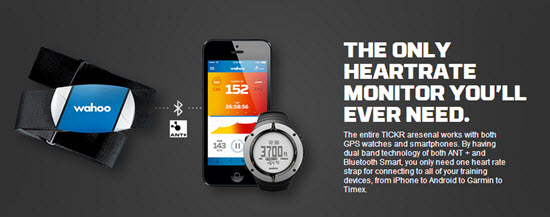
Finally a Heart Rate strap with both Bluetooth and Ant+ connectivity 🙂
I've been using a new TICKER Heart Rate Monitor straps – I'm excited to tell you about them + they'll be awesome used with the new Apple Smartwatch.
The guys at Wahoo Fitness emailed me today about their new line of HR straps that send out both BLE (Bluetooth Low Energy) and Ant+ frequencies. About time someone thought to offer both in the same monitor strap!
Up until now, your decision about what monitor strap to purchase was based on what device you wanted to connect with:
- I want to connect to my iPhone / smart phone = you buy a bluetooth strap. Bluetooth is the only signal your phone can pair with.
- I want to connect to a Garmin bike computer or use the strap with Performance IQ's display system = you purchase an ANT+ strap.
This new TICKR strap has both Bluetooth and ANT+ and it doesn't cost anymore than most single frequency straps – that's awesome in my book!
They've solved a second problem
How many times have you felt like saying; “IS THIS DAMN THING ON?
No Heart Rate strap, that I've ever seen, gives you any understanding that it's working. Is the battery good or dead? Do I need more spit to get it connected? I'm seeing that these new TICKR straps have two colored LED lights to show the TICKR’s device connection and heart rate detection – more awesomeness – and no more wasted trips to Walgreen's to buy one of those ridiculously expensive little flat batteries, when that isn't the problem.

I can't wait to try one and will update you once I have.
You can learn more here.
by John | Nov 11, 2012 | Best Practices, Instructor Training, Master Instructor Blog, Music

More and more I'm hearing and seeing how Instructors are experimenting with riding in with the class, rather than presenting up-front-and-center on the traditional “Instructor Bike”.
It's fun to mix it up and IMO, an imperative when teaching to a structured Virtual Ride DVD.
But riding away from the music controls creates a technical difficulty; how do you make adjustments to the sound volume?
I witness this firsthand, while riding in an unnamed (but very attractive) Instructor's class this morning.
Her playlist included a bunch of very interesting mashups of popular tunes. Which made for a great class… except that a number of tracks had been mixed at varying sound levels. After hitting play, our unnamed Instructor took her position with the rest of class in the front row, leaving her iPod up on the sound equipment cabinet. Everything was going as planned until one of the mashups came on REALLY LOUD! She hopped off her cycle, walked up to her iPod, quickly turn down the volume and returned to her bike. Problem solved.
Solved that is until the next song which was very quiet. Not wanting to disrupt the class any further she left it where it was, leaving me wanting to yell out “turn up your music!” Out of respect for another Instructor, I didn't say anything during her class.
But I will offer you two possible solutions, Amy:
- I can order you a very long cord for your iPod.
- I can lend you my Bluetooth receiver and show you how you can connect wirelessly using your Android phone.
I'm here to help and you know where to find me.
Actually there's another reason I've found to go wireless – many accessory cases prevent the 1/8″ plug on the connection cord from being fully inserted into your phone. So it doesn't work with the case installed 🙁
In my case I was forever taking off my iPhone's case so I could plug in the cord. When I got tired of the hassle, I quit using the case altogether. And then promptly dropped my iPhone, breaking the back glass panel – not good. So a Best Practice for any Instructor is to invest in a $25.00 (with free Prime shipping) for this Bluetooth receiver and not need to invest in a $549.00 replacement iPhone.
Speaking of riding along with your class… I Shazam'd this track last night, Come Along from Vicci Martinez. It conveys the essence of exactly what I'm trying to communicate to my students as we push through a tempo Threshold effort together. There's a wonderful refrain the you can add to your cuing at the 2:27 mark; Time Fly's, Make a Statement, Take a Stand… and finishes with; Take… Your… Shot!
I felt you might like it.
Vicci Martinez — Come Along
