

Adding Cadence / RPM to a Star Trac Spinner® NXT or Spinner® Pro Indoor Cycle
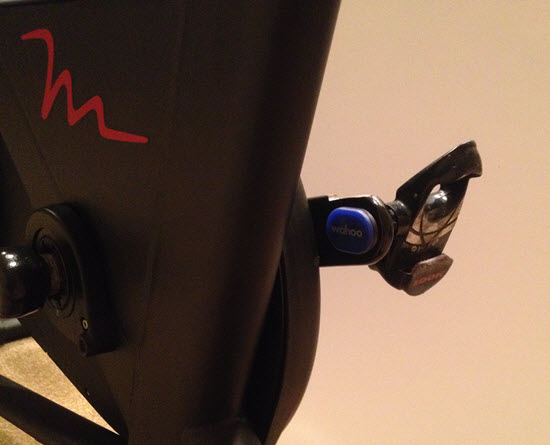
Wahoo BLE & ANT+ cadence sensor easily attaches to either crank arm and doesn't require any magnet or second sensor.
We talk a lot about the new Indoor Cycles with consoles that display a rider's performance data; Power /watts, RPM, distance, calories. Training with Power is fabulous if your club or studio as invested bikes recently. It's even more fabulous when all of that data is connected to a display training system like what's offered from Performance IQ or Spivi. Either system really adds to the fun factor, while delivering true performance data directly into each participant's email box – an awesome convergence of Keeping It Fun & Indoor Cycling 2.0 🙂
But is there an option to bringing big screen display training to your club or studio using conventional Indoor Cycles?
Absolutely and around 90% of the investment you'll make today will carry over to when you do finally upgrade to Power bikes – assuming you do of course.
My assumption is based on the fact that if you are riding a conventional Indoor Cycle, with no computer/console, there's a good chance you're on Star Trac Spinner® NXT's and Spinner® Pro's. Star Trac owned the market for indoor cycles back in the 2000's and sold thousands of both models. To my knowledge, back then nearly all of the Big Box clubs were riding Star Trac's – the one exception being LA Fitness.
So if your NXT's or Pro's are in relatively good nick and you would like to add technology so everyone knows how fast they're pedalling, you have a couple of options.
NOTE: I haven't seen a studio adapt a bicycle computer successfully and don't recommend wasting your time trying.
The most common solution is to install a Spinning® computer. These consoles will display cadence, distance (wildly inaccurate) time and HR if you're wearing an analog HR strap. A few words of caution:
- The Spinning computer has no option for connection (BLE or ANT+) to a display training system = they won't connect with Performance IQ or Spivi.
- These computers are designed to fit multiple models of Spinners®. There is a setting (you use a magnet to get into the option screen) you need to make to adjust the computer to your model of bike – to have RPM displayed correctly.
- They're pricey at $167.00 each and I'm not aware of any bulk discounts.
The alternative for studios not ready to replace their bikes, but do want to begin offering performance metrics (even RPM & HR can make a huge impression on clients) and possibly a bike reservation system, I recommend the new Wahoo RPM cadence sensor.
The $39.99 Wahoo sensor is about the size of a quarter and attaches easily to one of the crank arms. That's it. There's no second  magnet or parts needed. The package comes with a number of attachment methods – I'm showing it simply stuck on using some incredibly sticky double sided tape.
Battery life (replaceable coin cell) is supposed to be a year or more with it's auto-on feature. The sensor transmits in both BLE and ANT+ with great range so you could have a large studio with 40 or more NXT's wirelessly connected to Performance IQ or Spivi. Let the fun begin 🙂
The other option would be for participants to bring in their personal portable device; iPhone, iPad or Android phone. There are multiple Apps that will receive the sensor's BLE signal (all phones have BLE) and the free Wahoo Fitness App would be my choice. It's super easy to use and paring is very intuitive.
Yes this sensor will work with the Spinning App – only after you purchase additional sensor options.

Wahoo Fitness App showing RPM and Heart Rate

