
by Christine Hawthorne | Jan 8, 2014 | Deezer, ICI/PRO Team Member Articles, Instructor Training, Music, Spotify

When it comes to choosing music for my classes, I like to include several different genres in my playlists. Many that I create include a mix of classic rock, electronic, pop, and occasional country song and sometimes even classical. I always include at least a few current songs in each playlist, so it’s important for me to keep up with the latest songs as they come out each week.
Recently, I created a ride that included many favorite songs that came out in 2013, and since my riders had heard many of them through the year in my classes and of course on the radio, they really enjoyed the ride. You can check my post and playlist here.
Before I created the playlist for that particular class, I put together a separate Spotify playlist featuring all of my favorite cycling songs that dropped in 2013. I came up with forty-three of them, as well as a list of ‘honorable mention’ songs (songs that I used a few times, but wasn’t really crazy about-but some that you might find work just fine for you).
So without further adieu, I give you my top 10 Cycling Songs of 2013:
- Counting Stars by One Republic: This song is so upbeat and catchy, that I could use it in every class. It has a great beat and can be used seated or standing, or in combination. Some other great songs from this album that made my top list: What You Wanted and I Lived. This is by far my favorite album that came out this year.
- My Songs Know What You Did In The Dark (Light ‘Em Up) by Fallout Boy: This one is hands down my favorite of the whole bunch. Perfect for accelerations on the chorus, (or sprints/surges-whatever name you give them). This song’s energy and lyrics are unlike anything else I’ve heard on the radio this year and it will definitely keep your feet pedaling. Also check out The Phoenix and Young Volcanoes from the same album.
- Wake Me Up by Avicii: This song is a great mix of electronic, country-fusion. I remember the first time I listened to it thinking that it was different from anything I’d ever heard. Even after hearing it over and over, I’m still hooked. Some other great songs for cycling on this album: Heart Upon My Sleeve, You Make Me and Hey Brother.
- Timeless by The Airborne Toxic Event: I’m always searching for songs to use for heavy climbs. The lyrics and the vocals on this song are breathtaking, and as the title suggests, this one is timeless. A close runner up for climbing song of the year goes to Rebel Beat by the Goo Goo Dolls.
- Best I Ever Had by Gavin DeGraw: Another one of my favorites for accelerations on the chorus. I really like Gavin DeGraw’s music, and while this is a different sound for him, it works. It’s quirky, catchy and upbeat, and it’s sure to put a smile on everyone’s face.
- San Fransisco by The Mowgli’s: .This is one of those songs that sets the tone for your entire class when used as a warm up. It also works well as a fast flat road. Do you feel the love? I feel the love.
- Best Day of My Life by American Authors: This song, which you may have heard in a Lowe’s commercial or in the trailer for the movie ‘Delivery Man’, makes a great seated, standing or alternating hill climb. I also love Believer from the same album.
- #thatPOWER by will.i.am, Justin Bieber: While this is not a song I would typically listen to in my leisure time, I love a good strong beat that you can just get lost in while you’re pedaling. This one delivers just that.
- Jubel by Klingade: This is a recent find and one that I can see using again and again. It’s fresh and unique. I love the sound of the saxophone and the pretty vocals. I alternated between seat work and a standing climb on the beat, but I can see many different ways to ride to this one.
- Zorba’s Dance by David Garrett: This may seem like an odd choice to make my top ten, but every time I used this song, my classes LOVED it! It only clocks in at 2:34, but you’ll be tired and sweaty after this one. As the tempo builds, so does your cadence, ending with a 20 second all out sprint to the finish. Trust me. You and your class with love it!
Here’s the playlist that includes these top songs as well as the 33 others that made my list this year:
Honorable Mention: As I stated earlier, these are songs that didn't make my Top List this year. That’s not to say that you wont find the perfect spot for them in your next playlist:
-Clarity by Zedd
-Can’t Stop by Miley Cyrus
-Wrecking Ball by Miley Cyrus
-Safe and Sound by Capital Cities
-Blurred Lines by Robin Thicke
-Cups by Anna Kendrick
-Get Lucky by Daft Punk
-Applause by Lady Gaga
-Suit and Tie by Justin Timberlake
Care to take a listen?
Did I miss any? What were your favorites from 2013?
So whether you use strictly mainstream music for your classes, or you like to mix it up, try adding some of these top songs to your playlists in the coming months. You might just find some keepers in this bunch.
Here’s to a great new year filled with more amazing new music! Happy 2014!
by Christine Hawthorne | Apr 30, 2013 | Instructor Training, iTunes & Spotify Training, Music, Spotify
 When I joined Spotify Premium almost a year ago, I just loved the ease of using it to create and share playlists so much that I was able to overlook some of the problems I had with it’s cluttered look and lack of social features. Now, with Spotify’s newest updates, many of those problems have been fixed, making it even easier to find and follow other people and artists.
If you haven’t already taken advantage of the update, I highly recommend it. While there is one major drawback (I’ll get to that.), I’m finding the advantages to be worth it.
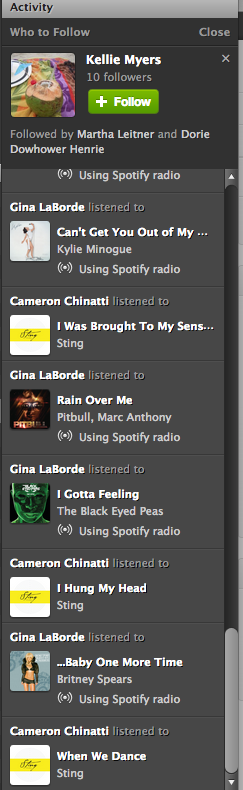
The first thing you will notice with the new update is the less cluttered look. Now it is much easier to navigate your profile page, playlists and activity sections. On the right side of your desktop screen, there is no longer a ‘favorites’ list. It has been replaced with a larger activity bar. Above the activity bar, you will find a handy ‘Who To Follow’ box. This box highlights people or artists that other people you follow are connected to-a great way to find new people to follow! Here’s a tip: If you don’t like Spotify’s current suggestion, click the ‘x’ on the top right of the box and a new suggestion will pop up.
You might also notice that the ‘Share’ and ‘Start Radio’ buttons are just above your playlist now for quick access. Tip: When you click ‘Share’, and then ‘Post To Feed’, you can add a little message that will show up on your follower’s feed. This would be a great place to share something about your playlist or a specific song in your playlist.

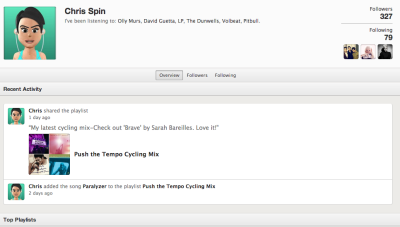
One of my favorite things about the newest update is the social section, with it’s emphasis on following others and viewing their activity. Click on a user and go to their profile page. You can view their published and followed playlists just like before AND you can now see their most recent activity and their ‘following’ activity-another great way to find new people to follow!
With all of these great new updates comes one little glitch. This one has caused instructors quite a bit of frustration. They took away the playlist timer. I can’t think of a good reason why they would do it, but they did. To get around this, I use on online timer which you can find here. It adds an extra step to my playlist preparation, and it’s kind of an inconvenience, but it really doesn't take too much longer once you get used to it.
These changes in Spotify are a step in the right direction, and I hope to see more updates and changes from them in the future. Great job on this update Spotify!
What do you think? Do you like the new updates? Is there anything you would like to see Spotify add to make your job as an instructor easier?
by Christine Hawthorne | Mar 11, 2013 | Instructor Resources, iTunes & Spotify Training, Music, Spotify
 Do you know about Spotify's Collaborative Playlist feature? It's a great way to share playlists with friends, fellow instructors and even members at your gym or club. When you use this Spotify feature, others can share, edit and add to your original playlist.
Sound interesting? It's really pretty simple. Just create a playlist in Spotify as you normally would. Then, right click (control+click if you're a Mac user like me) and you'll see a drop down box like this:
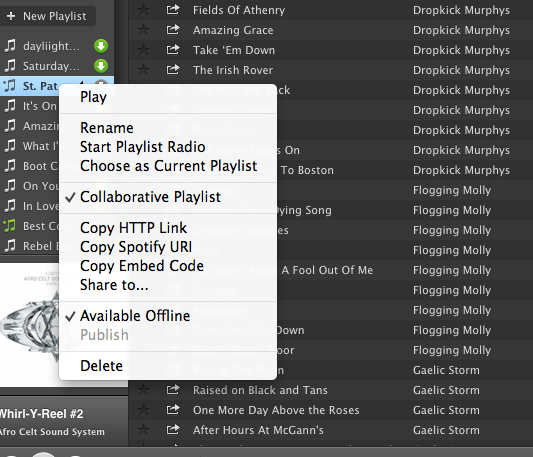 Choose Collaborative Playlist.
You can now find your collaborative playlist on the left sidebar of your profile screen with a green music note next to it. The playlist will not, however appear on your Spotify profile page. As far as I can see, there is no way to add a collaborative playlist to your profile. I believe this is because these playlists are always changing and therefore never really complete. If you figure out a way to publish them and still allow them to be collaborative, please share with us! Because the playlist does not appear on your profile, you need to invite others to see it.
Inviting others to join your collaborative playlist is as simple as sharing the link. You can do this by right clicking (control+click on a Mac) and choosing any of the options shown here:
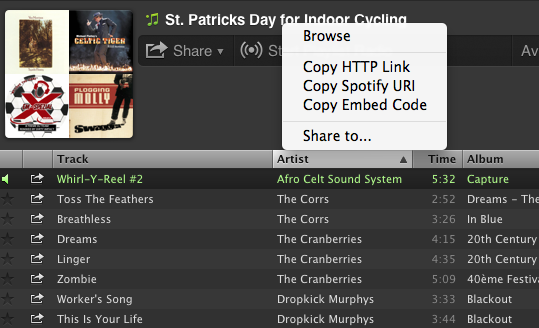
Now you can share your playlists by email or social media sites. Here are a few things to keep in mind when creating collaborative playlists in Spotify:
- Anyone that subscribes to your playlist can add songs, delete songs and change the order of the songs in the playlist.
- Everyone that subscribes to your playlist will see these changes.
- You can turn off the collaborativity of the playlist the same way you turned it on.
- Anyone that gets the link to your playlist can share the link with friends.
ICI/PRO has several collaborative playlists that you can access here.
I've recently created my own collaborative Spotify playlist: St. Patrick's Day for Indoor Cycling. I hope you find some inspiration here for your St. Patrick's Day ride this week! Please subscribe and share your favorites!!
by Christine Hawthorne | Dec 12, 2012 | Instructor Resources, iTunes & Spotify Training, Spotify
 When I first upgraded to Spotify Premium back in August, I was excited to try something new, but a little disappointed and apprehensive because it wasn’t as easy as I thought it was going to be. Change is never easy. But I kept at it and now I think I’m able to navigate it quite well. Creating and publishing playlists is the easy part. Muddling through all the little glitches with the system was a little tricky, but once I was able to figure them out, I rarely run into problems anymore. The difficult part, for me anyway, was finding people to follow and finding new music.
I don’t know about you, but I could spend hours listening to music and deciding if I think certain songs should earn a spot on my next playlist. When I first began using Spotify, I really didn't know where to begin. It wasn't like iTunes, (which I had been using forever), so I knew that I needed to find an easy way to use Spotify to get access to music that I could use in my classes. I didn't want to be tied to my computer all night searching for music because I couldn't navigate my way through this new terrain. I wanted to be able to easily find new releases and I wanted to see what other instructors were using in their playlists. So I set a goal to find some easy and time-saving ways to search for new music. I think I succeeded. Here are few tips to add to your arsenal or to help you if you’re just getting started:
- Find people to follow and subscribe to their playlists. I explain this in detail in my last ICI/PRO post.
- Don’t overlook the ‘What’s New’ Tab at the top left of your main sidebar on your profile screen. Click on this tab and you’ll find a customized page for you with new releases, top playlists, top tracks, trending playlists, and featured Spotify apps.
- Subscribe to playlists that ‘refresh’. I have found a few playlists to subscribe to that help me to keep up with the best new releases as well as the hottest songs in the country at the moment. Here are a few that I subscribe to: Billboard Hot 100; New Release Tuesdays and New Releases on Spotify
- And speaking of new releases, if you like to use them in your playlists, learn to love Tuesdays! Most of the new releases come out on Tuesdays, so check for updates on your main page and be the first one to listen!
- ‘Like' Spotify on Facebook. You'll get really great updates on new music and bands, helpful tips and general updates.
- Sign up at Sharemyplaylist.com. I have not used this service as a means of sharing my playists (yet), but they DO email me a newsletter every week with seven of their top playlists, all of which have been published in Spotify. So with the click of a button, you can listen and subscribe. I can't say enough about this resource. I always find a TON of great music here.
In addition to the ideas mentioned above, I think in the not too distant future you may see some changes over at Spotify that will make your music discovery a little bit easier. Not only has Spotify overhauled
their website, but they will very soon be unrolling some new and exciting changes. If you used iTunes Ping, you may find this to be a good replacement. See what it's all about by clicking the photo below:
How do you find music to use in your classes? If you have a great resource, please share in the comment section.
by Christine Hawthorne | Nov 13, 2012 | Instructor Tips and Tricks, Instructor Training, iTunes & Spotify Training, Music, Spotify

After some poking around and exploring, I think I have discovered the best way to find and follow other people on Spotify. Finding, following and adding people to your ‘favorites’ will in turn give you more music to explore and ultimately use in your cycling profiles.
Spotify has clearly not made the task of finding other people or cycling instructors to follow an easy one. If you were an iTunes Ping user, you remember how simple it was to find other instructors and to see their playlists and what they were purchasing and listening to. In Spotify you can do most of these things. You just have to work a little harder at it. Once you have found some people with similar musical tastes, you’ll find the process of searching for new music much simpler.
There are a few ways to go about searching for and finding people to follow in Spotify:
- Since Spotify and Facebook are connected, you can follow friends that are already on Facebook. While this one is simple, it’s my least favorite option. First of all, you actually need to be ON Facebook. I realize that most of you probably are, but I’m sure there are some of you that either don’t have a Facebook account, or, like me, use it very sparingly. Another reason I’m not a fan of the Facebook method is because your Facebook friends may not be listening to the kind of music you want to use in your cycling playlists. You’re looking for other instructors with similar musical tastes. I suppose you could ‘friend’ all of the cycling instructors in the world on Facebook, but then you have a bunch of people you don’t even know looking at your personal Facebook page. If that doesn't bother you, then I guess using Facebook is one way to find friends to follow in Spotify.
While the above mentioned techniques will surely work, I think I’ll stick with my highly un-scientific, yet effective (not to mention easy and fast) way to find people to follow on Spotify:
- Find one person that has a playlist you like and head on over to their profile. Let’s use my profile to get you started: http://open.spotify.com/user/chrispins
- Once you have arrived on my profile page, take a look at some of my ‘published’ playlists. Not only will you see my original playlists here, but you will also see playlists that I have subscribed to. These are playlists from other members. Here is a picture of part of one of my original playlists, posted on my profile page:
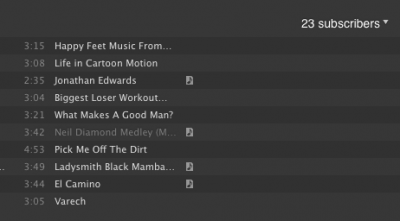
- In the upper right corner of these profiles, you can click on the ‘subscribers' and a drop down list will appear with the profiles of all of the people that have subscribed to my playlist. There you go! 23 new people (mostly cycling instructors) to follow! Click on their names to go to their profile pages, and check out what they are publishing and subscribing to. If you like what you see, click ‘add’ in the upper right hand corner of their profile. This will allow you to see what they are listening to and publishing in a scrolling list on the side of your profile. Hint: After you click ‘add’, you will have an option to add them to your ‘favorites’. I recommend doing this because it allows you to access their profile even if they are not actively listening to or using Spotify at the same time that you are. Their latest activity will always be available in the upper right side of your profile.
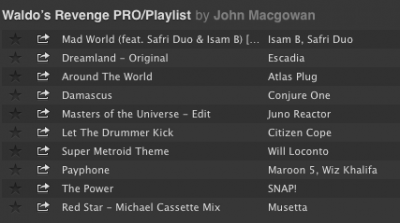
- Now that you have found some other profile pages, you can continue to explore the ‘followers’ of the playlists that they have published or subscribed to. Many people have not published many playlists, but have ‘subscribed’ to other people’s playlists. In this case, you can go directly to the profile of the person that created the original playlist by clicking their user name next to the playlist title as in this example: This is a partial shot of a playlist that I subscribed to by John MacGowan:
- Just click on John's name next to the playlist title to go directly to his profile.
- Here are some links with some basic tutorials that you might find useful:
Can I Add Any Spotify User To My People List?
How To View A Profile From Within Spotify
Spotify Social Basics
So, what are you waiting for? Give yourself a little time and start exploring more music on Spotify. Once you start finding people to follow, you might find it hard to stop!
**Feel free to share your Spotify profile link in the comment section to get the ball rolling!

