
by John | Jan 5, 2014 | Big Box Instructor, Class Work-Sets, Master Instructor Blog, Training With Power
Today was the official launch of the Life Time Fitness Performance Cycle Winter training series. These classes are hosted at many of the LTF clubs around the country and the plan is for all of us to deliver similar formats, following the same nonlinear (or is it non-linear) periodization training program.
If the concept of nonlinear periodization is new to you, join the club. I first saw the term used in some of the educational material from Coach Troy Jacobson that was provided to us. It essentially means you don’t follow the rigid training periodization calendar we’re all familiar with; Endurance > Strength > Speed > Anaerobic > Race.
Here’s a good description of nonlinear periodization from trainingpeaks.com
Lydiard-style periodization is known as linear periodization because the various major training stimuli (aerobic, anaerobic, strength, speed, etc.) are largely segregated from each other in the training process and arranged in a line in which each gives way to the next. This approach is distinct from nonlinear periodization, in which the various major training stimuli are mixed together throughout the entire cycle and only the emphasis changes from period to period.
Most of the newer periodization systems–those introduced since 1980–are nonlinear. One example is the so-called multi-pace training method developed by David Martin and Peter Coe. In their book, Better Training for Distance Runners, Martin and Coe wrote, “One sensible method for injury-free performance progress over the course of a macrocycle involves harmonious interdevelopment of strength, speed, stamina, and endurance all during the year, never eliminating any of these from the overall training plan… We tend to disagree with coaches who prescribe large volumes of solely longer-distance running over an initial period of weeks, followed by a similarly concentrated bolus of solely higher-intensity speed sessions over succeeding weeks.”
When I hear Nonlinear Periodization I think NOT BORING! Perfect for our Indoor Cycling classes where we really don’t know exactly what our Athletes in class need, so let’s give them a combination of; Endurance > Strength > Speed > Anaerobic.
I discussed this with Coach Troy during an Instructor call last week. His said he felt confident that our riders will see good progress, working in multiple energy zones in the same class = no mind numbing Long & Slow classes… or at least Long & Slow combined with some Strength > Speed > Anaerobic efforts to break up the monotony of a long class.
Why haven’t I heard about this before?
Good question…
As this was the official Kick Off – we started with Spinervals 27.0 Threshold FTP Test .
Here’s my Spotify FTP Class Playlist which tracks well with Epic RaceDay Indoor Cycling DVD — which includes a very intense 30 minute criterium race that is the perfect motivation for a 20 minute FTP assessment classes.
Instructor Tip
You can time the criterium to end right on cue with the completion of your 20 minute effort for an awesome finish – complete with the cheering crowd and ringing cow bells! At the initial start/options screen, select 60 min SFX – (no music > just the sound effects). I run the video from the beginning, not really following it until the start of the Crit. When you have 15 minutes left in the FTP assessment use the Skip >> on the DVD player remote to move forward to the next section = the final 15 minutes of the Crit. I keep the DVD sound down until the last 5 minutes. It’s bicycle racing magic when they ring the Cow Bell signalling last lap / one minute to go!
Class length 75 minutes + Cool Down
Warm Up — 10 minutes. 5 minutes of gradual increases in wattage. During the second 5 mins. we’re finding the wattage where everyone is first noticing a change in breathing; VT1 / Aerobic Threshold = the top of the Recover Zone. This establishes a rough understanding of a base wattage that we use throughout the rest of class.
3 x 30 sec. Hard / 30 sec. Easy – Openers to AT/LT. I cue these by first having everyone find the amount of load @ 70 RPM that has them feeling they should (not just could) come out of the saddle. The 30 sec. Hard is then simply accelerating to 90+ RPM which results in some pretty impressive power numbers. The 30 sec. Easy is back to 70 RPM — many will stand during the Easy portion.
1 minute rest – I encourage riders to focus on their recovery. Once they feel calm in their breathing, bring back the Base level work wattage.
3 min. Hard Effort — Here’s a “Best Effort” to establish a benchmark PTP Personal Threshold Power (top of the Perform Zone) or ride at 110% of FTP if known. It’s very helpful to riders to have that understanding of their personal upper wattage number. The “Best Effort” Threshold # + the Base Threshold # we found earlier form the three Power working zones I use in class.
2 min. Rest
3 x 1 min. Hard Effort x 1 min. Rest. These should be above the 3 minute average wattage.
3 min. Rest
20 min. TT / FTP Assessment effort – Quickly establish the average wattage at or near the 3 min. Interval. > Stage Button and then maintain. You may want to offer slight changes in cadence & load, while keeping wattage = to the initially established watts #. I was off the bike at the 10 min. to go, coaching, encouraging and then just watching them with a big smile on my face. This is a great group and they looked incredible – I’m so in my element with these classes 🙂
5 min. Rest
Base Wattage (aerobic) flat road to finish – use these time to congratulate everyone and give tell them a bit about what you have planned for them next week.
Cool Down
by John | Jan 5, 2014 | Best Practices, Big Box Instructor, Engage Your Students, Instructor Training, Promote and Build Your Class
Don’t depend on BCC email getting through to your athletes.
“Sure John – I’ll email everyone on my list about your up-coming classes.”
My buddy Randy Erwin is a “Connector”. One of those awesome people who makes the effort to plan events (like outdoor rides) and get-togethers. Randy is the team captain of our Subaru MS 150 team and his love/passion for coordinating group rides lead to him being recruited to be the area Life Time Fitness Cycle lead.
Last night I talked to Randy and he told me he was excited for the FTP assessment I had planned for this morning and that he had emailed everyone three times, so he felt that we’d have a bunch of cyclist from his list.
Except most of them didn’t show this morning 🙁
A couple of them did show up for the 9:00 am class that follows mine. Confused looks at those of us there who were cooling down; “Wait, was there an earlier class… why wasn’t I told?”
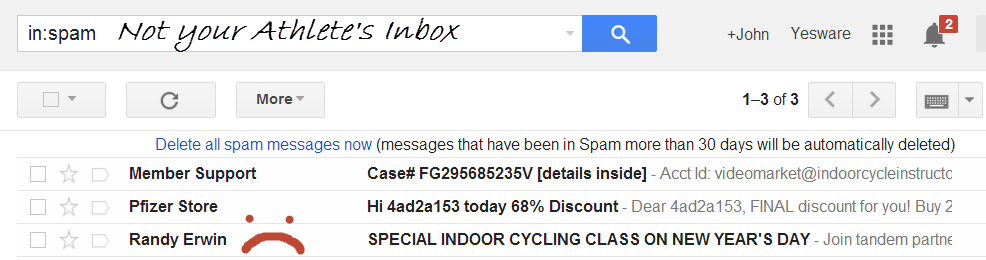
I hadn’t received (and neither had many others) any emails from Randy this week. Neither did Amy – we’re both on his list. So when I got home this morning I checked and found one of Randy’s emails in my SPAM folder, which I rarely check on my laptop and never on my iPhone. Note to self to check there more frequently.
I called and asked; Randy…how many names are on your list? . About 200 was his response. Send a BCC email to a large of a list of email addresses must have triggered something in Gmail to think his email was SPAM = very few of us saw it.
So what to do?
It drives me crazy when I receive mass CC emails – typically I see them as sub requests. They are a total violation of email privacy and if one of the recipients have their email hacked, we all get the spam emails.
So if I want to email a list of athletes who take my class, I should use the BCC (Blind Carbon Copy) feature… right?
For a few people, sure that’s OK. But once you have a large number (20+) of recipients, then No. At least not if you want to be sure your email doesn’t end up in a SPAM folder and everyone will receive your latest class/event announcement.
Use a White-Listed Email Provider.
White-Listed just means trusted source… as in we don’t allow any SPAM emails sent from our accounts Ms. AOL, Yahoo, Gmail,  Hotmail, etc. so you can confidently deliver it to your customer. The two most popular are Constant Contact and my favorite MailChimp for a bunch of reasons. The biggest reason for you is that it’s completely free until you go over 2,000 subscribers or send over 12,000 individual emails a month. So if Randy used MailChimp he could send 60 emails a month to is list of 200 subscriber each month at no charge. Fabulous deal – they don’t even ask for a credit card.
Click to Subscribe
At one point you subscribed to the ICI/PRO Newsletter, by clicking a link and adding your name and email address. Using MailChimp you’ll have the same ability to post a Subscribe Here link on your Facebook or Instructor blog = no manual entries!
You need their permission first
I decided that I would like to have all of Randy’s contacts in a MailChimp account so I could email them > and know they are getting through. Except Randy doesn’t have permission to give me the list, from the people on it, so he can’t just give it to me. The solution is to:
- Create a MailChimp account – here’s the link.
- Create a specific list
- Have Randy send out my Subscribe Here link in an email. I’ll suggest that he brake up the list into 20-30 address at a time and send the email with the link 2-3 times.

I already have a MailChimp account – so all I needed to was to create a new list. Here’s the link to my list if you’d like to see it – http://eepurl.com/LQ_2P The Default in MailChimp is to collect First & Last Name + email address, which is normally plenty to start with. It’s beyond the scope of this post, but the signup form can be easily modified to include pretty much anything. Please understand that you can ask for too much and they’ll not subscribe.
Class sign-in list
I’m also collected emails at the start of each class using a hand written sign-in legal pad.
Instructor Tip: When adding emails to MailChimp from a sign in sheet, it’s not uncommon to end up with a few you can’t read. My tip is to do a quick search in Google using what you CAN read and search for the rest.
-
First and Last + the word “email” will many times display the correct email. You might need to add a state (MN, CA,FL, etc.) or city for common names. Google knows everything.
-
I will frequently check the domain alone – @XYZcompany.com or the domain + first/last name
Would you like additional info or help with this or other methods of marketing your class?
Many of us get near ZERO help from our club/studio > so it’s up to all of us to grow our classes.
by John | Jan 3, 2014 | Featured Studios, Free Podcasts, Instructor Training
This podcast is no longer available.

by John | Jan 1, 2014 | Instructor Training, Latest News

Thank You! With the one exception (losing our friend Jim Karanas) 2013 was an awesome year here at ICI/PRO!
I just got back from co-teaching a 90 minute Performance Cycle class with the Senior Group Fitness Instructor Amy. We had a great group of committed Endurance Athletes this AM – I say committed because many of them said they went to bed early (missing the ball-drop), just so they would be rested for class this morning.
Here’s the playlist we used – which is a combination of Amy’s and my songs selections.
2014 New Years Class Spotify Playlist
While Amy was leading the ride, I got to thinking; as we move into 2014 it would be fun to take a quick look back at 2013, by looking at the numbers…
141,174 – Number of unique visitors to ICI/PRO – up ~20% from 2012.
418,367 – Number of pages they read while here.
20,518 – Number of views of our most popular page Starting an Indoor Cycling or Spinning® studio….can it work? If you have the of dream of starting a new Indoor Cycling Studio, you’re not alone 🙂
1,458 – Total number of posts published here to date.
377 – Posts published in 2013
And to think, when I started this 5 1/2 years ago I was concerned we would run out of things to talk about!
Here’s to making your 2014 the best year ever!

by John | Jan 1, 2014 | Audio PROfiles, Instructor Training, Latest News, PRO Podcasts

Are you taking advantage of our Super Secret iTunes RSS Feed to listen to our Audio Class Profiles – through your computer or portable device [wlm_firstname]?
If so, we’ve made a significant change that will simplify finding just the right profile for your next class > now the Super Secret iTunes RSS Feed only contains profiles and PRO/Podcasts – not other free Podcast episodes.
Here’s what happened .
Based on the sheer number of Podcasts and PROfiles we’ve published over the past 5 years, the iTunes RSS feed (that tells iTunes what’s new here at ICI/PRO) has put on a bunch of weight. The sheer volume of content included in the feed was really slowing down our communication with the iTunes music store + many of our old episodes got pushed off the bottom of the list. As weight-loss is on the minds of many at the start of a new year – we felt this is a great time to shed a few pounds.
Now we are publishing two separate feeds:
- Our free iTunes RSS feed that’s for everyone – .
- Our new Super Secret iTunes RSS Feed that’s just for ICI/PRO members and only contains ICI/PRO member’s only audio and video content.
If you’re happy with things as they are, you don’t need to make any changes.
But our suggestion is for ICI/PRO members to subscribe to both the free Podcast feed and the new Audio PROfiles RSS feeds.
Set up your Super Secret iTunes RSS Feed using iTunes on your computer
- You don’t need to, but I would first open iTunes > select Podcasts and then delete the existing ICI/PRO Podcasts.
- to subscribe to the free Podcast.
- Scroll down this page and Right Click on the “RSS Link” below > Copy Link Address
- In iTunes – in the top left navigation select File > Subscribe to a Podcast > Right Click in the dialog box that will open and select > Paste (or us the keyboard Ctrl “V”) and then OK.
- Depending on your settings in iTunes you will probably see just the most recent episode. Use the old episode button to add more.

Super Secret iTunes RSS Feed on your mobile devise
Once you have a Podcast App installed on either an iDevice or Android, open this page on your device, Simply clicking the “RSS Feed” link below should open the App and asked if you want to subscribe to the Podcast > click OK and that’s all you should need to do. Here’s the link to the Apple Podcast App for iPhones and iPads – here’s an App for your Android.
Please let me know if you have any difficulties.
ICI/PRO Members – the link to your RSS Feed is right below this. You’ll also find it in the RH side bar of every post.
[wlm_loginform]