This Podcast is was originally published on December 13, 2008, I have updated it with our new Podcast host information and I am representing it now. I hope you enjoy it, Joey
Minneapolis was the last stop on the Global Ride Tour. It was at Pedal Indoor Cycling Studio a wonderful private studio in NE
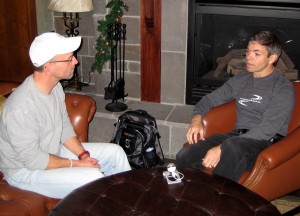
Minneapolis. The studio's owner Maryjo Hackett made everything work on short notice. I had a chance to sit down and hear from Spinning Instructor Gene Nacey about his two week, 9,500 mile road show. Gene was telling me that he has been editing and uploading videos to YouTube while they drove between towns. I felt a little competition brewing so I wanted to get this up before he got on the airplane this afternoon.
Listen to the Podcast below or subscribe using iTunes or Zune.
This Podcast is was originally published on December 3, 2008, I have updated it with our new Podcast host information and I am representing it now. I hope you enjoy it, Joey
I met Gene Nacey, the founder of Global Ride, LLC, at the Heart Zones Convention last month. Gene premiered one of his new Virtual Ride DVD's during an Indoor Cycling Class. What's unique about these DVD's is that you can teach to them. I had a chance to talk with Gene during a short break in his “Nationwide Global Ride” promotion tour.
You can follow along with Gene's tour at his blog Here
Listen to the Podcast below or subscribe using iTunes or Zune.
This Podcast is was originally published on November 26, 2008, I have updated it with our new Podcast host information and I am representing it now. I hope you enjoy it, Joey
Keiser Cycling Master Trainer Suzette O'Byrne and I discuss their M3 Indoor Cycle and it's unique magnetic resistance system. Suzette also describes the focus of their Indoor cycling certification and module based continuing education programs. You can find Indoor Cycling Certifications and Workshops here.
You heard it here first!
I think Suzette gave me my first “news scoop“. Keiser Cycling is planning to announce a correspondence (home study) certification course by the end of the year. Listen to the Podcast for the details.
This Podcast is was originally published on November 10, 2008, I have updated it with our new Podcast host information and I have updated the relevant links. I am representing it now. I hope you enjoy it, Joey
I have always felt that there was something missing when you compare riding a Spinning bike indoors with riding outdoors; an understanding (or some measurement) of how much power you are actually creating.
I'm still getting asked (and see questions on Facebook) about integrating music MP3's from multiple sources (Soundcloud's the most popular) into a Spotify or Deezer playlist.
We'll use Spotify for this tutorial as Deezer is nearly identical and Spotify is more popular right now. I'm using a PC, but the solution is the same on a MAC if you're having this problem that goes something like this:
Hi John,
I downloaded a Free Music Friday track from Soundcloud (or one of Dennis Mellon's fabulous 3 song mixes) and want to include it in a Spotify playlist. I'm pretty sure I downloaded the track and it opened and played in iTunes – but I can't find it anywhere in Spotify.
Can you help me?
Frustrated Instructor 🙁
Hidden settings in iTunes and Spotify and your Internet Browser
We'll actually they're not hidden, just hard to find without knowing where to look. There are two places that will decide what local files (music that you have in iTunes) will be displayed in Spotify's Local File Library.
iTunes settings
When you download a MP3 from any website, it will typically end up in your Download Folder. I say typically because the default location on every browser (Chrome, FireFox, Safari – please don't use IE) is your computer's Download Folder. If your downloaded MP3s don't end up in your Download Folder you can change the location in the browser's settings. Leave a comment below if you need help.
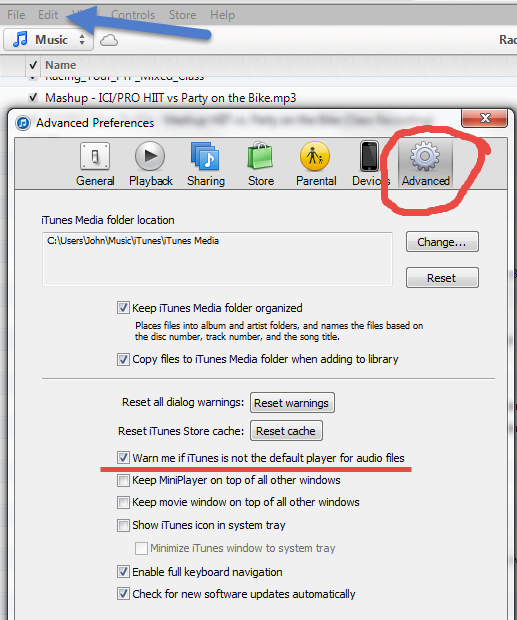
To get your new remix into iTunes you just need to click the file and it should open in iTunes. If it doesn't open iTunes and go to Edit > Preferences > Advanced and tic the box shown below and then close the Edit window. Click another MP3 in your Download Folder and you'll get a message, something like; iTunes is not the default music player… would you like it to be? You do. Select yes and that part's done.
Now just because a MP3 opens and plays in iTunes, doesn't mean it's actually in iTunes.
Go back to the Advanced settings in iTunes. Tic the two boxes shown below so when you open a track iTunes will make a copy and add it to your My iTunes Music Folder. That will solve 99% of the problems I hear 🙂
Spotify settings
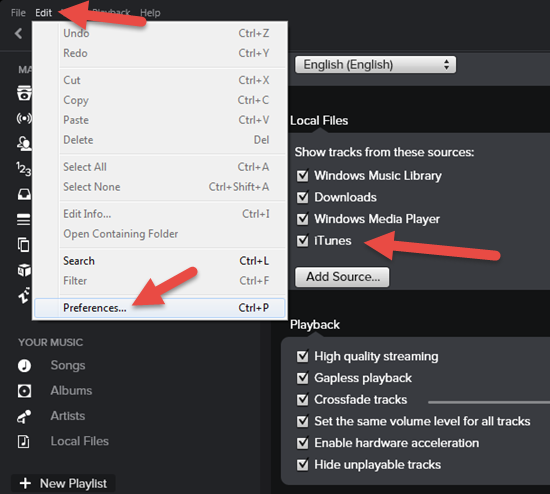
The defaults settings in Spotify should be set correctly. So once you've downloaded a track, clicked it and it opened in iTunes, it will show as a local file in Spotify. Here's where you check if it doesn't.
Yes I know Spotify is supposed to also include files from your Download Folder – I'm not sure it works for everyone. So Tic everything you see here.
Did this solve a big problem for you?Here's how you can reciprocate value with me and have access to dozens of similar tricks combined with over 1300 articles and 60+ class profiles.