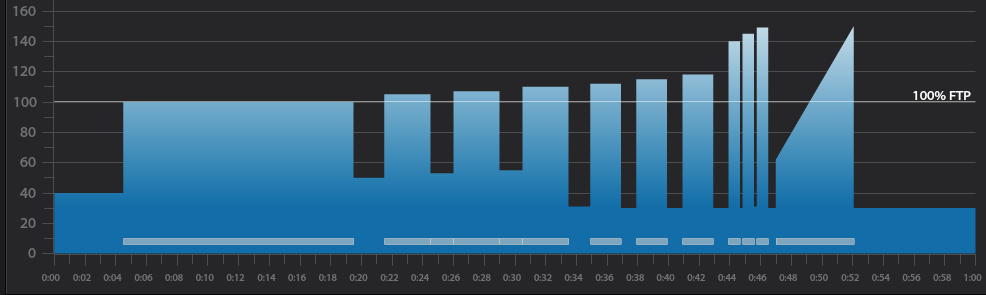
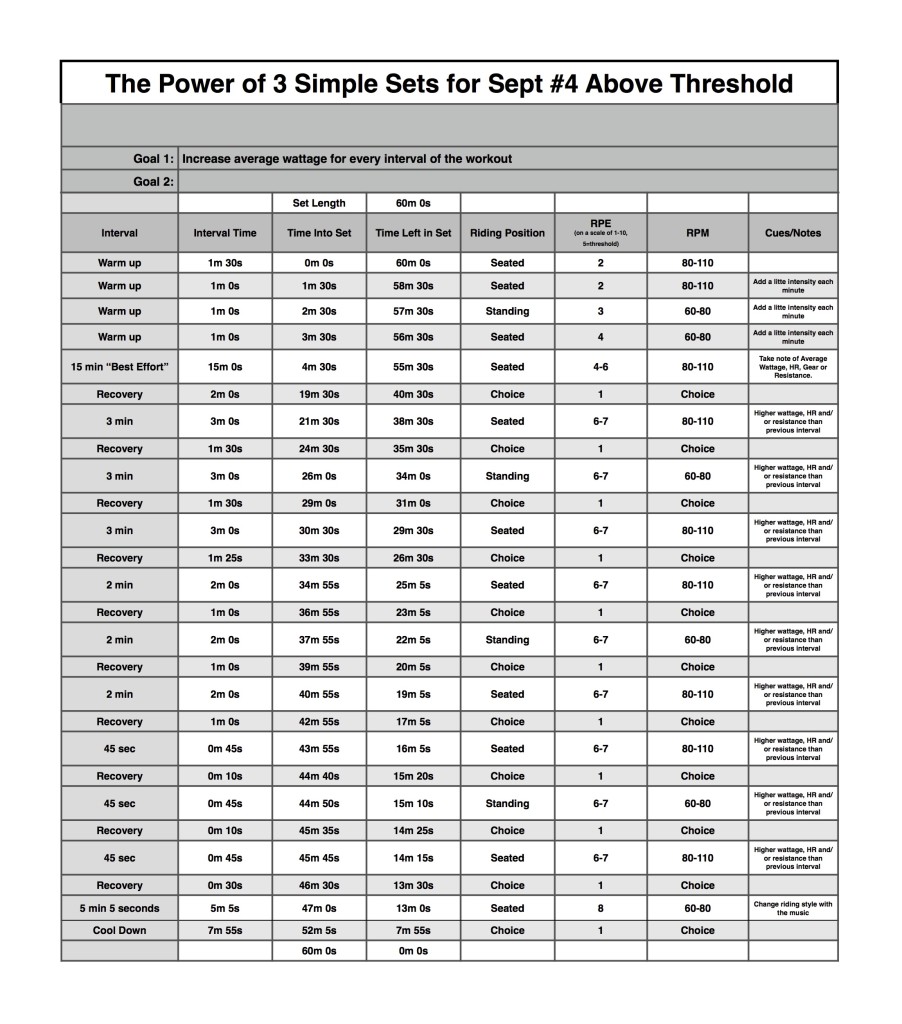
Below you'll find Week 1 of October's @ or Above Threshold Keep it Simple and Progress indoor cycling profile.
Workout Basics:
4 minute 30 second warmup
15 minute benchmark ride to find “Maximum Sustainable Wattage”
2 minute recovery
3 x 3 minute interval w/1 minute 30 secondrecovery after each
3 x 2 minute interval w/1 minute recovery after each
3 x 45 second interval w/10 seconds recovery after each
5 minute interval increasing intensity throughout
8 minute cooldown
Workout Goal:
“Can you increase your average wattage for EVERY interval until the last song?”
4 minute 30 second warm up
Slowly and steadily elevate the HR or Wattage to above threshold
1 minute recovery
15 minute “Maximum Sustainable Wattage” Test
Settle into a sustainable intensity, HR or Wattage
The songs change every 3 minutes
Change riding position or RPM with song changes
Remember Average wattage at the end of the 15 minute interval
2 minute recovery
3 minute interval goals and specifics:
Ride for 3 minutes seated at a constant RPM between 80-110 rpm.
Complete the interval with a higher average wattage than the previous interval
1 minute 30 second recovery or reset
3 minute interval goals and specifics:
Ride for 3 minutes standing at a constant RPM between 60-80 rpm.
Complete the interval with a higher average wattage than the previous interval
1 minute 30 second recovery or reset
3 minute interval goals and specifics:
Ride for 3 minutes seated at a constant RPM between 60-80 rpm.
Complete the interval with a higher average wattage than the previous interval
1 minute 30 second recovery or reset
2 minute interval goals and specifics:
Ride for 2 minutes seated at a constant RPM between 80-110 rpm.
Complete the interval with a higher average wattage than the previous interval
1 minute recovery or reset
2 minute interval goals and specifics:
Ride for 2 minutes standing at a constant RPM between 60-80 rpm.
Complete the interval with a higher average wattage than the previous interval
1 minute recovery or reset
2 minute interval goals and specifics:
Ride for 2 minutes seated at a constant RPM between 60-80 rpm.
Complete the interval with a higher average wattage than the previous interval
1 minute recovery or reset
45 second interval goals and specifics:
Ride for 45 second seated at a constant RPM between 80-110 rpm.
Complete the interval with a higher average wattage than the previous interval
10 second recovery or reset
45 second interval goals and specifics:
Ride for 45 second standing at a constant RPM between 60-80 rpm.
Complete the interval with a higher average wattage than the previous interval
10 second recovery or reset
45 second interval goals and specifics:
Ride for 45 second seated at a constant RPM between 60-80 rpm.
Complete the interval with a higher average wattage than the previous interval
30 second recovery or reset
5 minute interval goals and specifics:
Increase intensity every minute until end of song
Cool Down
[wlm_private ‘PRO-Platinum|PRO-Monthly|PRO-Gratis|PRO-Seasonal|Platinum-trial|Monthly-trial|PRO-Military|30-Days-of-PRO|90 Day PRO|Stages-Instructor|Schwinn-Instructor|Instructor-Bonus|28 Day Challenge'].
Trainer Road Profile (If you're Trainer Road Member join my Team to get this and all profiles)
[wlm_private ‘PRO-Platinum|PRO-Monthly|PRO-Gratis|PRO-Seasonal|Platinum-trial|Monthly-trial|PRO-Military|30-Days-of-PRO|90 Day PRO|Stages-Instructor|Schwinn-Instructor|Instructor-Bonus|28 Day Challenge'
Right Click on the blue underlined link
Select “Download Linked File As”
Select a download location
Once file is completely downloaded, find it in the location you selected
Drag the file into your iTunes or Spotify library OR
Right Click on the file and Select “Open With”
From the drop down menu select “iTunes” or “Spotify”
File should begin playing and is now part of your iTunes or Spotify library
To download the above media on a PC:
Right Click on the blue underlined link
Select “Save Link As”
Select a download location
Once file is completely downloaded, find it in the location you selected
Drag the file into your iTunes or Spotify library OR
Right Click on the file and Select “Open With”
From the drop down menu select “iTunes” or “Spotify”
File should begin playing and is now part of your iTunes or Spotify library Click here to watch a video on how to download media files from ICI/Pro.
Here's a song I use every once in a while in my classes and it seems that almost every time I do, someone asks, ‘What is that song??” It's unique, funky and fun and makes a great fast flat road at around 100 rpm's. Here is the original:
E.S. Posthumus has some great stuff that I've loved using in my profiles-especially those that involve a lot of climbing. Wikipedia describes their sound as “a form of 21st-century classical music that intertwined popular style drum rhythms with orchestral and electronic sounds”. (Fun fact: E.S. is an acronym for “Experimental Sounds”).
There are so many of their songs that I love using but the latest is around 3:00 in length, so if you're looking to plug a shorter hill song into your profile, this one should definitely fit the bill. Go to their Spotify page to find many more!
I'm on my way to Chicago for Club Industry 2015 to show off the new Stages SC3 Indoor Cycling bike. Cameron Chinatti and I will be leading a bunch of free training session, if you're in the area please stop by and ride with us. Here are class descriptions and registration links:
Here are the descriptions and form links to register for each:
8:30-10:00 – Oh no! Not the Power Police – Led by Cameron Chinatti: It’s official: consoles and power measurement for indoor cycling are here to stay. But with every new piece of equipment comes ‘creative’ misuses and abuses. Avoid getting caught by never committing a crime in the first place! You’ll learn the most common crimes against consoles, then get ready to ride as we explore our top-ten best power practices. These Simple Setsâ„¢ will give you hours of new ride content and provide priceless aha! moments for your participants. Join Stages® Indoor Cycling to see how easy it is to use today’s data to achieve tomorrow’s goals.
Register for the 8:30am session, here: http://goo.gl/forms/FBrFLLtvkZ
11:00-12:00 -Head Up to Get Down! – Led by Cameron + Dennis Do you want to know that you’re doing exactly the right amount of effort? Join Stages® Indoor Cycling for a ride with our Special Edition version of Performance IQ Heads Up Display, better known as Stages IQ. A quick 3-minute assessment is all you need to determine your Power Rx – the most important piece of ride data you’ll ever need! For the first time ever your entire class is doing exactly what they need to get better and see the results they’ve always wanted.
Register for the 11:00am session, here: http://goo.gl/forms/9UKtDmYUTs
1:30-2:30 -Show Me – Led by Dennis Mellon
If a picture is worth a thousand words, then a video is worth a million! Since the inception of indoor cycling, instructors have been talking and talking in an attempt to set the scene for their riders' indoor journey. Let’s stop talking and start showing! What is the speed of a sprint finish or the increased pulse of an epic ski run? Let’s dance to the beat of your favorite artist and experience the POWER of your favorite band playing a live concert. Through the use of video and the new Stages SC3 Eco Screen there is no course that cannot be ridden and no metric that cannot be evaluated to take your riders on the most epic fitness journey ever!
Register for the 1:30pm session, here: http://goo.gl/forms/ggYUrTXEor
3:30-5:00 – Oh No! Not the Power Police + SIQ – Led By Cameron Chinatti
It’s official: consoles and power measurement for indoor cycling are here to stay. But with every new piece of equipment comes ‘creative’ misuses and abuses. Avoid getting caught by never committing a crime in the first place! You’ll learn the most common crimes against consoles, then get ready to ride as we explore our top-ten best power practices. These Simple Setsâ„¢ will give you hours of new ride content and provide priceless aha! moments for your participants. Join Stages® Indoor Cycling to see how easy it is to use today’s data to achieve tomorrow’s goals.
Register for the 3:30pm session, here: http://goo.gl/forms/4Mwxd6UTXB
I'm most excited for my “Show Me” class where I'll take riders through a power based class where the focus will be on the metrics available on the SC3's console as well as the various videos on the screen. It will be a multi-media power party!
Below you will find the videos I'll be using for this class. If our stereo has a “Record Out” output I'll record the class and share it in a future post.
[wlm_private ‘PRO-Platinum|PRO-Monthly|PRO-Gratis|PRO-Seasonal|Platinum-trial|Monthly-trial|PRO-Military|30-Days-of-PRO|90 Day PRO|Stages-Instructor|Schwinn-Instructor|Instructor-Bonus|28 Day Challenge']
The Roadless Ride is quickly approaching and every year I search for new video and music to play during the classes I lead for this fundraiser. The one song that has been on the playlist for the past 8 years is U2's Where the Streets Have No Name. This year I'm going to couple it with a live version of Bad from their Elevation tour way back in 2001. I own all of U2's concert DVD's and this performance of Streets is the best. My plan is to warmup and talk about Brent's Place during Bad then let the party begin with Streets.
Let me know what you think and if you're in the Denver area next Friday come join me, Jay and the other instructors for an awesome day of riding positive energy while we raise money for kids with cancer.
I put this mix together over 2 years ago and when I first played it I didn't like it all that much. The other day I put it on for one of my strength training circuit classes and my clients were all saying how much they enjoyed my new mix. I told them it wasn't new it was actually old, but I never thought it “worked”. Over the past few days I've listened to it a few more times and it has really grown on me so I thought I would share.
Let me know what you think.
[wlm_private ‘PRO-Platinum|PRO-Monthly|PRO-Gratis|PRO-Seasonal|Platinum-trial|Monthly-trial|PRO-Military|30-Days-of-PRO|90 Day PRO|Stages-Instructor|Schwinn-Instructor|Instructor-Bonus|28 Day Challenge']
Right Click on the blue underlined link
Select “Download Linked File As”
Select a download location
Once file is completely downloaded, find it in the location you selected
Drag the file into your iTunes or Spotify library OR
Right Click on the file and Select “Open With”
From the drop down menu select “iTunes” or “Spotify”
File should begin playing and is now part of your iTunes or Spotify library
To download the above media on a PC:
Right Click on the blue underlined link
Select “Save Link As”
Select a download location
Once file is completely downloaded, find it in the location you selected
Drag the file into your iTunes or Spotify library OR
Right Click on the file and Select “Open With”
From the drop down menu select “iTunes” or “Spotify”
File should begin playing and is now part of your iTunes or Spotify library Click here to watch a video on how to download media files from ICI/Pro.