
by John | Dec 6, 2012 | Best Practices, Music

I was in Rochester MN yesterday and took an awesome class at the Dan Abraham Healthy Living Center. It's a beautiful club, with a stadium style studio, full of FreeMotion S11.9 Indoor Cycles. If you're ever find yourself in Rochester It would be worth your time to pop in and take a class at the DAHLC – that's what they call it.
I've made it a habit to take other Instructor's classes as often as possible. My objective is to learn from as many different people as possible – it doesn't matter who they are or their experience level. I find I can always pick up something of value, not to mention it's just fun take someone else's class!
The Instructor's name was Julie and she had a great playlist that included two tracks that worked very well together as a 70 rpm steep climb that transitioned into a 94ish flat. I'm never in class without my iPhone these days and Shazam identified and saved them so I could add them to my Spotify library and also share them with you.
Juno Reactor — Swampthing 5 minute climb
Van Halen — Right Now 5 minute flat
They have a SoundEar Sound Meter hanging on the back wall of the studio to help the Instructor understand how loud her music is playing. I see this as a valuable tool (although very pricey @ $700.00) that solves the “YOUR MUSIC IS TOO LOUD” problem. With the studios speakers mounted to either side of the Instructor and pointed at the class, Julie isn't hearing her music at the same level as her class. It was interesting to watch her make adjustments to her iPod when she saw the SoundEar's red light flashing – which indicates a volume above the preset level of 85 dBs. In case you are wondering 85 decibels is pretty loud, at least it sounded loud enough for me 🙂
by John | Nov 30, 2012 | Music

It was dumb luck. That's the only reason this playlist worked so well with the Epic Wine Country DVD I played last night in my class. I mean, Amy even liked it and for her to approve of my music is a pretty big deal. I hadn't even intended to use that video last night – I'd forgotten the one I planned to use.
But dumb luck may not have the only reason this class worked so well…
It wasn't that I was getting lazy, It's just that I've always preferred longer songs (>4:00) for my playlists. Maybe it came from my iTunes days where I figured that I was getting a better value if I bought a 6:37 song vs. a 2:54 song. Made sense to me. And I'll admit that building an hour long class of 8-10 tracks was a lot less effort than compiling 16 or more.
It was just random chance 🙂
More songs = More transitions = More chances for a song change to match up with a change in the video. I teach using video in nearly all my classes these days. I've wasted spent a lot of time trying to matchup songs to the structure of the video, with a varying level of success. I'd find myself stressing about exactly when I'm to start the music and video so they are “In Sync” – even though I've been suggesting to you the exact opposite in the companion Audio PROfiles I've published.
This playlist has 16 tracks and worked very well – it was almost scary how well it matched the two big climbs that make up the final 20 minutes of effort. I did end up pausing the music for about a minute before The Gap Band — You Dropped The Bomb On Me.
Here's a screenshot if you don't have access to Spotify.

by John | Nov 27, 2012 | iTunes, iTunes & Spotify Training
What's with Apple these days?
Back in September Apple was talking about a complete redesign of iTunes for version 11, with a promised release in October 2012 – which is obviously passed. I had made a note to myself to look into this so I could understand any changes and help with any new challenges that those of you still using iTunes may experience.
Now I'm reading that the release of iTunes 11 is imminent, whatever that means.

Here's another disappointment.
One recent addition to iTunes that I haven't discussed (I'd been waiting for iTunes 11) is how iTunes now offers wireless home sharing between devices logged in with the same Apple ID.
In this post I talk about how you can share iTunes music between computers that are using the same wireless network. It works very well in a Two Instructor household 🙂
So when I saw that you can now share between devices I thought I should create a tutorial on how to use it. I figured that it would most likely work the same as Spotify; you can listen to a playlist from your computer – or – transfer all the tracks onto your iPhone (turn on the available Off-Line toggle) so you can use the playlist for your class… turns out you can't. Best as I can tell you can only listen to music from another networked computer. There's no option to transfer a track or playlist to your device.
“I must be missing something here?”, I thought. When would I want to use my iPhone to just listen to music from a computer in my house or office?
But wait! I must be able to drag tracks or playlists from my computer, to my device. That's what iTunes Wi-Fi Sync is for right? Well, no. Not exactly. To use Wi-Fi Sync your computer needs to:
- Recognize your device = you must go through the complete setup process if it doesn't.
- Be connected to a power source, er… like your computer. So what's the point of Wi-Fi if you have to plug in?
If Spotify is available where you live and you have a wireless enabled portable device, we have a bunch of tutorials (here and here) to help you make the transition away from iTunes.
by | Nov 23, 2012 | Music
Nothing like flipping the tables on a punishing climb with Crystal Castles goth influenced remake of ‘Not In Love‘ clocking in at just under 4 minutes with a bpm 136 for an RPM of around 70.
It's heavy thumping beat helps to mirror your riders exertion and I've always enjoyed using the image of the riders cadence being so strong and powerful here that they are literally shaking the gravel along the side of the road as they punish the climb for daring to question their ability and resolve to get to the top.
Checkout my ICI/PRO class profile companion mixes.

by John | Nov 16, 2012 | Music
So there I was, sitting in the front row at OMpower Studio in San Francisco on Monday, taking a MyRide+ virtual ride with ICG Master Trainer Jim Karanas. Jim was leading us up a long climb somewhere in Italy when this song came on to motivate us to the top.
“This is an awesome climbing track, I need to remember to ask Jim what it's cal… wait a second… I can just Shazam it and have on my iPhone when I get home!
You'll probably recognize it as the de beers TV commercial music we start hearing as we get closer to Christmas.
It's a version of Palladio and this track screams climb, with a powerful beat at 70rpm and a big finish at the end. Jim actually strung a number of versions of Palladio together for his 10 minute video segment.
Silent Nick — Palladio
 
If you will be in SanFran this weekend, Jim is leading an Indoor Century (100 miles) on Saturday. That's 5 hours on the bike riding to 5 hours of stunning video from locations around the world – I came home too soon 🙁
by Christine Hawthorne | Nov 13, 2012 | Instructor Tips and Tricks, Instructor Training, iTunes & Spotify Training, Music, Spotify

After some poking around and exploring, I think I have discovered the best way to find and follow other people on Spotify. Finding, following and adding people to your ‘favorites’ will in turn give you more music to explore and ultimately use in your cycling profiles.
Spotify has clearly not made the task of finding other people or cycling instructors to follow an easy one. If you were an iTunes Ping user, you remember how simple it was to find other instructors and to see their playlists and what they were purchasing and listening to. In Spotify you can do most of these things. You just have to work a little harder at it. Once you have found some people with similar musical tastes, you’ll find the process of searching for new music much simpler.
There are a few ways to go about searching for and finding people to follow in Spotify:
- Since Spotify and Facebook are connected, you can follow friends that are already on Facebook. While this one is simple, it’s my least favorite option. First of all, you actually need to be ON Facebook. I realize that most of you probably are, but I’m sure there are some of you that either don’t have a Facebook account, or, like me, use it very sparingly. Another reason I’m not a fan of the Facebook method is because your Facebook friends may not be listening to the kind of music you want to use in your cycling playlists. You’re looking for other instructors with similar musical tastes. I suppose you could ‘friend’ all of the cycling instructors in the world on Facebook, but then you have a bunch of people you don’t even know looking at your personal Facebook page. If that doesn't bother you, then I guess using Facebook is one way to find friends to follow in Spotify.
While the above mentioned techniques will surely work, I think I’ll stick with my highly un-scientific, yet effective (not to mention easy and fast) way to find people to follow on Spotify:
- Find one person that has a playlist you like and head on over to their profile. Let’s use my profile to get you started: http://open.spotify.com/user/chrispins
- Once you have arrived on my profile page, take a look at some of my ‘published’ playlists. Not only will you see my original playlists here, but you will also see playlists that I have subscribed to. These are playlists from other members. Here is a picture of part of one of my original playlists, posted on my profile page:
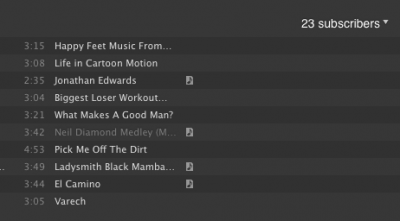
- In the upper right corner of these profiles, you can click on the ‘subscribers' and a drop down list will appear with the profiles of all of the people that have subscribed to my playlist. There you go! 23 new people (mostly cycling instructors) to follow! Click on their names to go to their profile pages, and check out what they are publishing and subscribing to. If you like what you see, click ‘add’ in the upper right hand corner of their profile. This will allow you to see what they are listening to and publishing in a scrolling list on the side of your profile. Hint: After you click ‘add’, you will have an option to add them to your ‘favorites’. I recommend doing this because it allows you to access their profile even if they are not actively listening to or using Spotify at the same time that you are. Their latest activity will always be available in the upper right side of your profile.
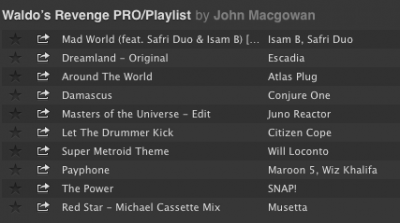
- Now that you have found some other profile pages, you can continue to explore the ‘followers’ of the playlists that they have published or subscribed to. Many people have not published many playlists, but have ‘subscribed’ to other people’s playlists. In this case, you can go directly to the profile of the person that created the original playlist by clicking their user name next to the playlist title as in this example: This is a partial shot of a playlist that I subscribed to by John MacGowan:
- Just click on John's name next to the playlist title to go directly to his profile.
- Here are some links with some basic tutorials that you might find useful:
Can I Add Any Spotify User To My People List?
How To View A Profile From Within Spotify
Spotify Social Basics
So, what are you waiting for? Give yourself a little time and start exploring more music on Spotify. Once you start finding people to follow, you might find it hard to stop!
**Feel free to share your Spotify profile link in the comment section to get the ball rolling!
