
by Dennis Mellon | Oct 7, 2015 | Dennis Mellon, Instructor Training, Video, Video PROfiles

I'm on my way to Chicago for Club Industry 2015 to show off the new Stages SC3 Indoor Cycling bike. Cameron Chinatti and I will be leading a bunch of free training session, if you're in the area please stop by and ride with us. Here are class descriptions and registration links:
Here are the descriptions and form links to register for each:
8:30-10:00 – Oh no! Not the Power Police – Led by Cameron Chinatti: It’s official: consoles and power measurement for indoor cycling are here to stay. But with every new piece of equipment comes ‘creative’ misuses and abuses. Avoid getting caught by never committing a crime in the first place! You’ll learn the most common crimes against consoles, then get ready to ride as we explore our top-ten best power practices. These Simple Setsâ„¢ will give you hours of new ride content and provide priceless aha! moments for your participants. Join Stages® Indoor Cycling to see how easy it is to use today’s data to achieve tomorrow’s goals.
Register for the 8:30am session, here: http://goo.gl/forms/FBrFLLtvkZ
11:00-12:00 -Head Up to Get Down! – Led by Cameron + Dennis Do you want to know that you’re doing exactly the right amount of effort? Join Stages® Indoor Cycling for a ride with our Special Edition version of Performance IQ Heads Up Display, better known as Stages IQ. A quick 3-minute assessment is all you need to determine your Power Rx – the most important piece of ride data you’ll ever need! For the first time ever your entire class is doing exactly what they need to get better and see the results they’ve always wanted.
Register for the 11:00am session, here: http://goo.gl/forms/9UKtDmYUTs
1:30-2:30 -Show Me – Led by Dennis Mellon
If a picture is worth a thousand words, then a video is worth a million! Since the inception of indoor cycling, instructors have been talking and talking in an attempt to set the scene for their riders' indoor journey. Let’s stop talking and start showing! What is the speed of a sprint finish or the increased pulse of an epic ski run? Let’s dance to the beat of your favorite artist and experience the POWER of your favorite band playing a live concert. Through the use of video and the new Stages SC3 Eco Screen there is no course that cannot be ridden and no metric that cannot be evaluated to take your riders on the most epic fitness journey ever!
Register for the 1:30pm session, here: http://goo.gl/forms/ggYUrTXEor
3:30-5:00 – Oh No! Not the Power Police + SIQ – Led By Cameron Chinatti
It’s official: consoles and power measurement for indoor cycling are here to stay. But with every new piece of equipment comes ‘creative’ misuses and abuses. Avoid getting caught by never committing a crime in the first place! You’ll learn the most common crimes against consoles, then get ready to ride as we explore our top-ten best power practices. These Simple Setsâ„¢ will give you hours of new ride content and provide priceless aha! moments for your participants. Join Stages® Indoor Cycling to see how easy it is to use today’s data to achieve tomorrow’s goals.
Register for the 3:30pm session, here: http://goo.gl/forms/4Mwxd6UTXB
I'm most excited for my “Show Me” class where I'll take riders through a power based class where the focus will be on the metrics available on the SC3's console as well as the various videos on the screen. It will be a multi-media power party!
Below you will find the videos I'll be using for this class. If our stereo has a “Record Out” output I'll record the class and share it in a future post.
[wlm_private ‘PRO-Platinum|PRO-Monthly|PRO-Gratis|PRO-Seasonal|Platinum-trial|Monthly-trial|PRO-Military|30-Days-of-PRO|90 Day PRO|Stages-Instructor|Schwinn-Instructor|Instructor-Bonus|28 Day Challenge']
Right Click to Download (detailed download directions are listed below)
Right Click to Download
Right Click to Download
Right Click to Download
Right Click To Download
Right Click to Download
Right Click to Download
Right Click to Download
To download any of the above media on a Mac:
- Right Click on the blue underlined link
- Select “Download Linked File As”
- Select a download location
- Once file is completely downloaded, find it in the location you selected
- Drag the file into your iTunes or Media Player library OR
- Right Click on the file and Select “Open With”
- From the drop down menu select “iTunes” or your preferred media player
- File should begin playing and is now part of your library
To download any of the above media on a PC:
- Right Click on the blue underlined link
- Select “Save Link As”
- Select a download location
- Once file is completely downloaded, find it in the location you selected
- Drag the file into your iTunes or Media Player library OR
- Right Click on the file and Select “Open With”
- From the drop down menu select “iTunes” or your preferred media player
- File should begin playing and is now part of your library
Click here to watch a video on how to download media files from ICI/Pro
[/wlm_private]
Podcast: Play in new window | Download

by Dennis Mellon | Oct 1, 2015 | Dennis Mellon, Music, Video

The Roadless Ride is quickly approaching and every year I search for new video and music to play during the classes I lead for this fundraiser. The one song that has been on the playlist for the past 8 years is U2's Where the Streets Have No Name. This year I'm going to couple it with a live version of Bad from their Elevation tour way back in 2001. I own all of U2's concert DVD's and this performance of Streets is the best. My plan is to warmup and talk about Brent's Place during Bad then let the party begin with Streets.
Let me know what you think and if you're in the Denver area next Friday come join me, Jay and the other instructors for an awesome day of riding positive energy while we raise money for kids with cancer.
Right Click and follow directions below to download
To download any of the above media on a Mac:
- Right Click on the blue underlined link
- Select “Download Linked File As”
- Select a download location
- Once file is completely downloaded, find it in the location you selected
- Drag the file into your iTunes or Media Player library OR
- Right Click on the file and Select “Open With”
- From the drop down menu select “iTunes” or your preferred media player
- File should begin playing and is now part of your library
To download any of the above media on a PC:
- Right Click on the blue underlined link
- Select “Save Link As”
- Select a download location
- Once file is completely downloaded, find it in the location you selected
- Drag the file into your iTunes or Media Player library OR
- Right Click on the file and Select “Open With”
- From the drop down menu select “iTunes” or your preferred media player
- File should begin playing and is now part of your library
Click here to watch a video on how to download media files from ICI/Pro
Podcast: Play in new window | Download
by Dennis Mellon | Sep 1, 2015 | Dennis Mellon, Video
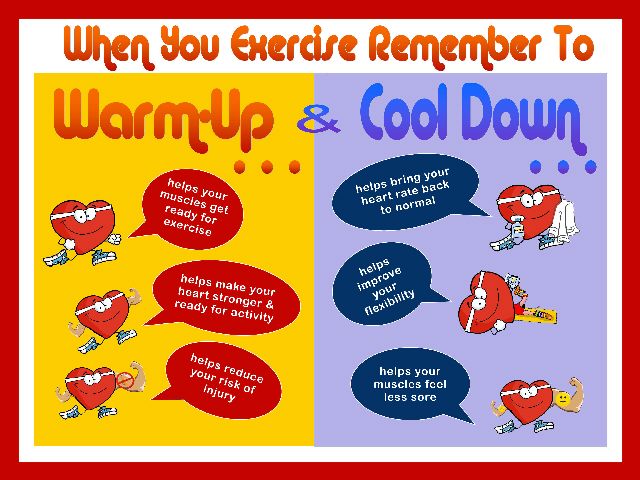
I'm always looking for Warm Up and Cool Down videos and I think I just created my all time favorite.
Check it out.
[wlm_private ‘PRO-Platinum|PRO-Monthly|PRO-Gratis|PRO-Seasonal|Platinum-trial|Monthly-trial|PRO-Military|30-Days-of-PRO|90 Day PRO|Stages-Instructor|Schwinn-Instructor|Instructor-Bonus|28 Day Challenge']
Right Click and follow directions below to download
To download any of the above media on a Mac:
- Right Click on the blue underlined link
- Select “Download Linked File As”
- Select a download location
- Once file is completely downloaded, find it in the location you selected
- Drag the file into your iTunes or Media Player library OR
- Right Click on the file and Select “Open With”
- From the drop down menu select “iTunes” or your preferred media player
- File should begin playing and is now part of your library
To download any of the above media on a PC:
- Right Click on the blue underlined link
- Select “Save Link As”
- Select a download location
- Once file is completely downloaded, find it in the location you selected
- Drag the file into your iTunes or Media Player library OR
- Right Click on the file and Select “Open With”
- From the drop down menu select “iTunes” or your preferred media player
- File should begin playing and is now part of your library
Click here to watch a video on how to download media files from ICI/Pro
[/wlm_private]
Podcast: Play in new window | Download

by Dennis Mellon | Aug 27, 2015 | Dennis Mellon, Video

This weeks video takes the music from my The Power of 3 – Three Song Harmonically Mixed Music Sets – Some Old and Some New post and I add it to the first stage of last year's USA Pro Challenge Bike Race. It's so exciting living in the bike crazy state of Colorado then add a professional bike race to the mix and many of us cyclist feel like we have died and gone to Heaven.
I hope you like it, I know my class participants do.
[wlm_private ‘PRO-Platinum|PRO-Monthly|PRO-Gratis|PRO-Seasonal|Platinum-trial|Monthly-trial|PRO-Military|30-Days-of-PRO|90 Day PRO|Stages-Instructor|Schwinn-Instructor|Instructor-Bonus|28 Day Challenge'].
Right Click and follow directions below to download.
To download any of the above media on a Mac:
- Right Click on the blue underlined link
- Select “Download Linked File As”
- Select a download location
- Once file is completely downloaded, find it in the location you selected
- Drag the file into your iTunes or Media Player library OR
- Right Click on the file and Select “Open With”
- From the drop down menu select “iTunes” or your preferred media player
- File should begin playing and is now part of your library
To download any of the above media on a PC:
- Right Click on the blue underlined link
- Select “Save Link As”
- Select a download location
- Once file is completely downloaded, find it in the location you selected
- Drag the file into your iTunes or Media Player library OR
- Right Click on the file and Select “Open With”
- From the drop down menu select “iTunes” or your preferred media player
- File should begin playing and is now part of your library
Click here to watch a video on how to download media files from ICI/Pro
[/wlm_private]
Podcast: Play in new window | Download

by Dennis Mellon | Aug 20, 2015 | Dennis Mellon, Video

I love music. One of the reason I enjoy teaching indoor cycling so much is that I get to hear the music I love on rockin sound systems numerous times per week and to top it off, I get paid for it. I'm on an endless search for songs that I can add to the soundtrack of my life and ever once in a while a song miraculously emerges.
The song I Hold On by Direks Bentley is one of those songs. I had plans for a long post where I would write about all that I think is wrong in the world today, but who needs another political rant. I believe the lyrics below say it better than I ever could.
I Hold On by Dierks Bentley
It's just an old beat up truck,
Some say that I should trade up
Now that I got some jangle in my pocket
But what they don't understand
Is it's the miles that make a man
I wouldn't trade that thing in for a rocket
What they don't know is my dad and me
We drove her out to Tennessee
And she's still here and now he's gone
So I hold on
It's just an old beat up box,
Its rusty strings across the top
It probably don't look like much to you
But these dents and scratches in the wood,
Yeah, that's what makes it sound so good
To me it's better than brand new
You see this here flat top guitar,
Has had my back in a million bars
Singing every country song
So I hold on
[Chorus]
To the things I believe in
My faith, your love, our freedom
To the things I can count on
To keep me going strong
Yeah, I hold on, I hold on
Like the stripes to the flag,
Like a boy to his dad
I can't change who I am, right or wrong
So I hold on
Yeah, baby, looking at you right now,
There ain't never been no doubt
Without you I'd be nothing
So if you ever worry about
Me walking out
Yeah, let me tell you something
I hold on
I hold on
Can you hear me, baby?
I hold on
Yea,
I hold on
To the things I believe in
My faith, your love, our freedom
To the things I can count on
To keep me going strong
To the things I believe in
My faith, your love, our freedom
To the things I can count on
To keep me going strong
Yeah, I hold on
I hold on
I hold on and on and on and on and on
I hold on and on and on and on and on
[wlm_private ‘PRO-Platinum|PRO-Monthly|PRO-Gratis|PRO-Seasonal|Platinum-trial|Monthly-trial|PRO-Military|30-Days-of-PRO|90 Day PRO|Stages-Instructor|Schwinn-Instructor|Instructor-Bonus|28 Day Challenge'].
Right Click and follow directions below to download.
To download any of the above media on a Mac:
- Right Click on the blue underlined link
- Select “Download Linked File As”
- Select a download location
- Once file is completely downloaded, find it in the location you selected
- Drag the file into your iTunes or Media Player library OR
- Right Click on the file and Select “Open With”
- From the drop down menu select “iTunes” or your preferred media player
- File should begin playing and is now part of your library
To download any of the above media on a PC:
- Right Click on the blue underlined link
- Select “Save Link As”
- Select a download location
- Once file is completely downloaded, find it in the location you selected
- Drag the file into your iTunes or Media Player library OR
- Right Click on the file and Select “Open With”
- From the drop down menu select “iTunes” or your preferred media player
- File should begin playing and is now part of your library
Click here to watch a video on how to download media files from ICI/Pro
[/wlm_private]
Podcast: Play in new window | Download
by Dennis Mellon | Aug 13, 2015 | Dennis Mellon, Video

Sometimes I need a cool video to play as a warm up song. This video is perfect! Beautiful scenery, classic rock song and a smooth flowing video that everyone can appreciate and “Get Lost in the Moment.”
The entire, full length, movie is available for download on iTunes.
[wlm_private ‘PRO-Platinum|PRO-Monthly|PRO-Gratis|PRO-Seasonal|Platinum-trial|Monthly-trial|PRO-Military|30-Days-of-PRO|90 Day PRO|Stages-Instructor|Schwinn-Instructor|Instructor-Bonus|28 Day Challenge']
Right Click and follow directions below to download.
To download any of the above media on a Mac:
- Right Click on the blue underlined link
- Select “Download Linked File As”
- Select a download location
- Once file is completely downloaded, find it in the location you selected
- Drag the file into your iTunes or Media Player library OR
- Right Click on the file and Select “Open With”
- From the drop down menu select “iTunes” or your preferred media player
- File should begin playing and is now part of your library
To download any of the above media on a PC:
- Right Click on the blue underlined link
- Select “Save Link As”
- Select a download location
- Once file is completely downloaded, find it in the location you selected
- Drag the file into your iTunes or Media Player library OR
- Right Click on the file and Select “Open With”
- From the drop down menu select “iTunes” or your preferred media player
- File should begin playing and is now part of your library
Click here to watch a video on how to download media files from ICI/Pro
[/wlm_private]
Podcast: Play in new window | Download
