
by Christine Hawthorne | Jan 8, 2014 | Deezer, ICI/PRO Team Member Articles, Instructor Training, Music, Spotify

When it comes to choosing music for my classes, I like to include several different genres in my playlists. Many that I create include a mix of classic rock, electronic, pop, and occasional country song and sometimes even classical. I always include at least a few current songs in each playlist, so it’s important for me to keep up with the latest songs as they come out each week.
Recently, I created a ride that included many favorite songs that came out in 2013, and since my riders had heard many of them through the year in my classes and of course on the radio, they really enjoyed the ride. You can check my post and playlist here.
Before I created the playlist for that particular class, I put together a separate Spotify playlist featuring all of my favorite cycling songs that dropped in 2013. I came up with forty-three of them, as well as a list of ‘honorable mention’ songs (songs that I used a few times, but wasn’t really crazy about-but some that you might find work just fine for you).
So without further adieu, I give you my top 10 Cycling Songs of 2013:
- Counting Stars by One Republic: This song is so upbeat and catchy, that I could use it in every class. It has a great beat and can be used seated or standing, or in combination. Some other great songs from this album that made my top list: What You Wanted and I Lived. This is by far my favorite album that came out this year.
- My Songs Know What You Did In The Dark (Light ‘Em Up) by Fallout Boy: This one is hands down my favorite of the whole bunch. Perfect for accelerations on the chorus, (or sprints/surges-whatever name you give them). This song’s energy and lyrics are unlike anything else I’ve heard on the radio this year and it will definitely keep your feet pedaling. Also check out The Phoenix and Young Volcanoes from the same album.
- Wake Me Up by Avicii: This song is a great mix of electronic, country-fusion. I remember the first time I listened to it thinking that it was different from anything I’d ever heard. Even after hearing it over and over, I’m still hooked. Some other great songs for cycling on this album: Heart Upon My Sleeve, You Make Me and Hey Brother.
- Timeless by The Airborne Toxic Event: I’m always searching for songs to use for heavy climbs. The lyrics and the vocals on this song are breathtaking, and as the title suggests, this one is timeless. A close runner up for climbing song of the year goes to Rebel Beat by the Goo Goo Dolls.
- Best I Ever Had by Gavin DeGraw: Another one of my favorites for accelerations on the chorus. I really like Gavin DeGraw’s music, and while this is a different sound for him, it works. It’s quirky, catchy and upbeat, and it’s sure to put a smile on everyone’s face.
- San Fransisco by The Mowgli’s: .This is one of those songs that sets the tone for your entire class when used as a warm up. It also works well as a fast flat road. Do you feel the love? I feel the love.
- Best Day of My Life by American Authors: This song, which you may have heard in a Lowe’s commercial or in the trailer for the movie ‘Delivery Man’, makes a great seated, standing or alternating hill climb. I also love Believer from the same album.
- #thatPOWER by will.i.am, Justin Bieber: While this is not a song I would typically listen to in my leisure time, I love a good strong beat that you can just get lost in while you’re pedaling. This one delivers just that.
- Jubel by Klingade: This is a recent find and one that I can see using again and again. It’s fresh and unique. I love the sound of the saxophone and the pretty vocals. I alternated between seat work and a standing climb on the beat, but I can see many different ways to ride to this one.
- Zorba’s Dance by David Garrett: This may seem like an odd choice to make my top ten, but every time I used this song, my classes LOVED it! It only clocks in at 2:34, but you’ll be tired and sweaty after this one. As the tempo builds, so does your cadence, ending with a 20 second all out sprint to the finish. Trust me. You and your class with love it!
Here’s the playlist that includes these top songs as well as the 33 others that made my list this year:
Honorable Mention: As I stated earlier, these are songs that didn't make my Top List this year. That’s not to say that you wont find the perfect spot for them in your next playlist:
-Clarity by Zedd
-Can’t Stop by Miley Cyrus
-Wrecking Ball by Miley Cyrus
-Safe and Sound by Capital Cities
-Blurred Lines by Robin Thicke
-Cups by Anna Kendrick
-Get Lucky by Daft Punk
-Applause by Lady Gaga
-Suit and Tie by Justin Timberlake
Care to take a listen?
Did I miss any? What were your favorites from 2013?
So whether you use strictly mainstream music for your classes, or you like to mix it up, try adding some of these top songs to your playlists in the coming months. You might just find some keepers in this bunch.
Here’s to a great new year filled with more amazing new music! Happy 2014!
by John | Jun 13, 2013 | iTunes, Music, Spotify

Nope. Move along, nothing to see here.
Based on what's being described, iTunes Radio won't work for your class. Unless you just want to hit play and work with whatever iTunes decides to deliver to you.
iTunes Radio (from what I can see) is really just Apple's version of Pandora. Give them a song or genre of music and iTunes Radio will serve a streaming radio of suggested songs.
I found a good explanation at zdnet.com of why Apple isn't offering a streaming catalog like Spotify or Google's new Google Play music services.
Apple most likely chose the radio station model because:
1. It's less like to cannibalize its iTunes music sales. A buy button is prominently displayed in the upper-right hand corner of the iTunes Radio now playing screen putting you just a touch away from being able to purchase a track.
2. It was a much easier sell to the music labels. I'm sure that the buy button in the upper-right corner was a significant part of Apple pitch to labels.
3. It was easier to close deals with three major music labels (which came down to the wire) as opposed to getting deals with all of the labels representing the 26 million plus tracks in the iTunes Store's massive music library.
Personally, I'd rather have a “catalog” (or hybrid) music streaming service from Apple (imagine, every track in the iTunes store being free to listen to!) over a “radio” service, which is why I don't see canceling my Spotify subscription any time soon. Ever since I've bought into the catalog streaming model, I've purchased very few individual tracks (although I've still purchased a few pre-release albums and live recordings) — which is probably the exact reason why Apple (and the labels) opted for iTunes Radio on Monday. I hope that Apple eventually expands it's music subscription offering, but judging by how long it took it to secure deals with three music labels (iRadio has been rumored since September) I'm not optimistic.
iTunes Radio is planning to launch this Fall.
by Jennifer Lintz | Jun 11, 2013 | Instructor Training
By Jennifer Lintz, Registered Dietitian and ICI/PRO Member Soigneur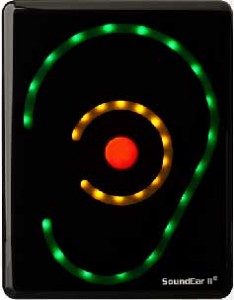
There is no question that in the group fitness studio – whether it be cycle, strength, yoga or some other modality – music matters. The right song placed at the perfect spot in a class can heighten the overall experience for participants.
Unless that song is too loud.
Or not loud enough.
That brings me to my question.
How do you as an instructor determine a volume that is “just right?”
From the time I began teaching in 2008, I can recall several ways music volume was addressed by management.
- In a couple of facilities, I remember being asked to use my “best judgement.”
- In other places, there was a “do not cross line” next to the volume knob.
- And, in one location, music was never really mentioned … at all.
It was not until I started my current teaching position that I was exposed to a more objective method for monitoring music volume:
drum roll …
the SoundEar (pictured).
As you can see, there are three rings of color on the SoundEar. The outside edge of the ear is green and – when lit – indicates music volume is in a safe range. The middle ring lights up in yellow when volume starts to approach the maximum, and a red dot in the center becomes bright when volumes have exceeded the limit. In our situation, the SoundEar is set to recognize maximum volume as 85 decibels. This limit was set to promote both the safety of instructors and members. And, yes, I do feel that 85 decibels is loud enough and conducive to exercising in the “zone.”
In our facility, the Sound Ear is located on the back wall of each studio so that the instructor can easily see it while teaching. While I can't speak for other instructors, I really appreciate the tool. The SoundEar helps me keep my music within ranges that I know are safe for anyone in the room. Disclaimer: Ear plugs are always available in the studio for participants who prefer a little lower decibel level, but I don't see them being used very often.
The SoundEar has truly cleared up the gray area for me and quickly lets me know when my music is too loud AND when I have wiggle room to crank things up, if I feel the urge.
I rarely hear comments from participants about music volume, and a member has yet to say anything to me about the device mounted on the wall. In fact, I have a hunch a majority of folks don't even know it is there. Quality assurance measures are in place, too. Our supervisors regularly drop in on classes throughout the year to make sure we are abiding by volume policies and respecting members' safety.
I know it is impossible to please everyone with regard to sound levels, but I appreciate the SoundEar and have noticed that comments about music volume have been few and far between over the past year.
What are your thoughts on monitoring music volume? Do any of you use a similar device? Would you find it helpful to use/have something similar?
by Christine Hawthorne | Apr 30, 2013 | Instructor Training, iTunes & Spotify Training, Music, Spotify
 When I joined Spotify Premium almost a year ago, I just loved the ease of using it to create and share playlists so much that I was able to overlook some of the problems I had with it’s cluttered look and lack of social features. Now, with Spotify’s newest updates, many of those problems have been fixed, making it even easier to find and follow other people and artists.
If you haven’t already taken advantage of the update, I highly recommend it. While there is one major drawback (I’ll get to that.), I’m finding the advantages to be worth it.
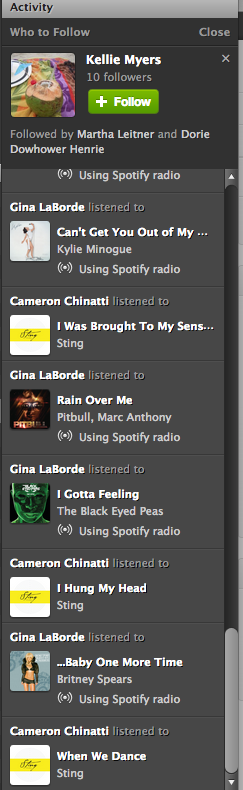
The first thing you will notice with the new update is the less cluttered look. Now it is much easier to navigate your profile page, playlists and activity sections. On the right side of your desktop screen, there is no longer a ‘favorites’ list. It has been replaced with a larger activity bar. Above the activity bar, you will find a handy ‘Who To Follow’ box. This box highlights people or artists that other people you follow are connected to-a great way to find new people to follow! Here’s a tip: If you don’t like Spotify’s current suggestion, click the ‘x’ on the top right of the box and a new suggestion will pop up.
You might also notice that the ‘Share’ and ‘Start Radio’ buttons are just above your playlist now for quick access. Tip: When you click ‘Share’, and then ‘Post To Feed’, you can add a little message that will show up on your follower’s feed. This would be a great place to share something about your playlist or a specific song in your playlist.

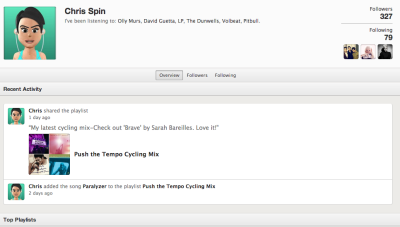
One of my favorite things about the newest update is the social section, with it’s emphasis on following others and viewing their activity. Click on a user and go to their profile page. You can view their published and followed playlists just like before AND you can now see their most recent activity and their ‘following’ activity-another great way to find new people to follow!
With all of these great new updates comes one little glitch. This one has caused instructors quite a bit of frustration. They took away the playlist timer. I can’t think of a good reason why they would do it, but they did. To get around this, I use on online timer which you can find here. It adds an extra step to my playlist preparation, and it’s kind of an inconvenience, but it really doesn't take too much longer once you get used to it.
These changes in Spotify are a step in the right direction, and I hope to see more updates and changes from them in the future. Great job on this update Spotify!
What do you think? Do you like the new updates? Is there anything you would like to see Spotify add to make your job as an instructor easier?
by Christine Hawthorne | Mar 11, 2013 | Instructor Resources, iTunes & Spotify Training, Music, Spotify
 Do you know about Spotify's Collaborative Playlist feature? It's a great way to share playlists with friends, fellow instructors and even members at your gym or club. When you use this Spotify feature, others can share, edit and add to your original playlist.
Sound interesting? It's really pretty simple. Just create a playlist in Spotify as you normally would. Then, right click (control+click if you're a Mac user like me) and you'll see a drop down box like this:
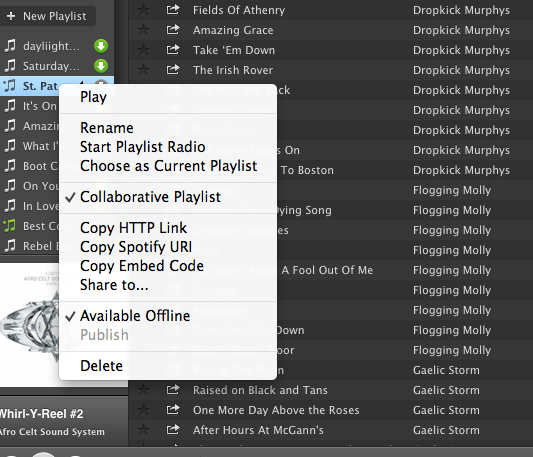 Choose Collaborative Playlist.
You can now find your collaborative playlist on the left sidebar of your profile screen with a green music note next to it. The playlist will not, however appear on your Spotify profile page. As far as I can see, there is no way to add a collaborative playlist to your profile. I believe this is because these playlists are always changing and therefore never really complete. If you figure out a way to publish them and still allow them to be collaborative, please share with us! Because the playlist does not appear on your profile, you need to invite others to see it.
Inviting others to join your collaborative playlist is as simple as sharing the link. You can do this by right clicking (control+click on a Mac) and choosing any of the options shown here:
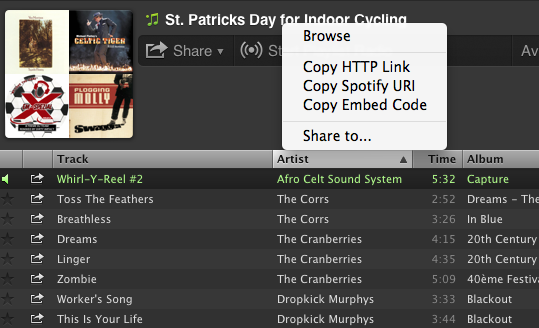
Now you can share your playlists by email or social media sites. Here are a few things to keep in mind when creating collaborative playlists in Spotify:
- Anyone that subscribes to your playlist can add songs, delete songs and change the order of the songs in the playlist.
- Everyone that subscribes to your playlist will see these changes.
- You can turn off the collaborativity of the playlist the same way you turned it on.
- Anyone that gets the link to your playlist can share the link with friends.
ICI/PRO has several collaborative playlists that you can access here.
I've recently created my own collaborative Spotify playlist: St. Patrick's Day for Indoor Cycling. I hope you find some inspiration here for your St. Patrick's Day ride this week! Please subscribe and share your favorites!!
