
by John | May 11, 2014 | Instructor Training, Music, Spotify
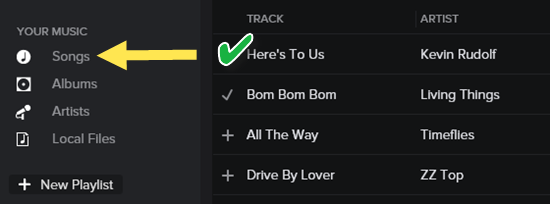
Wait… what the @#$%^ happened to my Spotify Music Library?
It seems that every new Spotify update includes something that can be considered as an actual down-grade. This time they've removed a function many of us used regularly – the music library 🙁
The music library was a sort of master playlist. It included all the tracks from every playlist you've created or had followed. I would go there to find tracks of a specific length of time. Sorting your music library by the time column made easy work of finding that perfect song or two to round-out the perfect class.
Here's the solution
Your Music > Songs replaces the now missing music library. It provides the same function, except it's no longer auto populated with all the tracks you add to a playlist. Click on Songs and you'll probably find it empty. To add songs to it you need to tic the “+” symbol next to a track you “like” and it will appear in the Songs listing.
Easy enough to add tracks until you realise that you're going to be spending a bunch of time clicking each and every track – there is no option to “like” a whole playlist. So pour yourself a cup of tea, or adult beverage and start clicking if you want to re-populate a master list of all your favorite tracks.
Or you could just forget the whole thing and do without.
Why did Spotify remove this feature?
It's only a guess on my part – Spotify is hoping to improve their track referral engine… they see that you “like” song “A” and others who like song “A” also “like” track “B” = a better discovery experience for users. Music services have very sophisticated software that is constantly learning from watching our behavior, while using the service. For example Pandora tracks skips (indicating dislike) and Spotify now figures you'll only tic the best tracks to add to your Songs list.
So let's mess with them, by selecting everything!
by John | May 2, 2014 | Instructor Tech Help, Spotify
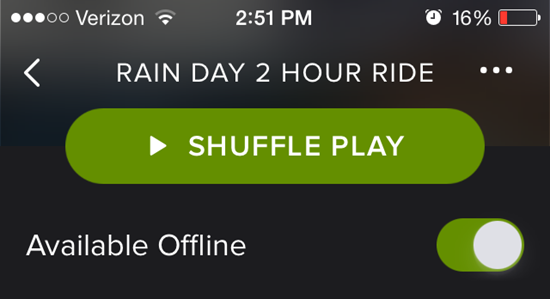
I had a feeling this big shuffle button was going to cause trouble.
The latest Spotify update included this very prominent SHUFFLE PLAY button – which I see as a bit of an over reaction. The old versions of Spotify kind of hid the shuffle option… except many of us still inadvertently found it – often with embarrassing results.
Now we've got this big button sitting there at the top of the screen, just daring us to tough, tap or drip sweat on it.
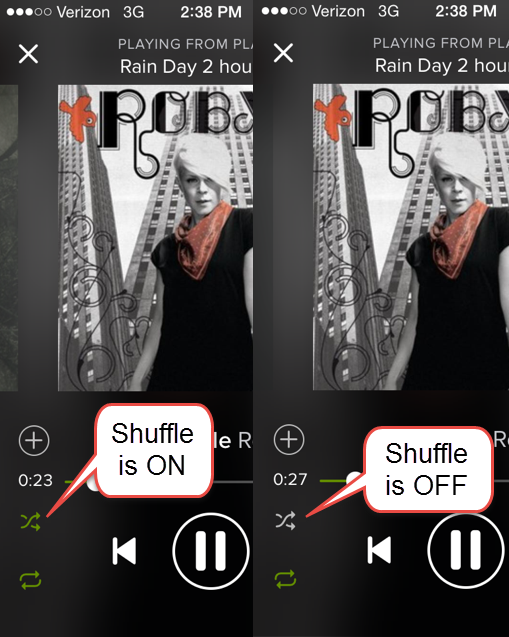
So how do check to see if shuffle is off and your playlist will play in the order you selected?
Check this image showing the little x icon. Green = shuffle is ON and grey = shuffle is OFF
by John | Apr 28, 2014 | Instructor Tech Help, Spotify
The latest version of the iPhone Spotify App had an annoying bug in it that appears to be corrected when combined with the most recent iOS update I downloaded this morning. Good thing as it was making me crazy thinking the App was going to crash in the middle of class, while I'm waiting for the song timer to catch up with the music after a transition.
My Settings
Apple and Spotify update software in batches of users = your iPhone may update at a different time, depending on your location. If you want to compare yours with mine, I'm running Spotify version 1.1.0.2549 and iOS 7.1.1.
Crossfade set at 10 seconds and Gapless Playback turned on.
Here's what was happening
I you were watching the playlist timer during the crossfade between tracks, you would hear the music transition smoothly, but the timer and album artwork would freeze in place for an agonizingly long period of time.
Why this is/was important to me… I can barely see those tiny numbers
I will often use the Stage button on the console (with it's large numbers) to help me time longer intervals – possibly different from how you would. This is a work-around (hack) for me, due to having a hard time focusing on the small fonts Spotify is using.
The 3-4 minute “Best Efforts” I do early in class, to establish PTP (Personal Threshold Power) are a great example. I want the effort to end along with the song if possible, so I need to understand the total length of the track – but not have to continuously watch the countdown timer I have trouble seeing. During the fade between songs I'll sit up (bringing my eyes to the best focal distance) and take a quick peek squint at my iPhone, note the total time and then hit the stage timer on my bike.
Yesterday I used The Crystal Method — Busy Child which is long – 7:25 mins, for the opening 4 min PTP effort. If I hit the Stage timer at the start, I now have the large numbers counting up. Next I can do so simple math in my head: 7:25 – 4:00 = 3:25. Now I know that if the class and I hit the Stage button (resetting the timer to zero) and start the effort at the 3:25 mark on the console timer, I have a near perfectly timed 4 minute interval timed to finish with the music 🙂
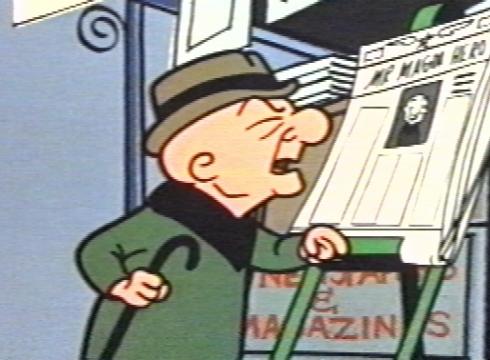
Understanding how I do this, do you see how frustrating it would be for me to be sitting there, watching and waiting for the timer to catch up and display properly? I swear there were times when it would take 10 seconds or more, with me staring at my iPhone like Mr. Magoo.
Now everything appears to be working smoothly – and that makes me happy!
by John | Jan 10, 2014 | Deezer, iTunes & Spotify Training, Music, Spotify

Spotify is awesome for delivering your class music – at least for those of us teaching in a country where it's available. Seeing so many visitors here from Canada – where Spotify doesn't work, we decided it would be helpful to build a simple, free tool that will quickly convert a Spotify playlist into something a Deezer user can open and play!
The tool is located on it's own page that you can find here:
https://www.indoorcycleinstructor.com/free-spotify-deezer-music-track-playlist-conversion-tool/
Please note that you need a free or premium Deezer user's account before you'll see the actual tool. Click this link to login into to your Deezer account and convert away!
by Christine Hawthorne | Jan 8, 2014 | Deezer, ICI/PRO Team Member Articles, Instructor Training, Music, Spotify

When it comes to choosing music for my classes, I like to include several different genres in my playlists. Many that I create include a mix of classic rock, electronic, pop, and occasional country song and sometimes even classical. I always include at least a few current songs in each playlist, so it’s important for me to keep up with the latest songs as they come out each week.
Recently, I created a ride that included many favorite songs that came out in 2013, and since my riders had heard many of them through the year in my classes and of course on the radio, they really enjoyed the ride. You can check my post and playlist here.
Before I created the playlist for that particular class, I put together a separate Spotify playlist featuring all of my favorite cycling songs that dropped in 2013. I came up with forty-three of them, as well as a list of ‘honorable mention’ songs (songs that I used a few times, but wasn’t really crazy about-but some that you might find work just fine for you).
So without further adieu, I give you my top 10 Cycling Songs of 2013:
- Counting Stars by One Republic: This song is so upbeat and catchy, that I could use it in every class. It has a great beat and can be used seated or standing, or in combination. Some other great songs from this album that made my top list: What You Wanted and I Lived. This is by far my favorite album that came out this year.
- My Songs Know What You Did In The Dark (Light ‘Em Up) by Fallout Boy: This one is hands down my favorite of the whole bunch. Perfect for accelerations on the chorus, (or sprints/surges-whatever name you give them). This song’s energy and lyrics are unlike anything else I’ve heard on the radio this year and it will definitely keep your feet pedaling. Also check out The Phoenix and Young Volcanoes from the same album.
- Wake Me Up by Avicii: This song is a great mix of electronic, country-fusion. I remember the first time I listened to it thinking that it was different from anything I’d ever heard. Even after hearing it over and over, I’m still hooked. Some other great songs for cycling on this album: Heart Upon My Sleeve, You Make Me and Hey Brother.
- Timeless by The Airborne Toxic Event: I’m always searching for songs to use for heavy climbs. The lyrics and the vocals on this song are breathtaking, and as the title suggests, this one is timeless. A close runner up for climbing song of the year goes to Rebel Beat by the Goo Goo Dolls.
- Best I Ever Had by Gavin DeGraw: Another one of my favorites for accelerations on the chorus. I really like Gavin DeGraw’s music, and while this is a different sound for him, it works. It’s quirky, catchy and upbeat, and it’s sure to put a smile on everyone’s face.
- San Fransisco by The Mowgli’s: .This is one of those songs that sets the tone for your entire class when used as a warm up. It also works well as a fast flat road. Do you feel the love? I feel the love.
- Best Day of My Life by American Authors: This song, which you may have heard in a Lowe’s commercial or in the trailer for the movie ‘Delivery Man’, makes a great seated, standing or alternating hill climb. I also love Believer from the same album.
- #thatPOWER by will.i.am, Justin Bieber: While this is not a song I would typically listen to in my leisure time, I love a good strong beat that you can just get lost in while you’re pedaling. This one delivers just that.
- Jubel by Klingade: This is a recent find and one that I can see using again and again. It’s fresh and unique. I love the sound of the saxophone and the pretty vocals. I alternated between seat work and a standing climb on the beat, but I can see many different ways to ride to this one.
- Zorba’s Dance by David Garrett: This may seem like an odd choice to make my top ten, but every time I used this song, my classes LOVED it! It only clocks in at 2:34, but you’ll be tired and sweaty after this one. As the tempo builds, so does your cadence, ending with a 20 second all out sprint to the finish. Trust me. You and your class with love it!
Here’s the playlist that includes these top songs as well as the 33 others that made my list this year:
Honorable Mention: As I stated earlier, these are songs that didn't make my Top List this year. That’s not to say that you wont find the perfect spot for them in your next playlist:
-Clarity by Zedd
-Can’t Stop by Miley Cyrus
-Wrecking Ball by Miley Cyrus
-Safe and Sound by Capital Cities
-Blurred Lines by Robin Thicke
-Cups by Anna Kendrick
-Get Lucky by Daft Punk
-Applause by Lady Gaga
-Suit and Tie by Justin Timberlake
Care to take a listen?
Did I miss any? What were your favorites from 2013?
So whether you use strictly mainstream music for your classes, or you like to mix it up, try adding some of these top songs to your playlists in the coming months. You might just find some keepers in this bunch.
Here’s to a great new year filled with more amazing new music! Happy 2014!
