With the increase of those interested in getting a healthy start to 2012, more and more people are joining health clubs and attending indoor cycling classes. This is great! It provides a perfect opportunity to foster good technique and skills as these new members acclimate to our classes. One topic I have found myself addressing more than usual lately is proper footwear.
Multi-Purpose?
It is definitely a delicate balance at times as we try to encourage new or beginner riders to regularly return to class while guiding them toward good clothing and equipment choices. The more prominent issue lately is people riding with running shoes. I totally understand their mindset and appreciate their determination. They are starting this new exercise routine, which may incorporate running, weight training and cycling. Without understanding the nature of cycling, it would seem logical to just purchase a pair of running shoes and kill 3 birds with one stone (a terrible expression). As we know, this approach is not ideal when cycling is concerned.
Protect the Feet
As many of us know, the forces applied to the feet during an indoor cycling class can be great. These forces can be created by both resistance and speed alike. Simply put, if someone is wearing a running shoe, which is probably one of the worst options (besides those barefoot running shoes and Vibrams), the sole will flex placing stress on the feet. Under heavy resistance, a shoe with a soft sole will bend over the pedal, straining the intrinsic muscles of the foot plus ligaments, tendons and joints. In a similar fashion, high speeds can encourage riders to dorsiflex (angle their foot and toes upward) in order to stabilize the pedal. This exaggerated (and unnecessary) dorsiflexion can stress the extensors on the top of the foot and lower leg. To protect the feet from injury (and fatigue) from these strenuous forces, cycling shoes were created with stiff soles.
You Don’t Even Need Cleats
It can be very intimidating to learn all there is to know about the different types of cycling shoes, cleats, pedals, etc. Even though to us it appears very simple, to a person new to exercising in general, this can be overwhelming. We toss out terms like “SPD pedals” and “clipless”. Just think how confusing that can be…you “clip” into your “clipless” pedals. I try to put new riders at ease and tell them the most important reason to purchase a cycling shoe is to protect the feet. So I will often encourage the seemingly overwhelmed person to just by the shoes WITHOUT the cleats. I’ll of course educate them on the benefits of having a cycling shoe designed for walking when off the bike and write down “SPD” for them as they venture to the wilds of the local bike shop (where a techy geek with too much knowledge and not enough education may lurk in the darkness). Once they wrap their minds around the shoes and experience the vast difference, we take the next step toward cleats.
Bring on the Power and Performance
The rigidity of the soles on cycling shoes provides a more stable platform for delivering force to the pedals. Remember the foot is a “lever” and both the ankle and attachment to the crank arm (pedal axle) are the fulcrums. If the sole of the shoe is not firm, the power being delivered to the pedals will be affected.
In addition, without proper support or a firm platform, the muscles of the feet can fatigue. This muscle fatigue can lead to burning, pain and/or injury.
SPECIAL NOTE: If your cycling shoes are more than 3 years old, consider getting a new pair. Over time (considering the amount of use), the upper part of the shoe can stretch and the sole of the shoe can develop small, often unseen, cracks in the plastic, or breaks in the fibers (carbon soles). As the shoe loses its rigidity, its ability to support the foot and transfer power to the pedals diminishes.
————————————————
Whether it is spurring on the newcomer or persuading the veteran rider, help them understand the safety and performance benefits of using proper cycling shoes. If all else fails, convince them to at least switch to a tennis or basketball sneaker, which provide far more support than running shoes.
Are you annoying some of your current (or potential) participants? You know, rubbing those folks who are of a different/opposite personality type than yours the wrong way?
I recently came to the conclusions that there's a good chance that I do at times – please let me know if any of this makes sense to you…
Yesterday I gave a presentation to our sold-out group of studio owners and Instructors at the Full Psycle/PRO PIQ workshop entitled:
Selling Power – The success of your studio depends on it!
We've got all of this fancy technology in our studios; bikes with consoles, display training systems, results emails and online user profiles that record all of your previous class data. So (to me) it should follow that persuading (Selling) participants that Training with Power is worthwhile becomes supercritical to building a loyal following = a profitable fitness business.
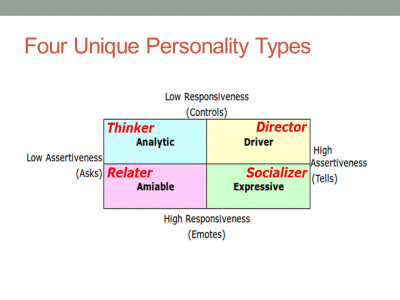
The core concept of my talk was how you need to understand how the four different personality types; Director, Socializer, Relater and Thinker need to be “Sold” to differently.
The personality matrix is constructed like this:[wlm_private ‘PRO-Platinum|PRO-Monthly|PRO-Gratis|PRO-Seasonal|Platinum-trial|Monthly-trial|PRO-Military|30-Days-of-PRO|90 Day PRO|Stages-Instructor|Schwinn-Instructor|Instructor-Bonus|28 Day Challenge']
Then I went on to describe the common personality traits of each type.
Teach an early AM class? I'll bet it's filled with “A” type Directors.
I am a Director > my kids will attest to me sometimes being a bit harsh 🙁
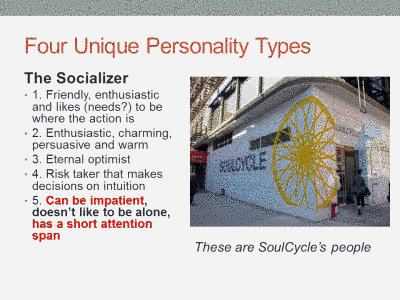
These social folks will pay your overhead if you can attract and retain them.
I explained how it was my belief that attracting Socializers is the key to a successful/profitable Indoor Cycling Studio. Everything I observed at SoulCycle appeared to be designed to attract this type of people and who can argue with their success?
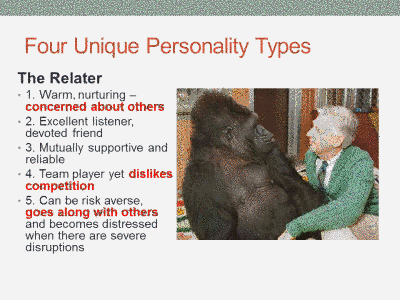
You're a Relater if you include the word “safe” in your class description.
When we first began promoting Performance IQ there was some initial pushback from Instructors; “we need to keep competition out of our classes!” > which I realize now came from Relaters who were concerned about weaker riders not being able to keep up. NOTE: that's been fix… now you can run PIQ competitions between riders that are handicapped for weight/gender or Team based challenges are awesome for including everyone.
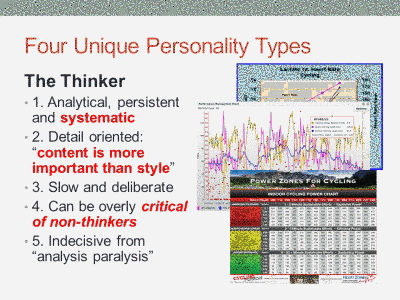
Thinkers spend a lot of time discussing the “Science” of training with anyone who will listen.
At the risk of sounding harsh (I'm a Director… we do stuff like that!)…
I feel we are wasting our time, when we focus our attention on Thinkers.
Many (maybe most) dedicated endurance athletes/cyclists fall into the Thinker group. Don't get me wrong – I know hundreds of them and they're a bunch of nice people. If I had a technical product or service to sell I would devote nearly all of my attention on these data junkies. But Thinkers are very individualistic* (loners) ≠the type of people who add value to a group fitness class. Not to mention they disappear from your class on the first nice spring day.
While typing this I remembered an article from Stages Indoor Cycling's Cameron Chinatti about not focusing on the Squeaky Wheels in your classes. Cameron doesn't call out Thinkers directly, but I see it all the time where Instructors get sucked into esoteric debates about the science of training on Facebook or with the guy in a full kit, who sat in the front row, doing his own thing.
Little, if any, of the “science” of training is of interest to Socializers. So while you're caught up with the wannabe pro cyclist/Thinker, debating the pro's and con's of Training Zone 5B > the Socializer (who has many hundreds of friends) who wanted to thank you for recognizing them during class, leaves feeling like you don't really care… and never comes back.
So Who annoys Who?
I got a lot of heads nodding “YES” when we discussed who annoys who during my presentation.
All of this is strictly anecdotal > just my 53 years of observation and my own personal feelings.
Thinkers and Socialisers can get under each other's skin.
As a Director, Relaters can bug the crap out of me and they see me a uncaring 🙁
We discussed a number of examples of how we need first need to identify our “type” and then be careful not to annoy our opposites, during the presentation of our classes.
Directors need to recognise a Relater's concerns for the safety of others – even if we think it's unfounded.
Relaters need to understand that not everyone shares their concerns and encourage the Directors in class to take a risk.
Thinkers need to minimize the “science lessons” or they'll quickly lose Socializers.
Socializers – it can't be all passion and cheerleading. Throw your Thinkers a few technical “bones” to satiate their need for concrete data.
[/wlm_private]I'm kicking myself for not recording this complete session. There was a lot of excellent comments and feedback. We're planning more of these Full Psycle/PRO workshops and I won't make the same mistake twice.
*Yes, cyclists go on group rides, with other cyclists. But these rides are rarely social events – especially for men. More like a group of individuals riding near each other, all going in the same direction and using each other's draft.
I invited Cameron Chinatti and Doug Rusho from Stages Indoor Cycling back to the Podcast to learn how they communicate the concepts of Power in ways that reach the different learning styles and personalities in your classes.
PRO member Kay asked a very good question about ANT+
… I'm also wondering about Heart Rate. If the bikes are ANT+, will they only pick up ANT+ Heart Rate Monitors? I noticed that the new Schwinn did not pick up my Polar HRM
Thank you for your comments!
Kay
The short answer is; No. Indoor Cycles with or without ANT+ consoles will detect and display most Heart Rate straps.
It all comes down to the type of HR strap you are using, but it can get confusing. I'll try to explain.
First let's identify the three players:
Analog (Low Frequency) HR Monitor straps
Digital/ANT+ (High Frequency) HR Monitor straps
Hybrid HR Straps that offer both High and Low Frequencies
Analog HR straps & monitors have been around for years. I guess you could say they are the generic version and any inexpensive HR monitor is Analog. For many people they work just fine but they have two problems:
They will “Cross Talk” with other monitors as they are indiscriminate in which signal they will choose to display.
Battery life of the strap can be relatively short (measured in months of use) due to the amount of power they consume broadcasting their low frequency (5000Hz) signal. It takes comparably more energy to generate low frequencies vs. high frequencies – think how much work a Tuba Player expends vs. the Piccolo Player in a marching band and I'm not referring to the weight of the instrument.
To solve these two problems HR manufactures introduced Digital HR straps and monitors using a very high frequency 2.4gHz or 2,400,000,000Hz which is what is referred to as ANT+ or some like Polar describe it as “Coded”.
ANT+ receivers will lock onto the source – commonly known as “Pairing”, they will reject other competing signals once they have been successfully paired.
Battery life is measured in years – Garmin says their strap's battery will last over 5 years, operating one hour a day.
ANT+ has another ability that Analog doesn't, the ability to transmit and receive multiple data sets over multiple channels. Where your Analog monitor can only understand; Beat…Beat…Beat, ANT+ can transmit an incredible amount of information that's really limited to the engineer's imagination. I'll bet that that CycleOps PowerCal Power Meter that uses only heart rate data from the users chest strap to estimate Power Output is transmitting a lot more than just Beat…Beat…Beat
The Spinning Fitness Tracker uses a Garmin ANT+ strap and ANT+ iPhone Dongle
So ANT+ looks like the perfect solution, except for one little problem… every piece of fitness equipment on the planet is designed to receive and display Analog signals. But this is changing and Garmin as an article here that lists the change with more and more pieces of equipment adding ANT+ technology.
Enter Hybrid HR straps that transmit in both the high ANT+ and Low Analog frequencies. This give the user the option to display their HR on a club's treadmill, while at the same time only pairing with a compatible ANT+ device.
So back to your question about not being able to see your HR on the Schwinn AC, Kay. Either the Schwinn AC MPower Console or FreeMotion's should display your HR, regardless of what strap you were wearing. I have a Hybrid Polar strap which works just fine on the Schwinn, but not an exclusively ANT+ strap – so I don't have first hand experience.
I've asked the question to both companies and will update this post when I know more.
UPDATE: Schwinn Master Instructor Julz Arney got back to me with:
Yes, the wireless technology used by the MPower console is ANT+ (owned by Garmin.) Any HR strap using ANT+ should connect. There are a few hints to make it easier:
-Have HR strap on and functioning before turning on console
-Be on the bike saddle (i.e. in close range of the console)
The console looks for a HR signal for approximately 30 seconds from when it's turned on. If it doesn't find a signal it will stop looking. The rider will then need to turn off the console and turn it back on.)
I hope this helps!
Both the Schwinn AC and FreeMotion have a limited time for the rider to pair to the console. The S1.9 will only connect during when the console shows Warm Up.
When I'm asked to review a product or service that includes new technology, I'm always a bit hesitant. You see I like simple and I tend to see many new products trying to solve a problem that really doesn't need to be solved or will add another (needless) layer of complexity/frustration/distraction to the lives of Instructors and/or their students.
Power indication in our classes is a perfect example. Seeing our watts is a huge step for many of us and equally so for our students. We see the value of all this information (metrics) about the amount of work we're doing in class. Many of us are excited to use that data as the basis for improving our fitness.
But what do we do with all this new information?
Collecting your data is a good place to begin. Both the FreeMotion and Schwinn Power Meter consoles offer the option to plug in a USB flash drive. After your training session you can download the ride to your computer to see what you've done. Which is interesting, about two times. Then you realize that looking at a snapshot of a single day isn't really telling you anything of value. If you're an Excel expert you can build a fancy spreadsheet to show graphs where you can see trends. Or you can subscribe to an online service like Training Peaks ($20 a month if you want the graphing features), upload your results and track your fitness. I see online services as an excellent choice for a committed athlete, but a bit over-the-top for the Club Athletes that make up the majority of our classes.
When Cameron Chinatti from Stages Indoor Cycling explained their new iPhone App, which is designed for use with the FreeMotion console, I saw it as a potentially useful tool that could benefit both you and your students.
So I agreed to give it a try to see if it was in fact useful and not needlessly complex or distracting.
I have a “Is it intuitive and easy to use?” test, which is simply; “do you turn it on and it works… Yes or No?
The App passed – and as long as I followed the proper procedure, every time I turned it on it worked.
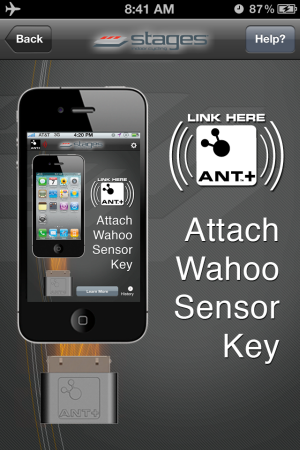
The console is designed to “Pair” fancy word for connecting to both a Heart Rate strap and/or your iPhone during “Warm Up” mode. Once you advance to Stage 1 Pairing is no longer available. With the Stages App turned on, pedaling the bike and the console in Warm Up you will see:
Pressing the Stage button brings you to the main screen.
My second test is; “what value does this product provide, beyond some fancy graphics?”
Something we all need to know.
The Stages App will calculate your FTP (Functional Threshold Power) and your Heart Rate at FTP over a series of rides. Understanding your FTP is as important as knowing your Threshold Heart Rate. With both these metabolic markers you can create specific training zones. Once your student's know their Power Zones your class will be a whole lot easier to teach for you and more understandable (and beneficial) for them 🙂
Here's the setup screen where you can select to App to calculate your FTP or you can manually add it if known.
Auto-Calculate FTP is HUGE
I talked to Cameron about the auto-calculate feature because after three rides it was showing my FTP as 186 Watts vs. ~240 watts which I'm normally seeing during a long hard effort. Her response was; “how hard did you ride during those classes?” I admitted that I hadn't worked as hard as I could have. Cameron explained that App is looking for your best 20 minute average wattage and if I don't provide a hard/long effort the App doesn't have the necessary data to work from. It didn't have any trouble calculating my FTHR 🙂
There's much more to this App and I am planning a Podcast with Cameron to explore all it's functionality in more detail. For more now please check out this Quick Start video and if you are teaching or training on a FreeMotion S11 series Indoor Cycle I highly recommend that you start using this App – ASAP. Order your Freemotion S11.0 Indoor Cycle – with Power Sensor Console


 With the increase of those interested in getting a healthy start to 2012, more and more people are joining health clubs and attending indoor cycling classes. This is great! It provides a perfect opportunity to foster good technique and skills as these new members acclimate to our classes. One topic I have found myself addressing more than usual lately is proper footwear.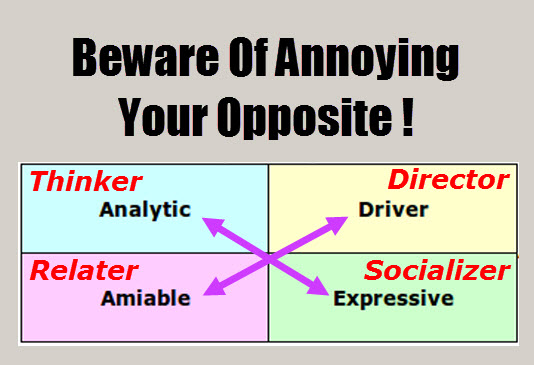
 The personality matrix is constructed like this:[wlm_private ‘PRO-Platinum|PRO-Monthly|PRO-Gratis|PRO-Seasonal|Platinum-trial|Monthly-trial|PRO-Military|30-Days-of-PRO|90 Day PRO|Stages-Instructor|Schwinn-Instructor|Instructor-Bonus|28 Day Challenge']