by John | Jun 15, 2014 | Latest News, Your Fitness Business

Click image to visit.
Courtney Lee has me all fired up about Facebook! It occurred to me that there wasn't anything there for owners and managers of Spinning® / Indoor Cycling studios. So we've created the official Facebook Group for studio owners and soon to be studio owners 🙂
www.facebook.com/groups/CyclingStudios/
The group is open to owners, managers and prospective studio owners + industry experts willing to provide helpful information and resources.
If that sounds like you please join (we need to approve your request) and then leave a note about your studio and a fun picture.
by John | Jun 15, 2014 | Latest News

Image from Pear iZumi.
“We'd Like to Thank All the Dads Who Taught Their Kids to Ride a Bike” was the subject line of an email I received today from Pearl iZumi. I'm pretty sure it was the kids in my neighborhood who taught me to ride. I do know for sure that it was my privilege to teach each of these young ladies, now 19 (Carly) and 23 (Abby) – pictured on each other's bicycles in 1997 🙂
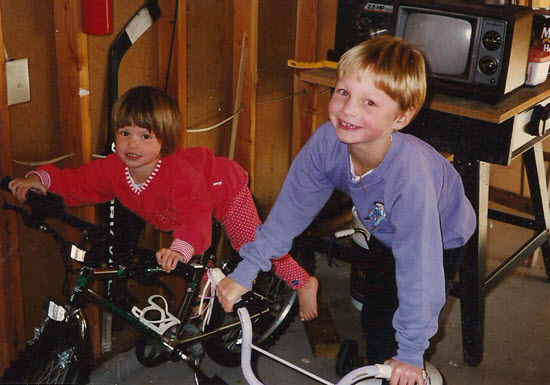
I'll never forget running up & down the street with them, holding them by their shirt collars, very glad I had given up my sedentary lifestyle. ICI/PRO members don't forget about your 40% discount on anything Pear iZumi makes. Here's our page http://shop.pearlizumi.com/icipro/ And no your dad won't care if your gift is a little late.
S0 who taught you to ride a bicycle?
by John | Jun 13, 2014 | Instructor Training, Music

You haven't heard it yet, I just finished recording an interview with Stages Indoor Cycling's Master Trainer Cameron Chinatti where we discuss participant evaluations; your riders telling you what you are great at and what you need to improve on. I know that at times I over communicate, cuing everyone on things they've heard multiple times before. Trust that they'll know what to do and let them do it.
This week's track, a remix of Ellie Goulding's How Long Will I Love You is one you don't need say anything over. If you listen carefully there's a subtle plug for us dads – fitting as Father's Day is this weekend.
I'm thinking it could be perfect as a second track, following your intro. Turn up the volume and ride 🙂
https://soundcloud.com/henry-krinkle/ellie-goulding-how-long-will-i
Here's an alternate version that may fit as well.
https://soundcloud.com/unitedubstep/ellie-goulding-how-long-will-i-love-you-aznar
The original could be your closing track… or this version if you need a bit more intensity. Click over and like their FB page – then scroll down for the free track.
https://soundcloud.com/solarheavy/ellie-goulding-remix
by John | Jun 13, 2014 | Instructor Tech Help, Instructor Training, iTunes & Spotify Training, Music, Spotify
Does Spotify seem to take forever to load on your iPhone? Did it close abruptly (crash) when you hit ‘play', act sluggish or is just not as responsive as when it was new? It may have bonked. Here's how to nurse your prized device back to life…
Wikipedia describes bonking as
In endurance sports such as cycling and running, hitting the wall or the bonk describes a condition caused by the depletion of glycogen stores in the liver and muscles, which manifests itself by sudden fatigue and loss of energy. Milder instances can be remedied by brief rest and the ingestion of food or drinks containing carbohydrates. The condition can usually be avoided by ensuring that glycogen levels are high when the exercise begins, maintaining glucose levels during exercise by eating or drinking carbohydrate-rich substances, or by reducing exercise intensity.
Your iPhone, or other portable device, can experience the bonk as well. No, not because the battery is low, or you haven't fed it enough GU, but from a depletion of available system memory (RAM – Random Access Memory). This results in slow operation, freezing / crashing Apps and mysteriously frustrating actions that have you wondering why you're not using CD's anymore 🙁
Two types of fuel
As a fitness professional you no doubt are aware that your body stores two types of energy; sugars (glycogen) and fat. Regardless of your fitness level, during a long period of exercise the limited amount of stored glycogen you have is consumed. If you don't eat carbohydrates before they are exhausted, you'll bonk. Interestingly, your body can't access the energy in your stored body fat quickly enough to prevent bonking, even though you have all the fat calories needed to keep you going for days. Yes, with proper training you can improve fat usage, but watch the Tour de France next month and you'll see very fit cyclists eating frequently during each stage.
The energy that fuels your iPhone is memory:
- System memory (RAM) which runs all of the phone's operations – a small amount @ 512MB (one half GB)
- Storage memory – that's the amount of memory you choose when you bought your iPhone; 8GB, 16GB, 32GB, etc… that holds your offline Spotify music files, iTunes tracks, videos and pictures.
Your iPhone bonks when it runs low on available RAM – none of the 32GB of storage memory you paid extra for is available to help out. You don't see it, but there are a bunch of processes running continuously on your phone, eating small bits of RAM. Typically this happens when you have multiple Apps running in the background or you have too many Apps looking for updates (push notifications) or GPS location updates. You can't add any additional RAM – so the solution to prevent bonking is to free up RAM – by closing unused Apps and turning off unneeded functions will free up some additional memory.
Step one – Close Unused Apps
Did you know that clicking the Home button doesn't actually close an App? It doesn't. There's a good chance that every App you've ever downloaded and opened is still quietly running, consuming the much needed RAM to run Spotify properly. Powering down your iPhone doesn't close them either – each App needs to be closed manually.

Double click the home button and then swipe up to close Apps.
Here's how…
- Double click the ‘Home' button quickly and you'll see thumbnails of the Apps currently running.
- Scroll left/right to select an App to close.
- Swipe the thumbnail up to close it – there's no reason not to close all of them.
Step two – Do you talk to Siri?
Besides it being annoying, Siri is a bit of a RAM hog. If you're not on speaking terms, turn her off. Settings>General>Siri
Step three – Reboot Regularly
Whenever you're tired, does it seem like your mental processor doesn't operate as sharply as it does after a good night's sleep? After a long day your brain's RAM has a bunch of “stuff” running in the background that it collected during the day; problems at work, anxiety about a future event, what to get your dad for Father's Day… stuff. The best way to clear it is an 8 hour horizontal reboot.
Computers are no different. They collect “stuff” as they work, reducing the amount of RAM needed for Spotify to crossfade between songs. NOTE: cross-fading streaming tracks is actually a very neat (and memory intensive) trick.
So when was the last time you powered down your iPhone and give it a rest? I've asked people this question and mostly been told that the only time they've rebooted their phone is when the battery goes dead. Same goes with your computer, Mac or PC – they all benefit from regularly being turned off. Wait until it has completely powered down and then bring it back to life 🙂
Step four -Turn off unneeded services
Every neat little thing your iPhone does requires RAM…
- Do you really need to instantly see every new FB comment displayed on your home screen? Turn a few off: General > Settings > Notification Center.
- Location tagging is a bit creepy. Does Shazam really need to know where I am? I don't think so. Turn off all of the nonessential location tags: General > Settings > Privacy > Location Services and scroll down to see who's tracking your location. I only have Facebook (for checking in) and Google Maps turned on.
There are multiple ways to reduce RAM usage beyond this list – these should be a great start to prevent your iPhone from bonking anytime soon!
by John | Jun 11, 2014 | Instructor Training, Spinning Class, Training With Power
 At WSSC I had the opportunity to complete a PST (Personal Spinning® Threshold) test – which is (their words) the key to Spinpower success. I couldn't agree more as knowing your maximum sustainable power or Heart Rate, and then building training zones around a known metric BPM/Watts is crucial to effective training. Here's some notes on this session and the discovery process MI Janet Toussaint lead us through to determine our Personal Spinning® Threshold.
PST is something we can change
Janet's session included a lecture period before we climbed on the Blade Ions for the PST test. During her presentation she made three very profound points that I feel are important for anyone teaching with power, to convey to their participants…
- It is possible to change/raise/improve your PST. You maybe familiar with the statement; if you can test it you can improve it. In the past the Spinning program was based on Maximum Heart Rate – a number that doesn't change no matter how hard you train. Yes you can become more efficient at Fat utilization, except that's difficult to measure without a metabolic cart. Sustainable power at threshold (PST) is something you can easily see changing and that can be very motivating.
- PST is based on Maximal Efficient Effort – key word being efficient, as in where efficiency drops off during the graded intensity ramp test. This isn't a test where COME HELL OR HIGH WATER I'M GOING TO PUT UP THIS HUGE WATTAGE NUMBER!!! Janet made the point a number of times that you have to be careful not to let these assessments become a competition, where people are trying to prove something.
- Your PST is specific to this sport – actually Angie Sturtevant made similar statements. The wattage you see as a PST only applies to a Spinning class – not your road bike with a power meter. I would add that it also only applies to the specific brand of Indoor Cycle.

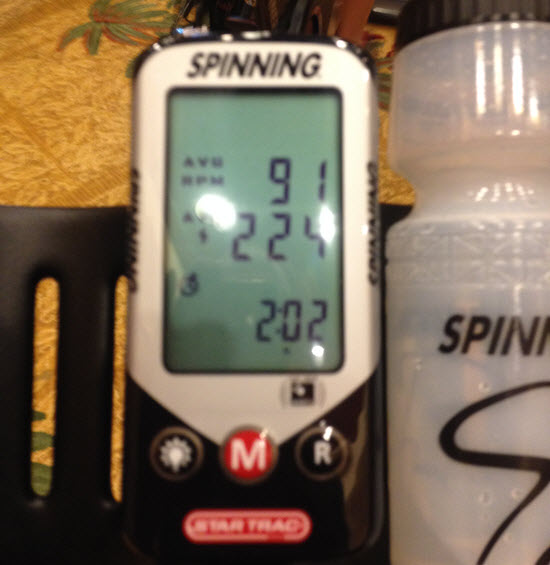
I snapped this picture showing the ramp test protocol used to asses the PST used to create the 6 power zones in the SpinPower program.
Constants and Variables
The constant during this test is cadence/RPM which doesn't change during the test. Janet suggests you not mandate a cadence, instead ask every one find “where they hang out” = natural cadence. What will vary will be the amount of resistance, and the resulting changes in HR and perceived exertion/RPE.
- Start everyone warming up in zone one, finding that natural cadence for 10 or more minutes. Include a few brief accelerations – but not too intense or long.
- Every two minutes you'll add resistance / ramp up. How much? Janet recommends 10-20 watts from women and 15-30 watts for men.
- After you've added the new ramp, push the reset button to record your average for that ramp – remembering the previous ramp's wattage.
- When you can't maintain your cadence, for the whole two minutes, you're done. Your PST is the watts from the last fully completed ramp.
- How many ramps is the right amount? Janet explained that there is no “right amount”. You need to run the assessment until everyone has completed the test. There were some questions about this and it sounds like you should see at least 4 ramps until failure. Less than that probably means that the rider is adding too many watts with each ramp.
My experience during the test was as I got closer to PST, I wanted to reduce the size of each ramp's increase. I also knew very quickly when I wouldn't be able to finish a ramp. My numbers are in the image above. I couldn't complete my last ramp of 240 watts, which actually isn't that far off what I'm used to seeing as my threshold on the FreeMotion bikes I teach on at Life Time.
Thinking about conducting an assessment like this in your class? I would suggest that you practice on yourself first, so you understand what your riders will be experiencing.
If you are teaching on Spinner Blade Ions I would love to talk to you. Please contact me.