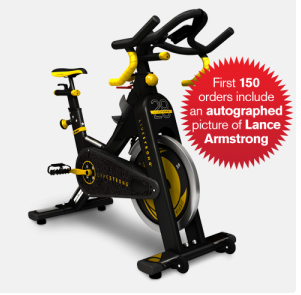
I just found this, but it may be old news to you. I'm not sure if it's club quality but it's sure nice looking. Here is what Lance says about Livestrong fitness equipment:
I'm excited to introduce a new line of LIVESTRONGâ„¢ fitness equipment where every piece sold raises money for the fight against cancer. Our team has put countless hours of development into making these products worthy of the LIVESTRONGâ„¢ name, and I am proud of this partnership. Staying fit has always been an important part of my life and leading an active lifestyle is one of the best ways to stay healthy.
2/2014 UPDATE: This software is no longer available.
With all this talk about PRO/Playlists and Spotify I can't forget my friends with iTunes 🙂
I received an email today from Richard, who's an ICI/PRO member, asking if I could help him…
Over a year ago I had to restore my computer and I used a back up drive to restore my music, actually I gave it to someone else to restore. When I got it back all my music was there but there were multiple entries of the same songs, some as many as 7 or 8 in iTunes.
I tried the iTunes duplicate feature to try to eliminate them but I have so many it was an endless task. Then I tried to delete all but one song in the list but when I clicked on some of the song listings, some played and some did not. So by mistake I deleted a lot of songs before I realized my error. I use Mixmeister 6 to build all of my playlist and then export a 1 hour long mixed file to iTunes to download to an iPod Touch. I think I might as well delete the music I have in the iTunes files and rebuild iTunes from what I have left in my music files.
I really don’t use iTunes much other than to transfer to the Touch. Do you have any thoughts on how I might correct this huge file problem?
You may remember (I sure haven't forgotten) that last fall I needed to replace my computer's hard drive after dropping it on the floor. Thankfully I was completely backed up with Carbonite and was able to restore everything… except I now have the same problem as Richard, dozens of duplicates showing in iTunes. So I thought this would be a good time for another I Can Help Video where I look into TuneUp – a popular plugin for iTunes designed to quickly remove duplicate listings in iTunes. UPDATE: I just got an email from this company and they offered a 20% to our community. Use promo code CYCLING if you decide to invest in the full version.
Update: As I continued to explore TuneUp I discovered how well it can replace Track 1/Track2/Track3 and I made another video about it here at iTunes TuneUp Software Review Videos.
Meet Spinning® Instructor/Personal Trainer and Fitness blogger Darcy Knoblich!
Darcy is doing a fabulous job connecting with participants and other instructors, while promoting herself online through her websitedarcyknoblich.com.
I really enjoyed interviewing Darcy and I hope you enjoy listening to her passion for helping others 🙂
Our goal for this Podcast was to help motivate Instructors (that could be you) to get active online. There are multiple online tools available that are free and easy to use, like the blogging platform WordPress.com or Blogger.com.
UPDATE: A great promotional tool you could should leverage is creating your Instructor profile on indoorcyclinginstructorjobs.com where you can post your resume. Wouldn't it be awesome to get a call from an interested studio owner?
Your website may just include some info about you, your class format and your scheduled classes. Or you could really get into it and post your playlists, training information, feature some of your favorite participants or one of the Instructors on your team!
During our conversation I mentioned that I had started a blog back in 2008 – it was actually Spring of 2007. I checked and it's still there indoorcycletraining.blogspot.com/
This profile uses the concept of “Negative Split Training” to assist the rider
in developing body awareness, and aerobic capacity. The competitive cyclist will
have an opportunity to practice pacing skills. A “Negative Split” is an effort that is
somewhat easier or slower in the first half than it is in the second half. Almost all
of the world running records have been set with a 51/49 ratio, meaning the first
half was completed in 51% of the total time and the last half in 49% of the total.
Here's your Spotify PRO/Playlist!Deezer. We have made every attempt to replicate the original playlist. In some instances the tracks specified were unavailable in Spotify. When necessary we have substituted individual songs of similar length and tried to maintain the Instructor's intent.
I was greeted by another Spotify update this morning and see they've added a new way to accidentally screw up your class 🙁
Forgive me if you have already experienced this Spotify update. I might be a few days late reporting the change – I've been using the new Schwinn Class Tamer app and wanted to use a past Spotify playlist today.
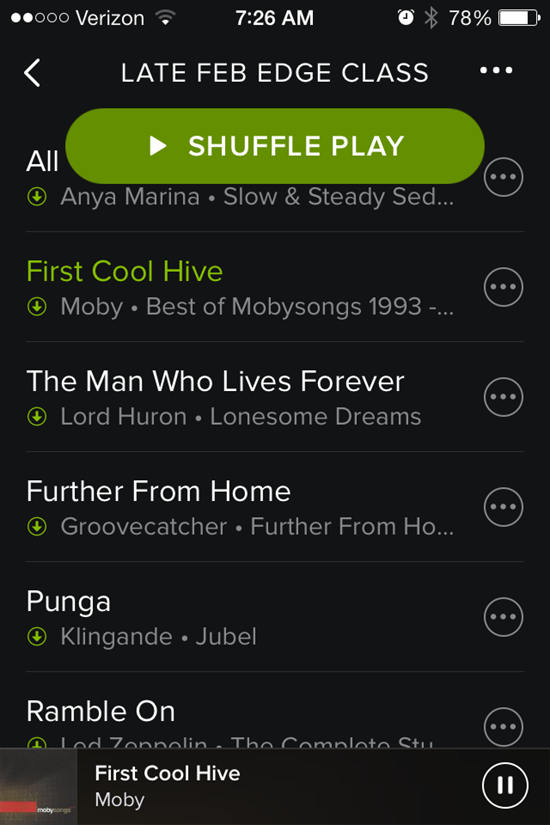
That big Shuffle Play button sits there at the top, taunting you to inadvertently touch it (or drip on it) and mix up your song order. It won't go away. Swipe up or down to scroll through the playlist to see what's next and that dang button stays right there at the top. Who thought that would be a good idea?
I do like the white on black fonts – they're a bit easier for me to see/read – but still the same frustratingly tiny track length time font.
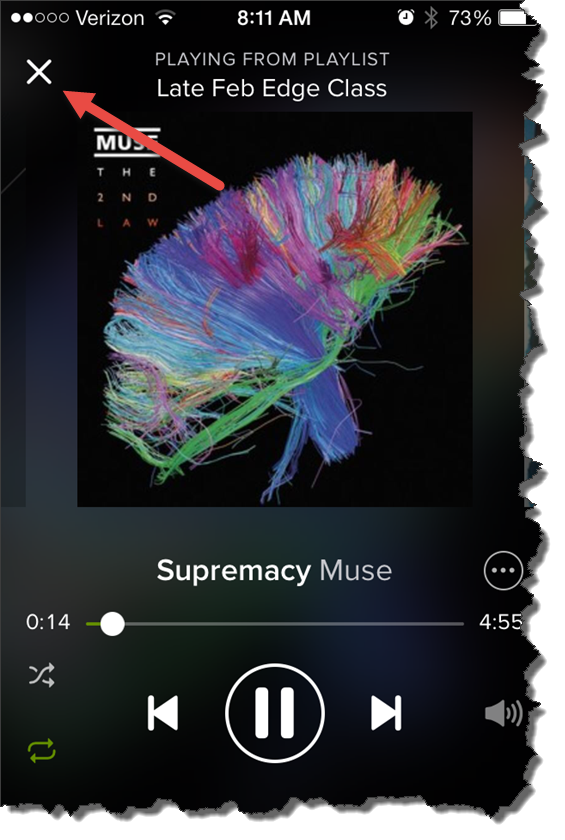
During class this morning it took me a few tries to get out of the Now Playing Info screen. Tapping anywhere on the bar across the top doesn't work anymore – you need to carefully tap the little X in the top-left corner.
For some reason I couldn't see that X this morning.