Many instructors tell me that teaching indoor cycling has ruined their appreciation of music. They say that once you become an instructor music comes in only two genres, can be used in class or not. This is sad but true. I have been experiencing a different problem since I started using video in my classes. Now when I watch YouTube videos they are put into the same categories. I am stuck in the never ending quest for the best videos to use in my classes. Every once in a while someone posts a gem that magically appears in my Facebook News Feed, this week the gem was posted by non other than our very own John Macgowan.
[wlm_private ‘PRO-Platinum|PRO-Monthly|PRO-Gratis|PRO-Seasonal|Platinum-trial|Monthly-trial|PRO-Military|30-Days-of-PRO|90 Day PRO|Stages-Instructor|Schwinn-Instructor|Instructor-Bonus|28 Day Challenge']
I hope you like it and I wonder what would happen if the bike stalled?
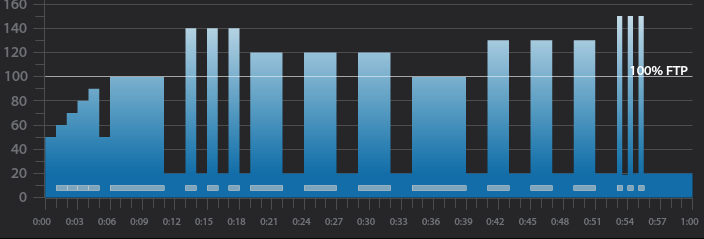
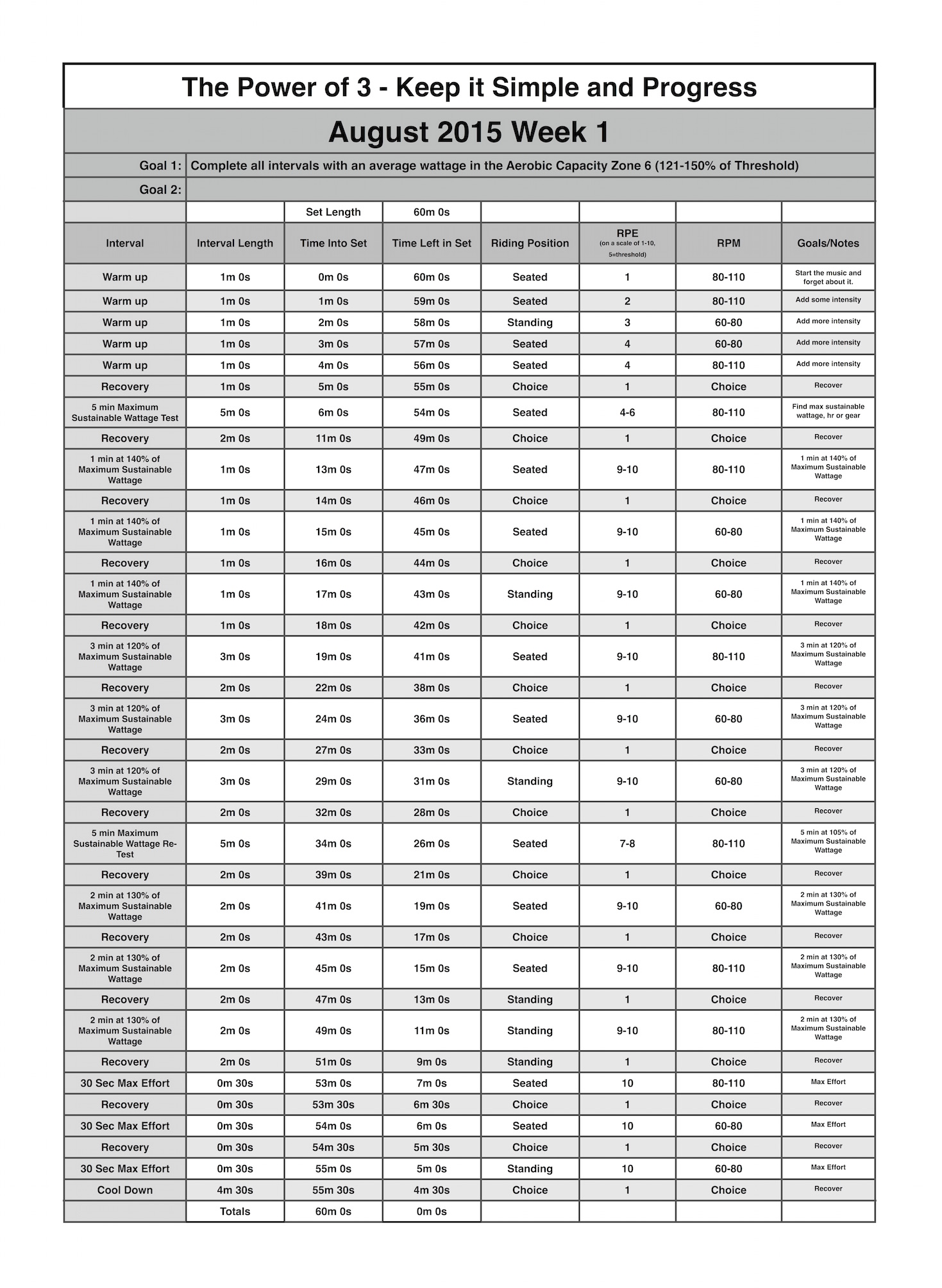
Below you'll find Week 1 of August's Keep it Simple and Progress indoor cycling profile. Over the past few months we have been working hard but with the limited rest most of the work was being performed in the Lactate Threshold and VO2 Max Zones of 90-120% of Threshold. The August progression is going to call for higher intensities into the Aerobic Capacity Zone of 121-150% of Threshold. Because of these higher intensities I'll also be giving more recovery. At first it may seem scary to recover this much, but I promise you, if your riders are working in the Aerobic Capacity Zone the'll appreciate the rest.
5 minute benchmark ride to find “Maximum Sustainable Wattage”
2 minute recovery
3 x 1 minute intervals
1 minute recovery after each
3 x 3 minute intervals
2 minute recovery after each
5 minute interval
2 minute recovery
3 x 2 minute intervals
2 minute recovery after each
3 x 30 second intervals
30 second recovery after each
5 minute cool down
5 minute “Maximum Sustainable Wattage” Test
Settle in to a 5 minute interval at 80-110 rpm.
This interval should be ridden at a maximum sustainable intensity.
if riders know their threshold they can spend this 5 minutes riding at it.
At the end of the interval take note of average wattage or HR or be aware of the RPE.
3 x 1 minute interval goals and specifics:
1st one minute interval should be ridden seated at 80-110 rpm at 140% of maximum sustainable wattage or threshold.
1 minute recovery or reset
2nd one minute interval should be ridden seated at 60-80 rpm at the same wattage or intensity as the 1st.
1 minute recovery or reset
3rd one minute interval should ridden standing at 60-70 rpm at the same wattage or intensity as the 2nd.
1 minute recovery or reset
3 x 3 minute interval goals and specifics:
1st 3 minute intervals should be ridden seated at 80-110 rpm at 120% of maximum sustainable wattage or threshold.
2 minute recovery or reset
2nd 3 minute interval should be ridden seated at 60-80 rpm at the same wattage or intensity as the 1st.
2 minute recovery or reset
3rd 3 minute interval should ridden standing at 60-70 rpm at the same wattage or intensity as the 2nd.
2 minute recovery or reset
5 minute “Threshold” interval goals and specifics:
Ride for 5 minute seated at 80-110 rpm and try match the output or wattage from the “Maximum Sustainable Wattage” test
2 minute recovery or reset
3 x 2 minute interval goals and specifics:
1st 2 minute intervals should be ridden seated at 80-110 rpm at 130% of maximum sustainable wattage or threshold.
2 minute recovery or reset
2nd 2 minute interval should be ridden seated at 60-80 rpm at the same wattage or intensity as the 1st.
2 minute recovery or reset
3rd 2 minute interval should ridden standing at 60-70 rpm at the same wattage or intensity as the 2nd.
2 minute recovery or reset
3 x 30 second interval goals and specifics:
1st 30 second intervals should be ridden seated at 80-110 rpm at 150% of maximum sustainable wattage or threshold.
30 second recovery or reset
2nd 30 second interval should be ridden seated at 60-80 rpm at the same wattage or intensity as the 1st.
30 second recovery or reset
3rd 30 second interval should ridden standing at 60-70 rpm at the same wattage or intensity as the 2nd.
4 minute and 30 second cool down
[wlm_private ‘PRO-Platinum|PRO-Monthly|PRO-Gratis|PRO-Seasonal|Platinum-trial|Monthly-trial|PRO-Military|30-Days-of-PRO|90 Day PRO|Stages-Instructor|Schwinn-Instructor|Instructor-Bonus|28 Day Challenge'].
Trainer Road Profile (If you're Trainer Road Member join my Team to get this and all profiles)
Over the last year I have been trying to take classes from many different instructors in many different facilities. I've been doing this to see what kind of profiles other instructors are using and what kind of music they are playing. Also, as a Master Educator for Stages Indoor Cycling, I want to see if our eduction is making it's way into these facilities and what we need to emphasize in our trainings.
When it comes to music I have found that most instructors are using mixes that you would hear in dance clubs. They are high energy with a strong beat. I like these mixes and they work well in most class, but sometimes I like to use Classic Rock songs that have real instruments with sing-a-long lyrics.
In this week's “Power of 3” mix I used some songs that bring me back to my childhood, riding in the car with my parents and hearing them sing along on the old AM radio.
[wlm_private ‘PRO-Platinum|PRO-Monthly|PRO-Gratis|PRO-Seasonal|Platinum-trial|Monthly-trial|PRO-Military|30-Days-of-PRO|90 Day PRO|Stages-Instructor|Schwinn-Instructor|Instructor-Bonus|28 Day Challenge']
Kickstart My Heart by Motley Crue is one of my favorite indoor cycling songs. It's my first choice whenever a profile calls for a Tabata interval. A Tabata interval is simply 8 max effort 20 second intervals with only 10 seconds rest between each.
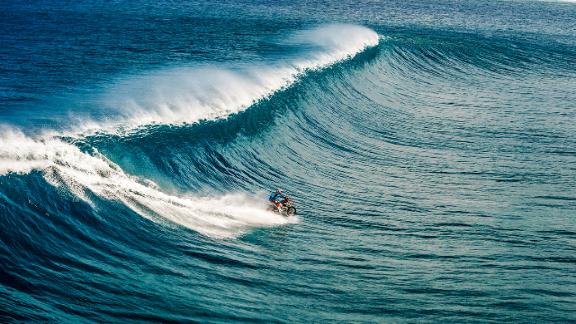
If a Tabata interval done to Kick Start My Heart while watching a big wave surfing video doesn't get your rider's heart pumping, nothing will.
[wlm_private ‘PRO-Platinum|PRO-Monthly|PRO-Gratis|PRO-Seasonal|Platinum-trial|Monthly-trial|PRO-Military|30-Days-of-PRO|90 Day PRO|Stages-Instructor|Schwinn-Instructor|Instructor-Bonus|28 Day Challenge'].
I taught my final class for LifeTime Fitness yesterday and thought I would use my very last track as this week's free music Friday.[wlm_private ‘PRO-Platinum|PRO-Monthly|PRO-Gratis|PRO-Seasonal|Platinum-trial|Monthly-trial|PRO-Military|30-Days-of-PRO|90 Day PRO|Stages-Instructor|Schwinn-Instructor|PRO-Visitor|PRO-Studio']
Line of Fire from Junip is one of those sneaky songs that starts quiet and unassuming. Then it begins to build @ 92 RPM, in volume and intensity. Listen for the obvious places to cue additional load that come about 20 seconds apart. We built up to our Best Effort power over the first 2:30. Then there's a nice quiet spot to regroup before ramping up again to the BIG FINISH – you decide how long you want to keep everyone above threshold. The total length (before the outro) is 5:22. Plenty of time to really do something cool!
Has this ever happened to you and really messed up the energy of your class?
You switch from the Now Playing screen on your iPhone, back to the Playlist Screen to check what song is coming up next.
Except you're a ways into the class and to see the current song that's playing in the list, you need to carefully scroll down through the playlist. Easy to do when you're sitting at a desk. Not so easy when you are all sweaty and pedaling a bike. So what you intended as a swipe to scroll down the order, becomes a click that starts a different song. This of course messes up everything and has you flustered, trying to get back to the previous song – and at the correct point in the track 🙁
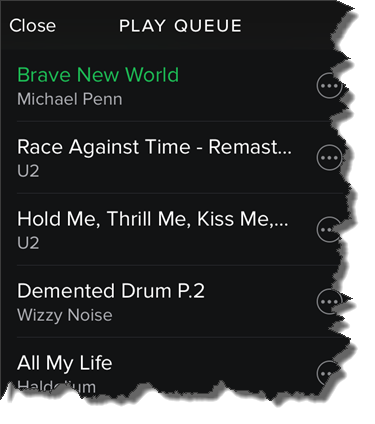
I found a solution for this today. I'm not sure how long it's been there, but there's now an option to see the Play Queue the list of what's coming up next. Here's how you can find it:
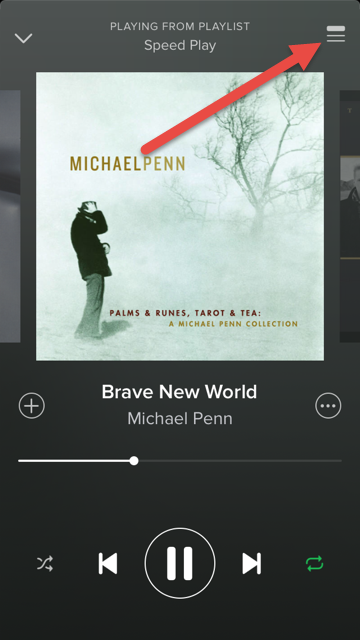
From the Now Playing screen > Click the top right icon.
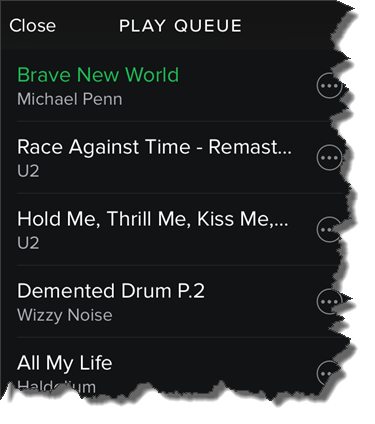
That will open the Play Queue with the current track always at the top!








 That will open the Play Queue with the current track always at the top!