Not usually drawn to “pop” music, this little tune caught my ear when the stereo was mysteriously left on in my car. I've been using today's Free Music selection as a relief 90 rpm flat road after 12 Tabata intervals.
This song has a happy feel and catchy tune (typical to this artist), which is a nice relief to everyone after all the intervals :). It's 3:43, just the right length to recover at T1 and head back into another round of Tabata's.
John it just disappeared. It showed up fine on my computer and I'll swear it was on my Droid before I left to teach. But as I was ready to launch into a long threshold effort, Spotify skipped past a track, completely messing up my class.
Amy is the official Android user here in our home, me and the girls all have iPhones. Which is helpful when people rely on you to help them understand the little idiosyncrasies of a particular music software app like Spotify.
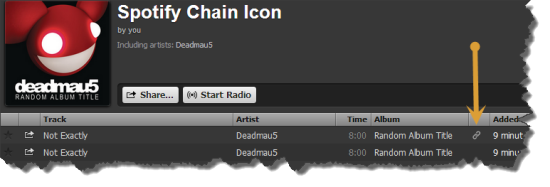
I'll admit that, although I had seen that chain icon before… I had no idea what it meant or represented. I do now 🙂
That chain icon indicates; the specific song you dragged into your playlist isn't available in that exact place, so Spotify has conveniently linked to to the actual location of the track in their database. Perfect if everything works as planned. Which, unfortunately wasn't the case with Ms. Amy today, at her noon class at CycleQuest Studio. I've never had an issue with this on my iphone, but you can never be too careful when it comes to your class music. I'd recommend checking for any any “linked” tracks and see if you can replace them.
Click the “chain” icon and Spotify will take you to the linked location. Select and drag that track into your playlist. Open the playlist and position the track next to the linked track, and then delete it.
So while we're on the topic, what do those other, funny little icons represent?
The square box with the music note symbol indicates a local track, probably from iTunes, that Spotify can't connect to its database. If you see this in your playlist be sure that you set “offline mode” while both your computer and portable devise are on the same WiFi network.
I'm still trying to understand the pinkish square with the lighting bolt. Supposedly they're tracks that Spotify had found once, but can no longer find. Funny – songs with that icon still sync to my iPhone and play both on my computer and iPhone.
Seeing this icon next to a local file means that the link (or path) to your local file is broken or not found. Perhaps iTunes moved the local file to a different folder. You can try to import the file again by browsing to the actual file and dragging it into Spotify’s Local Files pane. The broken rectangle link also shows up if a song is protected by digital rights management (DRM), so it can’t be played outside of iTunes. A notification bar appears if this is the case, and you’re prompted to remove all DRM-protected tracks from the Local Files pane.
Which doesn't make sense to me – all three tracks from the image above play and sync without any trouble.
I subbed John's class tonight and used a new playlist. His class just lit up when this 66 rpm hill came up! It's a great funk tune (Re-recorded and Remastered) from a Cleveland based 80's group. It has that ‘I recognize this' familiarity that our classes love.
Simply setting leg speed at 66 and asking them to stay just under AT, I just let them go for 4:43 (the Re-recorded/Remastered Spotify version).
Here's hoping you and your class have as much fun with Dazz's ‘Let It Whip' as we did tonight.
http://www.youtube.com/watch?v=r7lLPvDJI5M
And a really cool free download re-mix from Soundcloud – they moved the link to the bottom of the player:
Here's a great free download mash up from Soundcloud:
This Friday brings a change of pace with a hard driving climb. If you enjoy a great bass line, this song will rock your socks.
A British alternative rock band, self described as ‘techno-pop punk rock', with a lead singer from Nigeria, this band originated in 1994 and was most popular in the late 90's. They reunited in 2008 and continue to perform today.
What's so fun about this song is our group vaguely recognizes it and we can use that to our advantage as we coach them through the 5 minute 65 rpm push.
‘Ready To Go' by Republica is just a great IC song- straight up! I've been known to play ‘Name that band' every once in a while and this is a great song to do it with.
I also say, “Are you ready to go?, because we are already gone”….that fires them up to work at AT.
I REALLY like the free download from Soundcloud. A Chris Chambers edit. I might even like it better than the original, so hurry and download it while the downloading is good!
Sometimes it's about taking a deep breath, hunkering down into the bars, focusing and seeing what we can do. Today's music is exactly what that's about. At 94 rpm's, this very chill tune lends itself towards self reflection and deep intense work, with great opportunity for coaching.
Have you noticed often our participants equate hills with intensity and flats with easier work? I wonder when that happened? Oh contraire! This song is a ‘sleeper', as I ask them to add 10 watts (from base) each 30 seconds (total 8 times), holding cadence at 94. Wow are we pushing by 4:00, ending at 4:28.
No power? No problem! Just pedal away in time to the music at 94 rpm's and add load as described above. Before we had power meters, I would have the group look in the mirror and compare their leg speed to mine as a cadence meter if they couldn't hear it in the music.
Enjoy “All I Need” from the French Electronica band- Air.
” Do you believe in what you see? ” A line taken from today's Free Friday tune. It's a downtempo 80 rpm song with a cool vibe. At 4:32, it's nicely placed in a profile coming out of a climb.
An interesting fact: this British duo named themselves after a night club in Honduras!
Enjoy ‘In the Waiting Line' from the Simple Things album by Zero 7:
And here's a fun remix for your free soundcloud download: