
by Chuck Cali | Mar 26, 2014 | Instructor Tech Help, Latest News

How often have you wondered what your daily caloric burn REALLY is rather than estimates from metabolic tests or formulas? What about resting heart rate? Sleep patterns? Body temperature and perspiration? How about steps you take a day? These are all indicators of the work your body is doing or not doing if you're asleep.
Well enter BASIS. Recently acquired by Intel, their website calls it, The Most Advanced Health Tracker. And I tend to agree. Some history.
Sally Edwards and I had just started working on ZONING. A major part to ZONING education was simple heart rate training. But sampling heart rate historically had come at the cost of wearing a chest strap. Often an obstacle to
ongoing use, the chest strap is cited as, scratchy, pinches, squeezes and plain uncomfortable. I was on a quest to find a reliable heart rate monitor that did not require a chest strap.
IHRSA was in San Francisco that year (2011). So Sally and I stopped by a San Francisco start up company before heading off to IHRSA. That company, BASIS.
We sat in their offices as the lead engineer explained their technology and what they hoped the future uses in the wellness field could be. I was wearing one of the prototypes and comparing heart rate between my prototype Blink 1 and the BASIS watch. Spot on.
The unique BASIS watch measured my heart rate using optical sensors rather than EKG like the Blink. That meant no chest strap. 🙂 Moreover, it also measured body temp, perspiration, counted steps, told me the time I spent walking, the date and time. Finally a health and wellness tracker with heart rate and no chest strap. I didn’t want to give them back the prototype.
It was clear that the price point for such a device was way off from what Sally and I wanted to bring to market and it didn’t have flashing LED’s.
Fast forward three years. I find out on Facebook that BASIS is now on the market. Their web site up and running explaining everything good about wearing a BASIS watch. Once one owns a BASIS watch the site will start tracking one’s wellness just like they predicted.
I had to have one. The price had come down a bit from three years ago and is now in line with mid to upper range heart rate monitors. Mine first BASIS cost $169. With one downside (more on that later) I loved it from the moment I strapped it on.
Yes, my first BASIS. Let me explain. Marianne (my better half) had been an avid Body Media person. She had that ugly thing strapped to her arm since it was first introduced. It measured steps, body temp and somehow turned it into activity monitoring. She liked its simplicity, the nutritional nature of the their web site and velcro strap. But after years of wearing Body Media around her upper arm it had left a permanent mark.
After I had worn my first BASIS for a couple of months I was impressed with how well it tracked my activity, regardless of intensity level. I realized this is just what Marianne needs. So I let her try mine. She wouldn’t give it back citing how easy it is to wear and the accuracy of its features. Like most women, she is weight conscious. The BASIS website unlike the Body Media site does not provide a place to record one’s nutritional intake. Read monitor calories in. She has recommended to BASIS to add such capability and has kept wearing mine. So I bought another.
For our club athletes, tracking activity is often more helpful than zone training. BASIS provides a good look at resting heart rate – always a good indicator of VO2max – so ones overall fitness gains can be seen by improved (lower) resting heart rate. If BASIS could add a nutritional component to their web/mobile app I think more of our riders would be interested in stepping up to the plate for a device that cost twice as much as Fitbit but does four times as much.
I mentioned earlier one downside. BASIS does not sample heart rate continuously. Because of memory limitations displaying/recording real time heart rate is not possible. That is quite the limitation for those doing heart zone training. When I ride outside I use my Garmin. When I teach inside I use my Blink.
But the other 23 hours per day I wear my BASIS. And it has been most useful. I now know at age 60 that my caloric burn is more hot air than fire. Still, it helped me reset my caloric intake which really had not changed in over 10 years. Sadly, my weight had :-(.
Now that BASIS is a part of Intel's Devices line I hope there will be a surge of new development that will take this wellness product into the fitness limelight. I'm an avid heart zones training guy but, when I'm not training, I wear BASIS.
To date I've yet to walk more steps than Marianne.
John adds to Chuck's post here with Intel purchased the company behind BASIS today, for a rumored price of roughly $100 million. Why can't I come up with an idea like that?
by John | Mar 14, 2014 | Instructor Tech Help, Instructor Training, Music
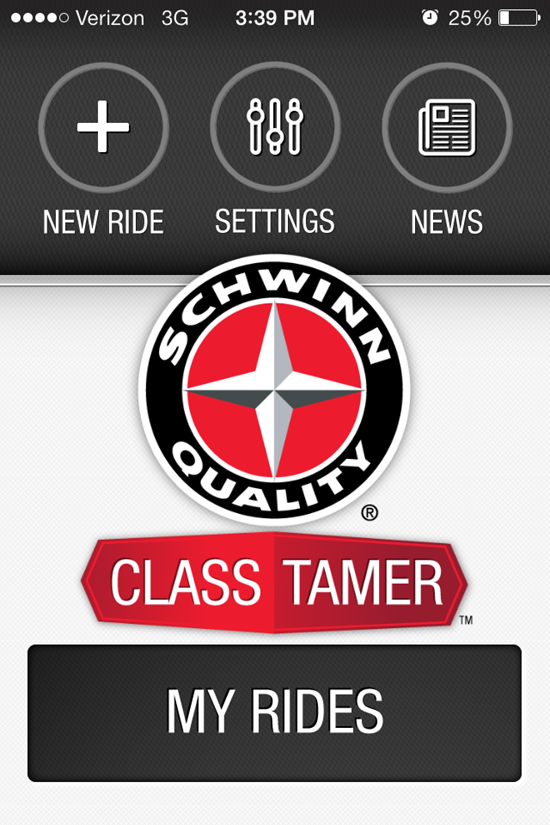
UPDATE 6/2017 – this app has been discontinued by Schwinn and is no longer available.
We're totally consumed here at IHRSA this week. So instead of a free track, how about an awesome and FREE Instructor iPhone App for building classes with cues instead?
This new iPhone App from Schwinn is called Class Tamer.
Here's the link to get the free App.
This is a crazy busy show and popular Master Trainers are… popular. After waiting a for a very busy Julz Arney to free up and show me the new App on her phone, I decided to install it and give it a try myself. Fantastic – it even has a crossfade with adjustable duration 🙂
Despite my fascination with new technology, my personal preference is for simple and easy. My biggest test is; when I turn it on, will I know instinctively how to make it work? This App is super easy to figure out. Even if you've moved to Spotify or Deezer, I'd encourage you to download it and give it a try. Who knows… you may get excited about iTunes again. There's also an easy to use tutorial if you get stuck.
Here's Schwinn's description of Class Tamer.
Designed with input and insight from Schwinn’s global team of Master Instructors, Class Tamerâ„¢ is the premier music player for group exercise professionals. The app intuitively organizes “what to say,” “what to play” and “what to do,” with large, easy-to-read fonts and controls, creating a tool that helps keep you organized — and your class energized.
Class Tamer features include:
– Ability to easily create and save ride playlists by accessing your songs, playlists, albums and artists directly from iTunes
– “What to say” and “What to do” scrollable notes pages, which allow you to input and save your cueing notes, music tags and BPM to specific songs
– Instructor-friendly, full-screen display
– Easy-to-read song timer, displaying time elapsed, time remaining, and prompting for next song
– Easy-to-navigate play/pause button
– Easy-access, oversized volume slider
– Ability to easily modify tempo of songs during a ride
– Customizable cross-fade setting
– Stopwatch that operates independently from the song timer and can be used while music is playing — perfect for intervals
– 10 sound effects to help add excitement to your classes – Adjustable font size for optimal readability during rides
– Demo and tutorial screen
Here's the player screen showing call-outs for some of the key features that have me excited to use Class Tamer in my next class.

Love those BIG NUMBERS!
NOTES:
- The BPM displayed in the top RH corner comes from the metadata (get info) of the track – the App doesn't compute the BPM or will the number change if you use the slider to change the tempo.
- For songs you purchased from iTunes that are “Protected AAC” – cross fade and tempo adjustment are disabled.
- Cues you've pinned to a song are manually chosen by swiping – they're not tied to any specific place in the song's time place.
by John | Dec 7, 2013 | Big Box Instructor, Class DVDS & Videos, Instructor Tech Help, Latest News

There's talk of a new YouTube Streaming Music service, similar to what many of us enjoy with Spotify & Deezer for delivering our class music. Imagine a service where you could create a playlist of music videos, add them to your portable device and then make them available for off line use 🙂
The alleged on-demand music service would be geared towards mobile use, and offer a free tier that lets you select songs from a large catalog of tracks, in addition to music videos supported by advertisements. A paid version of the service, which will cost $10 per month, will reportedly remove ads and offer the ability to save music offline on your device.
Word is that YouTube's service will be launched in the first quarter of 2014 – possibly as part of the Google All Access Music service.
I can't wait to see this because I've discovered something…
We've refrained in the past from advocating the use of YouTube music videos here at ICI/PRO in the past. My understanding was that the terms and conditions used by YouTube expressly prohibit playing their videos in a commercial setting.
Now I'm not an attorney, but it appears that this is another misconception from those “They Say” people. I just spent an hour researching this and can't find anywhere where YouTube prohibits the commercial use of their videos.
What is (has always been) prohibited is the playing of copyrighted music (audio only or music video) in a commercial setting = your club or studio, unless you're paying the appropriate fees to the music licensing authority where you're located.
Actually projecting the videos off your iPhone using this new service will of course create some new technical hurdles for many of us Instructors and studio owners. When YouTube's new service gets more real, I have an audio & video technology expert standing by to help us integrate this new video option into our classes.
by John | Nov 26, 2013 | Deezer, Instructor Tech Help, Latest News, Music
It sounds like Deezer Music will finally be available in the USA in 2014. I can't wait to see what happens, once Spotify has a proper competitor.
From theverge.com
Music streaming service Deezer will launch in the US in 2014. French company Deezer currently has 5 million paying subscribers in 80 countries worldwide, a figure that puts it close behind the similar service Spotify – based in Sweden – which boasts more than 6 million paying users. Deezer will join a crowded market of subscription-based streaming music services that also includes Rdio, Google Play Music, and MOG.
Except this rumor is a bit distressing…
US networks such as Verizon and AT&T are obvious targets for a partnership as Deezer expands, but TechCrunch reports the company would also consider joining with a firm outside the telecoms industry. According to Digital Music News, that partnership could even become a takeover. Its sources say Microsoft is considering acquiring the service outright to gain traction in an industry where it has failed to make an impact in the past.
Let's hope for Deezer's sake that Microsoft (if they are involved) doesn't turn Deezer into a Windows 8 like disaster.
We've been providing Deezer links to all of our Free Music tracks and Class Profile Playlists for the past year or so for our Canadian ICI/PRO members.
With the one exception of not having a cross fade playback option, Deezer works as well as Spotify on any iPhone or Android device.
by John | Nov 19, 2013 | Deezer, Instructor Tech Help, Spotify
Great question from ICI/PRO member Karin…
Hi John,
Question…can you direct me to the profiles/playlist that are more pop music? Or is there a way for me to search vs. going through each one? Thank you!
My response was: Most of our 60 Audio Class PROfiles are an eclectic composition of music, from many different genres. So there's no easy way to sort/search for playlists that are primarily pop songs. Unfortunately you will need to sample each playlist to learn if the music is to your taste.
I enjoy sampling music – what I do is:
NOTE: This all applies to Deezer as well.
- I subscribe to a bunch of playlists > and set them as Available Offline.
- Listen to each as I'm driving, working or some other activity when I'm alone.
- When I hear one I like I click the little circle with the three dots —

That opens the sharing options:
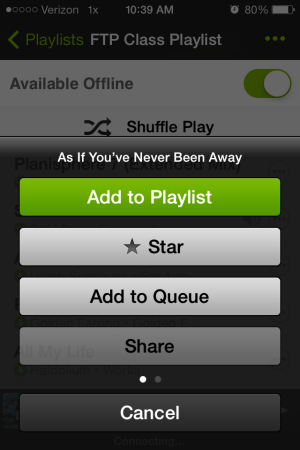
- Add to Playlist > and I add it to a special playlist I've created “Future to Use” – I keep at the top of my playlist column so it's easy to find. That's my go-to list (along with my Shazam Tags) when I'm ready to build a new class.
- Or you can “Star” the track > which adds it to your starred list > left hand sidebar has a “Starred” display option.
- Or if you swipe left, you'll see an option to; Go To Album, Go To Artist and Start Radio.

I enjoy the Radio feature a lot. Spotify will begin playing songs that are similar to the one you started with.
No telling what you'll hear (discover) next 🙂
[plulz_social_like width=”350″ send=”false” font=”arial” action=”like” layout=”standard” faces=”false” ]
by John | Nov 2, 2013 | Instructor Tech Help, Instructor Training, Spotify
Click Image to learn more about training for ICI/PRO Members.
We're planning our second live Spotify training for this Sunday 11/3 @ 5:00 central time.
The training will be conducted over Skype.
My preference is to keep the group small so we have time to answer everyone's questions = this is open to the first 8 Instructors who've emailed me a conformation – or you can leave a comment below.
We are planning to repeat these on multiple Sundays this Fall, as long as we have interest, so if you miss this week we'll get to you soon – use this link to join the notification list.
Some homework for you 🙂
- Create a free Skype account if you don't already have one.
- Sign up for the free trial of Spotify premium – I strongly suggest using FaceBook when you sign up. There is an option to register using just an email, but you'll be missing out on the ability to share music between friends and your class participants.
- Download and install the free App for your iPhone/iPad or Android Phone.
- Spend some time playing with Spotify so we can answer your specific questions during the training.
NOTE: you'll need the latest version of Skype (learned this last week) to see my screen and video. Existing Skype users check by going to: Help > Check for Updates
​
