Finally a Heart Rate strap with both Bluetooth and Ant+ connectivity 🙂
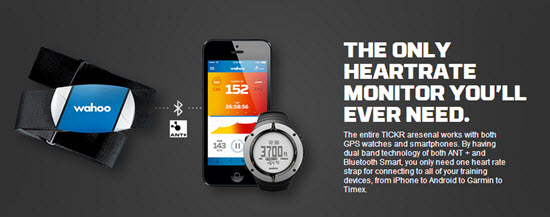
I've been using a new TICKER Heart Rate Monitor straps – I'm excited to tell you about them + they'll be awesome used with the new Apple Smartwatch.
The guys at Wahoo Fitness emailed me today about their new line of HR straps that send out both BLE (Bluetooth Low Energy) and Ant+ frequencies. About time someone thought to offer both in the same monitor strap!
Up until now, your decision about what monitor strap to purchase was based on what device you wanted to connect with:
I want to connect to my iPhone / smart phone = you buy a bluetooth strap. Bluetooth is the only signal your phone can pair with.
I want to connect to a Garmin bike computer or use the strap with Performance IQ's display system = you purchase an ANT+ strap.
This new TICKR strap has both Bluetooth and ANT+ and it doesn't cost anymore than most single frequency straps – that's awesome in my book!
They've solved a second problem
How many times have you felt like saying; “IS THIS DAMN THING ON?
No Heart Rate strap, that I've ever seen, gives you any understanding that it's working. Is the battery good or dead? Do I need more spit to get it connected? I'm seeing that these new TICKR straps have two colored LED lights to show the TICKR’s device connection and heart rate detection – more awesomeness – and no more wasted trips to Walgreen's to buy one of those ridiculously expensive little flat batteries, when that isn't the problem.
I can't wait to try one and will update you once I have.
Does Spotify seem to take forever to load on your iPhone? Did it close abruptly (crash) when you hit ‘play', act sluggish or is just not as responsive as when it was new? It may have bonked. Here's how to nurse your prized device back to life…
In endurance sports such as cycling and running, hitting the wall or the bonk describes a condition caused by the depletion of glycogen stores in the liver and muscles, which manifests itself by sudden fatigue and loss of energy. Milder instances can be remedied by brief rest and the ingestion of food or drinks containing carbohydrates. The condition can usually be avoided by ensuring that glycogen levels are high when the exercise begins, maintaining glucose levels during exercise by eating or drinking carbohydrate-rich substances, or by reducing exercise intensity.
Your iPhone, or other portable device, can experience the bonk as well. No, not because the battery is low, or you haven't fed it enough GU, but from a depletion of available system memory (RAM – Random Access Memory). This results in slow operation, freezing / crashing Apps and mysteriously frustrating actions that have you wondering why you're not using CD's anymore 🙁
Two types of fuel
As a fitness professional you no doubt are aware that your body stores two types of energy; sugars (glycogen) and fat. Regardless of your fitness level, during a long period of exercise the limited amount of stored glycogen you have is consumed. If you don't eat carbohydrates before they are exhausted, you'll bonk. Interestingly, your body can't access the energy in your stored body fat quickly enough to prevent bonking, even though you have all the fat calories needed to keep you going for days. Yes, with proper training you can improve fat usage, but watch the Tour de France next month and you'll see very fit cyclists eating frequently during each stage.
The energy that fuels your iPhone is memory:
System memory (RAM) which runs all of the phone's operations – a small amount @ 512MB (one half GB)
Storage memory – that's the amount of memory you choose when you bought your iPhone; 8GB, 16GB, 32GB, etc… that holds your offline Spotify music files, iTunes tracks, videos and pictures.
Your iPhone bonks when it runs low on available RAM – none of the 32GB of storage memory you paid extra for is available to help out. You don't see it, but there are a bunch of processes running continuously on your phone, eating small bits of RAM. Typically this happens when you have multiple Apps running in the background or you have too many Apps looking for updates (push notifications) or GPS location updates. You can't add any additional RAM – so the solution to prevent bonking is to free up RAM – by closing unused Apps and turning off unneeded functions will free up some additional memory.
Step one – Close Unused Apps
Did you know that clicking the Home button doesn't actually close an App? It doesn't. There's a good chance that every App you've ever downloaded and opened is still quietly running, consuming the much needed RAM to run Spotify properly. Powering down your iPhone doesn't close them either – each App needs to be closed manually.
Double click the home button and then swipe up to close Apps.
Here's how…
Double click the ‘Home' button quickly and you'll see thumbnails of the Apps currently running.
Scroll left/right to select an App to close.
Swipe the thumbnail up to close it – there's no reason not to close all of them.
Step two – Do you talk to Siri?
Besides it being annoying, Siri is a bit of a RAM hog. If you're not on speaking terms, turn her off. Settings>General>Siri
Step three – Reboot Regularly
Whenever you're tired, does it seem like your mental processor doesn't operate as sharply as it does after a good night's sleep? After a long day your brain's RAM has a bunch of “stuff” running in the background that it collected during the day; problems at work, anxiety about a future event, what to get your dad for Father's Day… stuff. The best way to clear it is an 8 hour horizontal reboot.
Computers are no different. They collect “stuff” as they work, reducing the amount of RAM needed for Spotify to crossfade between songs. NOTE: cross-fading streaming tracks is actually a very neat (and memory intensive) trick.
So when was the last time you powered down your iPhone and give it a rest? I've asked people this question and mostly been told that the only time they've rebooted their phone is when the battery goes dead. Same goes with your computer, Mac or PC – they all benefit from regularly being turned off. Wait until it has completely powered down and then bring it back to life 🙂
Step four -Turn off unneeded services
Every neat little thing your iPhone does requires RAM…
Do you really need to instantly see every new FB comment displayed on your home screen? Turn a few off: General > Settings > Notification Center.
Location tagging is a bit creepy. Does Shazam really need to know where I am? I don't think so. Turn off all of the nonessential location tags: General > Settings > Privacy > Location Services and scroll down to see who's tracking your location. I only have Facebook (for checking in) and Google Maps turned on.
There are multiple ways to reduce RAM usage beyond this list – these should be a great start to prevent your iPhone from bonking anytime soon!
I had a feeling this big shuffle button was going to cause trouble.
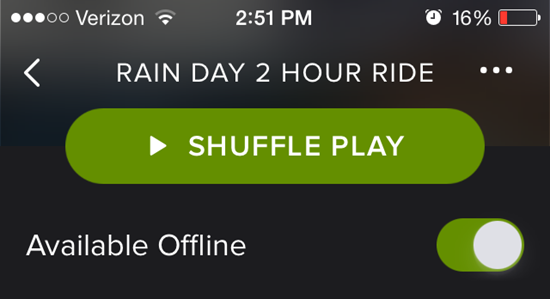
The latest Spotify update included this very prominent SHUFFLE PLAY button – which I see as a bit of an over reaction. The old versions of Spotify kind of hid the shuffle option… except many of us still inadvertently found it – often with embarrassing results.
Now we've got this big button sitting there at the top of the screen, just daring us to tough, tap or drip sweat on it.
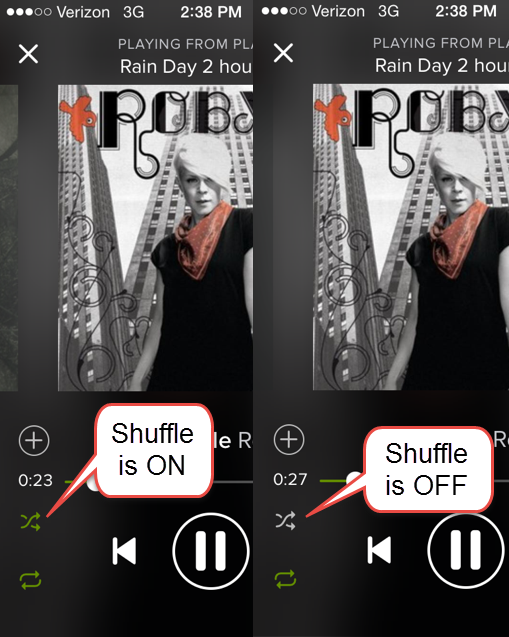
So how do check to see if shuffle is off and your playlist will play in the order you selected?
Check this image showing the little x icon. Green = shuffle is ON and grey = shuffle is OFF
The latest version of the iPhone Spotify App had an annoying bug in it that appears to be corrected when combined with the most recent iOS update I downloaded this morning. Good thing as it was making me crazy thinking the App was going to crash in the middle of class, while I'm waiting for the song timer to catch up with the music after a transition.
My Settings
Apple and Spotify update software in batches of users = your iPhone may update at a different time, depending on your location. If you want to compare yours with mine, I'm running Spotify version 1.1.0.2549 and iOS 7.1.1.
Crossfade set at 10 seconds and Gapless Playback turned on.
Here's what was happening
I you were watching the playlist timer during the crossfade between tracks, you would hear the music transition smoothly, but the timer and album artwork would freeze in place for an agonizingly long period of time.
Why this is/was important to me… I can barely see those tiny numbers
I will often use the Stage button on the console (with it's large numbers) to help me time longer intervals – possibly different from how you would. This is a work-around (hack) for me, due to having a hard time focusing on the small fonts Spotify is using.
The 3-4 minute “Best Efforts” I do early in class, to establish PTP (Personal Threshold Power) are a great example. I want the effort to end along with the song if possible, so I need to understand the total length of the track – but not have to continuously watch the countdown timer I have trouble seeing. During the fade between songs I'll sit up (bringing my eyes to the best focal distance) and take a quick peek squint at my iPhone, note the total time and then hit the stage timer on my bike.
Yesterday I used The Crystal Method — Busy Child which is long – 7:25 mins, for the opening 4 min PTP effort. If I hit the Stage timer at the start, I now have the large numbers counting up. Next I can do so simple math in my head: 7:25 – 4:00 = 3:25. Now I know that if the class and I hit the Stage button (resetting the timer to zero) and start the effort at the 3:25 mark on the console timer, I have a near perfectly timed 4 minute interval timed to finish with the music 🙂
Understanding how I do this, do you see how frustrating it would be for me to be sitting there, watching and waiting for the timer to catch up and display properly? I swear there were times when it would take 10 seconds or more, with me staring at my iPhone like Mr. Magoo.
Now everything appears to be working smoothly – and that makes me happy!
How cool is this? I hadn't experienced an Indoor Cycling studio that offered reserved seats before. It had me feeling like a VIP when Amy and I visited CB Cyclebarn, Karen Casler's studio last month.
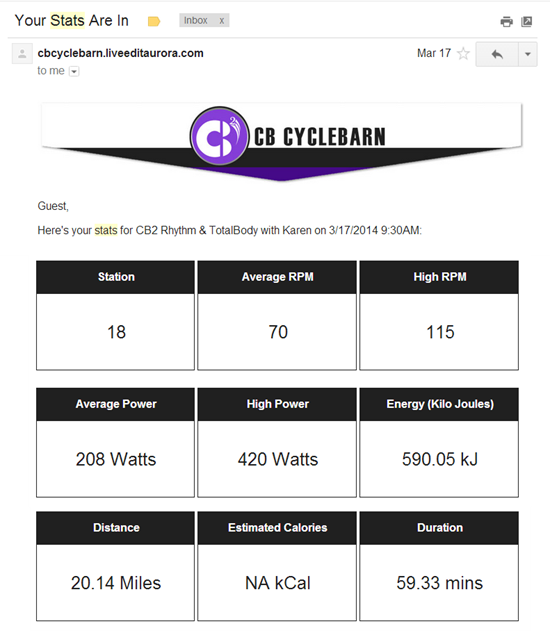
The website system she uses integrates her Mindbody account with the class rider data collected by Performance IQ. I thought you might like to see the string of conformation and followup emails the system creates automatically.
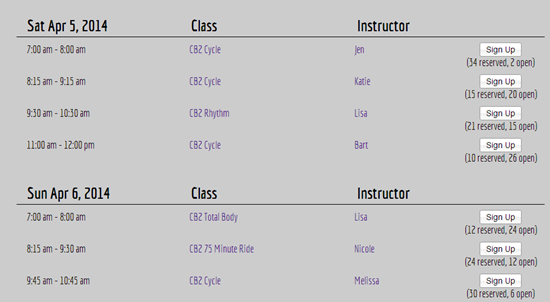
First let's reserve a spot in the class. I didn't think to take a screen shot at the time so I'm showing tomorrow's schedule.
Better hurry and sign up now for Jen's 7 am class! There's only 2 spots left.
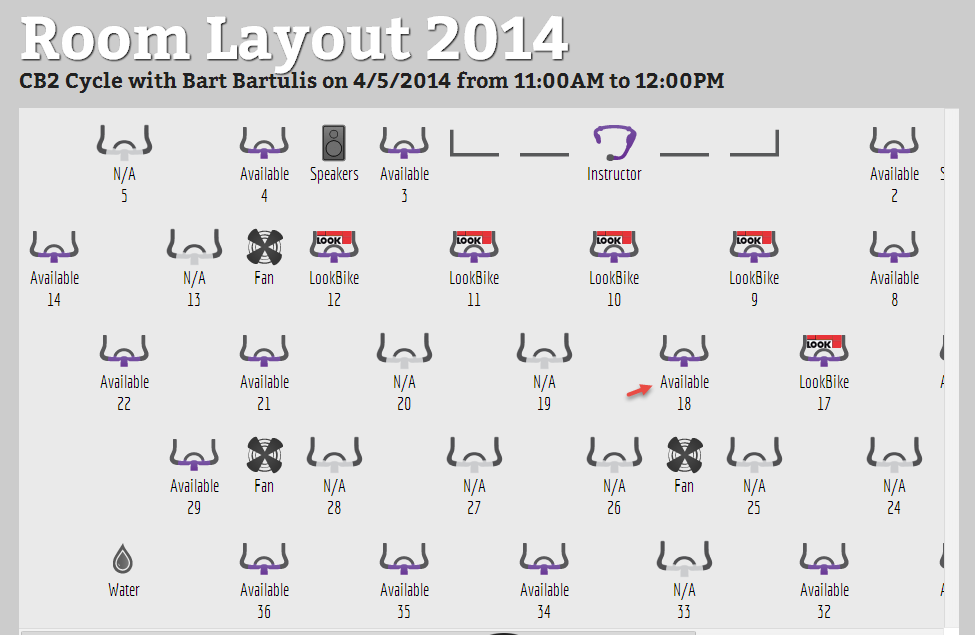
Next you select your bike – just like picking a seat on an airplane or at a concert. The image is for Bart's 11:00 am class. Note how you can pick a bike that has your type of pedals.
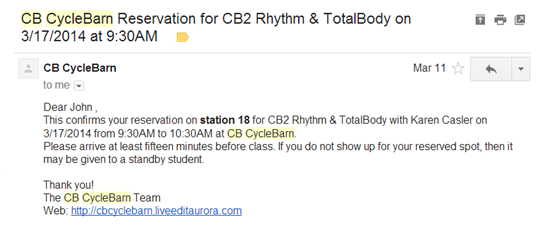
Once you've completed your purchase you receive a conformation email – all this happens automatically.
Having a confirmed seat, in a sold out class, is awesome.
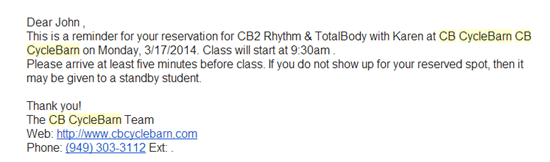
A friendly reminder is appreciated by scatter brains like me.
After the class I checked my email and saw all of my performance data. I wasn't wearing a heart rate strap in this class. If I had that data would show as well.
Receiving this information had me wanting to return to see if I could improve my average.
Amy and I were very impressed by this system and feel it will really get your participants excited about training with power on a consistent schedule! The website integration system is offered by LiveEdit and will work with these Indoor Cycles with power; FreeMotion S11.9, Spinner® Blade Ion and the Schwinn AC Performance.
Disclosure – Amy recently joined LiveEdit as a representative, specializing in helping new Indoor Cycling Studios. She would enjoy answering your questions. Amy.Macgowan@getliveedit.com or feel free to call her 320-685-0183
Do you really know when your class music is at exactly the right sound level?
That it's not too loud so it's unsafe… but not too quiet that you miss out on the energy?
How about the level of your microphone… is it adjusted so your voice and cues are easily understood by your class?
I only know one Instructors on the planet who can answer this with, YES John, I do know when my mic and music volume are adjusted correctly – our very own Jennifer Lintz. That's because Jennifer teaches at a studio where they've spent $766.00 to purchase one of these soundear noise meters. In this article she discusses teaching class with it hanging in the back of her studio. She only needs to take a quick peek and watch the color changes to know when everything is adjusted properly.
Image from http://www.soundsafety.com.au/
$766.00, for something you could live without, is what my buddy Randy would call “Stupid Money”. To be fair, the SoundEar appears to have been designed for use in hospitals, where the intent is keeping noise levels very low.
Continuous understanding vs. checking once or twice a year 🙁
Do you still do this in your class?
Over the years I've seen infrequent requests from GF Dept Heads saying something similar to:
We're getting complaints about music levels in some classes!! Please check the sound levels in your classes!! I have a sound meter in my top drawer you can use. I'm also going to make spot checks of classes to check and see that you're under 100 decibels – which is our company policy.
How does checking my sound level today help me a month, week, day or even 20 minutes from now?
I can't help comparing an annual sound check to the good old days when we checked our pulse with fingers and a watch. This gave the illusion of doing something important, but it's a worthless exercise when you compare it with the understanding you get from a Heart Rate monitor that display BPM continuously. If my HR is too low, I can increase my level of effort, and then wait, check again and adjust as necessary.
The typical fitness studio sound system includes a bunch of knobs that will change the sound levels. Where I teach there are 5 ways I can adjust what my class hears:
Master Volume Knob
iPod Volume Knob
Mic Volume Knob
CD Volume Knob
And the volume level slider on my iPhone
+ don't forget how many tracks play at a different volume
All those knobs effect how loud the music will be in class. Making a mark on the Master Volume Knob (as often suggested) ignores all the other settings that will over ride the Master Volume Knob. I need a meter that tells me the correct settings to make for the best class experience.
You don't hear… what they hear
In most studios there's what I call a cone of silencer, that looks like this:
What sounds perfect to you on the instructor bike can be deafening to riders in the front row. The only way you can truly understand what your class is hearing, is to get off and walk around the room.
So I propose building a Fitness Studio Sound Meter that looks like this prototype
Why in the clock?
Every fitness studio (if it doesn't already) should have a clock hanging on the back or side wall, so the Instructor can easily know the time. I feel it makes perfect sense to incorporate the sound meter where it's plainly visible while teaching.
Visible to you… but discrete
I've already test marketed this idea to a few dozen Instructors and Studio owners. The one negative concern expressed was not wanting participants focusing or judging you based on their watching the sound meter. So our design features small LEDs that are very easy to see in any level light.
I have a saying; “my ideas always sound good… to me“. The purpose of this campaign is to find out if my idea sounds good to you 🙂
I'll be posting more details and a link to Indiegogo campaign tomorrow (Sunday 3/30/14)