
by John | Sep 9, 2014 | Instructor Tech Help, Instructor Training, KEEPING IT FUN, Latest News
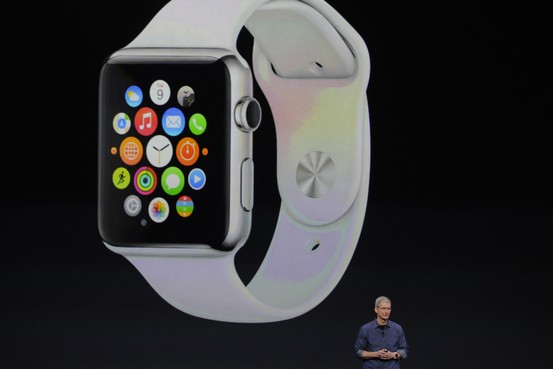
Another Apple product I'll have to have…
Apple revealed their new Smartwatch today – there's not much information available yet, but I'm betting it will turn the fitness industry on its head. Disclaimer, I own Apple stock and my prediction is that the Smartwatch will become the de facto fitness device in the very near future.
And I'd be sh***ing my pants if I was Polar or Garmin.
Why? Because the iPhone is a really lousy fitness accessory. There I've said it. Despite being able to run all those wonderful fitness and cycling Apps, the iPhone sucks to use when you're exercising.
- They make very cool bike mounts so you can use your iPhone as a bicycle computer… except the battery won't last longer than a few hours with the display on and GPS enabled.
- Ever try to run with an iPhone strapped to your arm? Try to change songs? Don't bother, you can't without stopping.
- Indoors it isn't any better. How many people use their iPhone in class? I've only seen two in all my years of teaching.
But we love our iPhones, so we've put up with how cumbersome they are to have along with us.
Put it on your wrist and everything changes. It will be as convenient to use as a … wristwatch… a wristwatch that runs cool fitness Apps!
Our participants will want to wear their new Smartwatch in class. And what will they do with it? THEY'LL MONITOR THEIR HEART RATE – and maybe THEIR POWER/WATTS. They might also want to record their data + upload and track their progress.
The Apple Smartwatch will make Indoor Cycling 2.0 cool 🙂
The Smartwatch is supposed to be out in early 2015. Unless Apple has figured out how to detect your heart rate from your wrist, the folks from Scosche and Wahoo better crank up their production of BLE HR monitor straps
I can't wait to see what happens 🙂
Next Day Update: I'm seeing my prediction about BLE monitor straps being unfounded. The video below explains that the Smartwatch includes optical sensors like the Scosche = the heart rate monitor is built in, so no additional strap is needed.

This promotional video is fascinating.
http://youtu.be/ktujsc4ZUTo?list=PLHFlHpPjgk73J6C3PHUrDntzy6TQxBh44
by John | Aug 21, 2014 | Big Box Instructor, Deezer, Google Music, Instructor Tech Help, KEEPING IT FUN, Music, Spotify
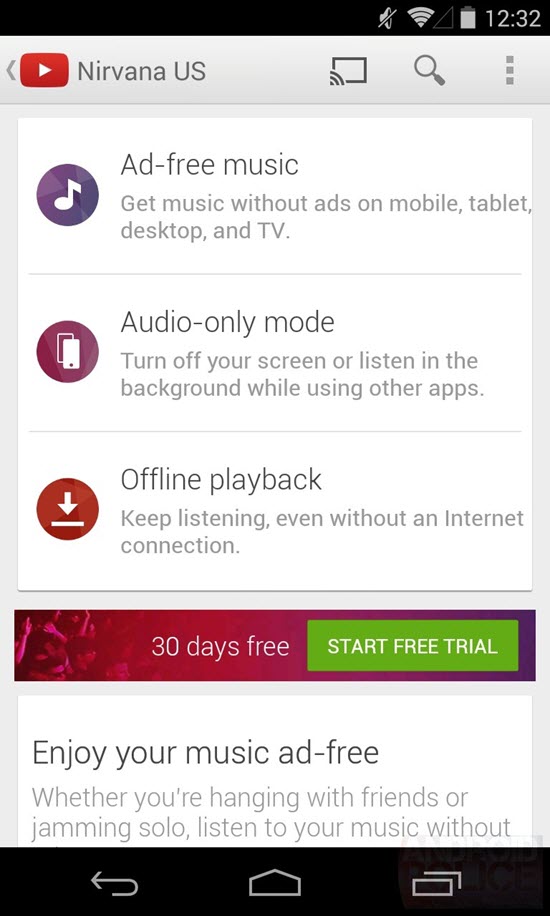
A Playlist of offline video could make for a cool class 🙂
The word out is that YouTube is planning to launch a streaming service, similar to Spotify and Deezer, for music videos. The premium version would be advertisment free which would be very cool.
I realise that in the past we (and others) have pointed out that playing YouTube videos in a commercial setting (your class) is against YouTube's terms and conditions that prohibit displaying their videos in a club, bar or studio. iTunes, Spotify, Deezer and every other music service has nearly the exact T's&C's – no commercial use. Many of us are using these services to deliver our class music and your club or studio should be paying ASCAP and/or BMI for a commercial use license. My view* is that that license should cover your playing of music videos, just as it does for the audio versions of the songs. Or maybe there's a different license required for videos? If this becomes real I'll dig in and find out more.
From the androidpolice.com
Here's the basic rundown – YouTube is set to launch a service called YouTube Music Key, and Google is set to rebrand Google Play Music All Access to Google Play Music Key.
Specifically, it looks like YouTube Music Key will offer ad-free music, audio-only playback (for background or screen-off listening), and offline playback…
Of course, one of Music Key's major value propositions is that users will have access not just to official discographies, but to concert footage, covers, and remixes. Play Music already houses remixes and covers, but YouTube as a platform is significantly more open and workable for derivative content – the platform is much easier to add content to, and user discoverability is substantially different from Play Music. YouTube Music Key also promises to make suggestions for what to watch/listen to based on the other things you watch/listen to on YouTube.
Of course all of this is speculation / rumors – except that screenshot looks pretty legit > so we'll have to wait and see if/when it launches. Also if this will be available as an iPad app, or will it just be for android?
While we continue to wait for Deezer to make it here in the USA (which was promised for sometime in 2014) the potential that there could be an advert free, music video service that would play off a portable device means there's lots to look forward to 🙂
Does showing a playlist of music videos sound exciting to you?
*I'm not an attorney, so proceed at your own risk. If you have questions or concerns, seek competent legal representation.
by John | Aug 13, 2014 | Best Practices, Boutique Instructor, Instructor Tech Help, Instructor Training, Training With Power
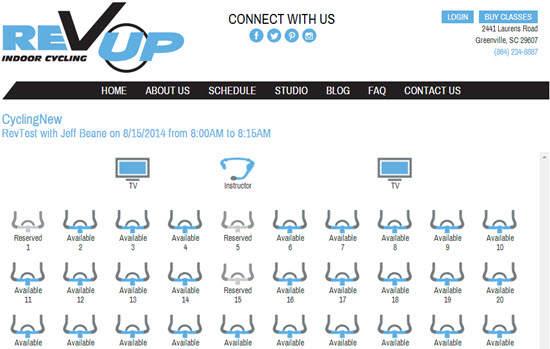
Two articles, about two different Indoor Cycling Studios, came across my desk today! The fun part for me was how they both featured ICI/PRO members who've hung out their shingle and pursued their dreams of a fitness business!
The first article features Jeffery Beane and his new studio Rev Up Cycling in Greenville, SC.
And Rev Up also takes advantage of technology to help people keep up with their workouts and fitness goals. Each bike has a mechanical device that calculates the amount of work a person does while exercising.
“One of the challenges has been, typically in spinning, is that people get on there for 45 minutes to an hour, and they get all hot and sweaty, and they guess how many calories they might have burned; they don’t really know,” Beane says. “With our system, they have a very accurate (record), as well as a way to track how many calories did you burn, how many watts did you produce. … Since that data all goes into your account, you can track over time, ‘How well am I doing? How am I progressing?’”
A screen shot of Jeff's online reservation page, from his great looking LiveEdit, website is above. By registering for a specific bike, the Performance IQ system knows who's – who in the class and then displays and records the rider's performance data in their user's account.
Jeff's studio is still very new. He'll probably appreciate learning how a bike reservation system has solved some problems at CBCycle Barn, from owner Karen Casler…
How CB CycleBarn Indoor Cycling Studio Used a Bike Reservation System to Cure ‘It's MY Bike Syndrome'
What are your customers saying about your site and the Stations app? (Live Edit's name for their reservation system)
Customers love booking their bikes! It has a trickle down effect of both customer and studio benefits. The Stations app allows me to give the customer what I feel is the most powerful customer service tool there is. The Stations app lets the customer know exactly what to expect!
Aside from knowing what to expect, another bonus is that by booking a bike online, customers are immediately escalated to VIP status. I like to use the analogy of flying American Airlines vs. Southwest Airlines. People are territorial about their space in any GroupX class. Before the Stations app, any territiorial Bike Vultures arrived early  and hovered anxiously, waiting to stake claim to “their” bike.
Territory anxiety is now a thing of the past–but that’s something I expected when we added the Stations app. What I didn’t expect was that the Stations app would relax everyone! Some of the greatest feedback I’ve received is from the riders who had simply put up with the Bike Vultures because it’s been that way since the beginning of GroupX time. It never occurred to anyone (myself included) to complain about the “It’s MY Bike Syndrome” riders.
The very day the Stations app launched, the tension that we didn’t even previously acknowledge was instantly gone. Customers shared with me that they had felt so uncomfortable waiting for a class to start because of riders inflicted with IMBS. They had stories of being pushed, accidently hit with gym bags, and shoved aside in the stampede to stake claim to a bike. But that’s not all. Riders from the class before the IMBS stampede had also been made to feel uncomfortable. Their amazing hour of cardiotherapy zen was abruptly disrupted by hovering Bike Vultures before the first rider could wipe down the bike and gather their belongings.
VIP status … Check.
Bike Vulture Extinct … Check.
Performance IQ Compatibility … Check.
Knowing Exactly What To Expect … Check.
As a studio owner, how can it possibly get any better ?
How bout … Parking Lot Congestion Relieved … Check.
One of the most common issues for any dedicated indoor cycling studio is the parking lot crossover between classes. Because it is no longer necessary to arrive early to secure bike real estate (and trust me some people arrive as much as 30+ minutes early,) riders now show up 5 minutes or less before class starts. This allows the first class to make their exit and gives a lil’ breathing room for those coming in for the next class.
Priceless.
And there is one more box to check…
Competitive Advantage … Check.
At the moment, none of the big box gyms around our studio offer a Stations app reservation system. Using the Stations app makes reserving your class and showing up for class easy.
Again, priceless.
by John | Jul 31, 2014 | Instructor Tech Help, Instructor Training, KEEPING IT FUN, Music, Spotify

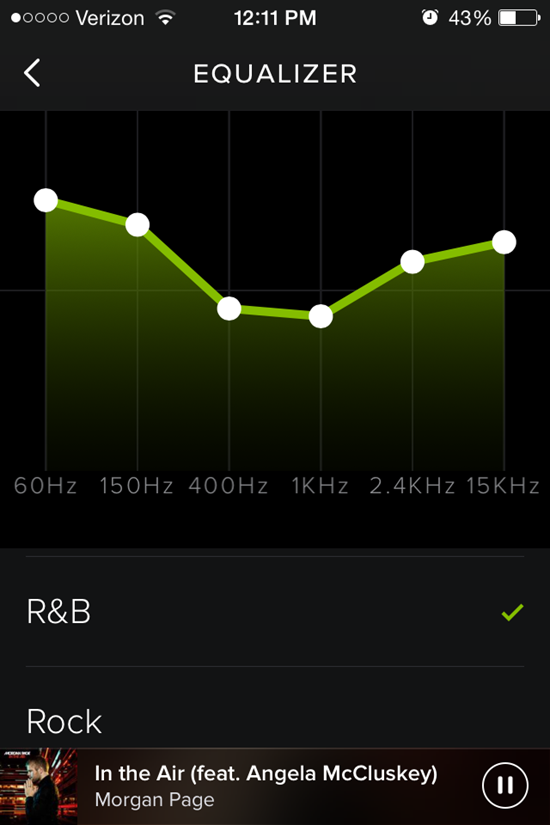
Spotify has added an Equalizer to their iPhone App in the latest update. NOTE: Spotify triggers software upgrades progressively, to groups of users over time. If you're not seeing the notification (pictured above) – you will soon.
This morning I saw the new notice, while I was checking that I had my playlist set to off-line mode and that it would play. This is cool, I thought and I had the chance to acquaint myself with how it worked, before my 6:00 am class. Wearing my ear buds, I found that the Electronic preset sounded the best… turns out I was wrong.
You'll find the new Equalizer in; Settings > Playback > (Scroll down) Equalizer toggle to turn it on/off. Spotify gives you 22 pre-set EQ settings or you can drag any of the six frequency ranges up/down to create you own personal settings.
I'm not sure why, but it seemed like I had to adjust both the sound system's and my iPhone's to a much higher volume level than normal. Please let me know if you experience something similar.
Class sounded OK – well actually I couldn't hear any difference where I sit. After class I connected my bluetooth receiver, so I could stand in the middle of the room to hear what my class hears – while changing the EQ settings.
Now I realise that this is completely subjective; what sounds good to me, may or may not be your preference and every studio's acoustics is different. The R&B setting sounded best, using Morgan Page — In the Air (feat. Angela McCluskey) as my demo track.
That track was part of today's playlist – 45 minutes. I built it from a larger playlist I followed from Instructor Gregg Pitts who teaches at Zengo Cycle in Washington DC – Gregg Pitts Cycle July Tunes. Gregg was featured in this Active Life DC fitness instructor profile. Here's my playlist.
by John | Jul 27, 2014 | Deezer, Instructor Tech Help, Latest News, Music, Spotify
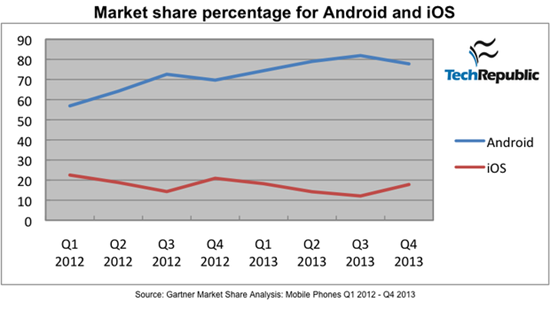
Image from http://www.techrepublic.com/
I find it fascinating to watch all the posturing going on in the digital music delivery business. It all started with iTunes – who ruled the legal, digital download space for years. Multiple services (ZUNE, Rhapsody, Napster, etc…) have tried, and failed to take more than a tiny amount of market share from Apple.
But that's all changing because of Spotify, Deezer and a little company called Google. The article below opened my eyes to why.
Apple looking Into Android Compatible Streaming Music Service To Compete With Spotify
In an interesting turn of events, Apple is reportedly considering opening up and launching their own streaming music service to compete with the likes of similar services like Spotify and the newly released Beats music. In addition to this they are apparently considering launching an Android app for the streaming service to go along with the launch of the service itself, all in an effort to attack the declining sales of US iTunes music downloads according to sources that are close to the matter. People still use iTunes? All jokes aside, it has been difficult for apple to compete with services that offer streaming music at a low price, as the music libraries are competitively similar in size, and listening is unlimited, all for a small monthly fee. Downloading the same number of songs through iTunes that you would have at your disposal with a service like Spotify would take massive amounts of money, even with most songs on iTunes being available as singles with most as low as $0.99 a hit.
It’s interesting to hear these possibilities as Apple and iTunes have always been known to be a partnered exclusive company and service. While Google’s popular Google Play Music is available on multiple platforms including Mac, Windows, Android and iOS, Apple’s iTunes is only accessible to those who use iOS devices or Mac computers. They have effectively closed themselves off from other possibilities for quite some time, and it used to work for them when they were the dominating force in digital music. With the iPod reaching its end of life though, and a myriad of subscription based music services available on virtually any platform you can think of, Apple will have to find a way to take the once reigning king of music services and transform it if they want to compete.
So I did some quick research to see how Apple's iOS competes with Google's Android market share for portable device sales.
… If you look at the raw numbers for sales market share between Android and iOS devices, Google seems to be dominating the space. In Q4 2013, Gartner reported that Android had 77.8% worldwide market share while iOS had only 17.8% share. One quarter prior, Android had 81.9% and iOS took second place with 12.1%. It is worth noting that, according to ComScore, iOS market share in the lucrative US market is about 40%, while Android accounts for around 50% of US sales. The problem with these numbers is that the do not take into account the fragmentation that Google has allowed with the Android platform.
What goes around…comes around
One of the legacies of Steve Jobs was his/Apple's decision to keep iTunes exclusive to iDevices (there is no iTunes App for an Android phone). While this worked to Apple's advantage for years, they now find themselves becoming uncompetitive now that Spotify and Deezer have Apps for both iOS and Android phones.
So what does this mean for you?
Choices, lots of choices for digital music coming with fewer restrictions on how you'll be able to build, share and then deliver great music to your classes. Many of us found Spotify to be revolutionary – it completely changed my views about renting vs. buying music. But now Spotify is SOP (standard operating procedure). I'm guessing that a few years from now we'll be using a music service that doesn't even exist today and we will access it using a device none of us has even seen.
And we can't wait to help you understand how you'll use it in your class 🙂
by John | Jul 19, 2014 | Deezer, Instructor Tech Help, iTunes & Spotify Training, Master Instructor Blog, Music, Spotify
I'm hearing from Instructors outside of the USA who are switching from Spotify, over to Deezer.
Hi,
I have had Spotify for a long time now and have created lots of different playlists. I have recently just converted into using Deezer, however, it would be much easier for my Spotify playlists to be on Deezer instead!
Is this possible? If so, how do i do it?
Thanks
Cydnie.
Cyndie we created an ICI/PRO playlist conversion tool for just this occasion 🙂
Here's the steps to convert your Spotify playlist to one Deezer can play.
Step #1 Open and log in to Deezer in a new tab – clicking this link will do that for you. Note: Deezer is different from Spotify in that Deezer is a web application, vs. Spotify, which is a program that you install on your computer. Yes I know that Spotify also has a web version… I never had much luck using it and suggest you install the full program if you want to run Spotify on a laptop.
Step #2 Clicking this link will open our conversion tool in another tab. Scroll down the page and you should see that you're logged in to Deezer and a Please enter Spotify URI dialog box like this:
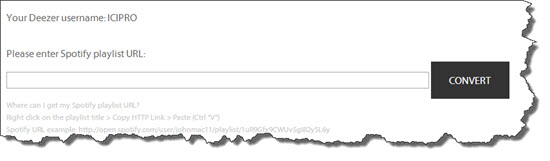
If you don't see this click the Log into Deezer link or refresh the conversion tool page.
Step #3 In Spotify, Right Click the playlist you want to convert and select Copy Spotify URI.
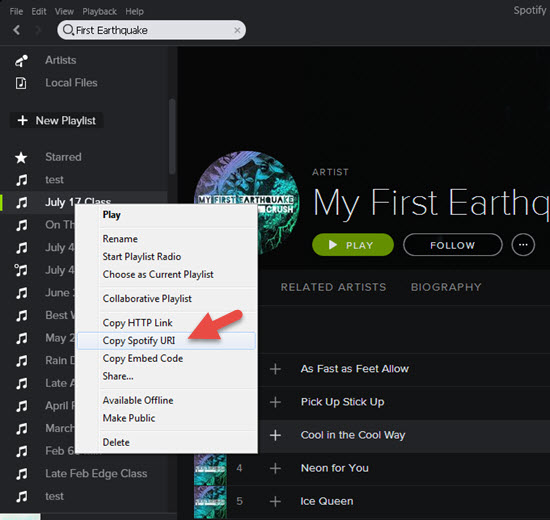
Step #4 Back at the conversion tool, Paste the URI you copied and click Convert. It will look like this:
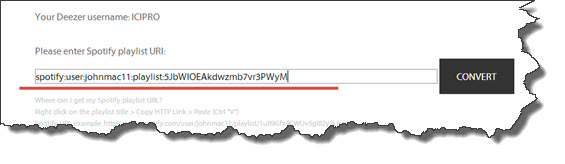
Step #5 Success! Click the link to see your new Deezer playlist 🙂

A few notes:
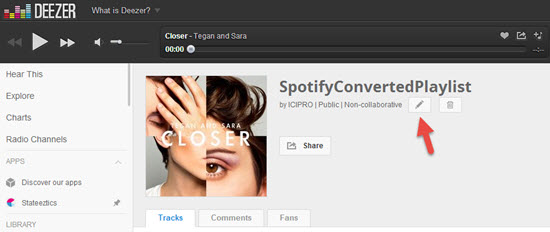
- Despite a lot of programming time, we weren't able to get Deezer to carry over the name of the playlist from Spotify. Renaming the Deezer playlist is a snap using the edit option shown below.
- Check your new Deezer playlists for accuracy > differences between each service's music library and Meta Data = not every playlist will convert perfectly.
Any other questions?
Feel free to contact us like Cydnie did – we're happy to help.
