
by Christine Hawthorne | Nov 13, 2012 | Instructor Tips and Tricks, Instructor Training, iTunes & Spotify Training, Music, Spotify

After some poking around and exploring, I think I have discovered the best way to find and follow other people on Spotify. Finding, following and adding people to your ‘favorites’ will in turn give you more music to explore and ultimately use in your cycling profiles.
Spotify has clearly not made the task of finding other people or cycling instructors to follow an easy one. If you were an iTunes Ping user, you remember how simple it was to find other instructors and to see their playlists and what they were purchasing and listening to. In Spotify you can do most of these things. You just have to work a little harder at it. Once you have found some people with similar musical tastes, you’ll find the process of searching for new music much simpler.
There are a few ways to go about searching for and finding people to follow in Spotify:
- Since Spotify and Facebook are connected, you can follow friends that are already on Facebook. While this one is simple, it’s my least favorite option. First of all, you actually need to be ON Facebook. I realize that most of you probably are, but I’m sure there are some of you that either don’t have a Facebook account, or, like me, use it very sparingly. Another reason I’m not a fan of the Facebook method is because your Facebook friends may not be listening to the kind of music you want to use in your cycling playlists. You’re looking for other instructors with similar musical tastes. I suppose you could ‘friend’ all of the cycling instructors in the world on Facebook, but then you have a bunch of people you don’t even know looking at your personal Facebook page. If that doesn't bother you, then I guess using Facebook is one way to find friends to follow in Spotify.
While the above mentioned techniques will surely work, I think I’ll stick with my highly un-scientific, yet effective (not to mention easy and fast) way to find people to follow on Spotify:
- Find one person that has a playlist you like and head on over to their profile. Let’s use my profile to get you started: http://open.spotify.com/user/chrispins
- Once you have arrived on my profile page, take a look at some of my ‘published’ playlists. Not only will you see my original playlists here, but you will also see playlists that I have subscribed to. These are playlists from other members. Here is a picture of part of one of my original playlists, posted on my profile page:
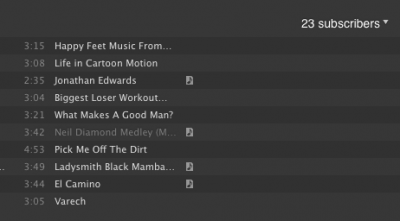
- In the upper right corner of these profiles, you can click on the ‘subscribers' and a drop down list will appear with the profiles of all of the people that have subscribed to my playlist. There you go! 23 new people (mostly cycling instructors) to follow! Click on their names to go to their profile pages, and check out what they are publishing and subscribing to. If you like what you see, click ‘add’ in the upper right hand corner of their profile. This will allow you to see what they are listening to and publishing in a scrolling list on the side of your profile. Hint: After you click ‘add’, you will have an option to add them to your ‘favorites’. I recommend doing this because it allows you to access their profile even if they are not actively listening to or using Spotify at the same time that you are. Their latest activity will always be available in the upper right side of your profile.
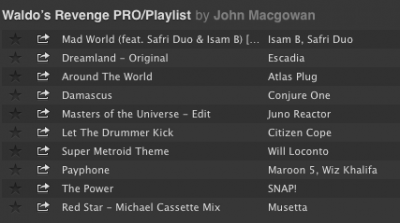
- Now that you have found some other profile pages, you can continue to explore the ‘followers’ of the playlists that they have published or subscribed to. Many people have not published many playlists, but have ‘subscribed’ to other people’s playlists. In this case, you can go directly to the profile of the person that created the original playlist by clicking their user name next to the playlist title as in this example: This is a partial shot of a playlist that I subscribed to by John MacGowan:
- Just click on John's name next to the playlist title to go directly to his profile.
- Here are some links with some basic tutorials that you might find useful:
Can I Add Any Spotify User To My People List?
How To View A Profile From Within Spotify
Spotify Social Basics
So, what are you waiting for? Give yourself a little time and start exploring more music on Spotify. Once you start finding people to follow, you might find it hard to stop!
**Feel free to share your Spotify profile link in the comment section to get the ball rolling!
by John | Nov 11, 2012 | Best Practices, Instructor Training, Master Instructor Blog, Music

More and more I'm hearing and seeing how Instructors are experimenting with riding in with the class, rather than presenting up-front-and-center on the traditional “Instructor Bike”.
It's fun to mix it up and IMO, an imperative when teaching to a structured Virtual Ride DVD.
But riding away from the music controls creates a technical difficulty; how do you make adjustments to the sound volume?
I witness this firsthand, while riding in an unnamed (but very attractive) Instructor's class this morning.
Her playlist included a bunch of very interesting mashups of popular tunes. Which made for a great class… except that a number of tracks had been mixed at varying sound levels. After hitting play, our unnamed Instructor took her position with the rest of class in the front row, leaving her iPod up on the sound equipment cabinet. Everything was going as planned until one of the mashups came on REALLY LOUD! She hopped off her cycle, walked up to her iPod, quickly turn down the volume and returned to her bike. Problem solved.
Solved that is until the next song which was very quiet. Not wanting to disrupt the class any further she left it where it was, leaving me wanting to yell out “turn up your music!” Out of respect for another Instructor, I didn't say anything during her class.
But I will offer you two possible solutions, Amy:
- I can order you a very long cord for your iPod.
- I can lend you my Bluetooth receiver and show you how you can connect wirelessly using your Android phone.
I'm here to help and you know where to find me.
Actually there's another reason I've found to go wireless – many accessory cases prevent the 1/8″ plug on the connection cord from being fully inserted into your phone. So it doesn't work with the case installed 🙁
In my case I was forever taking off my iPhone's case so I could plug in the cord. When I got tired of the hassle, I quit using the case altogether. And then promptly dropped my iPhone, breaking the back glass panel – not good. So a Best Practice for any Instructor is to invest in a $25.00 (with free shipping) for this Bluetooth receiver and not need to invest in a $549.00 replacement iPhone.
Speaking of riding along with your class… I Shazam'd this track last night, Come Along from Vicci Martinez. It conveys the essence of exactly what I'm trying to communicate to my students as we push through a tempo Threshold effort together. There's a wonderful refrain the you can add to your cuing at the 2:27 mark; Time Fly's, Make a Statement, Take a Stand… and finishes with; Take… Your… Shot!
I felt you might like it.
Vicci Martinez — Come Along
by | Nov 9, 2012 | Instructor Training, Music

Artist: Rogue Vogue
Track: Off My Mind (Rogue Vogue Remix)
Length: 4:52
BPM: 120
November the time of year when our classes start to fill to bursting as all of those outdoor riders make the forced transition inside, and the time of year when those rainy grey cold November skies can have an adverse effect on all of our energy levels.
As Instructors it's our job to to make sure that not only do we keep our riders in a positive frame of mind but we too have the energy and positive attitude to help fuel our riders minds and bodies.
And nothing does that better than some upbeat energetic music that just makes it impossible not to want to dance on those pedals!
Rogue Vogues – Off My Mind serves up 5 minutes of 120bpm music for you to keep those November blahs outside the studio doors, as you help your riders work up a good sweat and use it's positive energy to help yourself and your riders stay up through out the class.
by | Nov 2, 2012 | Music
You know you are an Indoor Cycling Instructor when you hear a song and your first thoughts are; “hey this would be great to do —– to”.
But how often do we allow the first initial impression to put blinders on our perception of what a song can be used for? I believe that, yes some songs are good for a specific purpose in a class, but there are times when we need to reevaluate a track. I'll bet you'd be surprised with the versatility of some tracks in your library.
Metamixs' track Charlotte is a case in point. Clocking in at just under 5 minutes and a nice slow 88 bpm. Upon first hearing it my thoughts went towards using it as a cool down track, but it works just as well for those times when you are doing a long 10 minute warm-up, playing it in the first 5 minutes to settle the class down.
And yes it can even work on a long steady climb out of the saddle, especially when you want your riders to relax and settle into the calm breathing and slow cadence, before letting them charge to the top with a track with a dose of attitude.
Too often when we hear a song our minds automatically click to; this is a —–.
So the next time you are sorting through your music library, give your songs another listen with an open mind. See if they call you to use them for something a little different.
Artist – Metamix
Track – Charlotte
Length: 4:56
BPM: 88
Download link: http://viprhealthcare.typepad.com/files/charlotte.mp3
Original post link: http://www.mashuptown.com/2012/10/oldies-but-goldies-metamix.html
Podcast: Play in new window | Download
by John | Oct 27, 2012 | Instructor Tips and Tricks, Latest News, Spotify

So this morning I'm poking around on the internet and checked on what Chris Hawthorne had going on over at her Chrispins Blog. Chris is part of our ICI/PRO team of contributors and has a unique talent for creating excellent Indoor Cycling Class music playlists. She's also an excellent communicator and you'll find her tutorials on using Spotify very helpful.
As I'm reading through her latest post: Anything Could Happen Cycling Mix and I see what looks like a screenshot of her latest playlist. “That's nice” I think… but then I realize it's not a screenshot at all, but an actual Spotify player where someone can listen to each track, the whole way through > even if they aren't a Spotify user. I stand corrected – you need to be a Spotify user for this to work.
“HOW THE H.E. DOUBLE HOCKEY STICKS DID I MISS THIS?”
And then I smiled to myself and did a little nod.
That's exactly why I asked her to be part of our team 🙂
Here's the player that Chris had added to her post:
How cool is that?
I'll be adding these Spotify Players to each Audio PROfile this weekend.
P.S. I'm assuming that everyone can see the player above, regardless of where you are located. Please leave me a comment below with your location so we can confirm this.
by John | Oct 27, 2012 | Best Practices, iTunes & Spotify Training, Spotify
LifeTime Instructor's have a super secret community at LTPulse.com. I've been trying to help my fellow LTF Indoor Cycling Instructors there get up to speed with Spotify. In the process they've alerted me to some additional problems that you maybe having as well.
One Instructor, who I believe had reviewed some of our past How To articles about Spotify, expressed some frustration that I'm seeing now was completely my fault 🙁
In the latest version of Spotify (0.5x) the little pencil edit icon appears to have disappeared. All my earlier tutorials showed version (0.4x) which I'm still running on my 3g Spotiphone so I can show you the difference with these screen shots.
Here's the old version:

And here's the latest version – note the change:

Click the three dots icon and you'll find the edit option to change the order or delete songs. When changing the order of tracks, be sure to double check that you don't end up with duplicates. I'm not sure why it happens, but duplicates seem to appear everytime I try to reorder my playlists on my device.

Here's the Playlist I used if you're interested Thursday.
