This week I was asked by a class participant to NOT play “Stairway to Heaven” in a class she was planning on attending. I was shocked that someone would ask me NOT to play what many people still consider the greatest song of all time. If any of you have ever been to a video class of mine I sometimes play Heart's cover of Stairway.
Here it is:
That's AWESOME! Would you ever ask someone NOT to play THAT?
or THIS:
I was so shocked by this request that I decided to ask the “experts” at the Indoor Cycling Instructors Facebook Group how they would respond. I was even more surprised by some of the comments:
“I would stop playing STH. It's 2015, save that for a classic rock playlist. As a rider, I too would be annoyed hearing Stairway if you play it so often. Or maybe try to find some remixes of it if you love it so much.”
“my surprise is that anyone would use STH for a song in Spin Class!!”
There were some great comments and advice given but these two really stuck out. Stairway is timeless and I'm sorry that I sometimes like to play music that was created with real instruments.
Ok, enough ranting. As anyone who has followed me here at ICI/Pro, listened to one of my recorded classes or taken a live class from knows, I play music from all genres. This week I put together a 3 song mix from some more “current” artists.
[wlm_private ‘PRO-Platinum|PRO-Monthly|PRO-Gratis|PRO-Seasonal|Platinum-trial|Monthly-trial|PRO-Military|30-Days-of-PRO|90 Day PRO|Stages-Instructor|Schwinn-Instructor|Instructor-Bonus|28 Day Challenge']
Right Click on the blue underlined link
Select “Download Linked File As”
Select a download location
Once file is completely downloaded, find it in the location you selected
Drag the file into your iTunes or Spotify library OR
Right Click on the file and Select “Open With”
From the drop down menu select “iTunes” or “Spotify”
File should begin playing and is now part of your iTunes or Spotify library
To download the above media on a PC:
Right Click on the blue underlined link
Select “Save Link As”
Select a download location
Once file is completely downloaded, find it in the location you selected
Drag the file into your iTunes or Spotify library OR
Right Click on the file and Select “Open With”
From the drop down menu select “iTunes” or “Spotify”
File should begin playing and is now part of your iTunes or Spotify library Click here to watch a video on how to download media files from ICI/Pro.
Last month I started this “Keep it Simple and Progress” profile post. In my classes this has been a huge success! Many riders have excitedly shared with me their wattage and/or resistance improvements. It's so rewarding to see and hear how we, as instructors, are changing lives through health and fitness everyday.
I've been using this 3 week progressive training technique, with great success, for many years as a coach, personal trainer, athlete and group exercise instructor. When I'm in a coaching situation I'll have my athletes work through a 3 week progression then take a week for recovery so they can “unload” all the accumulated training stress. In a group exercise setting, where you don't know the exercise consistency of your participants, a recovery week my be frowned upon. To incorporate this sound and proven training techniques in my indoor cycling world I'll set up progressive profiles for 3 weeks and on the 4th week I'll do something completely different. This 4th week is where I'll experiment with new music or video or use an old profile, maybe I'll even have my class cover their consoles and we go “Old School” and ride by perceived exertion only. I tell the riders that have been very consistent with their training the previous 3 weeks that it is time to take it easier and let the body recover and rebound from the straining stress of the previous 3 weeks. This is the time for them to enjoy their fitness level and have fun in class and not to worry about their metrics because we are going to get back to serious training very soon.
In order to provide the members of ICI/Pro with my class recordings, I'm always teaching one week ahead of these posts. This allows me time to experiment and perfect the profiles before I provide them to you. It also lets me hear the feedback and reaction of my class. I'm still amazed at the adaptive ability of the body. In week 1 of most progressions I usually hear how difficult the workout was. This makes sense because the body has not experienced these exact training stresses before. Then in week 2 after the body has had some time to adapt to week 1 the workout is not such a “shock” to the body, but I make some subtile changes to the workout so that the body still needs to adapt as we progress to week 3. Week 3 is, by far, the most difficult of the progression, but since we have taken “baby steps” from week to week this workout is doable. Progression is the only scientifically proven method to safely and effectively improve fitness. There has been a lot of talk in the media about “Muscle Confusion”. To be frank, “Muscle Confusion” is BULLSHIT and I challenge you to find one scientific study the proves it effectiveness. I'm working on another post on “The Myth of Muscle Confusion”, I'll let you all know when it's completed.
As many of you know I am a Master Educator for Stages Indoor Cycling and at our Stages University workshops one of our topics is the creation of “Simple Sets”. Next week I'm going to discuss using the technique of “Lather, Rinse and Repeat” on a micro and macro scale to help make you an even better instructor.
[wlm_private ‘PRO-Platinum|PRO-Monthly|PRO-Gratis|PRO-Seasonal|Platinum-trial|Monthly-trial|PRO-Military|30-Days-of-PRO|90 Day PRO|Stages-Instructor|Schwinn-Instructor|Instructor-Bonus|28 Day Challenge']
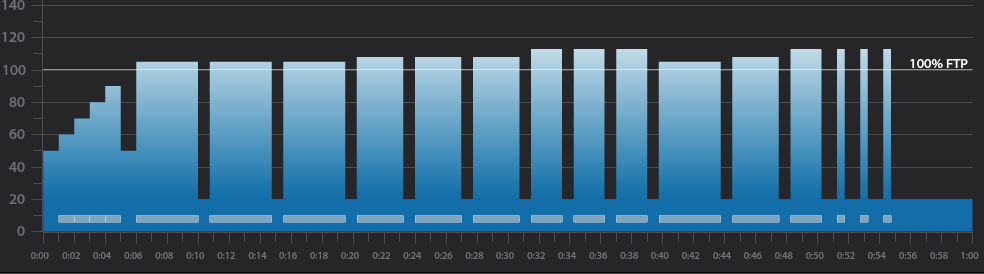
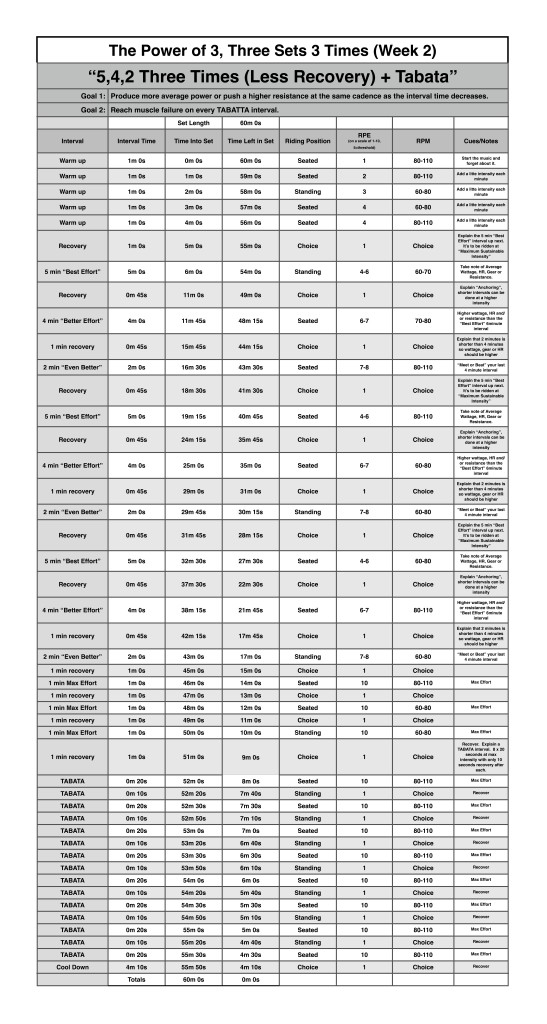
Below I have provided a snapshot of this new profile provided by Trainer Road.
Trainer Road Profile (If you're Trainer Road Member join my Team to get this and all profiles)
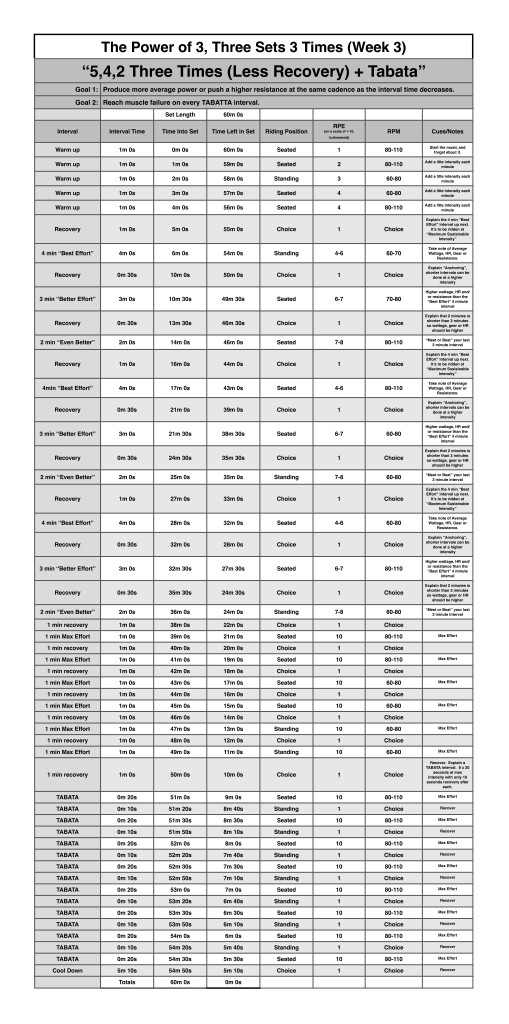
Here is the 3rd post of my new “The Power of 3 – Keep it Simple and Progress” profile feature on ICI/Pro. My goal with these profiles is to show how easy it can be to create just one profile every 3 weeks and with some subtle changes in riding position, RPM, interval and recovery duration as well as a new playlist each week theses workouts will “feel” different but the similarity of each ride will help class participants increase their fitness in a scientifically proven way.
This week I reduced the rest in the main sets and added two more 1 minute max efforts.
[wlm_private ‘PRO-Platinum|PRO-Monthly|PRO-Gratis|PRO-Seasonal|Platinum-trial|Monthly-trial|PRO-Military|30-Days-of-PRO|90 Day PRO|Stages-Instructor|Schwinn-Instructor|Instructor-Bonus|28 Day Challenge']
Trainer Road Profile (If you're Trainer Road Member join my Team to get this and all profiles)
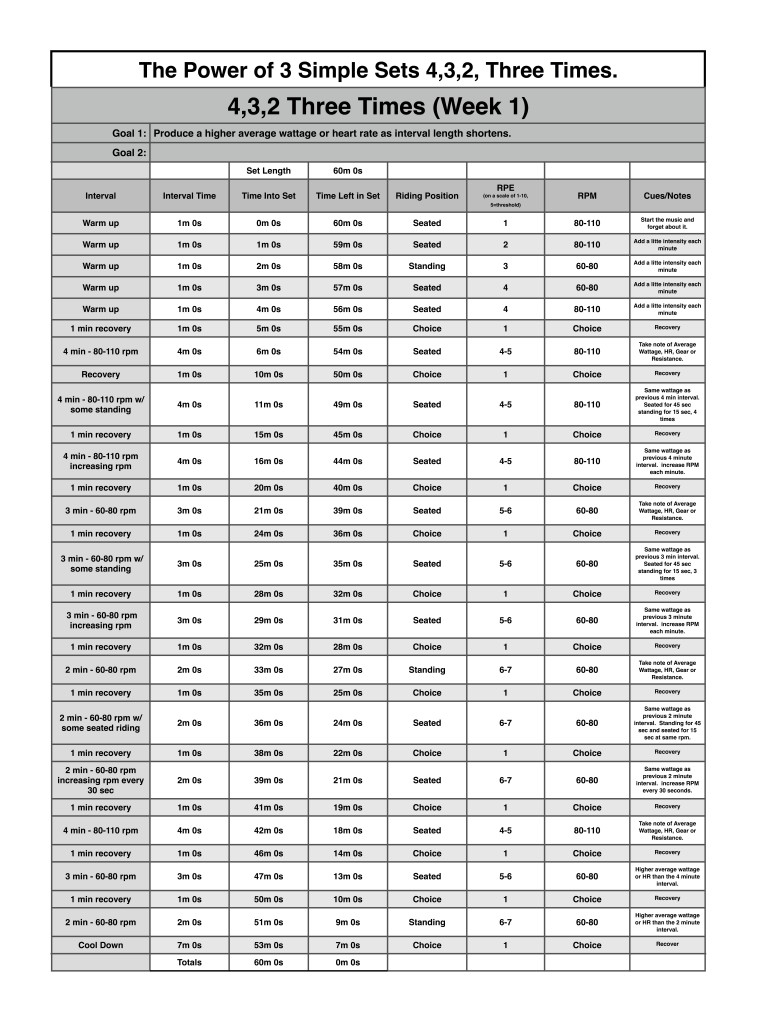
Last week I wrote about how my simplest sets and profiles are most often my most popular. I have also found that if I simply progress profiles from week to week, usually in 3 week blocks, my classes enjoy the familiarity of the workout and see progressive improvement.
To add progression to a block of workouts all you need to do is add time to each interval or reduce recovery or increase intensity to each interval set. This allows the body to adapt from workout to workout. Check out this article from Training Peaks about progression, How to Build Workouts.
I inevitably get the response from instructors that their riders like every class to be different or they'll get bored. My response is, “Even class IS different!” I use different playlists and videos from week to week, I may keep similar yet progressive profiles but I'll change around how each set is ridden, for example, seated vs standing or fast rpm vs slower rpm. This makes each week “feel” completely different but is similar enough that the body can adapt from week to week and a progressive training effect can occur.
If you used my profile from last week with your class, progress with this new one below and let me know how it goes.
[wlm_private ‘PRO-Platinum|PRO-Monthly|PRO-Gratis|PRO-Seasonal|Platinum-trial|Monthly-trial|PRO-Military|30-Days-of-PRO|90 Day PRO|Stages-Instructor|Schwinn-Instructor|Instructor-Bonus|28 Day Challenge']
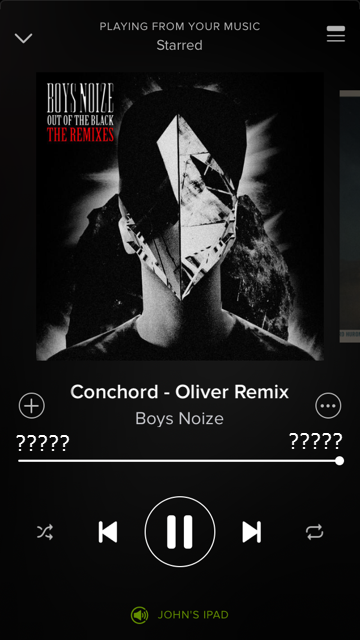
When I fired up Spotify this morning I was taken to a “this is new” screen and I knew I was hosed. Played a track and sure enough the track length timer disappears after a few seconds. Oh, sure, you can touch the album art and the numbers will reappear, only to fade away. Frustrating.
So I checked to see; how did this happen? Did I do something incorrectly in my settings that would have prevented this? Turns out no. Opening the App I see that Spotify is waiting for me to click update, along with all the others. So Spotify updated without my approval 🙁
So what to do?
I'm not seeing any option on my iPhone other than frequently tapping the screen.
Taking one for the ICI/PRO team, I crossed my fingers and updated Spotify on my iPad. That works! The playlist timer remains on. So that's going to be my device until if/when Spotify changes the iPhone version.
Beyond that, I suppose we'll have to wait a few weeks and – I hate to even consider this – and switch to Apple Music 🙁 Then of course there's the issue with the hundreds of playlists many of us have built. Will there be a way to convert a Spotify music playlist to an Apple Music playlist? We have a tool here to convert music playlists from Spotify to Deezer. I'll have to get cracking on that ASAP.