
by John | Dec 11, 2012 | Best Practices, Instructor Training, Music
One of the beauties of taking another Instructors class is that you can observe the problems and/or issues they have during class and make a note to ensure the same doesn't happen to you.
Case in point…
I was taking the class of an un-named Instructor last week. Even though I was sitting the the front row, I couldn't hear most of what she was saying. It wasn't that she was trying to talk over the lyrics (thankfully) but I was only able to pickup about 50% of her cues.
I found myself asking the person next to me; “what are we supposed to be doing now?” But then I had to stop. I was getting less than friendly looks from the un-named Instructor, so I turned to face forward, smiled and tried to concentrate on her cues… that I was only hearing bits and pieces of.
There's a perfectly technical reason why this can happen.
Instructors don't hear what their student's are hearing.
The sound levels you hear up on the Instructor bike can be are different from what your class hears. Speaker placement, room acoustics and the number of riders in the room all affect the sound levels – beyond the settings you make to the studio's sound system.
One universal problem is studios with wall mounted speakers, on either side of the Instructor platform, facing the class. Sound travels in a straight line and the sound's energy decays quickly as it travels through the air. So your participants in the front row get everything, second row a little less and so on. You sit in a relative Cone of Silence. Most of what you hear comes after bouncing around the room = weaker that what the rest of the class hears.

We had a phenomenal sound system, complete with a Sound Engineer and his big mixing board, at our last conference. Big speakers on either side of the stage. I thought it sounded great. Barbara Hoots was one of the Instructor team on stage during Tom Scotto's ride with a live band. She explained to me after the ride that she had a very difficult time understanding what Tom was saying, even though she was riding only 2 feet away from him and neither could the un-named Instructor sitting right next to her. We hadn't thought to provide monitors pointed back at the Instructors on the stage like they use during a concert.

But our studio also has speakers on the back wall facing me… so this doesn't apply to me, right?
Maybe yes, and maybe no. It didn't help the un-named Instructor in my example above. The distance you are from the source of sound has a huge effect on how loud it sounds.
There's a simple way to solve this* – get off your bike 🙂
When I first started riding in with my class, while teaching to a video, I would begin class up front in the normal position. Then, after we were through the warm up I would dismount and climb on a bike with the rest of the class. Often I'd find myself needing to reduce the volume of my music so I (and presumably the rest of the class) could hear me properly**. But then the music would be too low… so I would find myself constantly adjusting my iPhone down when I needed to cue and then back up for more energy.
I figured out that if I started class, with what I thought was a good balance between my voice and the music, I could walk around the room and test what everyone else was hearing. If I was a little too weak, compared to what sounded like the right level for the music, I could naturally return to the sound system's controls and make any needed adjustments. Only then, after finding a good balance, will I join the class for the rest of training.
Give this a try and let us know your experience.
*No, the solution is not to ask the class; “How's my volume?' With each student hearing you slightly differently (or having a different sensitivity to sound) who do you respond to? Besides, in public environments like your class, most people will tend to lie to you (not want to be critical) and tell you everything is just fine, when maybe it isn't.
**I use a $20 wireless Bluetooth connection for my iPhone so I can control it anywhere in the room. This post explains more.
by John | Oct 23, 2012 | Instructor Tech Help, Instructor Training, Spotify
Why isn't there a low cost handheld device just for Spotify? There isn't – I checked. But why not? OK, that's a dumb question. With about a Gazillion iPhones/iPads/iPod Touches and Android devices in the market already, why would a company create a device that's specifically designed for Spotify? But not every Indoor Cycling Instructor owns a Smartphone. Those that don't may not because of the costly data plan, they have a company issued phone with use restrictions or they just have no interest in becoming addicted to 24/7 technology like the rest of us 🙁
I get emails from these Instructors frequently and see posts on Pedal-On.com asking the same question; I'd love to use Spotify to deliver my class music… does it work on my iPod Nano? The answer is no by the way. So I'm thinking there's a potential market for a low cost, portable device that runs the Spotify App, without the added cost of a $40.00 a month data plan. Not finding one… I made one. I'm calling it the SpotiPhone and you can have your own for about $75.00 + $9.95 a month for Spotify Premium.

Ebay has thousands of these Spotiphones for sale.
Well I didn't actually make one… I went to Ebay and found that there are thousands of used iPhone 3G's for sale. A number of sellers with high ratings offer returns (so you can be sure the thing works) and I started placing bids on auctions that were ending soon. I had watched a few and saw that most were selling for around $75.00 so I set my maximum at so the total with shipping wouldn't exceed $80.00. I lost a few by a dollar or two, but won the third. Three days later I had my 8 GB Spotiphone. I logged in with my Apple ID and downloaded Spotify from the App store – be sure to select the older version (4.x) of Spotify. Once I entered my Facebook ID everything appeared; all my music and playlists 🙂 A couple of things to watch out for that I learned through the process:
- I limited my bidding to the smallest capacity – 8GB because I was only going to use Spotify so there was no reason for anything larger = more expensive.
- iPhone 3G's have a removeable SIM card that needs to be present for anything to work. As it turned out, the person I bought from had been using the iPhone as an iPod Touch so it was good to go. I'd contact the seller to see if it's included before bidding on it.
- If you end up without a SIM card they are available on Ebay for about $5 and look pretty easy to install.
- The iPhone 3G will not run the latest version of Spotify (5.x) – which includes the Gapless Playback and Crossfade options.
- A new iPod Touch will run Spotify (5.x) and of course you could easily run down to your local Apple store and purchase one or order one on line. It would do the same thing, but it would cost you another $130.00 or so + shipping.
I'm not sure if I'm actually going to use my SpotiPhone. It was more an experiment to see if I could find a low cost player for Spotify. I may hang on to it as a spare… or through it back on Ebay. If you'd be interested in buying it from me let me know.
by John | Sep 18, 2012 | Freemotion - Foundation Fitness, Training With Power
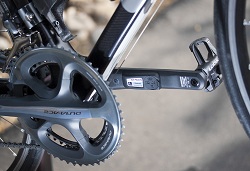
I'm going to need a pair of these so I can see when Amy is slacking off on the Tandem.
Stages Cycling has taken the technology they developed for the FreeMotion S11 series Indoor Cycles and is now offering the StageONE Power Meter to outdoor cyclists.
I don't have any direct experience other than a heads-up email announcing the launch of this , but there are two very informative posts from bloggers who are at Eurobike earlier this summer.
Stages Cycling StageONE power meter — Interbike 2012
Stages Cycling readily admits that it's not necessarily trying to go head-to-head with established players such as SRM, Powertap, and Quarq in terms of outright technology, instead preferring to go after so-called ‘blue collar' riders who merely want a consistent means of tracking progress for training purposes.
StageONE $699 ANT+ & Bluetooth Smart crank-based power meter announced
Using a Bluetooth enabled device (the StageONE doesn't come with any display) you can add power and cadence for $699.00 which is less than half that of other systems = outdoor power gets a bit closer to being real for many of us 🙂
Will Grossman from Stages Cycling has promised me more information soon. Right now they are swamped with their launch and Interbike which starts tomorrow. Their website is supposed to go live today. http://www.stagescycling.com/
[plulz_social_like width=”350″ send=”false” font=”arial” action=”like” layout=”standard” faces=”false” ]
by Sally Edwards | Jul 17, 2012 | Heart Zones USA, Zone based Heart Rate Training
Which heart rate monitor is best for you — digital or analog?

One Button Analog Blink Heart Rate Monitor
As a heart rate monitor, i.e. ZONING fitness enthusiast, you can now choose between two different types of heart rate monitors — digital or analog. But, what is the difference between a digital and an analog heart rate monitor? And which of the two is best for you? The answer lies in the transmission of the heart rate number, the bpm or beats-per-minute. And that transmission — that wave or that binary code — can make all of the differences to you.
8/14 UPDATE: I have posted a new review about what I feel is the best indoor cycling heart rate monitor strap.
First, both digital and analog heart rate monitor transmitter belts detect the same electrical activity of the heart’s contraction using sensors. The sensor in your transmitter belt can be viewed by looking at the back side of the belt which goes next to your skin. On each side of the elastic strap there is a soft and black rubber-like material that is usually oval in shape. There are always two the sensors — one on each side of the transmitter — that detect the electrical changes in the heart beat by using the amplitude of the EKG wave of the heart muscle.
Both digital and analog transmitter belts and watches are equally accurate. What is different is how they transmit the beats-per-minute of the heartbeat to the wrist top watch. And, that watch must either have a digital or an analog receiver that can accept that signal and convert it to a number that displays on our wrist or on your forearm or on your mobile device like an iPhone.
Analog transmission uses signals to the watch that are exact replicas of a sound wave. Analog signals can interfere with other nearby signals and this challenge is called the “cross talk” of two signals. The main advantages of analog heart rate monitors are the following:
- Compatible with most, now about 99%, of the cardio machines at the gym,
- Analog transmitters and receivers in the watch are less expensive
- The signal is carried through water so swimmers and those doing water activities can use a heart rate monitor.
The disadvantage of analog heart rate monitors is that if you are within 3 feet of another analog wave transmitter which can be another person wearing a transmitter belt or another source of an analog signal you will experience “cross talk”. In this case, the receiver in the heart watch will accept both signal sources and add them together and you will get an incorrect number until there is only one signal for the receiver to sense.

Two Button Blink Digital Heart Rate Monitor
Digital transmission converts the heart’s EKG activity into a digital signal using binary code which is made up of 0s and 1s. Digital transmission is a clearer signal because it is impossible with packets of data rather than analog wave signals for interference. Digital heart rate monitors are more expensive yet have the following advantages:
- The technology is newer
- Digital signals do not interfere or “cross talk with other users or other signals.
- Digital signals can be used with Bluetooth and ANT+ receivers in mobile devices like iPhones and others tools.
Digital heart rate monitors will not work for most swimmers because digital signals do not transmit from the transmitter to the watch under water. Here’s an example for you. If you are working out with another person who is using a heart rate monitor, the digital monitor is better because it will not receive both watches data and hence cross talk or allow interference.
What’s the best heart rate monitor for you — digital or analog? The answer is simple: it depends. It depends on price with analog less expensive, it depends if you are working out with others, digital is better because there is no cross talk, and if you are a triathlete or a swimmer — well — it depends because you cannot use it for swimming. My answer — just get a digital and get a less expensive analog and you have the best of both worlds.
Sally Edwards, author
ZONING, Fitness in a Blink
The Heart Rate Monitor GUIDEBOOK
This was originally posted by Sally at http://zoningfitness.com/blog/heart-rate-training-for-weight-loss/which-heart-rate-monitor-is-best-for-you-digital-or-analog/
by John | Jun 12, 2012 | iTunes & Spotify Training, Spotify

There is the option to Sync All but be careful if you have a lot of playlist. Tick each playlist you wish to sync.
Comments: Hi John-
I have scoured the entire ICI website and can't find anything to help me with the following:
1. It doesn't look like Spotify is syncing in some way with my droid2 phone. I have the app open on my phone before I open the software on my iMac. I updated a playlist on my iMac, and it didn't update the list on my phone. SO… I figured out how to download the songs directly to my phone. That led me to problem #2
2. when I add the songs to a playlist directly on my phone, it puts them at the end, and I can't find a way of moving them around (maybe this is too much for spotify)
So… I thought maybe I should delete the playlist from my phone, and if I log in to Spotify again, maybe it would sync up again, but I'm afraid of doing this and losing my playlist on my phone (since I have this playlist to play offline and it took quite a while to sync).
Is there a command/button on spotify to ask it to sync up again, and should it update anything on my phone that I updated on my iMac?
Also, is there a way of selecting only certain playlists to go to my phone, versus all of them?
Thanks so much for your help!!!!!
My response:
Interesting how I do things the opposite; I have a PC and use an iPhone – but I think everything is the same.
Yes you can select which playlists will sync to you Droid – the trick is finding where you do it 🙂
- Open Spotify in both your Mac and Droid – both need to be connected to the same Wireless system
- You should see your Droid listed in the left hand column under devices.
- Click on your Droid listing and you will see a list of all your playlists
- Tick the box for the playlists you want to sync
- You will still need to set each playlist to “Available off line” on your device.
I've attached a screen shot that show this.
You can reorder songs on your device by clicking the “pencil” icon and then dragging them by using the three horizontal icon on the right – but I haven't had good success with it. Better to reorder them on your Mac.
Does that help?
John-
Thanks a million!!!!! Truly! You have saved my sanity and allowed me to work with all the playlists I have put into spotify and onto my phone. Thank you!!!!
If this helped you please Like it on Facebook.
[plulz_social_like width=”350″ send=”false” font=”arial” action=”like” layout=”standard” faces=”false” ]
