
by John | Nov 12, 2020 | Instructor Tech Help, Instructor Training

In preparations for this Sunday's LIVE online training I was doing some prep work with Amy's Android phone. Note to self, when it's time to upgrade, stick with a new iPhone 4g if at all possible.
Maybe my frustrations were non-typical, but I found trying to switch worlds from iPhone > Android difficult and a bit frustrating. I got sucked into the the VCast world where Verizon wireless will show me the path to App enlightenment… except it didn't lead me to the place where I could download the stinking Spotify App. I had asked Amy (it's her phone) “how do I get to the Apps store?” I don't know… let's take a look.” Which lead us to the “special” store that Verizon has set up that is missing the most important App under the “Music” heading, which as far as I'm concerned is Spotify.
It's important to note here that I'm a PC guy, but I am slowly understanding the whole MAC thing…
“Abby, can you help me find the Spotify App on your mom's phone?” was very productive. She (Abby is under 25, so she understands both worlds) quickly took me to the Android Marketplace (you'll find it, you just need to scroll down below the deceptive Vcast App World icon) to the “Market Place” where you can search for the Spotify download.
Once (or if) you find it you can down load the Spotify App for your Droid phone.
Once I had the Spotify App installed I was asked to log in… but before I could, I had to approve a somewhat sinister message; Steaming or syncing playlists over your 3g or 4g connection can consume large amounts of data and potentially cost you a king's ransom in digital download fees 🙁
OK, I added that last part about the King myself. But this is important; your Smart Phone (doesn't matter which type) needs to be set properly so any transfers occur via wireless Internet, not a cellular connection. The screen shot I have above shows my iPhone (still trying to learn how to do this with Amy's Android) has syncing over 3g turned off, so I have no fears of going broke paying excessive download fees for syncing music to my iPhone.
This Sunday's LIVE training is over full so I will be scheduling a second very soon. You can click here to join the notification list for future Spotify, iTunes and MixMeister LIVE online training sessions.
Originally posted 2012-01-03 05:11:51.
by John | Nov 9, 2020 | Best Practices, Instructor Tech Help
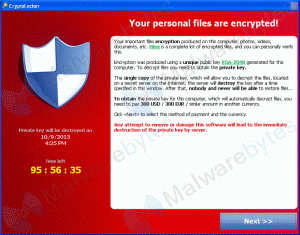
Strategies for protecting the health of your Mac or PC computer, from the malware know as CryptoLocker, isn't really much different from what you do to protect your personal health; you're careful with what you consume and have some insurance in place for when you get sick. As a fitness professional, you depend on your body to earn some or all of your income. If it breaks you're screwed. Your Dept Head will only except you teaching off the bike for so long, before deciding to replace you.
You are also very dependent on your computer for managing your music and communicating through email and social media – so if it fails you have a similar problem.
In case you haven't heard, CryptoLocker is a nasty piece of malware (virus) that can infect your computer – YES, Mac users are just as susceptible as PC owners. CryptoLocker encrypts (scrambles) your files so they can't be opened… ever…by even the NSA… unless you send the hacker $300.00 for the key to unlock the encrypt files.
This article from Forbes explains the threat –Computer Virus Spreading That Means You Never Get To See Your Files Again
However, there are trojans out there that have surprising and nasty behaviours like encrypting your files with a password you don’t have and demanding money to unlock them. This kind of malware is not new but over the past 18 months it has become significantly more prevalent and the malware authors have written significantly more clever and scary versions.
This kind of malware is now all over the web and your chances of running in to it and being exploited are uncomfortably high. Some of the more widespread examples such as CryptoLocker even include a count down timer which claims if you don’t pay them $300 in 72 hours they will delete the key file so that your data is lost forever. Malware like this is growing more scary day by day including the ability to encrypt all your data but also to spread over the network and hit other systems.
You can search in vain for a solution, but there is no know remedy to recover your encrypted files if you get infected. Well except by paying the ransom demanded by the hacker – yes, believe it or not, these are honest hackers. Most do send you the encryption key after they receive your $300.00.
Preventing CryptoLocker – don't click that link!
As scary as it sounds, any link you click could install the CryptoLocker virus (or other malware) on your computer. The trick is not clicking that infection link in the first place. The primary places you find those links is in SPAM email and garbage websites offering free nonsense; games, software and (wait for it) FREE MUSIC DOWNLOADS. Don't go there and you're 50% guaranteed that you won't have to send that $300.00 to recover your 10,000 songs in iTunes.
Long time readers have heard me implore you to use strong passwords for your email accounts. NOTE: you must have listened because I'm seeing far fewer SPAM emails, sent from hacked accounts. CryptoLocker doesn't get installed in your computer by hacking your email, no, but the SPAM emails going to all your friends in your contact list. Most people have learned to ignore an email that says; “Hi there. I saw your picture on facebook and think you're cute. Click this link to see pictures of me!” But a few haven't.
But what if I am infected?
Beyond sending the $300.00, the only known option is to completely wipe your computer clean / restore to factory settings and restore from a backup that predates the infection. If your last manual backup was two years ago – then that's what you'll have to work from. Sorry, there is no other solution 🙁
If you're using an automatic backup service to the cloud; Carbonite, TimeMachine, Windows Backup, etc… you're in luck. All of those services have multiple restore points – you can go back in time to before you were infected, and recover those old, encrypted files. But only after you've first wiped your computer clean so the files you re-import aren't reinfected.
I copied this from Carbonite's help page that explains:
- Restoring a previous version of a file lets you correct any accidental changes.
- Each day a file is backed up, Carbonite maintains a version of that file.
- You can view up to 12 versions of a file to restore (depending on how many times the file was backed up and how long ago it was backed up).
- You can restore a file you have deleted from your computer hard drive (as long as the file was deleted within the last 30 days).
Originally posted 2013-10-30 10:38:53.
by John | Oct 16, 2020 | Spotify

Click to get the free trial details.
I love Spotify!
It's hands down the most convenient service on earth for discovering, sampling and sharing music. I use Spotify every day and enthusiasticly promote it to anyone who will listen.
If you're privileged to live in an area where it's available, you can try their Premium version free for 30 days.
With the Premium version you can download and use the Spotify App for both iPhones and Droids. Try using it in your class and you may never use iTunes again 🙂
IMPORTANT NOTE FOR NEW PREMIUM USERS!
Spotify only works via a wireless connection between your computer and device. Yes it shows an option for connecting and transferring music using the USB cord on your iPhone – DON'T USE IT!
Please review these help articles for more tips and tricks.
Originally posted 2012-06-19 05:22:30.
by John | Aug 8, 2020 | Member Spotlight
 ICI/PRO member John Appleby purchased a new VeloVie Vitesse 400 through our PRO/Purchase program. John emailed me today…
John:
Here is the photo of the bike. I like it more every day. I rode the 14 percent grade section of Beaver Creek (11 percent average over 2 plus miles) last week. This is the same road the pro riders in the USA Pro Challenge will ride on the 4th stage on August 22nd.
We just heard that Chris Froome and his Sky team will coming to race. Can't wait to see the Beaver Creek finish in person!
What a treat it is to have the Wi fly gearing! The rear cassette goes from 28 to 32 so you only lose 1 gear on the lower end. It was nice to ride a super steep section and spin instead of mashing pedals all the way up.
Let me know if I can answer any questions. Also thanks for the help ordering from Pearl Izumi. This is a real nice benefit of ICI/PRO.
You're welcome John. You and your bike look great and that climb sounds like a real quad-buster 🙁
The SRAM WiFLi he's talking about is a compact grupo (two front sprockets / ten rear) that has gearing ranges very close to a triple (three front sprockets). Very important when you live and ride in the mountains of Colorado.
WiFLiâ„¢ is all you need to know…
- Wider — a wider range of gears for every climb and any descent
- Faster – two chainrings shift (and set-up) much faster and more easily than three
- Lighter — as much as 274g (9.8%) less than the most popular road triple
- Much improved Q-factor – improved heel clearance
- Easier set up – two is easier than three
- Compatible with SRAM Red, SRAM Force, SRAM Rival and SRAM Apex
Originally posted 2013-08-05 14:20:19.
by John | Jul 6, 2020 | Instructor Tech Help

I take Internet security very seriously:
- I see multiple hacked emails each week, that are sending out links to Malware sites to everyone in their contact lists, coming from the accounts of ICI/PRO members and subscribers to our weekly newsletter.
- I've had websites that I personally maintain hacked in the past and sending out SPAM, as if it's coming from me.
- I'm aware of friends and family who's identity was stolen, creating enormous hassles and expenses to clear their good name.
I'm also very aware the many of us spend a great deal of time online – actually it's not many… we all do. The truth is that there are Hackers watching and waiting for an opportunity to steal your identity and have you pay for their trip to Hawaii, or buy them a new 60″ flat screen TV.
Most importantly, I'm aware that many of you appreciate learning of these hazards, here from a trusted source.
So when I received this advisory from www.trustedsec.com, advising me that the healthcare.gov has serve security issues, I felt it was important to share this with you – so you can protect yourself and your family.
TrustedSec’s CEO David Kennedy released a written and oral statement for the Congressional meeting with the House Committee on Science, Space and Technology at Capitol Hill today (November 19). The meeting was to discuss the security concerns with the healthcare.gov infrastructure. The purpose was not to point out flaws to negatively show the website in any political view. TrustedSec remains neutral and agnostic to anything political related in regards to the Affordable Health Care Act. The purpose was to show that there are serious security concerns with the website. Our concern always remains the protection and security of the United States and it’s allies.
TrustedSec’s CEO David Kennedy will be presenting to Congress on Tuesday November 19, 2013 at 10:00AM ET on the security concerns around the Affordable Healthcare Act — healthcare.gov website. The website has been under scrutiny lately with not only performance issues but a number of glitches and security flaws that have been identified by TrustedSec as well as other independent security researchers.
David will present both a written and oral presentation to the Congressional committee on the security concerns around the website as well as a live demonstration on how an attacker could use information from the site to attack individuals that have registered.
It really is a big deal. There are people finding the personal information they entered at healthcare.gov, using a Google search, if they are even finding healthcare.gov in the first place 🙁
Our recommendation is to stay clear of healthcare.gov until these these security issues have been addresses and unbiased security experts give the all-clear.
Originally posted 2013-11-19 18:25:22.
