
by John | Nov 19, 2013 | Deezer, Instructor Tech Help, Spotify
Great question from ICI/PRO member Karin…
Hi John,
Question…can you direct me to the profiles/playlist that are more pop music? Or is there a way for me to search vs. going through each one? Thank you!
My response was: Most of our 60 Audio Class PROfiles are an eclectic composition of music, from many different genres. So there's no easy way to sort/search for playlists that are primarily pop songs. Unfortunately you will need to sample each playlist to learn if the music is to your taste.
I enjoy sampling music – what I do is:
NOTE: This all applies to Deezer as well.
- I subscribe to a bunch of playlists > and set them as Available Offline.
- Listen to each as I'm driving, working or some other activity when I'm alone.
- When I hear one I like I click the little circle with the three dots —

That opens the sharing options:
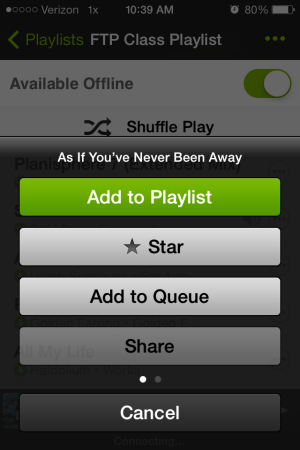
- Add to Playlist > and I add it to a special playlist I've created “Future to Use” – I keep at the top of my playlist column so it's easy to find. That's my go-to list (along with my Shazam Tags) when I'm ready to build a new class.
- Or you can “Star” the track > which adds it to your starred list > left hand sidebar has a “Starred” display option.
- Or if you swipe left, you'll see an option to; Go To Album, Go To Artist and Start Radio.

I enjoy the Radio feature a lot. Spotify will begin playing songs that are similar to the one you started with.
No telling what you'll hear (discover) next 🙂
[plulz_social_like width=”350″ send=”false” font=”arial” action=”like” layout=”standard” faces=”false” ]
by John | Nov 16, 2013 | Google Music, Instructor Training, Music
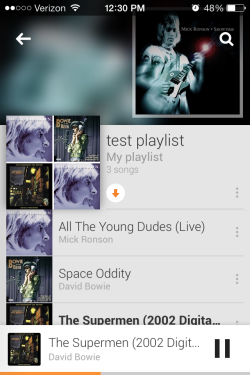
The orange arrow sets off-line mode.
I quit waiting for Google to launch an iPhone App, to go along with their Google Music All Access streaming music service, sometime ago. Two years ago, on November 16th 2011, I wrote Google Music — is it right for Spinning / Indoor Cycling Instructors?
We were just learning (and getting excited) about Spotify in the Fall of 2011. The promise of another similar service gave me hope that competitive pressure between these two would lead to continuously improving service = a better product for us to use in class.
I have to admit that until I received an alert about this, I had forgotten all about Google music. Spotify, now that the playlist timer is back, has been working very well for me.
So today there are a bunch of articles excitedly talking about the new Google Music All Access iPhone App. So right after my FTP class this morning, I downloaded the new App to my iPhone. Because I have a Google ID, my phone recognized me right away and…
then the confusion began 🙁
The App didn't work. It would show songs, but trying to play them, I kept getting an error message; unable to stream.
I must need to log in to the actual All Access service or something, I thought. Searching through every button or link I could find on the App relieved nothing. So I did a search on my computer (using Google) for Google Music All Access, which brought me to this page for Google Play Music. This is a big deal, so I figured they would have a large banner saying “Click Here to make your new App work”, but they didn't. You need to scroll way down the page to find anything – I had actually scrolled past it at first, left the page, then came back and then found the mauve banner that finally linked to where I could subscribe.
Why isn't there a way to subscribe right on your phone? Or at least a “this won't work without an All Access subscription, silly” notification. It would have prevented me wasting 20 minutes of my life.
Thankfully it's free for the first 30 days – then $9.95 a month. All Access offers a way to download a playlist for off-line use, which is good, but that's it for the functionality important to us. There's no option to change the order of songs on your iPhone – only on the desktop. There's no crossfade, or gapless playback options.
It may be that Google Music All Access was designed specifically to go against iTunes Radio. Unfortunately it has a long way to go before it will be of any value to me.
NOTE: If you found this looking for help with Spotify, we have lots of tutorials and informational articles here.
[plulz_social_like width=”350″ send=”false” font=”arial” action=”like” layout=”standard” faces=”false” ]
by John | Oct 28, 2013 | Big Box Instructor, Zone based Heart Rate Training
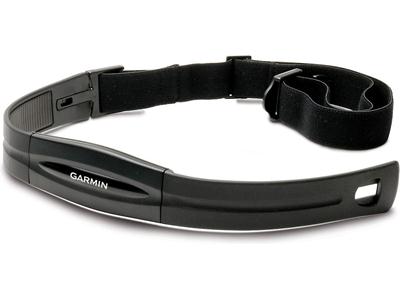
Bring your Garmin or other Ant+ compatible HR strap
Updated 10/30 below
Short notice… it's tomorrow night.
Here's the email invitation I received:
EDGE Cycle kick-off with Bahram Akradi & quests
This will be the 1st class offering in Minnesota of our “new” EDGE CYCLE signature Indoor cycle format!
Expect to have an experience that includes results, heart rate and community all with the future technology of LT Connect
Class time: 5:30-6:30pm
- First come, first serve.
- We kindly ask to arrive by 5:00pm for individualized LT Connect set up. Everyone who wants to experience this must have a heart rate strap (Garmin or Motorola).
- Music will be provided by DJ Dan; guest instructors to get you pumped and a party at Rare to follow the hard yet fun work! J
We look forward to seeing you there~
What's being launched is the new EDGE Cycle class format that integrates with LT Connect – Life Time's branded heart rate display system. Similar to MYZONE or Polar's system, but no power like Performance IQ 🙁
Fun none the less as both Amy and I teach in the same room!
I'm planning to attend and will relay the details when I know more.
Update post class:
I took the class last night. If you teach at a Life Time, you might be excited if/when this gets to your club.
First stop when I got to the studio, was to check in and get my Garmin HR strap connected to the system. They had a desk setup and the person manning it asked for my name and if (and how) I knew my personal HR Zones. “What's your top of Zone one” was his next question – I couldn't answer, but I explained that I have been tested multiple times and my AT (VT2) was 162. My and base of Zone 3 (VT1) is… but before I could say 146, he had hit the button that auto-populates all the other fields and showed 145, close enough for me.
Next I was handed a little black box, a little bigger than an iPhone, that I pointed at my HR strap. This identified my unique Ant+ signal which connected me to my profile. And there I was “John” up on the screen with the others.
Suggestion: this isn't the time to puff your chest out and give the highest possible threshold you can imagine, with the intent of impressing others in the class. The accountability that comes from having your name up on the screen becomes very real, so I suggest being a bit conservative. So when the 3 minute effort is supposed to have you at the top of Zone 4 (and you're sitting one over from your Dept Head) with the last minute pushing into Zone 5, you don't find yourself wishing you have said 160. Pushing hard enough to add that one BPM that causes your gauge to go RED, is every challenging. Especially while you're convinced everyone in the room is watching to see if you can do it.
More when I have a chance to teach with LT Connect.
by John | Oct 8, 2013 | Best Practices, Instructor Training, Music, Spotify
John it just disappeared. It showed up fine on my computer and I'll swear it was on my Droid before I left to teach. But as I was ready to launch into a long threshold effort, Spotify skipped past a track, completely messing up my class.
Amy is the official Android user here in our home, me and the girls all have iPhones. Which is helpful when people rely on you to help them understand the little idiosyncrasies of a particular music software app like Spotify.
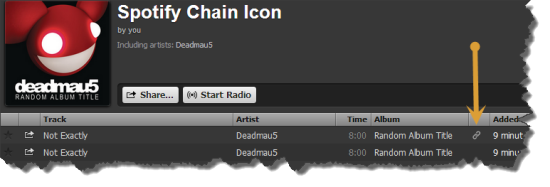
I'll admit that, although I had seen that chain icon before… I had no idea what it meant or represented. I do now 🙂
That chain icon indicates; the specific song you dragged into your playlist isn't available in that exact place, so Spotify has conveniently linked to to the actual location of the track in their database. Perfect if everything works as planned. Which, unfortunately wasn't the case with Ms. Amy today, at her noon class at CycleQuest Studio. I've never had an issue with this on my iphone, but you can never be too careful when it comes to your class music. I'd recommend checking for any any “linked” tracks and see if you can replace them.
Click the “chain” icon and Spotify will take you to the linked location. Select and drag that track into your playlist. Open the playlist and position the track next to the linked track, and then delete it.
So while we're on the topic, what do those other, funny little icons represent?

The square box with the music note symbol indicates a local track, probably from iTunes, that Spotify can't connect to its database. If you see this in your playlist be sure that you set “offline mode” while both your computer and portable devise are on the same WiFi network.
I'm still trying to understand the pinkish square with the lighting bolt. Supposedly they're tracks that Spotify had found once, but can no longer find. Funny – songs with that icon still sync to my iPhone and play both on my computer and iPhone.
Dummies.com says
| Red, broken rectangle |
Seeing this icon next to a local file means that the link (or path) to your local file is broken or not found. Perhaps iTunes moved the local file to a different folder. You can try to import the file again by browsing to the actual file and dragging it into Spotify’s Local Files pane. The broken rectangle link also shows up if a song is protected by digital rights management (DRM), so it can’t be played outside of iTunes. A notification bar appears if this is the case, and you’re prompted to remove all DRM-protected tracks from the Local Files pane. |
Which doesn't make sense to me – all three tracks from the image above play and sync without any trouble.
Do you have a better understanding?
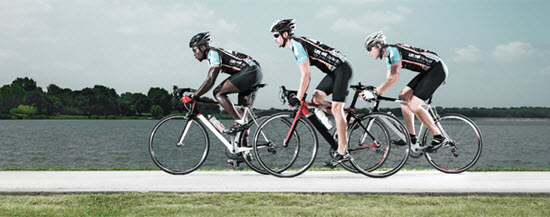
by Jim Karanas | Aug 5, 2013 | Master Instructor Blog
By Team ICG® Master Trainer Jim Karanas
In the early days of indoor cycling, there was a problem. When bike resistance was low, the weighted flywheel connected to a fixed gear with a chain produced an unnatural degree of momentum. It permitted riders’ legs to spin at cadences far above their natural ability.
This resulted in the infamous “bouncing” in the saddle, as well as potentially catapulting them over the handlebars if they were to suddenly stop pedaling. Then there were the as-yet-unknown, uninvestigated forces working on knees and hips.
So a ceiling was put on cadence. Everyone believed 120 rpm was fast enough. Some education bodies restricted it to 110 rpm. The reasons were obvious at the time. One look around a cycling class filled with “jumping beans”, or the surprised look on Superman’s face as he went over the handlebars made it clear that we instructors needed to control cadence.
As IC evolved, cadence became less of a worry. Better control was taught from the start, and IC became safer. The 110-120 rpm ceiling has been challenged on occasion, but usually sticks. People don’t typically ride at higher cadences, the logic goes, so why use them in cycling classes?
Is high cadence still unsafe? Do higher cadences offer training benefits in an authentic class, or general exercise benefits in a non-authentic class?
My opinion on safety is that high cadence is unsafe in some situations, but not in others. Cycling coaches are documented as recommending max-effort cadence drills up to 140-160 rpm. Arnie Baker’s Smart Cycling is an example.
Arnie Baker’s not alone. Cycling coaches don't have the same concerns IC instructors do about cadences above 110-120 rpm. They train athletes who are on road bikes on a track stand or a Computrainer. There’s no weighted flywheel. There’s no help on a real bike. It's all you. To spin at 140-160 rpm, you have to develop the necessary muscular composition and/or neuromuscular recruitment, or you can’t do it.
Not so on a chain-driven indoor cycle. The weighted flywheel creates substantial inertia, which we’ve spent decades teaching our students to control with technique and proper resistance. Chain-driven bikes create excess momentum and allow you to cheat on cadence training.
But belt-driven bikes can allow high-cadence training to become part of indoor cycling. The reduced momentum on a belt-driven bike makes it more like a real bike in terms of how hard you have to work to spin fast. I wrote about this in a previous post (“From Chain Junkie to Belt Convert”).
Should we create high-cadence trainings for our students if they’re riding belt-driven bikes? The statement that we don't typically ride at those cadences and shouldn’t train at them makes little sense to me.
High-cadence training, called spinning, can be defined as any cadence that exceeds a rider’s preferred cadence, usually 120-160 rpm. These cadences are performed in lower gears, applying lighter pressure to the pedals with each stroke. Neuromuscular adaptation increases pedal stroke fluidity and reduces the force the leg muscles and joints must transmit for a given workload.
Higher cadences also allow the muscles to work aerobically. Less activation of type II muscle fibers delays the burning of carbohydrate stores. In a study by Ahlquist et al., a higher cadence resulted in less stimulation of fast-twitch muscle fibers. As fast fibers deplete their glycogen stores from slower, high-strength pedaling, they become less forceful. Additional muscle fibers must then be activated to maintain a given speed. The activation of a larger number of muscle cells leads to higher oxygen consumption rates and reduced economy.
With proper high-cadence training, pedaling rates of 80-100 rpm become easy for slow-twitch muscle fibers to handle. High-cadence training may also make type I muscle fibers faster and more fatigue-resistant. Then, even less glycogen is used within type II fibers because slow-twitch, type I fibers can handle the fast, low-force contractions.
To take advantage of these adaptations, cyclists use cadence drills. They train the neuromuscular system to increase coordination and efficiency at high pedaling rates and promote fatigue resistance in type I fibers at the same time. In the end, higher cadences preserve glycogen, leading to faster and more powerful finishes over a day of riding.
None of this makes a difference unless you believe in the effectiveness of high rpm. We do at ICG because the cycling world does. We train at much higher rpm than we promote in the industry because of the traditional 110-120 rpm ceiling and the stigma of going above it.
Also, some cyclists do pedal fast. Track cyclists do, as do riders on fixed-gear bikes going downhill — unless they’re braking to slow their legs.
So high cadences have been validated in real cycling. What about non-authentic indoor cycling?
SoulCycle uses cadences over 120 rpm. They now produce their own bike, a chain drive. Is this safe? Maybe not. That's one reason we suggested that ACE research SoulCycle's training program. Would exceeding 120 rpm be safe on a belt-driven bike? We think so.
Still, the benefits I list above relate to cyclists. How does high-cadence benefit general membership? For one thing, it burns a ton of calories.
My view, and that of ICG, is it’s time to allow faster spinning in certain situations. We’ve advocated a belt drive for years, and I frequently train at cadences far in excess of 120 rpm on our bikes. Although our education still limits cadence to 120 rpm as a general rule, we’re in discussion regarding high-intensity spinning.
When is high cadence okay? When the bike's momentum can be controlled and the instructor’s training is of sufficient caliber to instruct correct pedaling efficiency.
