Click Image to learn more about training for ICI/PRO Members.
Hi John,
Since you are a Spotify guru, I thought you might know the answer to this question: Spotify says their music is for non-commercial use and that you can't use it to play at even a school. I haven't found anything from Spotify mentioning that it isn't allowed in fitness classes, and I know a LOT of people (including myself) who love to use it. Any thoughts?
This is from Spotify's page:
Can I use Spotify to play music in my bar, restaurant, store, school etc?<https://support.spotify.com/us/learn-more/faq/#!/article/public-usage>
ANSWER: No, the Terms & Conditions<http://www.spotify.com/se/legal/end-user-agreement/> that you agree to when registering for Spotify state that Spotify is for personal, non-commercial use.
We discussed this exact concern two years ago when we were just getting our feet wet with Spotify.
Before I got too excited, I decided to check what other Terms and Conditions I have agreed to — who reads those things anyway? It turns out that every music service or music software I use is restricted to Personal Use Only. Let’s go down the list:
iTunes has a similar restriction — (i) You shall be authorized to use iTunes Products only for personal, noncommercial use.
Windows Media Player from Microsoft — Unless otherwise specified, the Services are for your personal and non-commercial use.
My copy of MixMeister Express (no link) says: You may only use the MixMeister Software for Your private, non-commercial use.
You can add Deezer to that list:
The Developer agrees that the use of the Services is strictly limited for a non-commercial purpose and in a non-commercial environment.
It means that the Developer shall not perceive, receive, generate, benefit or create directly or indirectly, any moneys, incomes, revenues, data or any other consideration in connection with the use of neither the Services themselves, nor any and all Content accessed through the Services.
So am I screwed? Do I need to learn how to perform as a one-man-band?
No
Are you prevented from using Spotify, iTunes, Windows Media Player or MixMeister to produce and deliver music for your class tomorrow?
I’m not an Attorney, so that’s going to be your choice. I certainly don’t want to be advocating you do something that’s potentially in conflict with something you have agreed not to do… but I personally don’t see this as comparable with using music that’s been illegally downloaded in some fashion. Actually just the opposite.
You’ve heard me state on this recent Podcast about music licensing that; as a content creator, I’m very much against the distribution of copyrighted materials without due compensation given to the creators.
My feeling is that as long as the studio is properly licensed for playing music, this won’t be seen as much of an issue. Music labels are already dealing with the enormous amount of illegal file sharing that happens every day. iTunes changed how many people acquired music by creating a service that’s so convenient (and secure) that millions of people would rather pay a $0.99 than waste their time going elsewhere.
Like iTunes, I believe that Spotify can actually reduce the amount of sharing that ends in no revenue for the record labels by offering a convenient method of finding and accessing music.
That said, I want to offer this disclaimer: Links to Spotify playlists you find here are intended for your personal use only.
What do you think about this?
Do you have a question or problem we can help with? If so, please let us know and we'll do our best to answer it for you.
Remember from Part 1 that teaching indoor cycling is a form of public speaking, which itself is an art. Employing some public speaking skills will impact your class dramatically. Great public speakers know that much of their impact comes from body language, including stance, gestures and facial expressions.
Stance
When you teach, a strong, disciplined position on the bike is essential for building credibility, expressing your emotions, and connecting with your students. Nothing discredits an instructor more than moving poorly — rounded back; hunched or protracted shoulders; no fluidity when changing positions; sitting up constantly, often unconsciously, to recover. You’ve lost the class before you’ve started.
Being strong on the bike is not just about your monster CV system. Your ride position, like a public speaker’s stance, must be solid to project confidence in front of a class. Students respond to instructors whose bodies are alive and disciplined. If someone filmed you while teaching, you might be amazed at how your posture sometimes portrays the opposite of what you tell your class to do.
Gestures
Use your hands to gesture every so often. On a bike, your hands belong on the handlebars, but you can keep one hand connected and use the other to emphasize a point or express emotion.
Sit up occasionally and use both hands as a public speaker would. When sitting up, I tell my students to keep their hands on the handlebars unless they need a back break.
Get off your bike at times, not only to work with individual students, but also to stand closer to the class and gesture with your entire body.
Facial Expression
Eye focus is the most important element of facial expressions, particularly to communicate sincerity. Don’t just look around the room as you speak to maintain general eye contact. Nothing connects you to your students better than focusing on one student long enough to deliver an entire phrase without looking at anyone else.
Pause when you finish and let it sink in for a moment.
This connection between you and one student can rivet the entire class. What did he say? Why didn’t she say that to me? The technique contributes significantly to comprehension and retention by giving the listener, and anyone else who tuned in, time to process the message.
Most instructors lose their facial expressions while teaching and “solidify” into a single look. Relax your face right from the start, and always greet your class with a smile. You won't smile throughout the class, but smile at least at the appropriate moments, like when you crack a joke that was actually funny. Somber and serious can be effective too, depending on training intensity.
It isn't natural to sit on a bike in front of a group. It's unusual and odd, so don’t try to be natural. Be larger and more powerful. It takes effort, skill and practice. Work on your body language to make the most of every class you teach.
Media Support
Steve Jobs was the maestro of using media with his public presentations. In 2005, he called Madonna on iChat after she signed an exclusive deal with iTunes and displayed the call on a big screen — a great use of media to enhance a presentation. Check the link: http://everystevejobsvideo.com/tag/madonna/
As instructors we can use voice, music and video to deepen our class presentation experience.
Voice
Our tone of voice shows our students whether or not we care. It tells them whether we’re in fun mode or feeling excitement, passion and enthusiasm about teaching. If the members think our class is boring, it may have nothing to do with the workout or music selection, but with a monotone that sounds dull.
Here are some suggestions for making classes more impactful through tone of voice:
Pause before emphasizing an important word or concept.
Speed up your speaking to show excitement.
Tell a story. This will translate to your vocal quality.
Define a moment in your class that might be considered a pinnacle: “Everything we’ve done to this point has prepared us for the next 2 minutes!”
Music
In public speaking, music is often used as background when participants enter a room to set the mood for a meeting or event. How much attention do you give to the music you play as your class enters? The proper music gets people in the right mood to work and adds a touch of drama to your class.
What do you play as the class is leaving? Music can reaffirm a pleasant atmosphere as your students exit.
Avoid turning music on or off suddenly. It should always fade in or out slowly.
This post is not about how to use music when you teach, but to expand on your use of music to set the right mood for the class before it begins and when it’s over. That’s what great public speakers do.
Video
Effective use of video to enhance our classes is a prime directive at ICG®. Forward-motion video can make your class more absorbing and exciting. Beautifully filmed, high-energy video that showcases destinations from around the world entertains and engages.
Remember, however, that video should never dominate your class. That important job is always left to you, the instructor. Video is just another asset that supports your class profile.
At its best, public speaking is flawless talk in a compelling sequence that persuades through command of the language. It’s well structured, well delivered, informative, educational and entertaining. Striving to be better public speakers can make us better indoor cycling instructors.
John's note: We're highlighting some of Jim Karana's past articles this week.
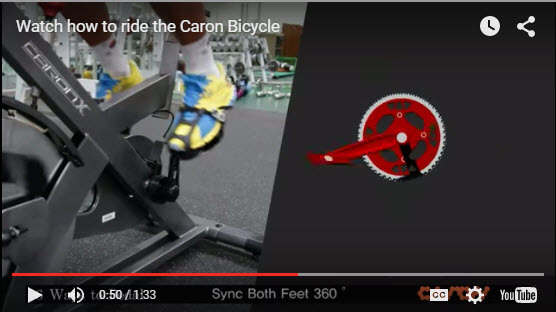
I just became aware of a new Indiegogo campaign for an innovative* method of pedaling a bicycle. Similar in functionality to a KrankCycle, the Caron Bicycle uses independent left/right crankarms that create 6 different pedalling movements.
They have their crankset installed on a conventional IC in this video. Watch and then tell me if you feel these added exercises would improve your class… or is it just a solution in search of a problem that doesn't really exist?
This animated video shows the various muscle activation from the different pedalling techniques.
*I'd be curious to know if Matrix has patents on the KrankCycle that would extend to a leg powered bicycle?
In case you haven't seen the KrankCycle in action:
Caron claims this on their campaign page:
Technology for CARON Bicycle is protected by patents worldwide, including US Pat. No. 7,544,139.
It might be cool to observe power output – especially during one legged work 🙂
Does Spotify seem to take forever to load on your iPhone? Did it close abruptly (crash) when you hit ‘play', act sluggish or is just not as responsive as when it was new? It may have bonked. Here's how to nurse your prized device back to life…
In endurance sports such as cycling and running, hitting the wall or the bonk describes a condition caused by the depletion of glycogen stores in the liver and muscles, which manifests itself by sudden fatigue and loss of energy. Milder instances can be remedied by brief rest and the ingestion of food or drinks containing carbohydrates. The condition can usually be avoided by ensuring that glycogen levels are high when the exercise begins, maintaining glucose levels during exercise by eating or drinking carbohydrate-rich substances, or by reducing exercise intensity.
Your iPhone, or other portable device, can experience the bonk as well. No, not because the battery is low, or you haven't fed it enough GU, but from a depletion of available system memory (RAM – Random Access Memory). This results in slow operation, freezing / crashing Apps and mysteriously frustrating actions that have you wondering why you're not using CD's anymore 🙁
Two types of fuel
As a fitness professional you no doubt are aware that your body stores two types of energy; sugars (glycogen) and fat. Regardless of your fitness level, during a long period of exercise the limited amount of stored glycogen you have is consumed. If you don't eat carbohydrates before they are exhausted, you'll bonk. Interestingly, your body can't access the energy in your stored body fat quickly enough to prevent bonking, even though you have all the fat calories needed to keep you going for days. Yes, with proper training you can improve fat usage, but watch the Tour de France next month and you'll see very fit cyclists eating frequently during each stage.
The energy that fuels your iPhone is memory:
System memory (RAM) which runs all of the phone's operations – a small amount @ 512MB (one half GB)
Storage memory – that's the amount of memory you choose when you bought your iPhone; 8GB, 16GB, 32GB, etc… that holds your offline Spotify music files, iTunes tracks, videos and pictures.
Your iPhone bonks when it runs low on available RAM – none of the 32GB of storage memory you paid extra for is available to help out. You don't see it, but there are a bunch of processes running continuously on your phone, eating small bits of RAM. Typically this happens when you have multiple Apps running in the background or you have too many Apps looking for updates (push notifications) or GPS location updates. You can't add any additional RAM – so the solution to prevent bonking is to free up RAM – by closing unused Apps and turning off unneeded functions will free up some additional memory.
Step one – Close Unused Apps
Did you know that clicking the Home button doesn't actually close an App? It doesn't. There's a good chance that every App you've ever downloaded and opened is still quietly running, consuming the much needed RAM to run Spotify properly. Powering down your iPhone doesn't close them either – each App needs to be closed manually.
Double click the home button and then swipe up to close Apps.
Here's how…
Double click the ‘Home' button quickly and you'll see thumbnails of the Apps currently running.
Scroll left/right to select an App to close.
Swipe the thumbnail up to close it – there's no reason not to close all of them.
Step two – Do you talk to Siri?
Besides it being annoying, Siri is a bit of a RAM hog. If you're not on speaking terms, turn her off. Settings>General>Siri
Step three – Reboot Regularly
Whenever you're tired, does it seem like your mental processor doesn't operate as sharply as it does after a good night's sleep? After a long day your brain's RAM has a bunch of “stuff” running in the background that it collected during the day; problems at work, anxiety about a future event, what to get your dad for Father's Day… stuff. The best way to clear it is an 8 hour horizontal reboot.
Computers are no different. They collect “stuff” as they work, reducing the amount of RAM needed for Spotify to crossfade between songs. NOTE: cross-fading streaming tracks is actually a very neat (and memory intensive) trick.
So when was the last time you powered down your iPhone and give it a rest? I've asked people this question and mostly been told that the only time they've rebooted their phone is when the battery goes dead. Same goes with your computer, Mac or PC – they all benefit from regularly being turned off. Wait until it has completely powered down and then bring it back to life 🙂
Step four -Turn off unneeded services
Every neat little thing your iPhone does requires RAM…
Do you really need to instantly see every new FB comment displayed on your home screen? Turn a few off: General > Settings > Notification Center.
Location tagging is a bit creepy. Does Shazam really need to know where I am? I don't think so. Turn off all of the nonessential location tags: General > Settings > Privacy > Location Services and scroll down to see who's tracking your location. I only have Facebook (for checking in) and Google Maps turned on.
There are multiple ways to reduce RAM usage beyond this list – these should be a great start to prevent your iPhone from bonking anytime soon!
The latest version of the iPhone Spotify App had an annoying bug in it that appears to be corrected when combined with the most recent iOS update I downloaded this morning. Good thing as it was making me crazy thinking the App was going to crash in the middle of class, while I'm waiting for the song timer to catch up with the music after a transition.
My Settings
Apple and Spotify update software in batches of users = your iPhone may update at a different time, depending on your location. If you want to compare yours with mine, I'm running Spotify version 1.1.0.2549 and iOS 7.1.1.
Crossfade set at 10 seconds and Gapless Playback turned on.
Here's what was happening
I you were watching the playlist timer during the crossfade between tracks, you would hear the music transition smoothly, but the timer and album artwork would freeze in place for an agonizingly long period of time.
Why this is/was important to me… I can barely see those tiny numbers
I will often use the Stage button on the console (with it's large numbers) to help me time longer intervals – possibly different from how you would. This is a work-around (hack) for me, due to having a hard time focusing on the small fonts Spotify is using.
The 3-4 minute “Best Efforts” I do early in class, to establish PTP (Personal Threshold Power) are a great example. I want the effort to end along with the song if possible, so I need to understand the total length of the track – but not have to continuously watch the countdown timer I have trouble seeing. During the fade between songs I'll sit up (bringing my eyes to the best focal distance) and take a quick peek squint at my iPhone, note the total time and then hit the stage timer on my bike.
Yesterday I used The Crystal Method — Busy Child which is long – 7:25 mins, for the opening 4 min PTP effort. If I hit the Stage timer at the start, I now have the large numbers counting up. Next I can do so simple math in my head: 7:25 – 4:00 = 3:25. Now I know that if the class and I hit the Stage button (resetting the timer to zero) and start the effort at the 3:25 mark on the console timer, I have a near perfectly timed 4 minute interval timed to finish with the music 🙂
Understanding how I do this, do you see how frustrating it would be for me to be sitting there, watching and waiting for the timer to catch up and display properly? I swear there were times when it would take 10 seconds or more, with me staring at my iPhone like Mr. Magoo.
Now everything appears to be working smoothly – and that makes me happy!