
by John | Jun 7, 2015 | Instructor Tech Help, iTunes, Latest News, Music, Spotify

What's it going to be? iTunes or Spotify in the future?
Apple's big announcement is supposed to be tomorrow – when they launch the iTunes (or whatever they decide to call it) streaming service! I can't wait to see what they're offering and learn if I'll be switching away from Spotify anytime soon.
There's a bunch of industry press asking if there is anything Apple could offer in an App, that would be an improvement over the Spotify App so many of us enjoy. Tweek this or that feature maybe, but there are many who feel Spotify has broken the code on streaming music.
Could Apple improve how we deliver music in our classes?
Apple doesn't do “Me Too” products or services. If you'll excuse the pun here. They do Apple… or they go home 🙂 Seeing how dominate Spotify has become in streaming – the company is valued at $8 Billion – I have a hard time believing Apple would make a half hearted attempt to compete.
Then there's the pride issue here. Apple revolutionized the digital music industry back in the 2000's. They've sat on their hands while Spotify, Deezer and Pandora are taking serious bites out of Apple's revenues. My prognostication is that Apple will roll out something very cool tomorrow. I can't wait to try it, learn it and then teach everyone how to use it in their classes!
by John | Jul 27, 2014 | Deezer, Instructor Tech Help, Latest News, Music, Spotify
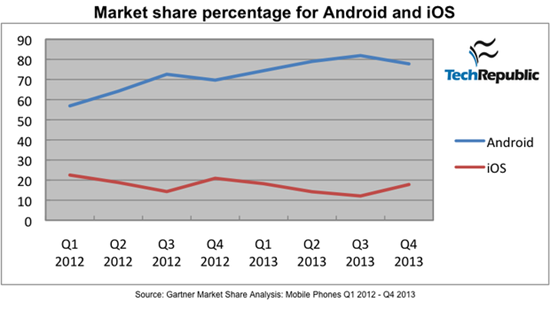
Image from http://www.techrepublic.com/
I find it fascinating to watch all the posturing going on in the digital music delivery business. It all started with iTunes – who ruled the legal, digital download space for years. Multiple services (ZUNE, Rhapsody, Napster, etc…) have tried, and failed to take more than a tiny amount of market share from Apple.
But that's all changing because of Spotify, Deezer and a little company called Google. The article below opened my eyes to why.
Apple looking Into Android Compatible Streaming Music Service To Compete With Spotify
In an interesting turn of events, Apple is reportedly considering opening up and launching their own streaming music service to compete with the likes of similar services like Spotify and the newly released Beats music. In addition to this they are apparently considering launching an Android app for the streaming service to go along with the launch of the service itself, all in an effort to attack the declining sales of US iTunes music downloads according to sources that are close to the matter. People still use iTunes? All jokes aside, it has been difficult for apple to compete with services that offer streaming music at a low price, as the music libraries are competitively similar in size, and listening is unlimited, all for a small monthly fee. Downloading the same number of songs through iTunes that you would have at your disposal with a service like Spotify would take massive amounts of money, even with most songs on iTunes being available as singles with most as low as $0.99 a hit.
It’s interesting to hear these possibilities as Apple and iTunes have always been known to be a partnered exclusive company and service. While Google’s popular Google Play Music is available on multiple platforms including Mac, Windows, Android and iOS, Apple’s iTunes is only accessible to those who use iOS devices or Mac computers. They have effectively closed themselves off from other possibilities for quite some time, and it used to work for them when they were the dominating force in digital music. With the iPod reaching its end of life though, and a myriad of subscription based music services available on virtually any platform you can think of, Apple will have to find a way to take the once reigning king of music services and transform it if they want to compete.
So I did some quick research to see how Apple's iOS competes with Google's Android market share for portable device sales.
… If you look at the raw numbers for sales market share between Android and iOS devices, Google seems to be dominating the space. In Q4 2013, Gartner reported that Android had 77.8% worldwide market share while iOS had only 17.8% share. One quarter prior, Android had 81.9% and iOS took second place with 12.1%. It is worth noting that, according to ComScore, iOS market share in the lucrative US market is about 40%, while Android accounts for around 50% of US sales. The problem with these numbers is that the do not take into account the fragmentation that Google has allowed with the Android platform.
What goes around…comes around
One of the legacies of Steve Jobs was his/Apple's decision to keep iTunes exclusive to iDevices (there is no iTunes App for an Android phone). While this worked to Apple's advantage for years, they now find themselves becoming uncompetitive now that Spotify and Deezer have Apps for both iOS and Android phones.
So what does this mean for you?
Choices, lots of choices for digital music coming with fewer restrictions on how you'll be able to build, share and then deliver great music to your classes. Many of us found Spotify to be revolutionary – it completely changed my views about renting vs. buying music. But now Spotify is SOP (standard operating procedure). I'm guessing that a few years from now we'll be using a music service that doesn't even exist today and we will access it using a device none of us has even seen.
And we can't wait to help you understand how you'll use it in your class 🙂
by John | Jun 13, 2014 | Instructor Tech Help, Instructor Training, iTunes & Spotify Training, Music, Spotify

Does Spotify seem to take forever to load on your iPhone? Did it close abruptly (crash) when you hit ‘play', act sluggish or is just not as responsive as when it was new? It may have bonked. Here's how to nurse your prized device back to life…
Wikipedia describes bonking as
In endurance sports such as cycling and running, hitting the wall or the bonk describes a condition caused by the depletion of glycogen stores in the liver and muscles, which manifests itself by sudden fatigue and loss of energy. Milder instances can be remedied by brief rest and the ingestion of food or drinks containing carbohydrates. The condition can usually be avoided by ensuring that glycogen levels are high when the exercise begins, maintaining glucose levels during exercise by eating or drinking carbohydrate-rich substances, or by reducing exercise intensity.
Your iPhone, or other portable device, can experience the bonk as well. No, not because the battery is low, or you haven't fed it enough GU, but from a depletion of available system memory (RAM – Random Access Memory). This results in slow operation, freezing / crashing Apps and mysteriously frustrating actions that have you wondering why you're not using CD's anymore 🙁
Two types of fuel
As a fitness professional you no doubt are aware that your body stores two types of energy; sugars (glycogen) and fat. Regardless of your fitness level, during a long period of exercise the limited amount of stored glycogen you have is consumed. If you don't eat carbohydrates before they are exhausted, you'll bonk. Interestingly, your body can't access the energy in your stored body fat quickly enough to prevent bonking, even though you have all the fat calories needed to keep you going for days. Yes, with proper training you can improve fat usage, but watch the Tour de France next month and you'll see very fit cyclists eating frequently during each stage.
The energy that fuels your iPhone is memory:
- System memory (RAM) which runs all of the phone's operations – a small amount @ 512MB (one half GB)
- Storage memory – that's the amount of memory you choose when you bought your iPhone; 8GB, 16GB, 32GB, etc… that holds your offline Spotify music files, iTunes tracks, videos and pictures.
Your iPhone bonks when it runs low on available RAM – none of the 32GB of storage memory you paid extra for is available to help out. You don't see it, but there are a bunch of processes running continuously on your phone, eating small bits of RAM. Typically this happens when you have multiple Apps running in the background or you have too many Apps looking for updates (push notifications) or GPS location updates. You can't add any additional RAM – so the solution to prevent bonking is to free up RAM – by closing unused Apps and turning off unneeded functions will free up some additional memory.
Step one – Close Unused Apps
Did you know that clicking the Home button doesn't actually close an App? It doesn't. There's a good chance that every App you've ever downloaded and opened is still quietly running, consuming the much needed RAM to run Spotify properly. Powering down your iPhone doesn't close them either – each App needs to be closed manually.

Double click the home button and then swipe up to close Apps.
Here's how…
- Double click the ‘Home' button quickly and you'll see thumbnails of the Apps currently running.
- Scroll left/right to select an App to close.
- Swipe the thumbnail up to close it – there's no reason not to close all of them.
Step two – Do you talk to Siri?
Besides it being annoying, Siri is a bit of a RAM hog. If you're not on speaking terms, turn her off. Settings>General>Siri
Step three – Reboot Regularly
Whenever you're tired, does it seem like your mental processor doesn't operate as sharply as it does after a good night's sleep? After a long day your brain's RAM has a bunch of “stuff” running in the background that it collected during the day; problems at work, anxiety about a future event, what to get your dad for Father's Day… stuff. The best way to clear it is an 8 hour horizontal reboot.
Computers are no different. They collect “stuff” as they work, reducing the amount of RAM needed for Spotify to crossfade between songs. NOTE: cross-fading streaming tracks is actually a very neat (and memory intensive) trick.
So when was the last time you powered down your iPhone and give it a rest? I've asked people this question and mostly been told that the only time they've rebooted their phone is when the battery goes dead. Same goes with your computer, Mac or PC – they all benefit from regularly being turned off. Wait until it has completely powered down and then bring it back to life 🙂
Step four -Turn off unneeded services
Every neat little thing your iPhone does requires RAM…
- Do you really need to instantly see every new FB comment displayed on your home screen? Turn a few off: General > Settings > Notification Center.
- Location tagging is a bit creepy. Does Shazam really need to know where I am? I don't think so. Turn off all of the nonessential location tags: General > Settings > Privacy > Location Services and scroll down to see who's tracking your location. I only have Facebook (for checking in) and Google Maps turned on.
There are multiple ways to reduce RAM usage beyond this list – these should be a great start to prevent your iPhone from bonking anytime soon!
by John | Jun 13, 2013 | iTunes, Music, Spotify

Nope. Move along, nothing to see here.
Based on what's being described, iTunes Radio won't work for your class. Unless you just want to hit play and work with whatever iTunes decides to deliver to you.
iTunes Radio (from what I can see) is really just Apple's version of Pandora. Give them a song or genre of music and iTunes Radio will serve a streaming radio of suggested songs.
I found a good explanation at zdnet.com of why Apple isn't offering a streaming catalog like Spotify or Google's new Google Play music services.
Apple most likely chose the radio station model because:
1. It's less like to cannibalize its iTunes music sales. A buy button is prominently displayed in the upper-right hand corner of the iTunes Radio now playing screen putting you just a touch away from being able to purchase a track.
2. It was a much easier sell to the music labels. I'm sure that the buy button in the upper-right corner was a significant part of Apple pitch to labels.
3. It was easier to close deals with three major music labels (which came down to the wire) as opposed to getting deals with all of the labels representing the 26 million plus tracks in the iTunes Store's massive music library.
Personally, I'd rather have a “catalog” (or hybrid) music streaming service from Apple (imagine, every track in the iTunes store being free to listen to!) over a “radio” service, which is why I don't see canceling my Spotify subscription any time soon. Ever since I've bought into the catalog streaming model, I've purchased very few individual tracks (although I've still purchased a few pre-release albums and live recordings) — which is probably the exact reason why Apple (and the labels) opted for iTunes Radio on Monday. I hope that Apple eventually expands it's music subscription offering, but judging by how long it took it to secure deals with three music labels (iRadio has been rumored since September) I'm not optimistic.
iTunes Radio is planning to launch this Fall.
by John | Jul 1, 2011 | Instructor Tips and Tricks, Instructor Training, Music
As far as I'm concerned Bill Gates, Steve Jobs, Larry Page and Sergey Brin all deserve a big hug! Without their fantastic companies; Microsoft, Apple and Google none of what we do here at www.indoorcycleinstructor.com would be possible 🙂
That's not to say that these services aren't without their problems… Much of the Free and ICI/PRO Premimum content we produce here is delivered automatically to you via an RSS feed to iTunes. So when I get an email stating that “My Podcasts aren't updating in iTunes” I'm always quick to respond.
But I've learned that not everyone feels comfortable asking for help*, so here is a quick; I can help tutorial – Forcing iTunes to refresh. *Your questions are always welcome – I'm here to help you 🙂
If you see this in the Podcast section of your iTunes.

I don't know why this happens... but here is how to fix it.
And the Refresh button in the bottom RH corner doesn't update all your Podcasts. Right Click on the Podcast Header Title (it has the little horizontal triangle next to it) and you will get this dialog box.

Click on the Update Podcast link. You should see the podcast update and if there are any new episodes you will see the orange status icon.

If not I'm here to help you trouble-shoot the problem. Click here for the support request form.
