
by Christine Hawthorne | Oct 19, 2020 | Instructor Training, iTunes & Spotify Training, Spotify

As an indoor cycling instructor, you already know that music plays an important part in creating an exceptionally motivating class.
But sometimes, searching for new music and developing playlists can be time consuming and costly. Since iTunes came out with its social network, Ping in 2010, I’ve had great success finding music and sharing songs and playlists there with other instructors. In fact, I may have been happy to stay with Ping forever. Then I heard a rumor that with its new upgrade this fall, iTunes will be dropping Ping. I can neither confirm nor deny that rumor, but it did scare me enough into looking at other music options.
That’s when my search began for a new music-sharing site that would offer me the ease of finding new music, putting my playlists together and sharing them with other instructors. I knew about other social music sites such as MeeMix, , Maestro.fm, and Last.fm, and I had dabbled in Spotify before, even recreating some of my iTunes playlists and publishing them there. I had never really explored Spotify enough to see all that it had to offer though.
With the possibility of Ping not being available to me any more, I knew that it was time to jump in and give Spotify another try. This was around the same time that John contacted me to write some blog posts here at ICI/ PRO. I mentioned to him that I was dabbling in Spotify, and he said it would ‘change the way I use music in my indoor cycling classes.’ As music ‘junkie’ and someone that had become pretty adept at creating playlists, sharing them and using them in my classes, I was sure that he was exaggerating.
As the next few weeks went by, I continued to explore Spotify, upgraded to ‘premium’ membership status and gained more confidence using it. I also installed the Spotify app on my new iPhone. In that short time, I have almost completely stopped purchasing new music in iTunes and cancelled my $12.99/month eMusic account. I’ve also begun to stream my playlists in my indoor cycling classes through my phone. Amazing, really, if you stop to think about it. I’m still working out the kinks in this area, but overall I’d say it’s going quite well.
To say that this was a challenge for me would be an understatement, because I consider myself just a bit technologically challenged, and I will admit that I found Spotify difficult to navigate at first. I am not someone that picks things like this up easily. I’m guessing that a lot of you reading this are in the same boat. I’m still working on learning how to use Spotify to it’s fullest potential. While I know that I am only using a small part of what’s available to me as a premium member, I’ve already decided that John was right. It already has started to change the way I’m using music in my classes.
Let me begin by telling you a few of the things that I already love about Spotify:
- It’s inexpensive. I know what you’re thinking. How is $9.99 a month for a premium membership inexpensive? Here’s how: You don’t have to purchase music anymore. You have thousands of songs available for you to use. Between my monthly eMusic payment and my iTunes purchases, I was spending well over the $9.99 that I am paying per month for Spotify.
- It’s simple to create playlists. This part of the process is actually very similar to iTunes, only much simpler. You can browse new music, see what others are listening to and create your own playlists in less time than if you had to download them and drag them into your playlists. In just a few clicks, you have everything you need at your fingertips.
- You can share your playlists: Kind of like sharing playlists on iTunes only you can actually sync an entire playlist to your device and use it in your own cycling class. Sure, on iTunes you could purchase entire playlists easily, but it would cost you anywhere from fifteen to twenty dollars or more. With Spotify, you have access to thousands of songs and playlists and you can use as many as you’d like.
While I’ve learned a lot about Spotify in the few short weeks that I’ve been exploring it, I still have so many questions about it. I’m quite certain that I have not even scratched the surface of all that it has to offer me as a cycling instructor.
For example, here are few things that I’ve struggled with continued to struggle with:
- I’m finding it hard to find other people to ‘follow’. One way to find people is to log in through your Facebook account and follow your Facebook friends that are on Spotify, but I am specifically looking for other instructors and people with good musical taste. No offense to my Facebook friends, but most of them don’t fit into either category. It’s not as simple as ‘searching’ for people by name.
- I’m still learning the whole ‘online’/’offline’ thing. Do I want to stream my music via the Internet, or take it ‘offline’, which is a feature of the premium membership? One lesson I learned: when you are ‘online’ and your iPhone rings during class, your music will pause until you dismiss the call, unless you switch your phone to ‘airplane’ mode.
My goal until my next post is work out some of these kinks and share more of my Spotify experience with you. I would love it if I didn’t have to take this journey into the great unknow alone, so In the meantime, I will put this challenge out to those of you not yet using Spotify premium:
At the very least, try the free membership to see how you like it. If you ‘re ready to make the jump, I promise you that the premium membership will be worth every penny. I would be more than happy to entertain any questions that you may have about starting up with Spotify. If I don’t know the answer, I’ll try to find it for you.
Until then, keep the music flowing!
Here are a few links that you may find helpful:
Spotify
Try Spotify Premium Free For 30 Days!
Chris’ Spotify profile
Originally posted 2012-09-11 15:32:23.
by Christine Hawthorne | May 28, 2020 | ICI/PRO Team Member Articles, Instructor Tips and Tricks, Instructor Training, Promote and Build Your Class
 As a long time educator, I’ve learned some lessons that have been very valuable to me as I added ‘Cycling Instructor’ to my resume. One of the things that I’ve learned over my years in education is how much my students and parents appreciate being connected to what’s going on in the classroom. In addition, my students are made to feel like they are a part of a family. Getting to know each and every one of them on a personal level is a goal I have in my classroom each school year. It builds camaraderie and it lets them know that I care. In return, I’m greeted with happy parents and almost 20 beautiful smiling faces every day.
This concept can be translated into your indoor cycling class in several ways. Connecting with your students can be as simple as sending out weekly emails. Or if you’re really ambitious, you can connect by blogging or through your own personal website. Your options are limitless!
How many times has a student come to you after class and asked you , “Now, which days/times do you teach”? Even though it’s surely posted on every wall in the facility. How often do you hear, “Wow, I loved that one song, what was it”? Or “I wish I had known class was cancelled-you added a class-you were subbing for so and so.”
Your students want to know what’s going on, and the easier you make it for them to get that information, the more they are going to appreciate it. In return, you WILL see your class size grow.
If you have a computer and five minutes a week, you’ll be off to a positive start. Here are a few simple ways that you can connect with your students:
Weekly Emails:
- Bring a sign up sheet on a clipboard with you to class and ask your students for their email address if they would like to receive updates and important information regarding your class.(Of course let them know that you would never share their information with anyone first.) As new members join and become consistent in your program, they will appreciate the connection, so keep that clipboard in your gym bag at all times. Every so often, make an announcement to see if anyone would be interested in receiving emails. If a member comes to you with a question about your classes or teaching schedule, suggest that they join your email list.
- Send out a mass email once a week. In the email give your students information about any closings or cancellations or special classes that you might be teaching that week. Your students will also appreciate the heads up when you’ll be subbing for another instructor or if another instructor will be filling in for you.
- If it’s a slow news week in your cycling world, add in a link to a good article about indoor cycling or a funny clip or picture.
- If you have your weekly playlists on iTunes or Spotify, add a link so your students can have a listen.
It doesn’t have to be elaborate, but I promise you-your students will appreciate you for it!
Connecting Through Facebook:
Facebook Groups
- You can easily create a group through Facebook where members can post, share and ask questions about your indoor cycling program.
- Creating a Facebook ‘Group’ is really pretty simple. If you have a Facebook account, click on ‘Groups’ under the ‘Applications’ menu on the left side of your home page. Enter your group information and invite members from a list of your Facebook friends.
- You have the option of keeping your group private or open to the public. Facebook members that are not already your ‘friends’ can search your group and request to be added to it.
- You can customize who can post on your group page, but it’s fun to keep it open for all group members to post.
- You can add photos and links to your Facebook groups. This is a good place to post your cycling playlists for your students to view.
Facebook Pages
- A Facebook ‘Page’ differs from a Facebook ‘Group’ in that it allows only the page administrator (you) to post. It is open to the public and anyone that ‘Likes’ your page can see your updates on their newsfeed. It is not as interactive as a ‘Group’, but still a great way to get information to your students. Page administrators (you) can also track your page’s activity.
- To create a Facebook ‘Page’: Go to this link which will take you to the Facebook page wizard. It will lead you through the steps and you will have your very own page in no time! You can view my Facebook page here.
If you’re feeling ambitious, here are a few other ideas for staying connected:
- Of course you could always create your own blog or website. I originally created my blog, Chrispins, with my students in mind. And while they still check it out, it has really blossomed into place where I communicate with other instructors around the globe.
- If you’ve never checked out FitGuru, it is a good (free!) tool for communication with your students as well. It takes a little bit of time to set up, but once you have it rolling, it is quick and easy to maintain your site. It allows you to easily email all of your members with the click of a button and you can post your teaching schedule there along with important news.
If you are not already connecting with your students in some way, give one of these ideas a try and see the difference it can make in your classes.
How do you communicate with your students? Are you already using some of these methods or do you use a method that I did not mention?
Originally posted 2013-01-22 05:44:28.
by John | Nov 8, 2019 | Instructor Training, iTunes & Spotify Training

There's maybe a new App on your iPhone when you update to OS 6.0
Wasn't I just saying; if it wasn't for Podcasts, I would rarely (if ever) use iTunes?
Well I now iPhone/iPad users can access The Indoor Cycle Instructor Podcast through a new Podcast App, completely bypassing iTunes.
IMPORTANT NOTE!
This new Podcast App changes how ICI/PRO members will subscribe to the premium RSS feed (Super Secret iTunes Feed) that allows you to download Member's Only Audio PROfiles and PRO/Podcasts.
For ICI/PRO members who were already subscribing – no worries. Your settings will automatically move everything to the new Podcast App.
Any ICI/PRO members wanting to use their iPhone to download and listen to our Member's only content please visit this page for simple instructions to adding your premium feed to the new Podcast App.
Some of you may have noticed the new Podcast App – it installed automatically for me – but not everyone I've talked to – when you upgraded to OS 6.0. You do upgrade your iPhone or Android device when prompted, don't you? Sounds like another Best Practices.
I'm seeing the new Podcast App as a big improvement, actually the whole OS 6.0 update as a big improvement, because now many common tasks can be done wirelessly. In other words; YOU ARE NO LONGER A SLAVE TO CONNECTING YOUR iPHONE TO A COMPUTER WITH THE CORD! Which of course is one of the benefits to Spotify – everything is done using a wireless connection 🙂
If you turn on the free iCloud storage and enable the iCloud Backup there may not be any reason to connect your iPhone to your computer at all.
This new App completely bi-passes iTunes. Once you've added the App here's a few tips and suggestions:
In the main Settings area (where you turn on Airplane mode) scroll down to Podcasts and be sure that Use Cellular Data is off so you don't burn through your Data plan 🙁

Open the Podcast App and select a Podcast. Clicking the arrow as shown takes you to the setting screen…

… can set the subscription to update and download new episodes whenever you have wireless service.

Let me know your questions.

Originally posted 2012-10-10 08:14:49.

by Dennis Mellon | Jan 16, 2016 | Dennis Mellon, Music

With the passing of David Bowie earlier in the week I decided to take a walk back down Memory Lane. I put together a harmonically mixed playlist of songs from years past and the era of my youth. The feedback I've received from my class participants has been overwhelming. I often think we, as instructors, try too hard to find the latest and greatest music to share with our class, when some of the greatest music has already been written and performed and many of these artists are passing away. Though they may have passes they have left us with the gift of their talent and artistry.
I challenge you to use this playlist in one of your classes this week and I bet you'll receive all the positive feedback I did.
iTunes Link
by John | Jun 30, 2015 | Instructor Training, iTunes, iTunes & Spotify Training, Music, Spotify
iTunes 12.2 wasn't ready for the launch – so I have no idea how, or even if, it works 🙁
7/1 9:40am – could this be anymore confusing? Trying to save a streamed track to a playlist named 7/1 Test Playlist I created this morning. After exhausting all obvious methods, I tried first adding it to MY Music = success. Turns out that to add an Apple Music track to a playlist, it first needs to be downloaded to your computer like all of your local tracks…
BUT THEN I DISCOVERED THIS

You have got to be kidding me – really Apple? You won't allow me to transfer a playlist from my computer to my iPhone?
So it looks like the only offline usage of Apple Music is on a computer 🙁
I'm not wasting anymore time with this.
7/1 8:06am – seeing iTunes 12.2 is now available (link) and downloading it now. I will be posting my experiences shortly.
I'll be adding updates of my initial experiences above, as I have them… I'll save you some time by telling you that I already hate Apple Music.
Alright, I'm a little biased on the subject. I've developed a dislike for iTunes over the years and Apple Music hasn't done anything to change that opinion.
I was excited to try the new Apple Music Streaming Music service today. It went live at 11:00est and if you update your iPhone or iPad to the latest version of iOS 8.4 you'll see the new iTunes logo. Click it and (if you're lucky) the new Apple Music will open. I say lucky because it took 4 tries (opening and then closing the App) to get past the welcome screen.

I got kind of tired seeing this screen, and nothing more.
Once I had a functioning iPad App – I quickly realised that, like Spotify, building playlists will be easier from a desktop. Apple Music is part of iTunes 12.2… unfortunately at the time I posted this it wasn't available.
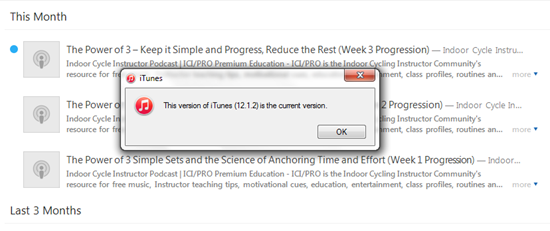
Err, no this isn't the most current version 🙁
Moving attempting to move a track into a playlist on my iPad requires a number of clicks; first click the track to play it > then click the “…” more icon for an option to move to a playlist. I prefaced this with attempted to move > after repeated tries I've yet to successfully see any tracks added to my test playlist. So I can't tell you how it works, because it doesn't.

No Cross Fade
This is a deal breaker for me. Apple Music doesn't appear to offer a crossfade > Just the EQ and volume limiter you had in iTunes.I love the crossfade feature in Spotify and can't even consider delivering class music without it. The one exception would be when I used one of Dennis Mellon's premixed class MP3s, which he's already fully mixed, so it's a non-issue.
I'm going to wait to see if Apple can sort out their issues, and release iTunes 12.2 so I can try the desktop version.
Stay tuned – but don't hold your breath. Spotify doesn't appear to have a competitor here for Indoor Cycling Instructors.
