When I click on the links nothing happens as I try to bring the playlists into Spotify. I also clicked on each person's name/profile but Spotify says they are unknown user?
Please help, I think I'm way off. I'm still trying to learn this app. Also, in order to take advantage in my class, I have to get a Premium account to stream through my iPhone right?
Thanks!
My response:
Hi – I'll try to help.
Yes you need a Spotify premium account to use your iPhone. You can get a free 30 day trial to see if Spotify is right for you.
There's a setting in Spotify that maybe preventing this.
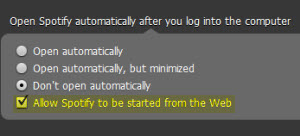
Open Spotify – Up at the top go to Edit > Preferences > and then scroll down to Open Spotify automatically and check the Allow Spotify to be started from the webbox.
Let me know if that solves it 🙂
John
P.S. You'll notice that I have the Don't Open Automatically box ticked. That setting prevents Spotify from opening on computer startup, but doesn't prevent Spotify from opening if you click a track or playlist link.
——————————–
Do you ever Shazam a track and then forget about it… only to be pleasantly surprised to find it later in our tagged lists?
I remembered to check this morning and here's what I found:
Lissie — Go Your Own Way is a cover of Fleetwood Mac's well known hit. I'd never heard of Lissie before – a powerful message that screams TURN IT UP as you cue a breakaway during a long climb that could begin with Lissie — Nothing Else Matters 🙂
When I joined Spotify Premium almost a year ago, I just loved the ease of using it to create and share playlists so much that I was able to overlook some of the problems I had with it’s cluttered look and lack of social features. Now, with Spotify’s newest updates, many of those problems have been fixed, making it even easier to find and follow other people and artists.
If you haven’t already taken advantage of the update, I highly recommend it. While there is one major drawback (I’ll get to that.), I’m finding the advantages to be worth it.
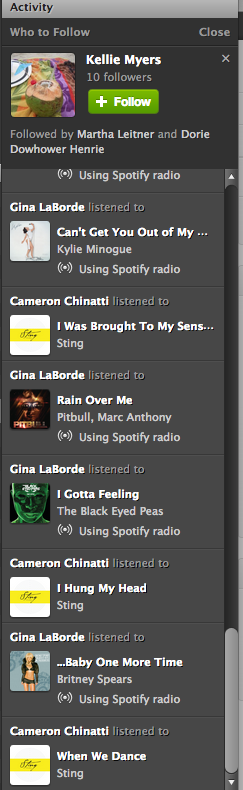
The first thing you will notice with the new update is the less cluttered look. Now it is much easier to navigate your profile page, playlists and activity sections. On the right side of your desktop screen, there is no longer a ‘favorites’ list. It has been replaced with a larger activity bar. Above the activity bar, you will find a handy ‘Who To Follow’ box. This box highlights people or artists that other people you follow are connected to-a great way to find new people to follow! Here’s a tip: If you don’t like Spotify’s current suggestion, click the ‘x’ on the top right of the box and a new suggestion will pop up.
You might also notice that the ‘Share’ and ‘Start Radio’ buttons are just above your playlist now for quick access. Tip: When you click ‘Share’, and then ‘Post To Feed’, you can add a little message that will show up on your follower’s feed. This would be a great place to share something about your playlist or a specific song in your playlist.
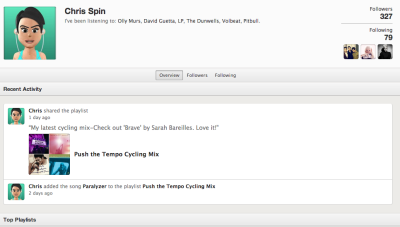
One of my favorite things about the newest update is the social section, with it’s emphasis on following others and viewing their activity. Click on a user and go to their profile page. You can view their published and followed playlists just like before AND you can now see their most recent activity and their ‘following’ activity-another great way to find new people to follow!
With all of these great new updates comes one little glitch. This one has caused instructors quite a bit of frustration. They took away the playlist timer. I can’t think of a good reason why they would do it, but they did. To get around this, I use on online timer which you can find here. It adds an extra step to my playlist preparation, and it’s kind of an inconvenience, but it really doesn't take too much longer once you get used to it.
These changes in Spotify are a step in the right direction, and I hope to see more updates and changes from them in the future. Great job on this update Spotify!
What do you think? Do you like the new updates? Is there anything you would like to see Spotify add to make your job as an instructor easier?
How many of you have sung along to a favorite tune for years, in the safety of your car/shower or (God forbid) over the Instructor Mic, only to learn that you have some of the lyrics completely wrong?
Or looked at from the other direction; how many of you have felt a sense of contentment – once you've discovered the correct lyrics for a song – and your brain no longer needs to create sounds to fill the space where the newly discovered word fits?
I'll bet nearly every person in your class has a similar experience. That's why I'm thinking what follows could be something they would enjoy 🙂
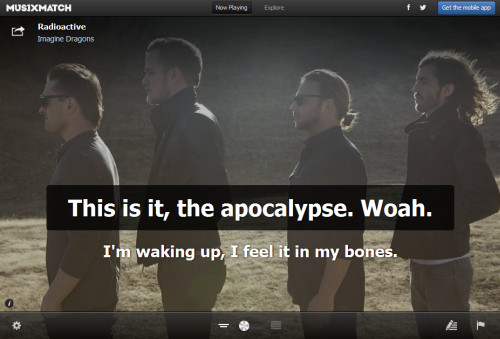
If you're using Spotify, you may have seen all of the different desk top Apps that are available. Most of them are designed around discovering new music. When I fired up Spotify this morning I saw this new musiXmatch App that displays the lyrics Karaoke style for tracks playing on Spotify, along with rotating cover art.
This could be something cool you could add to your class if you have video and a method of connecting your computer or device.
WARNING – Many songs you may search for may have the lyrics, but haven't been timed to the actual song. MUSIXMATCH will then ask if you would like to be the first to sync the lyrics to the song, as you listen along. THIS IS VERY ADDICTIVE! I burned an hour this morning working my way through the whole David Bowie — The Rise and Fall of Ziggy Stardust and the Spiders from Mars (40th Anniversary Edition) [Remastered] both to see if my 40 year memory was correct and to add the sync if needed.
I'm going to experiment with this next week. I'm starting a new 6:00 AM class on Thursdays and my experience is that these early AM “A” types appreciate being mentally stimulated early in the morning.
Here's a fun video about MUSIXMATCH.
Do you know about Spotify's Collaborative Playlist feature? It's a great way to share playlists with friends, fellow instructors and even members at your gym or club. When you use this Spotify feature, others can share, edit and add to your original playlist.
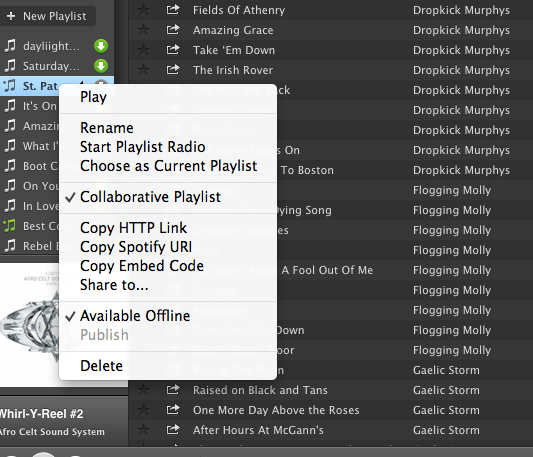
Sound interesting? It's really pretty simple. Just create a playlist in Spotify as you normally would. Then, right click (control+click if you're a Mac user like me) and you'll see a drop down box like this:
Choose Collaborative Playlist.
You can now find your collaborative playlist on the left sidebar of your profile screen with a green music note next to it. The playlist will not, however appear on your Spotify profile page. As far as I can see, there is no way to add a collaborative playlist to your profile. I believe this is because these playlists are always changing and therefore never really complete. If you figure out a way to publish them and still allow them to be collaborative, please share with us! Because the playlist does not appear on your profile, you need to invite others to see it.
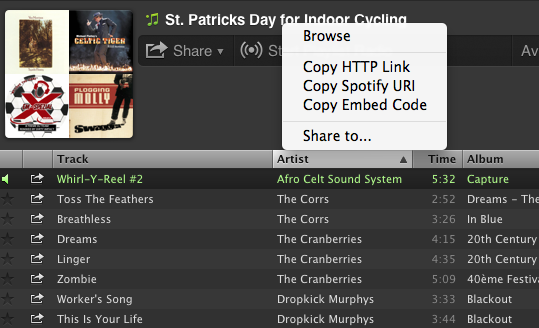
Inviting others to join your collaborative playlist is as simple as sharing the link. You can do this by right clicking (control+click on a Mac) and choosing any of the options shown here:
Now you can share your playlists by email or social media sites. Here are a few things to keep in mind when creating collaborative playlists in Spotify:
Anyone that subscribes to your playlist can add songs, delete songs and change the order of the songs in the playlist.
Everyone that subscribes to your playlist will see these changes.
You can turn off the collaborativity of the playlist the same way you turned it on.
Anyone that gets the link to your playlist can share the link with friends.
ICI/PRO has several collaborative playlists that you can access here.
I've recently created my own collaborative Spotify playlist: St. Patrick's Day for Indoor Cycling. I hope you find some inspiration here for your St. Patrick's Day ride this week! Please subscribe and share your favorites!!
Rule #1 when you're stuck in a music rut – look for someone to help pull you out! And I followed this rule today in my search for inspiration for this weeks track – ICG Master Trainer Vanessa Wilkins is providing our song and she doesn't even know it 🙂
That's the beauty of Spotify. Once we're connected, and I need a fresh perspective, I can check out what music you're using and grab a few tracks for myself.
If you're young you might not be familiar with the Brothers Johnson – they were pretty popular back in the Disco days. Vanessa is using Brothers Johnson — Strawberry Letter 23 in this playlist of her's Memories.
Once I heard it I remembered how I used to think the band Yes had crashed the recording session – give a listen at the complete change of genre at the 2:25 mark. This is a nice 90rpm flat that many of your more “seasoned” participants will enjoy.